

Emulation and Mixed Precision in cuEST#
Note
Emulation in cuEST is only available beginning with CUDA Toolkit 13.0.2
CUDA Toolkit 12.x does not support emulation.
GPU Performance#
cuEST uses advanced algorithms and mixed-precision FP64 emulation to provide highly accurate quantum chemistry library functions at the speed of light on modern NVIDIA GPUs. In earlier days of quantum chemistry, this was all about the raw speed of FP64 operations, e.g., as measured by the scalar DFMA (double fused-multiply add) or tensor core DMMA (double matrix matrix accumulation) throughput. Modern NVIDIA GPUs such as H200 or B200 have massive potential for quantum chemistry, but have a high amount of silicon area devoted to low-precision AI acceleration operations, such as INT8 IMMA (integer matrix matrix accumulation) units. As with many CUDA-X libraries, cuEST is able to harness the immense capacity of these low-precision units to achieve extremely high speedups in mixed-precision operations that can match or exceed the native FP64 speed of light.
cuEST takes an “opt-out” approach to the use of emulation and mixed precision. That is, the default code path taken by cuEST functions will optimize performance for the current device by opting the user in to emulation and mixed precision. Mixed precision may refer to fixed-point arithmetic that does not achieve the same or better accuracy of a native FP64 result; it may also refer to the use of alternate data types with reduced precision relative to FP64. In general, mixed precision is used judiciously in cuEST to improve performance in computationally demanding compute routines and with default parameter configurations expected to provide suitable accuracy for typical quantum chemistry applications. The user is provided with the option to increase the accuracy of certain mixed precision calculations and always provided the option to “opt-out” and use native FP64 arithmetic.
GPU |
FP64 FMA (TFLOPS) |
FP64 GEMM (TFLOPS) |
|---|---|---|
V100 |
8 |
8 |
A100 |
10 |
20 |
H200 |
34 |
67 |
B200 |
40 |
150 |
Controlling Emulation in cuEST#
At the highest level, this is controlled by the cuestMathMode_t. The cuEST handle,
cuestHandle_t, is initialized with the math mode set to CUEST_DEFAULT_MATH_MODE.
This opts the user in to use emulation and mixed precision where it is expected to
provide performance uplift. The user may opt out and use FP64 arithmetic everywhere
by changing the math mode to CUEST_NATIVE_FP64_MATH_MODE. The math mode can be
changed within the cuEST handle by calling cuestSetMathMode(). The current math mode
set within a cuEST handle can be queried by calling cuestGetMathMode().
Finer-grained control over mixed precision is also possible by modifying configuration parameters passed to routines that used mixed precision arithmetic.
Also at a high level, the user may control the code path selected by cuEST by changing
the “compute capability target” used when those decisions are made. For example, if
the user wants to run the A100 code path while using a B200, the compute capability
target can be set to 8.0. These can be set in the cuEST handle by calling
cuestSetComputeCapabilityTarget(). The values currently set in the handle can be queried
via cuestGetComputeCapabilityTarget(). Note that access to the compute capability target is
not intended for use in production calculations. It is meant as a tool for benchmarking
and testing. Further, note that the compute capability target affects only the logic used
in internal cuEST heuristics. It does not affect anything beyond that.
Depending on the values set for the cuestMathMode_t and the handle compute capability target there may be additional, finer-grained, controls for emulation in cuEST.
Examples of this include the Ozaki thresholds that control the behavior of emulation in density-fitted exchange, described below.
Specific Examples of Emulation in cuEST#
Density-Fitted Exchange#
In hybrid DFT calculations, the computational bottleneck is typically the formation of
the exchange (K) matrix. When computed using density fitting approximations, this term
requires a significant amount of FP64 compute and benefits greatly from the use of
fixed-point arithmetic. In the CUEST_DEFAULT_MATH_MODE, the density-fitted
exchange (DF-K) calculation will use fixed-point arithmetic when it is expected to
be performant based on the current device architecture. The matrix multiplications
performed in fixed-point arithmetic follow either the Ozaki Scheme I [1] or
Ozaki Scheme II [2].
Depending on the specific characteristics of the algorithm and the device being used, in some cases both Ozaki Scheme I and II may be activated in some cases.
The precision of multiplications following Ozaki Scheme I
can be controlled by CUEST_DFSYMMETRICEXCHANGECOMPUTE_PARAMETERS_INT8_SLICE_COUNT
and the multiplications following Ozaki Scheme II can be controlled by
CUEST_DFSYMMETRICEXCHANGECOMPUTE_PARAMETERS_INT8_MODULUS_COUNT.
Nonlocal Correlation#
Another computationally demanding contribution to certain density functionals is the
nonlocal correlation potential (usually, VV10 [3]). Evaluation of this
functional requires intensive FP64 compute and requires a treatment different from
matrix multiplications in fixed-point arithmetic. On devices with lower FP64 FMA
performance, this term can become quite expensive. If those cases, an extended
ffloat data type consisting of a pair of FP32 values is used. This data type
provides roughly 47-bits of precision while allowing the floating point operations to be
performed using FP32 compute. This data type is well-described by Thall [4].
On architectures with an FP32 to FP64 compute ratio of 32 or greater, ffloat
will be used in nonlocal exchange correlation computations (potential and gradient).
To disable the use of ffloat data types, set the math mode to CUEST_NATIVE_FP64_MATH_MODE.
Accuracy and Convergence Concerns#
Density-Fitted Exchange#
Important
Ozaki MxP DGEMM emulation in DF-K is a powerful new method to achieve high performance with high and tunable precision on modern NVIDIA GPUs. This section is intended to illustrate what is possible with these methods. Integrating DFT codes should perform their own benchmarks and develop their own standards for control of performance/precision ratio in real practice, including consideration of features such as fixed or dynamic precision aspects.
Both Ozaki-I and Ozaki-II based emulation have been implemented for DF-K. Depending on the compute capability of the device, either (or sometimes both) emulation schemes may be used. To guide the user in selecting appropriate configuration parameter values we present a brief analysis below. In each of the following examples we compute the wave function and matrix elements for a 110 atom molecule at HF/def2-TZVP using the def2-universal-jkfit basis.
Fig. 2 depicts absolute error of the Ozaki-I approximation compared to an FP64 reference. The absolute exchange energy error is shown as blue circles. Green triangles represent the maximum absolute error (MAE) between emulated and FP64 exchange matrix elements. The number of Ozaki-II moduli was fixed at 14 in this example, and the number of Ozaki-I slices was varied between 1 and 7.
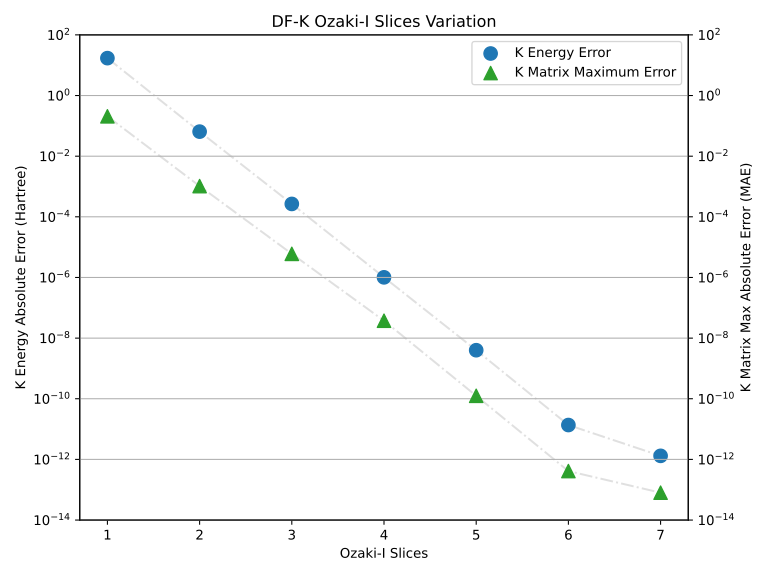
Fig. 2 DF-K error resulting from varying Ozaki-I slice numbers#
Extremely large errors manifest from slice counts of 1 or 2. Beginning with a slice count of 4 we begin to see errors compatible with running a full SCF computation. Both the exchange energy error and the exchange matrix MAE follow the same general trend, with energies lagging behind the matrix elements by just over a decade.
Next we examine the absolute error associated with modifying the number of moduli in the Ozaki-II scheme. Here we vary the moduli between 2 and 14, keeping the number of slices fixed at 14.
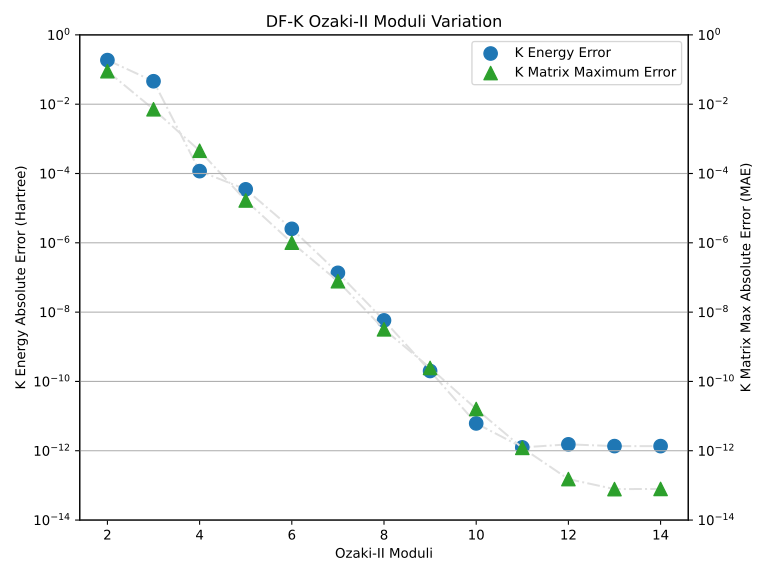
Fig. 3 DF-K error resulting from varying Ozaki-II moduli numbers#
The general DF-K Ozaki-II accuracy trend mirrors that of Ozaki-I. Small modulus values, those lower than 6, are seemingly incapable of contributing to a tightly converged SCF wave function. Modulus values ranging between 7 and 10 provide increasing accuracy, and those greater than 10 begin to approach the FP64 machine precision.
We continue our investigation in Fig. 4 by examining the effect DF-K emulation has on SCF convergence.
In each of these cases an SCF was computed with the orbital gradient convergence threshold set to 1e-15, ensuring the SCF would not converge, and capping the maximum number of iterations at 35.
An FP64 reference is shown as a blue triangle to serve as a reference.
Different combinations of Ozaki-I slices and Ozaki-II moduli are depicted as colored circles, with the legend describing them as slices/moduli.
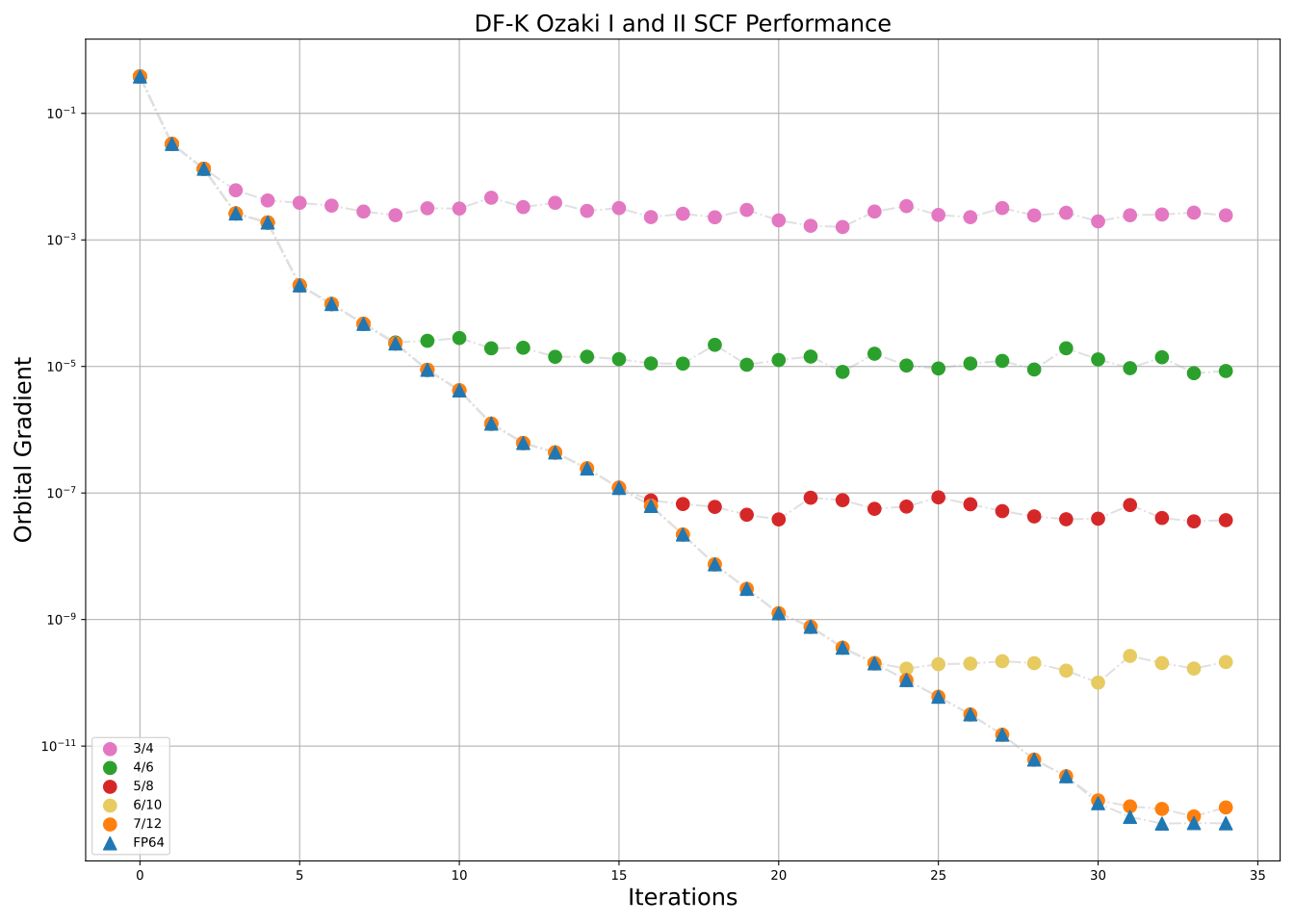
Fig. 4 SCF convergence using DF-K emulation with varying numbers of slices/moduli#
DF-K emulation using Ozaki-based algorithms is shown here to be both tunable and capable of achieving high accuracy. For many problems of interest a computation using 5 slices and 8 moduli can provide acceptable SCF convergence characteristics. For this particular problem Fig. 4 confirms that an orbital gradient of 1.0e-7 can be achieved with this combination. Higher accuracy solutions can also be obtained by increasing the number of Ozaki-I slices and Ozaki-II moduli.
We have set the default slices and moduli parameters in such a way that, in many cases, absolute error in the orbital gradient and observables of 1.0e-7 or less. We have found these default values to be relatively reliable in consistently producing these results. To extract the highest possible performance, we recommend that the user explore a scheme where early iterations employ lower slices/moduli counts and later iterations use higher counts. This enables the user to effectively match the precision of the emulated multiplications with that of the achievable result at a given iteration.
Emulation Examples in cuEST#
Density-Fitted Exchange with Emulation#
#include <stdio.h>
#include <stdlib.h>
#include <stdint.h>
#include <cuest.h>
#include <helper_status.h>

int main(int argc, char **argv)
{
    /* Declare the cuEST handle. */
    cuestHandle_t handle;

    /* Declare the parameters for cuEST handle creation. */
    cuestHandleParameters_t handle_parameters;

    /* Create the cuEST handle parameters. This sets reasonable defaults. */
    checkCuestErrors(cuestParametersCreate(
        CUEST_HANDLE_PARAMETERS,
        &handle_parameters));

    /* Create the cuEST handle */
    cuestCreate(
        handle_parameters,
        &handle);

    /* The cuEST handle parameters may be destroyed immediately following handle creation. */
    checkCuestErrors(cuestParametersDestroy(
        CUEST_HANDLE_PARAMETERS,
        handle_parameters));

    /*
     * Set up (see examples - not shown here):
     *   - AO basis
     *   - AO pair list
     *   - Density-fitted integral plan
     *   - Allocate storage on GPU for exchange matrix result (nao x nao)
     */

    /* create DF-K compute parameters object */
    cuestDFSymmetricExchangeComputeParameters_t dfk_compute_parameters;
    cuestParametersCreate(
        CUEST_DFSYMMETRICEXCHANGECOMPUTE_PARAMETERS,
        &dfk_compute_parameters);

    uint64_t slice_count = 6;
    uint64_t moduli_count = 10;

    /* Configure the DF-K parameters for Ozaki-I multiplications */
    cuestParametersConfigure(
        CUEST_DFSYMMETRICEXCHANGECOMPUTE_PARAMETERS,
        dfk_compute_parameters,
        CUEST_DFSYMMETRICEXCHANGECOMPUTE_PARAMETERS_INT8_SLICE_COUNT,
        &slice_count,
        sizeof(uint64_t));

    /* Configure the DF-K parameters for Ozaki-II multiplications */
    cuestParametersConfigure(
        CUEST_DFSYMMETRICEXCHANGECOMPUTE_PARAMETERS,
        dfk_compute_parameters,
        CUEST_DFSYMMETRICEXCHANGECOMPUTE_PARAMETERS_INT8_MODULUS_COUNT,
        &moduli_count,
        sizeof(uint64_t));

    /*
     * Query the DF-K workspace and compute the exchange matrix (not shown here)
     */

    /* Destroy the DF-K compute parameters */
    cuestParametersDestroy(
        CUEST_DFSYMMETRICEXCHANGECOMPUTE_PARAMETERS,
        dfk_compute_parameters);

    /*
     * Destroy the cuEST handle when no additional calls to the cuEST library will be made.
     * This destroys the CUDA stream, cuBLAS and cuSolver handles held by the cuEST handle.
     */
    checkCuestErrors(cuestDestroy(handle));

    return 0;
}