


Library Design#
cuDF contains 2 main data structures:
The Frame: A user-facing object mirroring pandas-like data structures like
DataFrameandSeries.The Column: An object holding a 1-dimensional representation of GPU data that implements methods for a particular data type.
The Frame layer#
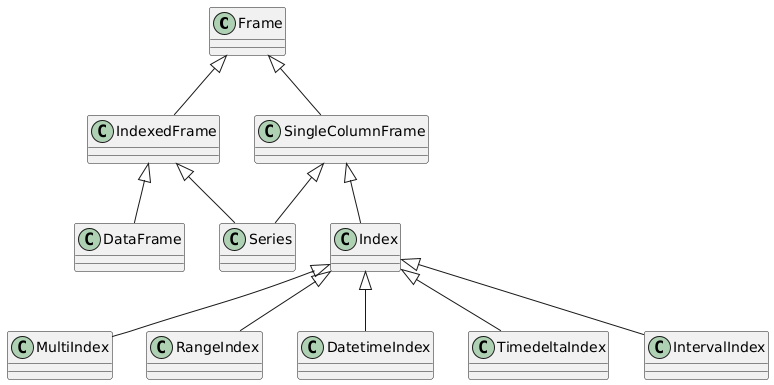
The class diagram shows the inheritance between various subclasses of the Frame which leads to public objects
like the DataFrame, Series and Index.
Frames#
The Frame is a base class that holds a data structure called the ColumnAccessor that maps one or more columns to a unique label.
The Frame and its subclass hierarchy is designed to consolidate shared implementation of private and public methods
that are applicable across the public Series, DataFrame and Index objects:
Frameimplements base methods that are common acrossSeries,DataFrame, andIndex.SingleColumnFrameimplements methods that can be shared acrossSeriesandIndexwhich are only represented by 1 column.IndexedFrameimplements methods that can be shared acrossDataFrameandSerieswhich both contain andIndex
Generally, a public Series, DataFrame or Index method should only implement class specific logic and eventually dispatch to a super() method to
leverage a shared implementation. Likewise SingleColumnFrame and IndexedFrame methods should only implement single column and index related logic respectively
and eventually dispatch to a Frame methods via super() to leverage a shared implementation which usually involves processing one or more Columns.
Indexes#
Index and its subclasses largely utilize the implementation of SingleColumnFrame except for the following
subclasses:
A
RangeIndexis backed by a Pythonrangeobject, not a column. Wherever possible,RangeIndexmethods have special implementations designed to avoid materializing therangeto a column. Otherwise, aRangeIndexmethod converts to anIndexofint64dtype first instead.A
MultiIndexcan be backed by multiple columns of data. Therefore,MultiIndexoverrides methods inSingleColumnFramethat assume 1 column of data to support multiple columns.
The Column layer#
Columns#
The ColumnBase represents 1 column in the Frame and is an object that contains two primary components:
A
pylibcudf.Columnrepresenting the GPU data in Apache Arrow Format.A
.dtypewhich is a valid pandas data type exposed to theFrame
ColumnBase is a base class implementing shared methods applicable to processing a pylibcudf.Column of any data type. ColumnBase
methods are generally implemented using pylibcudf APIs and contains data type resolution logic to return a new ColumnBase of appropriate
data type if applicable.
ColumnBase has various subclasses eventually used by the Frame
that consolidates logic and implements methods specific to 1 or more related data types:
NumericalColumn: integer, float, and booleanStringColumn: stringCategoricalColumn: categoryDatetimeColumn: timestampDatetimeTZColumn: timestamp with timezoneTimedeltaColumn: durationIntervalColumn: intervalListColumn: listStructColumn: structDecimalColumn: decimal32, decimal64, decimal128
Each column subclass is restricted to hold a .dtype object corresponding to a valid pandas data type, including pandas nullable extension types, of the same data type designation with the following exceptions:
A
CategoricalColumnholds acudf.CategoricalDtypeinstead of apandas.CategoricalDtypeA
IntervalColumncan hold acudf.IntervalDtypeinstead of apandas.IntervalDtypeA
ListColumncan hold acudf.ListDtypeA
StructColumncan hold acudf.StructDtypeA
DecimalColumncan hold acudf.Decimal32Dtype,cudf.Decimal64Dtype,cudf.Decimal128Dtyperespectively
Note
There is no representation for the
pandas.PeriodDtypeorpandas.SparseDtypeThe
objectdtype can be a.dtypeof StringColumn strictly representing a string type. In pandas, this type can represent arbitrary “PyObject” data which cuDF does not support.
The implementations of ColumnBase and its subclasses are located in python/cudf/cudf/core/column
Frame operations on Columns#
There are two common patterns when implementing APIs in cuDF:
Operations that act on columns of a
FrameindividuallyLoop over each
ColumnBasestored in aFrame’sColumnAccessorCall the relevant method on the
ColumnBaseIf returning another
Frame, construct a newColumnAccessorwith each newColumnBaseresult
Operations that act on multiple columns at once
Collect all the
ColumnBases stored in aFrame’sColumnAccessorPass the underlying
pylibcudf.Columns to a pylibcudf APIIf returning another
Frame, construct a newColumnAccessorwith each newColumnBaseresult
Both methods on Frame subclasses and intermediate objects such as GroupBy, Rolling, and Resampler mimic this pattern
by accessing private APIs on Frame. These two patterns generalize most operations in cuDF but other public APIs may employ
a more custom pattern.
Spilling to host memory#
Setting the environment variable CUDF_SPILL=on enables automatic spilling (and “unspilling”) of buffers from
device to host to enable out-of-memory computation, i.e., computing on objects that occupy more memory than is
available on the GPU.
Spilling can be enabled in two ways (it is disabled by default):
setting the environment variable
CUDF_SPILL=on, orsetting the
spilloption incudfby doingcudf.set_option("spill", True).
Additionally, parameters are:
CUDF_SPILL_ON_DEMAND=ON/cudf.set_option("spill_on_demand", True), which registers an RMM out-of-memory error handler that spills buffers in order to free up memory. If spilling is enabled, spill on demand is enabled by default.CUDF_SPILL_DEVICE_LIMIT=<X>/cudf.set_option("spill_device_limit", <X>), which sets a device memory limit of<X>in bytes. This introduces a modest overhead and is disabled by default. Furthermore, this is a soft limit. The memory usage might exceed the limit if too many buffers are unspillable.
Design#
Spilling consists of two components:
A new buffer sub-class,
SpillableBuffer, that implements moving of its data from host to device memory in-place.A spill manager that tracks all instances of
SpillableBufferand spills them on demand. A global spill manager is used throughout cudf when spilling is enabled, which makesas_buffer()returnSpillableBufferinstead of the defaultBufferinstances.
Accessing Buffer.get_ptr(...), we get the device memory pointer of the buffer. This is unproblematic in the case of Buffer but what happens when accessing SpillableBuffer.get_ptr(...), which might have spilled its device memory. In this case, SpillableBuffer needs to unspill the memory before returning its device memory pointer. Furthermore, while this device memory pointer is being used (or could be used), SpillableBuffer cannot spill its memory back to host memory because doing so would invalidate the device pointer.
To address this, we mark the SpillableBuffer as unspillable, we say that the buffer has been exposed. This can either be permanent if the device pointer is exposed to external projects or temporary while libcudf accesses the device memory.
The SpillableBuffer.get_ptr(...) returns the device pointer of the buffer memory but if called within an acquire_spill_lock decorator/context, the buffer is only marked unspillable while running within the decorator/context.
Statistics#
cuDF supports spilling statistics, which can be very useful for performance profiling and to identify code that renders buffers unspillable.
Three levels of information gathering exist:
disabled (no overhead).
gather statistics of duration and number of bytes spilled (very low overhead).
gather statistics of each time a spillable buffer is exposed permanently (potential high overhead).
Statistics can be enabled in two ways (it is disabled by default):
setting the environment variable
CUDF_SPILL_STATS=<statistics-level>, orsetting the
spill_statsoption incudfby doingcudf.set_option("spill_stats", <statistics-level>).
It is possible to access the statistics through the spill manager like:
>>> import cudf
>>> from cudf.core.buffer.spill_manager import get_global_manager
>>> stats = get_global_manager().statistics
>>> print(stats)
    Spill Statistics (level=1):
     Spilling (level >= 1):
      gpu => cpu: 24B in 0.0033
To have each worker in dask print spill statistics, do something like:
    def spill_info():
        from cudf.core.buffer.spill_manager import get_global_manager
        print(get_global_manager().statistics)
    client.submit(spill_info)
Copy-on-write#
This section describes the internal implementation details of the copy-on-write feature.
The core copy-on-write implementation relies on ExposureTrackedBuffer and the tracking features of BufferOwner.
BufferOwner tracks internal and external references to its underlying memory. Internal references are tracked by maintaining weak references to every ExposureTrackedBuffer of the underlying memory. External references are tracked through “exposure” status of the underlying memory. A buffer is considered exposed if the device pointer (integer or void*) has been handed out to a library outside of cudf. In this case, we have no way of knowing if the data are being modified by a third party.
ExposureTrackedBuffer is a subclass of Buffer that represents a slice of the memory underlying an exposure tracked buffer.
When the cudf option "copy_on_write" is True, as_buffer returns a ExposureTrackedBuffer. It is this class that determines whether or not to make a copy when a write operation is performed on a Column (see below). If multiple slices point to the same underlying memory, then a copy must be made whenever a modification is attempted.
Eager copies when exposing to third-party libraries#
If a Column/ExposureTrackedBuffer is exposed to a third-party library via __cuda_array_interface__, we are no longer able to track whether or not modification of the buffer has occurred. Hence whenever
someone accesses data through the __cuda_array_interface__, we eagerly trigger the copy by calling
.make_single_owner_inplace which ensures a true copy of underlying data is made and that the slice is the sole owner. Any future copy requests must also trigger a true physical copy (since we cannot track the lifetime of the third-party object). To handle this we also mark the Column/ExposureTrackedBuffer as exposed thus indicating that any future shallow-copy requests will trigger a true physical copy rather than a copy-on-write shallow copy.
Obtaining a read-only object#
A read-only object can be quite useful for operations that will not
mutate the data. To achieve this, we create simple wrapper classes around the ExposureTrackedBuffer that will construct an equivalent CAI except it will get the pointer by calling .get_ptr(mode="read"), avoiding marking the pointer as exposed as would occur with a writeable ptr access.
This will not trigger a deep copy even if multiple ExposureTrackedBuffers point to the same ExposureTrackedBufferOwner. This approach should only be used when the lifetime of the proxy object is restricted to cudf’s internal code execution. Handing this out to external libraries or user-facing APIs will lead to untracked references and undefined copy-on-write behavior.
Internal access to raw data pointers#
Since it is unsafe to access the raw pointer associated with a buffer when
copy-on-write is enabled, in addition to the readonly proxy object described above,
access to the pointer is gated through Buffer.get_ptr. This method accepts a mode
argument through which the caller indicates how they will access the data associated
with the buffer. If only read-only access is required (mode="read"), this indicates
that the caller has no intention of modifying the buffer through this pointer.
In this case, any shallow copies are not unlinked. In contrast, if modification is
required one may pass mode="write", provoking unlinking of any shallow copies.
Variable width data types#
Weak references are implemented only for fixed-width data types as these are only column
types that can be mutated in place.
Requests for deep copies of variable width data types always return shallow copies of the Columns, because these
types don’t support real in-place mutation of the data.
Internally, we mimic in-place mutations using _mimic_inplace, but the resulting data is always a deep copy of the underlying data.
Examples#
When copy-on-write is enabled, taking a shallow copy of a Series or a DataFrame does not
eagerly create a copy of the data. Instead, it produces a view that will be lazily
copied when a write operation is performed on any of its copies.
Let’s create a series:
>>> import cudf
>>> cudf.set_option("copy_on_write", True)
>>> s1 = cudf.Series([1, 2, 3, 4])
Make a copy of s1:
>>> s2 = s1.copy(deep=False)
Make another copy, but of s2:
>>> s3 = s2.copy(deep=False)
Viewing the data and memory addresses show that they all point to the same device memory:
>>> s1
0    1
1    2
2    3
3    4
dtype: int64
>>> s2
0    1
1    2
2    3
3    4
dtype: int64
>>> s3
0    1
1    2
2    3
3    4
dtype: int64

>>> s1.data._ptr
139796315897856
>>> s2.data._ptr
139796315897856
>>> s3.data._ptr
139796315897856
Now, when we perform a write operation on one of them, say on s2, a new copy is created
for s2 on device and then modified:
>>> s2[0:2] = 10
>>> s2
0    10
1    10
2     3
3     4
dtype: int64
>>> s1
0    1
1    2
2    3
3    4
dtype: int64
>>> s3
0    1
1    2
2    3
3    4
dtype: int64
If we inspect the memory address of the data, s1 and s3 still share the same address but s2 has a new one:
>>> s1.data._ptr
139796315897856
>>> s3.data._ptr
139796315897856
>>> s2.data._ptr
139796315899392
Now, performing write operation on s1 will trigger a new copy on device memory as there
is a weak reference being shared in s3:
>>> s1[0:2] = 11
>>> s1
0    11
1    11
2     3
3     4
dtype: int64
>>> s2
0    10
1    10
2     3
3     4
dtype: int64
>>> s3
0    1
1    2
2    3
3    4
dtype: int64
If we inspect the memory address of the data, the addresses of s2 and s3 remain unchanged, but s1’s memory address has changed because of a copy operation performed during the writing:
>>> s2.data._ptr
139796315899392
>>> s3.data._ptr
139796315897856
>>> s1.data._ptr
139796315879723
cuDF’s copy-on-write implementation is motivated by the pandas proposals documented here: