


Benchmarks#
Database-like ops benchmarks#
We reproduced the Database-like ops benchmark
including a solution using cudf.pandas. Here are the results:
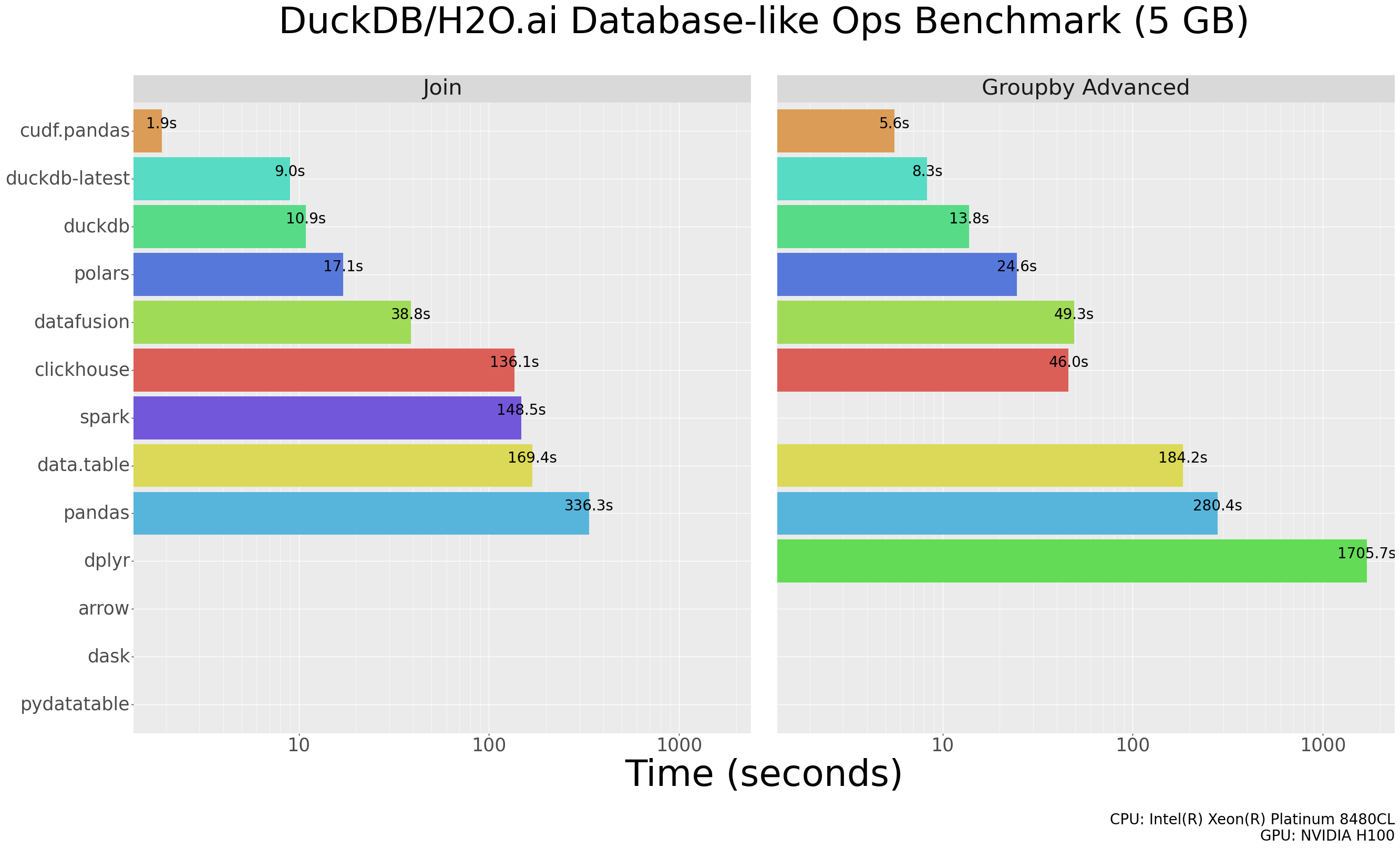
Note: A missing bar in the results for a particular solution indicates we ran into an error when executing one or more queries for that solution.
You can see the per-query results here.
Steps to reproduce#
Below are the steps to reproduce the cudf.pandas results. The steps
to reproduce the results for other solutions are documented in
duckdblabs/db-benchmark.
Clone the latest duckdblabs/db-benchmark
Build environments for pandas:
virtualenv pandas/py-pandas
Activate pandas virtualenv:
source pandas/py-pandas/bin/activate
Install cudf:
pip install cudf-cu12
Modify pandas join/group code to use
cudf.pandasand remove thedtype_backendkeyword argument (not supported):
diff --git a/pandas/groupby-pandas.py b/pandas/groupby-pandas.py
index 58eeb26..2ddb209 100755
--- a/pandas/groupby-pandas.py
+++ b/pandas/groupby-pandas.py
@@ -1,4 +1,4 @@
-#!/usr/bin/env python3
+#!/usr/bin/env -S python3 -m cudf.pandas

 print("# groupby-pandas.py", flush=True)

diff --git a/pandas/join-pandas.py b/pandas/join-pandas.py
index f39beb0..a9ad651 100755
--- a/pandas/join-pandas.py
+++ b/pandas/join-pandas.py
@@ -1,4 +1,4 @@
-#!/usr/bin/env python3
+#!/usr/bin/env -S python3 -m cudf.pandas

 print("# join-pandas.py", flush=True)

@@ -26,7 +26,7 @@ if len(src_jn_y) != 3:

 print("loading datasets " + data_name + ", " + y_data_name[0] + ", " + y_data_name[1] + ", " + y_data_name[2], flush=True)

-x = pd.read_csv(src_jn_x, engine='pyarrow', dtype_backend='pyarrow')
+x = pd.read_csv(src_jn_x, engine='pyarrow')

 # x['id1'] = x['id1'].astype('Int32')
 # x['id2'] = x['id2'].astype('Int32')
@@ -35,17 +35,17 @@ x['id4'] = x['id4'].astype('category') # remove after datatable#1691
 x['id5'] = x['id5'].astype('category')
 x['id6'] = x['id6'].astype('category')

-small = pd.read_csv(src_jn_y[0], engine='pyarrow', dtype_backend='pyarrow')
+small = pd.read_csv(src_jn_y[0], engine='pyarrow')
 # small['id1'] = small['id1'].astype('Int32')
 small['id4'] = small['id4'].astype('category')
 # small['v2'] = small['v2'].astype('float64')
-medium = pd.read_csv(src_jn_y[1], engine='pyarrow', dtype_backend='pyarrow')
+medium = pd.read_csv(src_jn_y[1], engine='pyarrow')
 # medium['id1'] = medium['id1'].astype('Int32')
 # medium['id2'] = medium['id2'].astype('Int32')
 medium['id4'] = medium['id4'].astype('category')
 medium['id5'] = medium['id5'].astype('category')
 # medium['v2'] = medium['v2'].astype('float64')
-big = pd.read_csv(src_jn_y[2], engine='pyarrow', dtype_backend='pyarrow')
+big = pd.read_csv(src_jn_y[2], engine='pyarrow')
 # big['id1'] = big['id1'].astype('Int32')
 # big['id2'] = big['id2'].astype('Int32')
 # big['id3'] = big['id3'].astype('Int32')
Run Modified pandas benchmarks:
./_launcher/solution.R --solution=pandas --task=groupby --nrow=1e7
./_launcher/solution.R --solution=pandas --task=groupby --nrow=1e8
./_launcher/solution.R --solution=pandas --task=join --nrow=1e7
./_launcher/solution.R --solution=pandas --task=join --nrow=1e8
PDS-H (TPC-H variant)#
The steps below reproduce the PDS-H benchmark results using cudf.pandas.
Setup#
Install cudf following the
installation guide. For nightly wheels:
CUDA_MAJOR=$(nvidia-smi | grep -oP 'CUDA Version: \K[0-9]+')
pip install --extra-index-url https://pypi.anaconda.org/rapidsai-wheels-nightly/simple/ \
    "cudf-cu${CUDA_MAJOR}>=0.0.0a0"
Then install tpchgen-cli, a Rust-based TPC-H data generator used to produce the benchmark
dataset as Parquet files:
pip install tpchgen-cli
Generate data#
Set the scale factor once and reuse it across all steps. The following generates SF50 (scale factor 50, roughly 50GB of data):
export SCALE_FACTOR=50.0
export DATA_PATH="data/tables/scale-${SCALE_FACTOR}"

tpchgen-cli parquet -o "${DATA_PATH}" -s ${SCALE_FACTOR}
Run#
CPU (--frontend pandas-cpu, pandas):
python -m cudf.pandas._benchmarks.pdsh all \
    --frontend pandas-cpu \
    --path "${DATA_PATH}"
GPU (--frontend in-memory, cudf.pandas):
python -m cudf.pandas._benchmarks.pdsh all \
    --frontend in-memory \
    --path "${DATA_PATH}"
Results#
Results are written to pdsh_results.jsonl in the current directory by default (override with -o).
Each run appends one JSON line containing metadata and a records field with per-query,
per-iteration timings:
{
  "engine_name": "cudf-pandas",
  "query_set": "pdsh",
  "frontend": "in-memory",
  "dataset_path": "data/tables/scale-50.0",
  "scale_factor": 50,
  "records": {
    "1": [
      {"query": 1, "iteration": 0, "duration": 0.79, "status": "success"},
      {"query": 1, "iteration": 1, "duration": 0.55, "status": "success"}
    ]
  }
}
duration is in seconds. Running multiple frontends with the same -o file appends each as a
separate line, making it easy to compare CPU and GPU results in one file.