


Accelerating Topic Modeling on HPC with cuML, Dagster, and Slurm#
August, 2026
This example runs a topic-modeling pipeline on a Slurm HPC cluster, combining CPU parallelism for model fitting with GPU-accelerated dimensionality reduction and clustering.
scikit-learn Latent Dirichlet Allocation (LDA) models are trained in parallel across CPU nodes as separate Slurm sbatch jobs. The resulting topic vectors are then transferred to a GPU node, where NVIDIA cuML UMAP is used for dimensionality reduction and HDBSCAN for clustering. In the final stage, the pipeline renders an annotated map of the discovered themes and returns it to the orchestration UI.
Orchestration uses dagster-slurm, an open source integration that submits Dagster assets as Slurm jobs from a local machine. The cluster requires only SSH access and sbatch. There is no container runtime to install, no preinstalled Python environment to maintain, and no administrative request to file: environments are delivered as pixi-pack archives over SSH.
The same asset definitions run without modification in three deployments: a local machine, a local Slurm cluster running in Docker, and a production HPC system with GPUs. Development and debugging therefore happen locally, and cluster queue time and GPU hours are spent only on workloads that have already been validated.
The problem#
Characterizing the subject matter of a large document collection is a standard application of topic modeling. When the collection spans a long period, a single model fitted over the whole corpus averages across it and obscures how the subject matter shifts. Partitioning by time and fitting a model per partition preserves that structure, but introduces two requirements that shape the rest of the pipeline.
Scale. One model per time slice, with several random restarts each to control for LDA’s sensitivity to initialization, produces tens to thousands of independent fits. This is a natural match for a batch scheduler that can run them concurrently across CPU nodes.
Comparability. Topic indices are assigned independently by each fit and carry no shared meaning across models, so results cannot be aligned by index. Comparison has to happen in a space the models hold in common. Fitting one vocabulary over the entire corpus before any training provides it: each topic is a distribution over that shared vocabulary, so topics covering similar subject matter occupy nearby positions regardless of which fit produced them.
Recovering themes then reduces to a clustering problem over the combined set of topic vectors. The pipeline implements this in five stages:
Build one shared vocabulary across the corpus.
Fit LDA independently per
(month, seed)partition.Stack every topic-term vector from every fit into a single matrix.
Reduce that matrix with UMAP and cluster it with HDBSCAN.
Report each cluster, referred to here as a meta-topic, with the terms its members share.
Clusters drawing on many partitions correspond to subject matter that persists across the corpus. Clusters confined to a single partition and seed correspond to subject matter local to that slice, or to noise.
The dataset#
Reuters-21578 is a standard newswire benchmark corpus from 1987, containing roughly 21,000 documents of which about 18,000 carry usable body text. It is small, retrievable in seconds, and carries publication dates, which supplies the temporal partitioning the pipeline is built around.
Five months contain enough documents to model. The example fits three seeds for each, giving 15 independent training jobs and, at 15 topics per fit, 225 topic-term vectors to cluster.
Architecture#
Six Dagster assets in the rapids_topics group. Each is submitted as a Slurm job.
Asset |
Runs on |
Environment |
Function |
|---|---|---|---|
|
CPU |
|
Retrieve the corpus, parse the SGML, bucket documents by month, build the shared vocabulary |
|
CPU, ×15 |
|
Fit one LDA model per |
|
CPU |
|
Stack every topic-term vector into a single matrix |
|
GPU |
|
Reduce the matrix to two dimensions with cuML UMAP |
|
GPU |
|
Group the reduced points into meta-topics with cuML HDBSCAN |
|
CPU |
|
Labeled scatter plot, JSON summary, inline preview |
Two stages request a GPU. topic_map runs on CPU but uses the environment, because it reads the cuML outputs and needs matplotlib, which is installed there. Device and environment are declared separately per asset, so they do not have to match.
The division between CPU and GPU stages follows the structure of the problem rather than a preference. Model fitting is independent per partition, so it scales by adding nodes and its throughput is limited by how many jobs the queue admits concurrently. Reduction and clustering operate over all topic vectors at once, so no partitioning of the input reproduces the result and additional nodes do not reduce runtime. The only available lever there is a faster device, which is what the two GPU stages use.
Stages exchange data as Parquet files written to a filesystem visible from every node, under the directory given by RAPIDS_TOPICS_BASE. Each stage reads its inputs from disk rather than receiving them through the orchestrator, so intermediate results remain inspectable on the cluster after a run completes.
The environment split matters as much. The GPU stages require a self-contained cuML environment that the scikit-learn stages cannot co-install, for reasons covered in the section on packed environments below.

Note
Every stage here is submitted as an sbatch job to keep the example uniform. This is a choice rather than a constraint. Dagster orchestrates before, during, and after the cluster, so ingest or publishing steps can run in the Dagster process or elsewhere while only the compute-intensive stages target Slurm, all within one lineage graph.
reuters_corpus is the clearest candidate. On sites whose compute nodes have no outbound network access, run the retrieval as a local or login-node asset instead.
Code layout#
dagster-slurm separates orchestration from computation. Assets select a payload script, an environment, and Slurm resources. Payloads are plain Python scripts that communicate with Dagster through Dagster Pipes and also execute standalone.
Component |
Path in the dagster-slurm repository |
|---|---|
Asset definitions |
|
Payload scripts |
|
Environments |
|
Submitting GPU work to an HPC cluster#
Most of the operational cost in an HPC workflow lies outside the computation itself. The table below sets out what each of those steps costs when run by hand, and what dagster-slurm handles instead.
Manual approach |
With dagster-slurm |
|
|---|---|---|
Python environment |
|
|
Mixed CPU and GPU stages |
A separate |
Each asset declares its environment and GPU count as metadata |
Submission |
Write the script, submit it, record the job ID |
Assets submit themselves; the job ID is attached to the run |
Monitoring |
Poll |
Logs stream into the UI during execution |
Failure diagnosis |
Locate the relevant log file and work backwards |
Structured error and per-stage metadata, in lineage context |
Re-execution |
Re-run the script, and typically everything downstream of it |
Re-run the changed asset; Dagster resolves what is downstream |
None of this imposes requirements on the cluster. There is no operator to deploy, no container runtime, and no persistent daemon. SSH access and sbatch are sufficient.
Requesting a GPU per asset#
Slurm resources are declared per asset and adapt to the active deployment:
def _gpu_slurm_opts() -> dict:
    if _is_supercomputer():
        return {"nodes": 1, "cpus_per_task": 8, "mem": "32G",
                "gpus_per_node": 1}
    return {"nodes": 1, "cpus_per_task": 2, "mem": "4G",
            "gpus_per_node": 0}
Despite its name, _is_supercomputer() tests only whether the active deployment targets a remote Slurm cluster rather than the local Docker one. Any GPU-equipped Slurm system satisfies it, including a small departmental cluster.
The CPU stages set gpus_per_node: 0 explicitly rather than leaving it unset, so they never hold a GPU allocation on sites whose default partition is GPU-backed.
One payload, two backends#
Payloads select their implementation at import time, so a single script serves both GPU and CPU-only deployments:
# umap_reduce.py (excerpt)
try:
    import cuml
    cuml.set_global_output_type("numpy")
    _HAS_CUML = True
except ImportError:
    _HAS_CUML = False


def make_umap(*, n_components, n_neighbors, min_dist, metric,
              random_state, build_algo):
    if _HAS_CUML:
        from cuml.manifold import UMAP as _UMAP
        return _UMAP(
            n_components=n_components, n_neighbors=n_neighbors,
            min_dist=min_dist, metric=metric,
            random_state=random_state, build_algo=build_algo,
            verbose=True,
        )
    from umap import UMAP as _UMAP
    return _UMAP(
        n_components=n_components, n_neighbors=n_neighbors,
        min_dist=min_dist, metric=metric,
        random_state=random_state, low_memory=True, verbose=True,
    )
Note
Setting cuml.set_global_output_type("numpy") keeps downstream code backend-agnostic, since the remainder of the payload receives numpy arrays in either case.
Each stage records the backend it used, either backend: cuml (GPU) or backend: umap-learn (CPU), so the active code path can be confirmed from the UI.
Two packed environments, one per stage type#
The pipeline uses two pixi environments, selected per asset through slurm_pack_cmd metadata:
workload-topic-modeling: the standard cluster stack plus scikit-learn, used by the corpus, LDA, and aggregation stages.packaged-cluster-rapids: a self-contained environment withcumlfrom therapidsaiconda channel on linux-64, plus the CPU fallback libraries (umap-learn, hdbscan, matplotlib). Used by the UMAP, HDBSCAN, and reporting stages in all deployments, including those without GPUs.
They are kept separate deliberately. cuML pins numba to a narrow version range, and numba in turn caps the numpy version it supports. The rest of the cluster stack is not subject to that cap, so a single environment holding both would have to satisfy two different numpy ranges at once. Giving the cuML dependencies their own solve-group lets each environment resolve independently, and assigning an environment per asset is a single declaration:
_RAPIDS_PACK_METADATA = {
    "slurm_pack_cmd": [
        "pixi", "run", "-e", "opstooling", "--frozen",
        "python", "scripts/pack_environment.py",
        "--env", "packaged-cluster-rapids", "--build-missing",
    ],
}

@dg.asset(group_name="rapids_topics", metadata=_RAPIDS_PACK_METADATA, ...)
def umap_embedding(...): ...
pixi-pack builds each environment into a single self-extracting archive, cached on the cluster by content hash. The build location is configurable. By default dagster-slurm packs on the cluster login node, which is faster because only the lockfile and a small number of inputs cross the network. If remote packing fails, it falls back to packing locally and uploading the archive. When remote packing is known to be unavailable, for example on a login node without outbound network access, force the local path with SLURM_PACK_ON_REMOTE=0.
In either case the archive carries every conda and PyPI package it requires, so extraction on a compute node needs no network access.
Selecting the CUDA build#
The packages used in this environment have builds for more than one CUDA major version. Which one is installed is determined by the pixi configuration rather than by the cuML version constraint alone. Two settings control it.
The workspace platform declares the CUDA version the target machines provide:
# examples/pyproject.toml
[tool.pixi.workspace]
platforms = [
  { name = "linux-64-cuda-13", platform = "linux-64", cuda = "13" },
  { platform = "linux-aarch64" },
  { name = "osx-arm64-macos-26-5-2", platform = "osx-arm64", macos = "26.5.2" },
]
The feature dependencies then constrain cuML and the CUDA version to resolve against:
[tool.pixi.feature.cluster-rapids]
channels = [{ channel = "rapidsai", priority = 1 }]

[tool.pixi.feature.cluster-rapids.dependencies]
python = "3.12.*"
numpy = ">=2.0,<2.3"
umap-learn = ">=0.5,<1"
hdbscan = ">=0.8,<1"
matplotlib = ">=3.9,<4"

[tool.pixi.feature.cluster-rapids.target.linux-64.dependencies]
cuml = ">=26.08,<26.10"
cuda-version = ">=13.0,<14"
Note
These two settings must agree. The platform declaration sets the __cuda virtual package that the solver treats as the machine’s capability, so a cuda-version constraint above it cannot be satisfied. The resulting conflict names the feature rather than the platform declaration that caused it, so change both together.
Match the platform declaration to the driver on your cluster. Running nvidia-smi on a compute node reports the maximum CUDA version the driver supports. Within a CUDA major version there is tolerance in both directions: a package built against a newer minor toolkit runs on an older minor driver, so a CUDA 13.3 build is valid on a driver reporting 13.0. Across major versions there is none, and a CUDA 13 build will not run on a CUDA 12 driver.
cuml is declared only under target.linux-64, so the same environment still resolves on macOS, with the CPU libraries substituted.
Operational notes on cuML#
Leave UMAP
build_algoset to"auto". cuML selects brute-force kNN for small inputs and GPU nn-descent at scale. Forcingnn_descenton an input below roughly 150 rows raises a CUDA invalid-argument error. Set it explicitly only for large corpora.cuML HDBSCAN assigns more points to noise than the CPU implementation at identical settings. Tune
min_cluster_sizeandmin_samplesagainst production data rather than against the CPU fallback.
Prerequisites#
pixi installed locally
A clone of the dagster-slurm repository
For the local Slurm cluster: Docker with Compose
For the HPC deployment: SSH access to a Slurm cluster you can submit from. GPU nodes are optional. Without them the GPU stages use their CPU implementations and the pipeline still completes.
git clone https://github.com/ascii-supply-networks/dagster-slurm.git
cd dagster-slurm/examples
Running the pipeline#
Three deployments share the same asset definitions.
1. Local machine, without Slurm#
pixi run start
# open http://localhost:3000 and materialize the rapids_topics group
Note
Local execution materializes 3 of the 6 assets. reuters_corpus, lda_models, and topic_term_matrix run directly on the local machine. The three GPU stages require the packaged-cluster-rapids environment, which the development environment excludes because of the numba and numpy constraint described above, and will fail with an import error. Use one of the Slurm deployments below for the complete chain.
This deployment provides the fastest iteration loop: seconds per cycle, with no scheduler and no queue.
2. Local Slurm cluster in Docker#
The repository ships a complete Slurm cluster in Docker, comprising slurmctld and compute nodes. It runs on the local machine and requires no cluster account, so the full scheduling path can be exercised before any real queue time is used.
docker compose up -d          # from the repository root
cd examples
pixi run start-staging
Materialize the full group. Every asset is submitted as an sbatch job inside the containers, and the GPU-stage payloads report backend: umap-learn (CPU) while producing artifacts of the same shape as the GPU path. This is also the configuration exercised by CI.
With environments already cached the full chain completes in a few minutes, and individual jobs take between seconds and roughly a minute. The first run also packs both environments, which dominates wall-clock time. The environment is several gigabytes, so the initial pack takes on the order of tens of minutes depending on machine and network.
3. HPC cluster with GPUs#
Point dagster-slurm at the cluster and start:
export SLURM_EDGE_NODE_HOST=login.your-cluster.example
export SLURM_EDGE_NODE_USER=your-user
export SLURM_EDGE_NODE_KEY_PATH=~/your/key/path

cd examples
pixi run start-staging-supercomputer      # packs and deploys environments on demand
# or, with environments already deployed:
pixi run start-production-supercomputer
In this deployment the GPU assets submit with gpus_per_node: 1 and the payloads report backend: cuml (GPU).
Note
Verify that the requested resources fit the available nodes. The GPU and CPU stages both default to 8 CPUs and 32 GB. If the GPU nodes are smaller than this, jobs remain in PENDING indefinitely rather than failing, because Slurm never finds a matching node.
Compare the defaults against scontrol show node <node> and adjust either the asset defaults or, for a single run, the launchpad fields described below. Smaller CPU requests also allow more of the 15 LDA partitions to run concurrently on one node.
Relevant environment variables:
Variable |
Effect |
|---|---|
|
Base output directory on the cluster (default |
|
Path to an already-extracted CPU environment; skips packing |
|
Equivalent for the environment |
Note
RAPIDS_TOPICS_BASE must resolve to a path visible from the compute nodes. On many clusters $HOME is node-local, in which case the default will not work and downstream stages will not locate their inputs. Set it to a shared filesystem path.
Per-run overrides#
All six assets share a configuration schema whose fields fall back to the deployment defaults when unset. From the Dagster launchpad, cpus_per_task, mem, time_limit, gpus_per_node, and pre_deployed_env_path can be overridden for a single run without code changes, alongside the modeling parameters each stage exposes, including topic count, UMAP neighbors, and HDBSCAN cluster sizes.
Packing the environment is slow on first execution. For iterative work on a cluster, extract it once and set RAPIDS_TOPICS_GPU_ENV, or point pre_deployed_env_path at it from the launchpad.
Scaling beyond a single cluster#
Two questions commonly arise once the pipeline is running on a real cluster:
Whether 15 parallel jobs can share one allocation rather than incurring 15 queue waits. dagster-slurm provides session and heterogeneous-job modes for this, running multiple assets inside a single allocation to amortize queueing. They are experimental at the time of writing, which is why this example submits one
sbatchper asset. See execution modes.Whether more than one cluster can be targeted. Deployments are configuration rather than code. Each names its own edge node, so the same asset graph can run against a departmental cluster in one deployment and a national system in another. The cluster configuration can also be overridden per run from the UI.
What you see in the UI#
The screenshots below are taken from a run against a Slurm cluster in staging supercomputer mode, with one A100 serving the GPU stages. That run materializes three LDA partitions rather than the full fifteen, so the vector and cluster counts shown are lower than a complete backfill produces.
Watching jobs run#
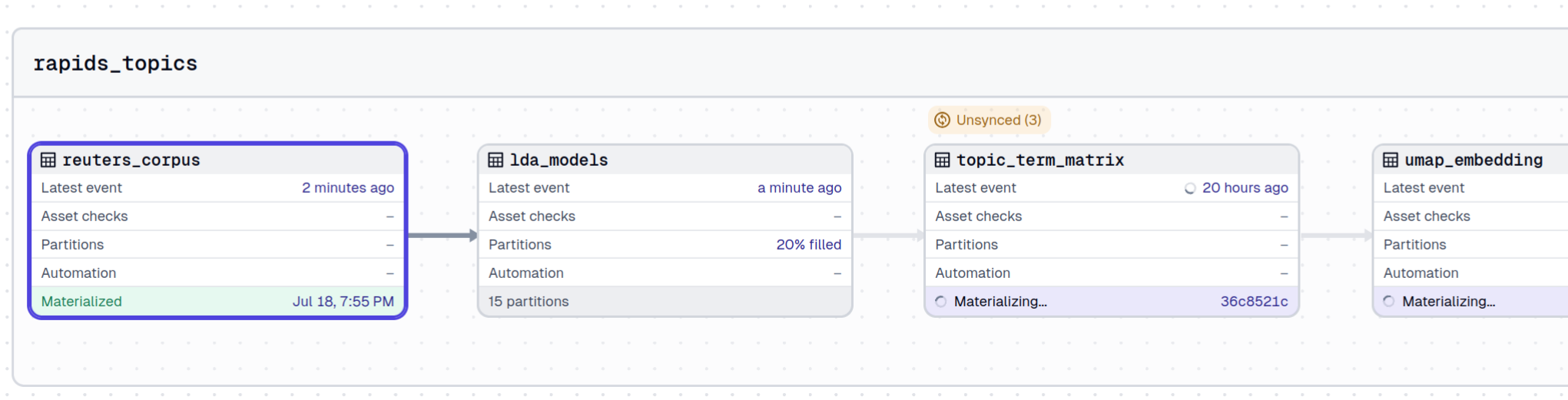
Parallel model fitting. lda_models is partitioned by (month, seed), and a backfill dispatches each partition as an independent sbatch job. The lineage view shows the partitions populating while downstream assets wait:
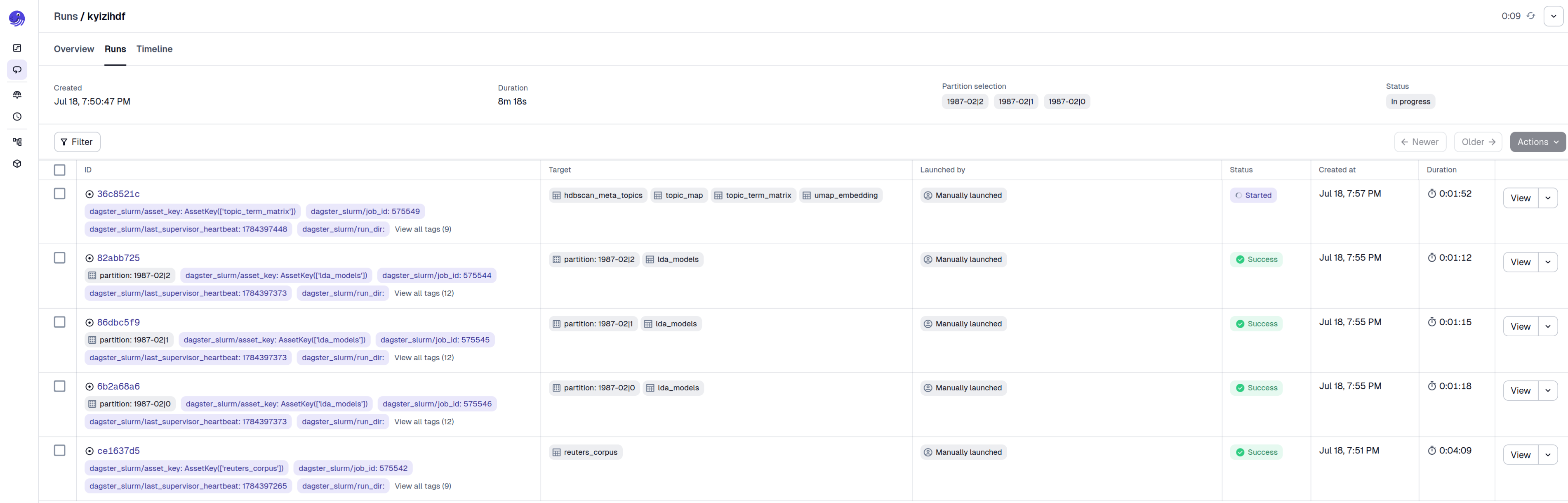
One Slurm job per run. Each run is tagged with its Slurm job ID (dagster_slurm/job_id), so Dagster runs correlate directly with sacct and squeue output:
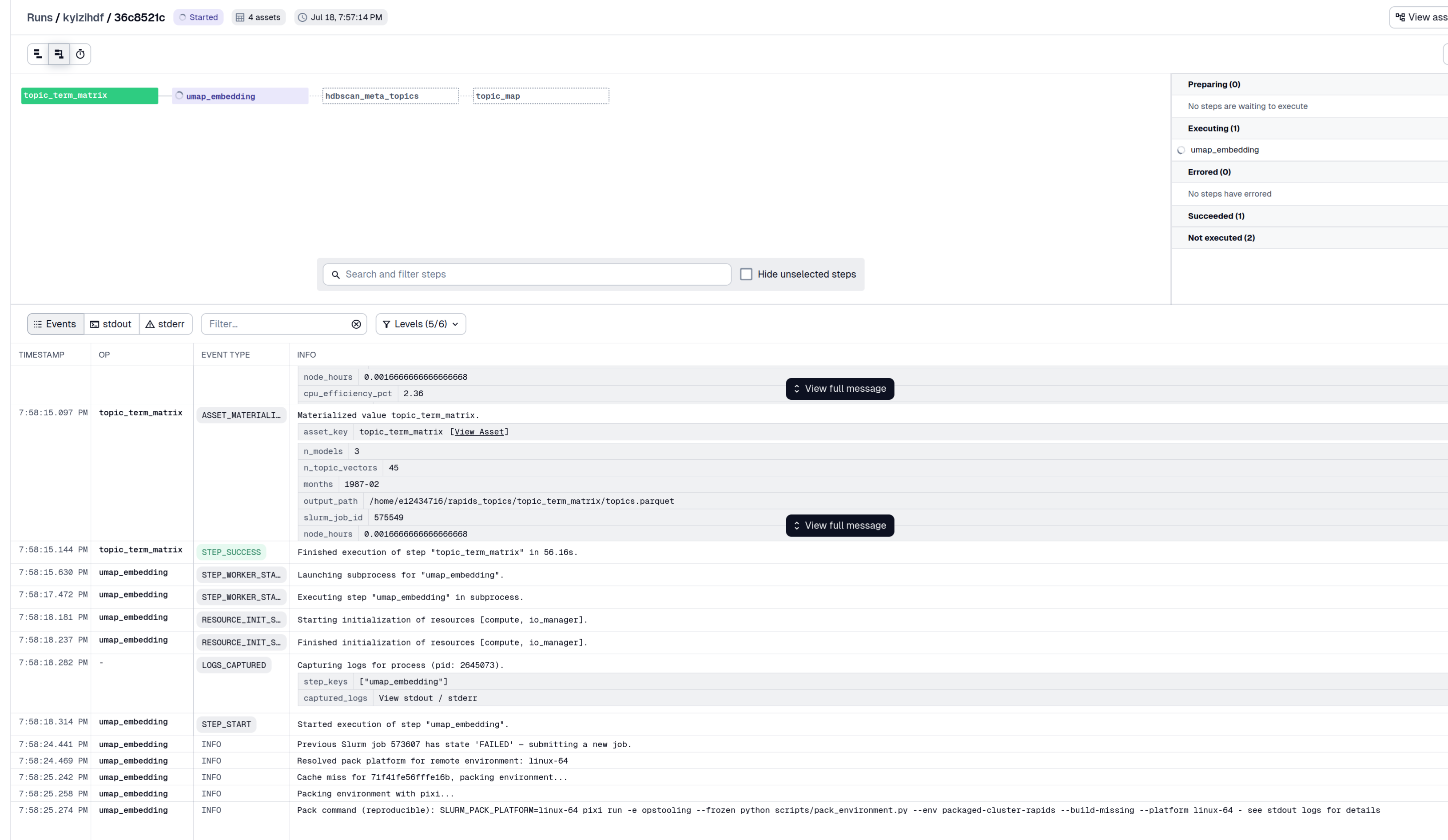
Event log, including environment packing. The log records the full lifecycle: a cache miss on the environment hash, the reproducible pixi-pack command, submission, and log streaming over SSH:
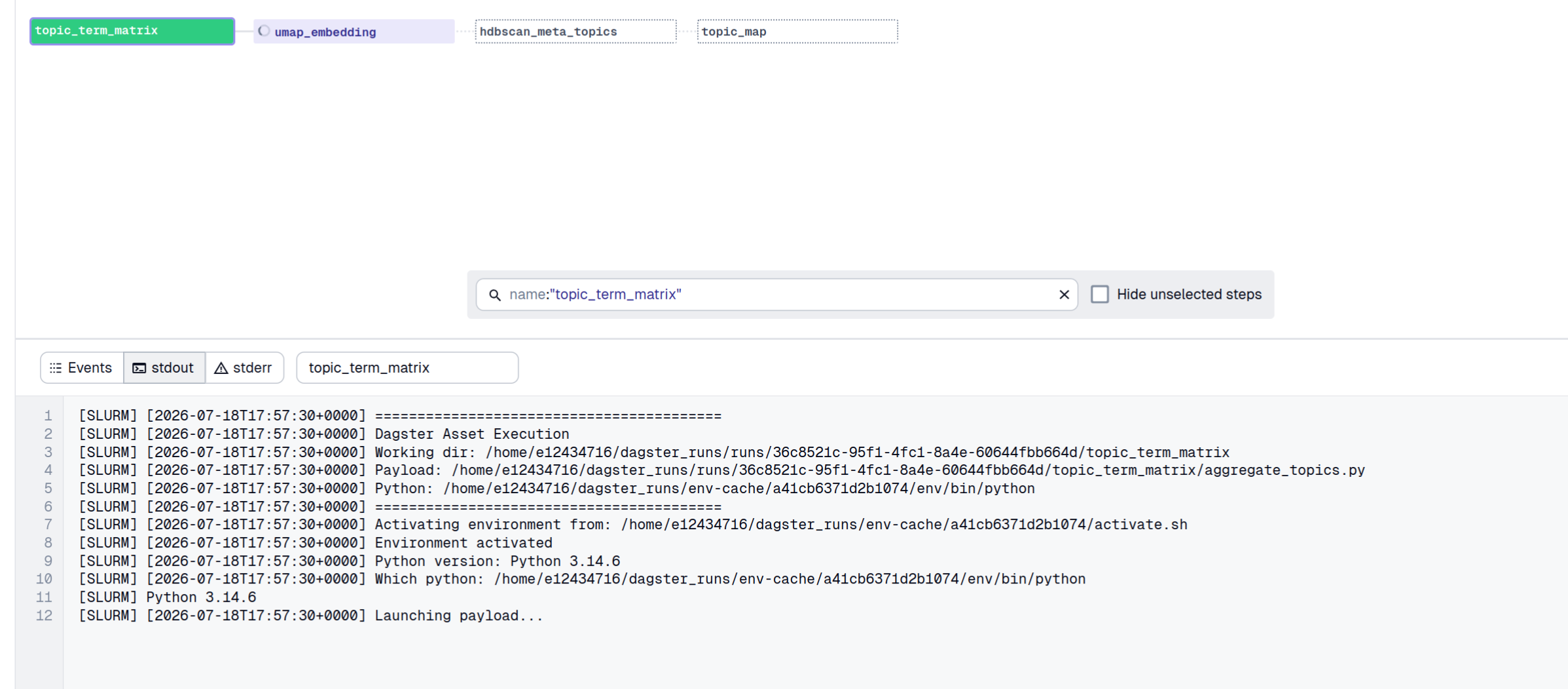
Streamed Slurm stdout. The stdout tab shows what executed on the compute node, including the working directory, payload path, and the Python interpreter the packed environment resolved to:
Structured results and metrics#
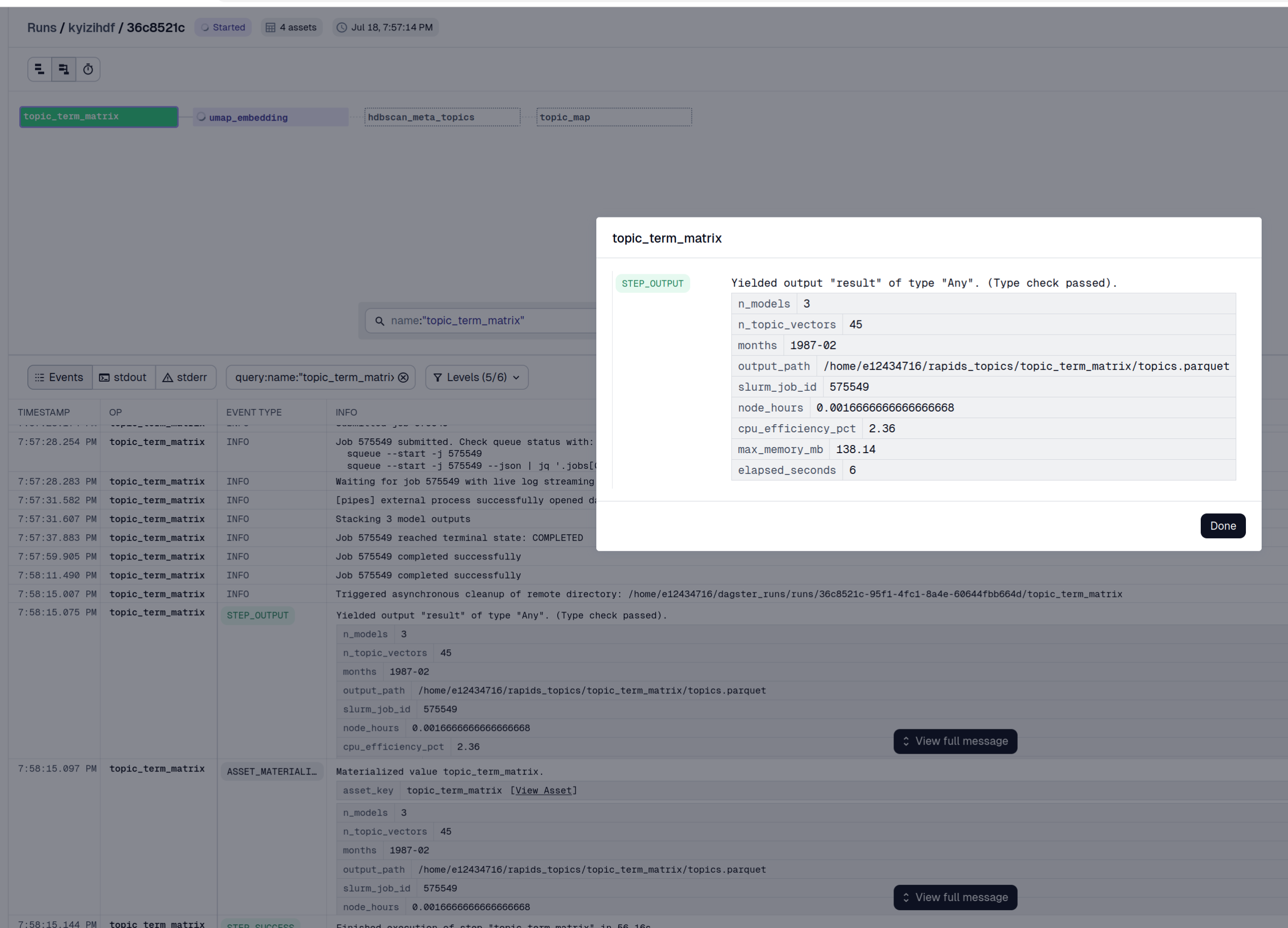
Structured results per stage. Every payload reports through Pipes: row counts, output paths, the Slurm job ID, and scheduler-derived efficiency figures (node_hours, cpu_efficiency_pct, max_memory_mb):
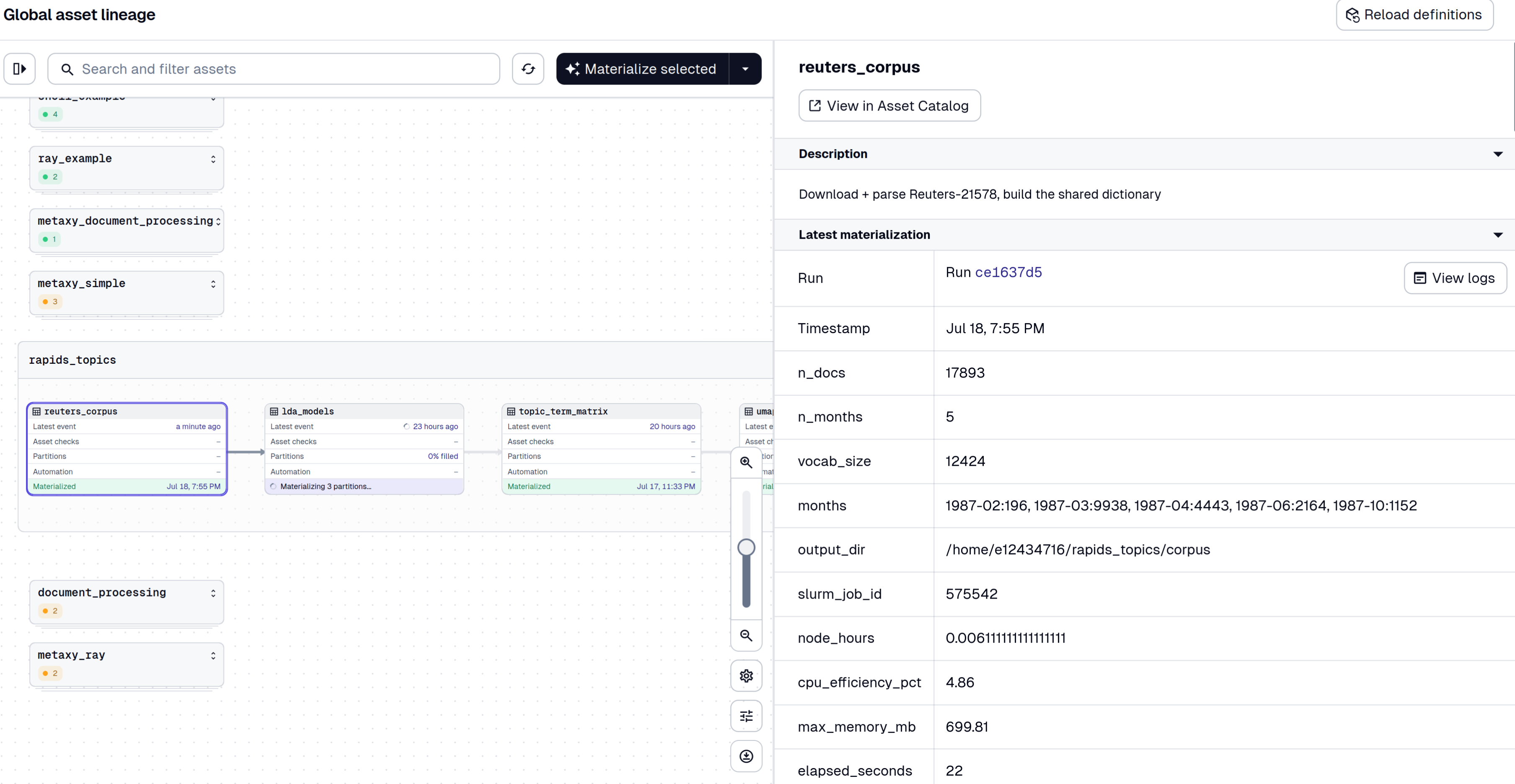
The corpus asset reports equivalently at the head of the pipeline, giving documents per month, vocabulary size, and output directory:
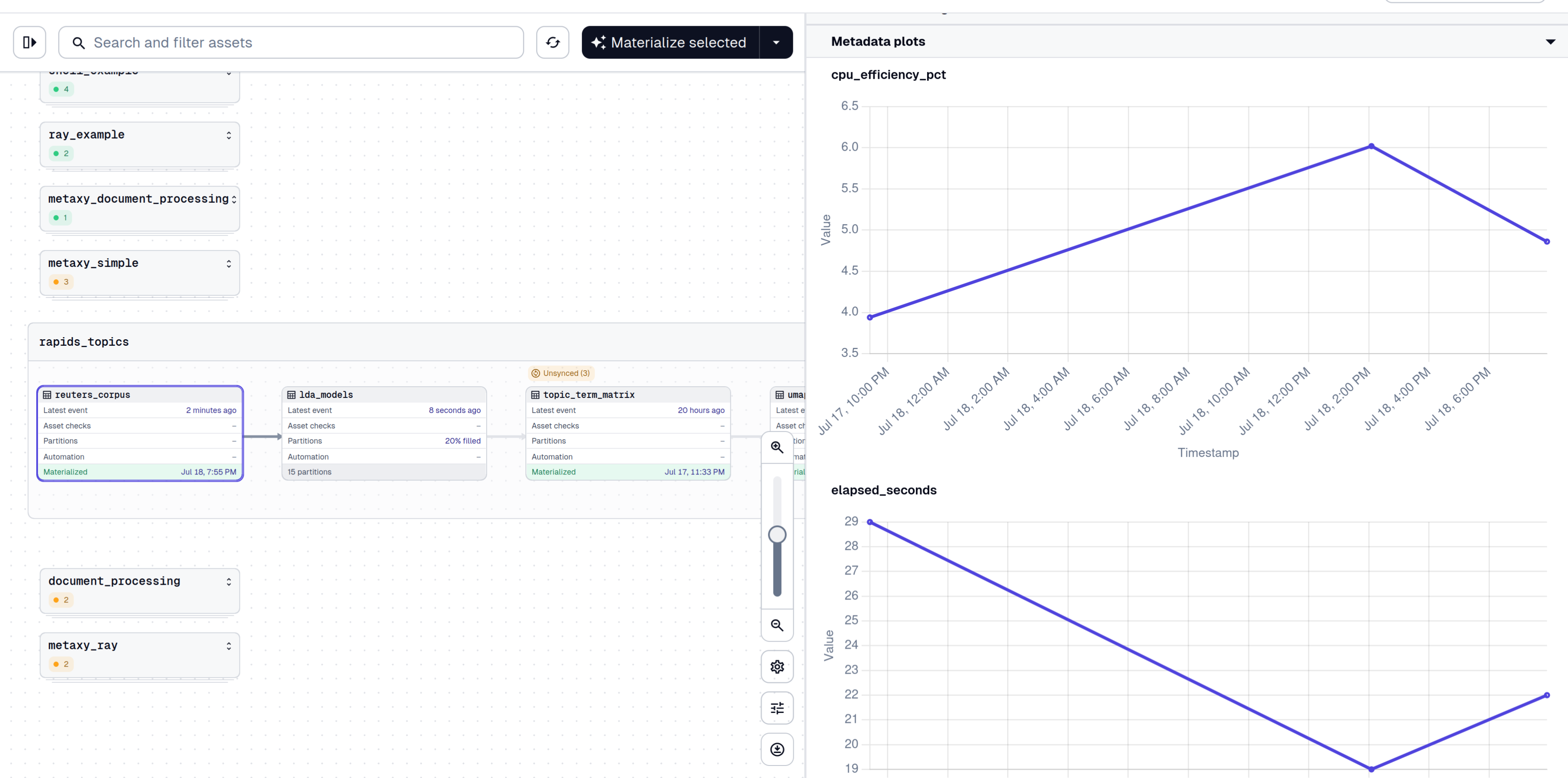
The efficiency figures are worth monitoring. A GPU stage reporting a low cpu_efficiency_pct indicates that the CPU request exceeds what the stage uses, which increases queue time without improving throughput.
Metrics over time. Because the efficiency figures are numeric metadata, Dagster plots them across materializations, so a regression in cost per run is visible directly:
Pipeline output#
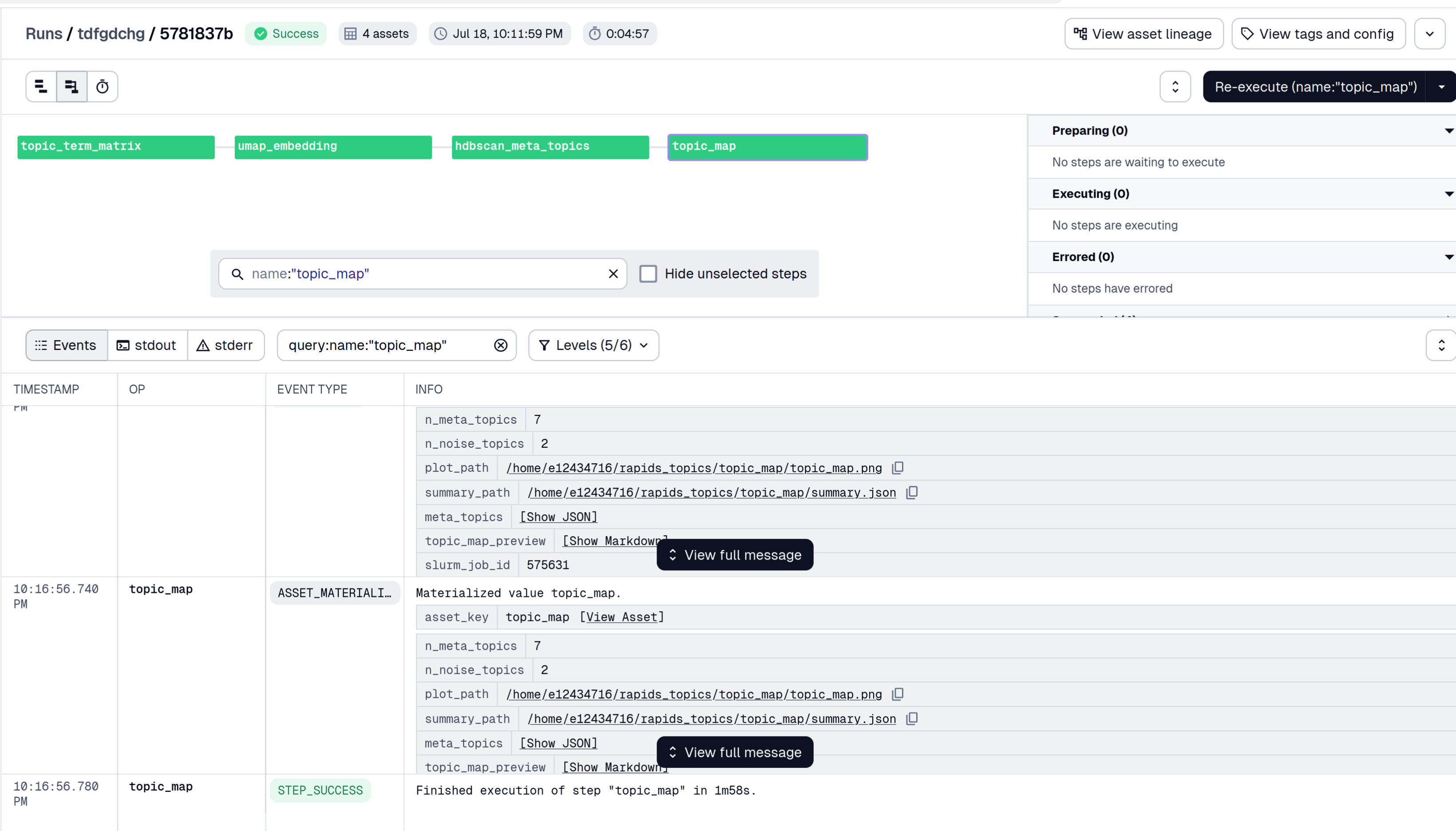
Results. The terminal topic_map asset reports the meta-topic and noise counts, the plot and summary paths on the cluster filesystem, the labeled cluster summary as JSON, and a markdown preview of the plot:
The preview renders the topic map inline in the Dagster UI, so no artifact transfer off the cluster is required to inspect the result:
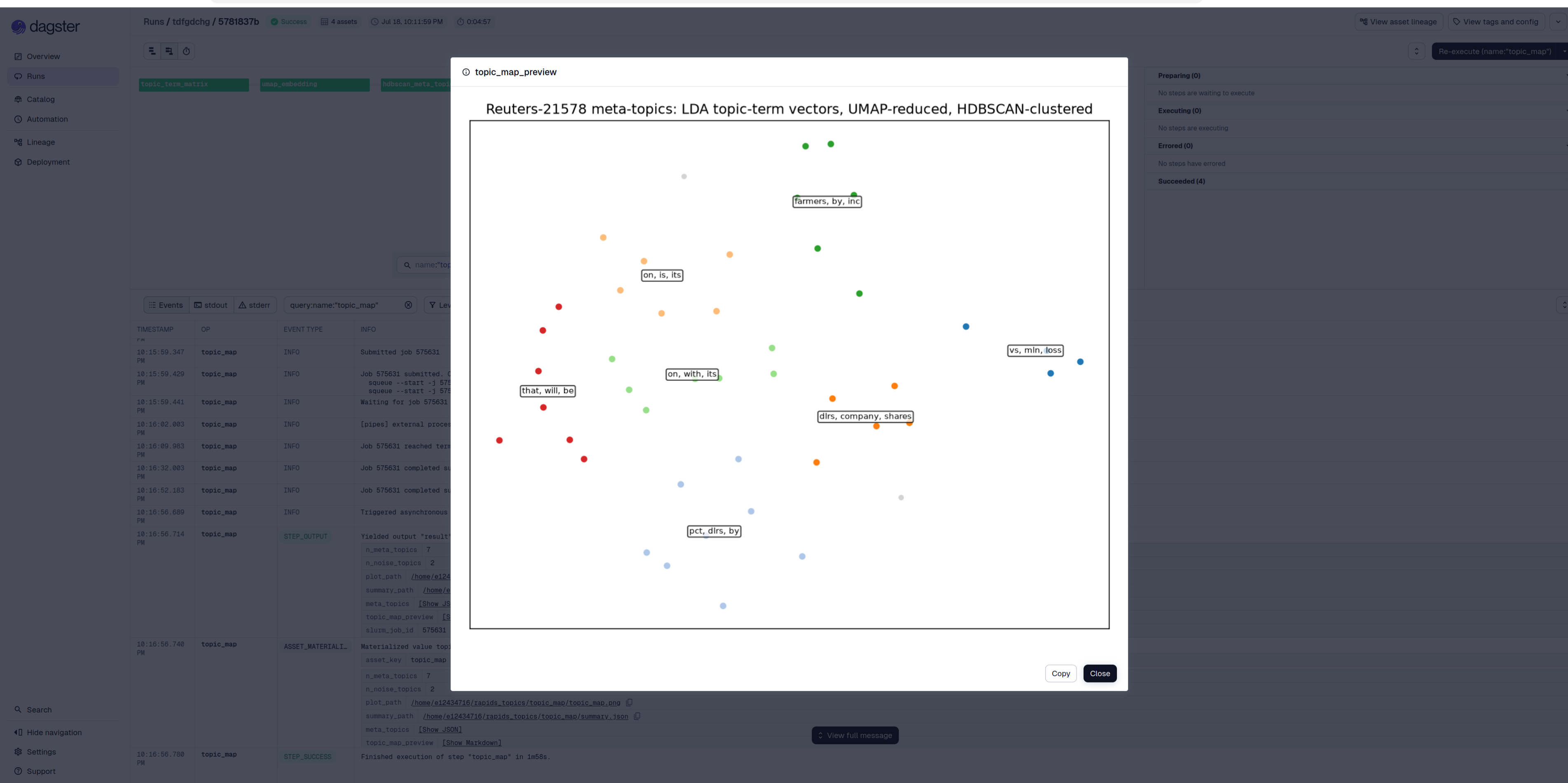
The map as written to the cluster filesystem shows the topic-term vectors from the LDA fits, UMAP-reduced and HDBSCAN-clustered into meta-topics, each labeled with its top shared terms:
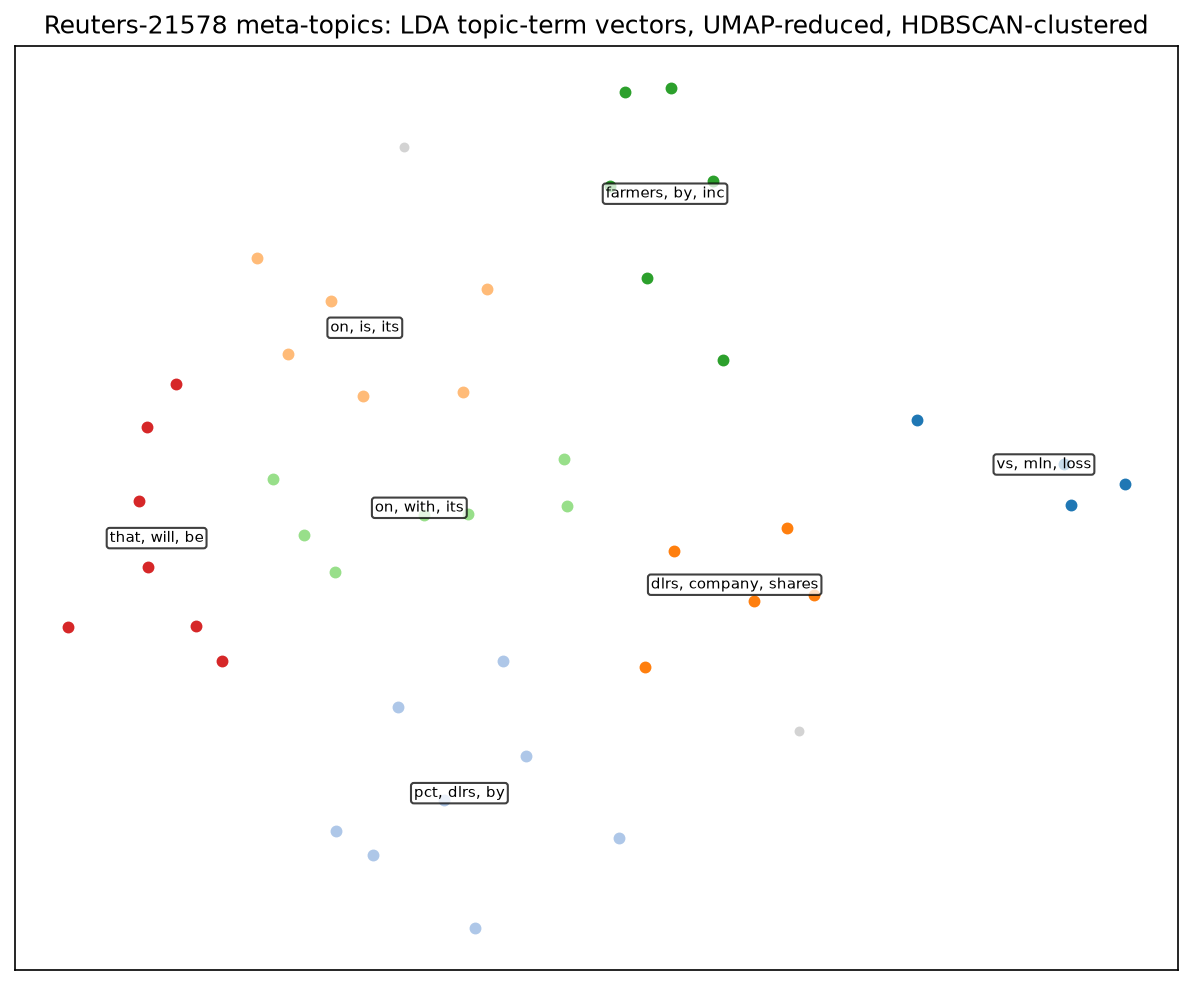
At this corpus size several clusters resolve to newswire boilerplate and high-frequency function words rather than subject matter, which is the expected result for 1987 newswire at 15 topics per fit without vocabulary filtering. Production runs of this pipeline use substantially larger corpora and filter the vocabulary before fitting.
Cluster counts scale with the size of the backfill. More partitions produce more topic vectors and therefore more meta-topics, and cuML’s HDBSCAN assigns a somewhat larger share of points to noise than the CPU implementation at the same settings.
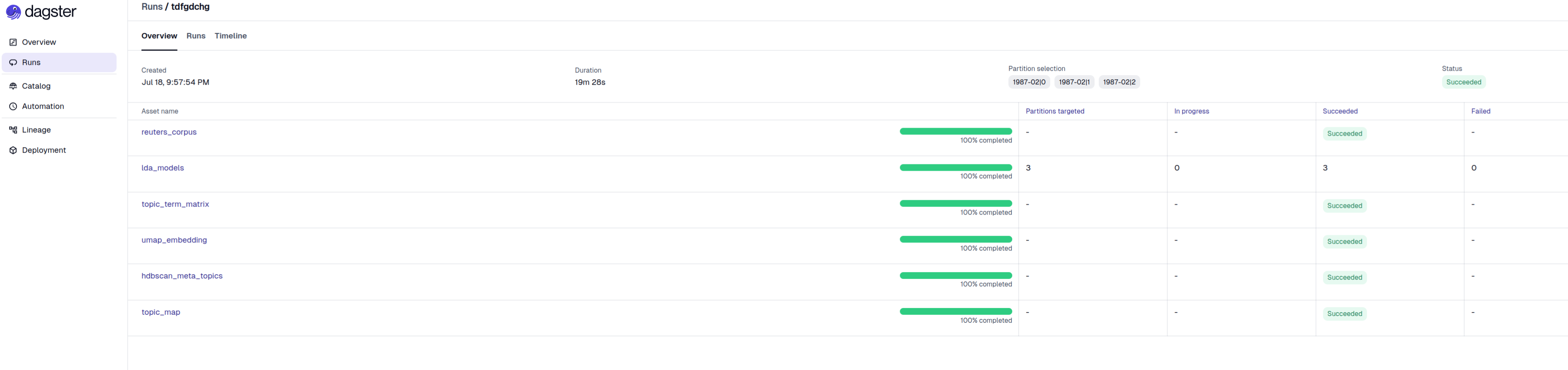
Full chain. A complete backfill finished in 19m28s end to end. Most of that time is not model fitting: individual LDA jobs complete in well under a minute each, and the majority of wall-clock time is first-run environment packing and per-job scheduling overhead. Once environments are cached, subsequent runs are substantially faster, which is the purpose of RAPIDS_TOPICS_GPU_ENV and pre_deployed_env_path.
Conclusion#
A data science pipeline is rarely uniform in what it requires, and the stages that benefit from a GPU are usually a minority. dagster-slurm makes that granularity expressible: each asset declares its own Slurm resources and its own packed environment, so the unit of deployment is the asset rather than the pipeline. The scikit-learn stages here never hold a GPU allocation, the cuML stages request one and receive a environment, and extending acceleration to a further stage is a metadata change rather than a migration.
On an HPC cluster that granularity is normally expensive, since every environment is another module to maintain and every resource shape another sbatch script. Here environments are built from the project lockfile, shipped over SSH, and cached on the cluster by content hash, while submission is generated from the asset definition. The cluster provides SSH and sbatch, and nothing further.
Because the same definitions run locally, on a Slurm cluster in Docker, and on the production system, and the payloads fall back to CPU implementations where no GPU is present, a stage can be written and verified before it consumes queue time. Which units belong on a GPU then remains a decision that can be revisited as the workload grows.
Resources#
dagster-slurm: repository and documentation
This example: asset definitions and payload scripts
Environment packaging: Packaging dependencies
Execution modes: session and heterogeneous jobs
cuML: documentation