Accelerating a Hugging Face Llama 2 model with Transformer Engine
Goal
This tutorial showcases how accelerate finetuning a full Llama 2 model from Hugging Face by using TransformerLayer from the Transformer Engine library in BF16 and FP8 precisions.
Dependencies for this tutorial
Following files and media are necessary to effectively run this tutorial:
te_llama.pyThis file contains the code to load a Hugging Face Llama 2 checkpoint in Transformer Engine’s
TransformerLayerinstead of Hugging Face’sLlamaDecoderLayer. This is used in the following two sections of the tutorial - “Improvement 1” and “Improvement 2”.
utils.pyThis file contains the code related to dataloading, hyperparameters, setting up model/optimizers/accelerator, model training and other miscellaneous tasks like restarting the jupyter notebook from within the cell.
media/This directory contains the images used in the following tutorial.
Table of contents
From “Transformer” to “Llama”
Hugging Face’s
LlamaModelHugging Face’s
LlamaDecoderLayer
[Baseline] Running HF
LlamaModel(Precision:BF16)[Improvement 1] Replace HF’s
LlamaDecoderLayerwith TE’sTransformerLayer(Precision:BF16)Transformer Engine’s
TransformerLayerTransformerLayeroptions explainedMapping weights from HF’s
LlamaDecoderLayerto TE’sTransformerLayer
[Improvement 2] Replace HF’s
LlamaDecoderLayerwith TE’sTransformerLayer(Precision:FP8)Conclusion
From “Transformer” to “Llama”

Fig 1: Llama visualized as a transformer. (generated with Nvidia’s AI-foundation models)
A flashback:
2017: “Attention Is All You Need” paper introduced pioneering “Transformer” architecture and changed the NLP field forever.
2018-2020: Emergence of GPT model series that showed causal decoder architectures are great fit for pretraining, few-shot and zero-shot learning.
Fast forward to 2023-2024: Following GPT-3/GPT-4 success stories, researchers and companies raced to produce the next best pretrained model that could further be finetuned for application-specific use-cases.
One of the latest in this line of pretrained models which is also open source is Meta’s Llama 2 models (Large Language Model Meta AI).
These models range from 7B to 65B parameters.
LLaMA 2 was pretrained on 2 trillion tokens.
For more information on Llama 2 consider reading the Huggingface tutorial. As a quick summary, here are some of the important differences b/w the conventional transformer decoder architecture vs Llama 2 architecture:
Decoder only model (causal language modeling and next word prediction)
RMSNorm in place of the LayerNorm
SwiGLU activation function
RoPE as positional embeddings
Grouped Query Attention
Trained on 4K context length
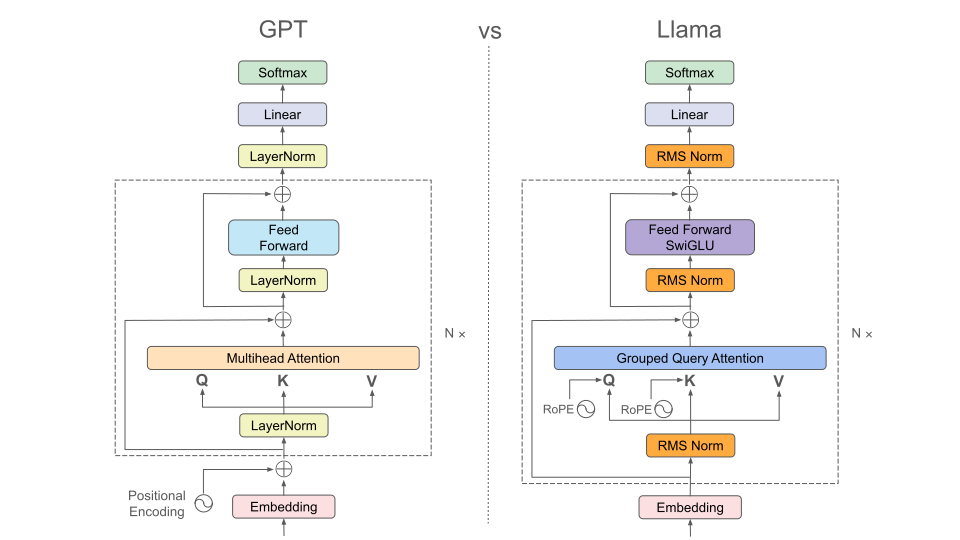
Fig 2: Comparing GPT and Llama architectures.
Hugging Face’s LlamaModel
Hugging Face provides an open-source implementation of Llama model in modeling_llama.py.
Here’s a block diagram that shows how Llama model is implemented in the Hugging Face repo. Notice the modular encapsulated form and LlamaDecoderLayer at the core of the model implementation.
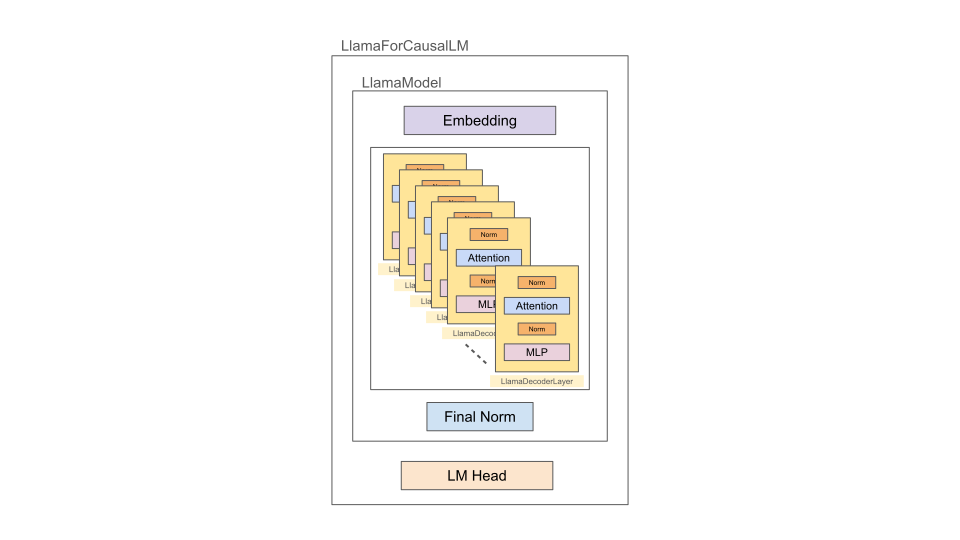
Fig 3: Causal Llama Model Block Diagram.
The above diagram translates to the following text output of the model in PyTorch. Notice that the core of the model has 32 LlamaDecoderLayers.
LlamaForCausalLM(
  (model): LlamaModel(
    (embed_tokens): Embedding(32000, 4096, padding_idx=0)
    (layers): ModuleList(
      (0-31): 32 x LlamaDecoderLayer(
        (self_attn): LlamaFlashAttention2(
          (q_proj): Linear(in_features=4096, out_features=4096, bias=False)
          (k_proj): Linear(in_features=4096, out_features=4096, bias=False)
          (v_proj): Linear(in_features=4096, out_features=4096, bias=False)
          (o_proj): Linear(in_features=4096, out_features=4096, bias=False)
          (rotary_emb): LlamaRotaryEmbedding()
        )
        (mlp): LlamaMLP(
          (gate_proj): Linear(in_features=4096, out_features=11008, bias=False)
          (up_proj): Linear(in_features=4096, out_features=11008, bias=False)
          (down_proj): Linear(in_features=11008, out_features=4096, bias=False)
          (act_fn): SiLU()
        )
        (input_layernorm): LlamaRMSNorm()
        (post_attention_layernorm): LlamaRMSNorm()
      )
    )
    (norm): LlamaRMSNorm()
  )
  (lm_head): Linear(in_features=4096, out_features=32000, bias=False)
)
Hugging Face’s LlamaDecoderLayer
Let’s take a closer look at LlamaDecoderLayer. It is composed of input_layernorm, self_attn, post_attention_layernorm and mlp modules. Each module has associated weights as shown in the diagram.
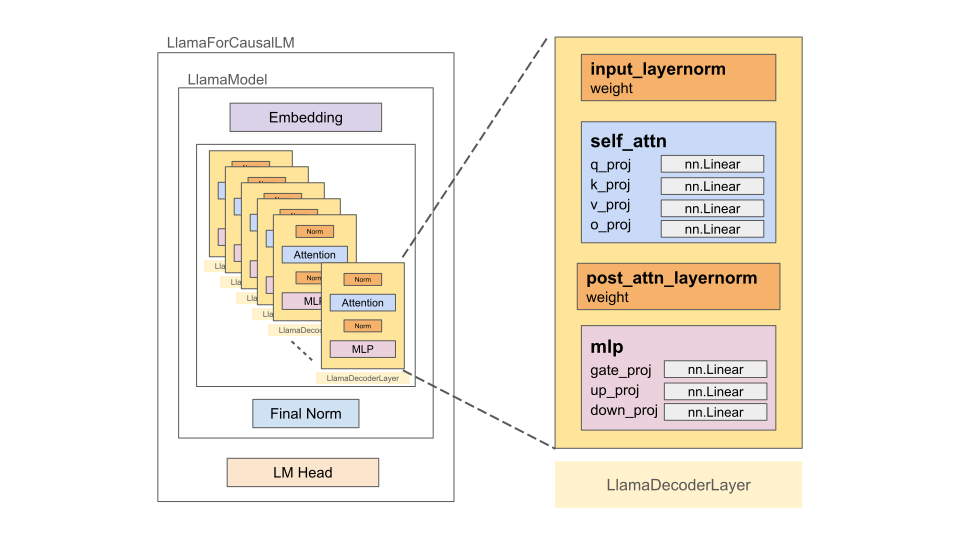
Fig 4: Causal Llama Model Block Diagram (with simplified illustration of the LlamaDecoderLayer).
Self_Attn Layer
For simplicity in the block diagram illustration of the “self_attn” box, we omit the “Grouped Query Attention” operation and only showcase the modules which have associated weights.
MLP Layer
SwiGLU is an activation defined as follows in the modeling_llama.py file in the Hugging Face github repo:
"""
1. `self.up_proj`, `self.gate_proj` and `self.down_proj` are "Linear" layers
2. `self.act_fn` is a "Swish" function

"""
down_proj = self.down_proj(self.act_fn(self.gate_proj(x)) * self.up_proj(x))
It requires a set of 3 weights as compared to 2 weights in conventional “MLP” layers e.g. in the traditional transformer or GPT architectures. This is also illustrated in the following figure:
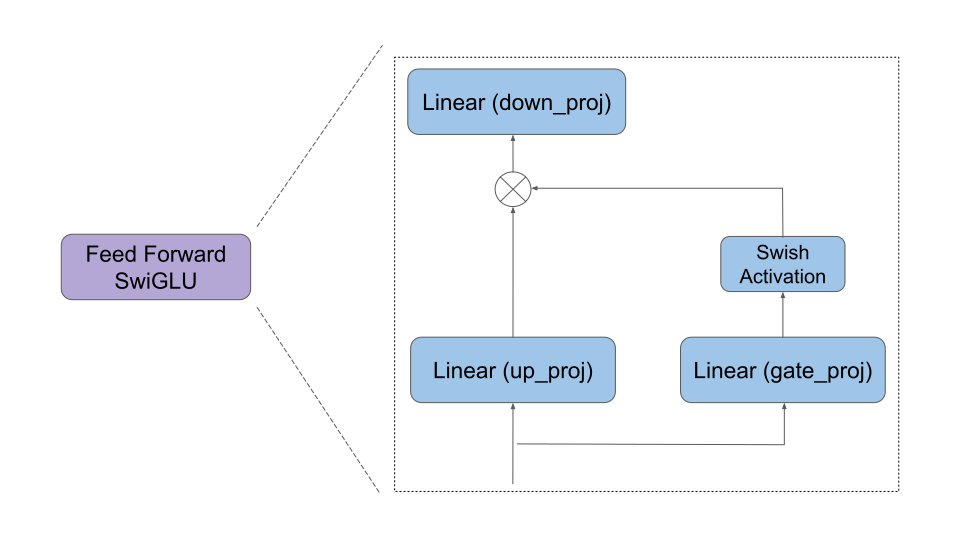
Fig 5: A look inside the feedforward layer with swiglu activation function.
[Baseline] Running HF LlamaModel (Precision: BF16)
Llama 2 weights are loaded into the Hugging Face native implementation LlamaForCausalLM (refer to modeling_llama.py).
For this and other subsequent runs, the batch_size is 8. The LlamaDecoderLayer is left unchanged in the baseline as follows:
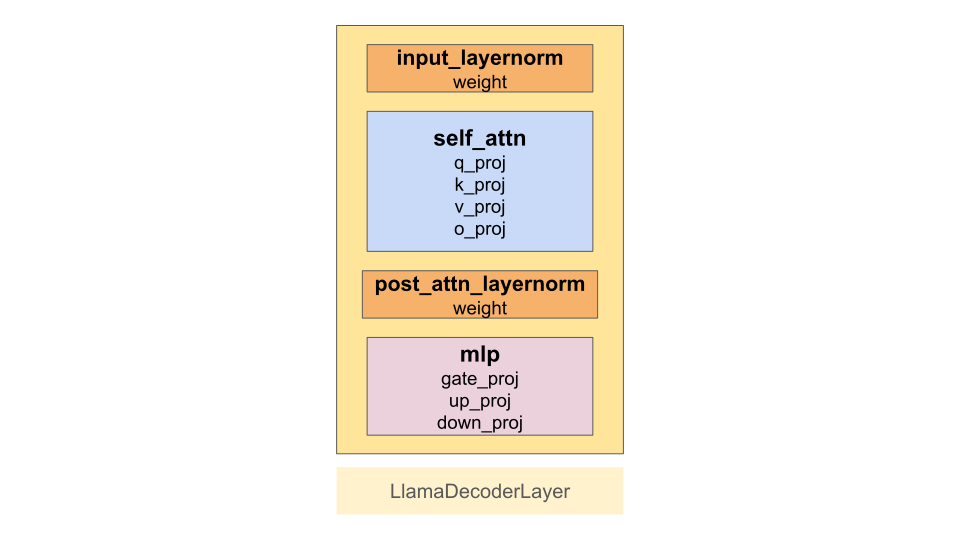
Fig 6: Revisiting “LlamaDecoderLayer”.
Note
The baseline implementation will be run in BF16 precision.
Note
This tutorial loads and trains a Llama 2 7B model which takes up most of the GPU memory and therefore, we need to restart the jupyter notebook each time before running the following sections. A small utility method restart_jupyter_notebook is defined in the accompanying utils.py file. This function restarts the jupyter notebook so that the GPU memory is flushed before the model is loaded again from the checkpoint in order to avoid running into OOM (Out Of Memory) errors.
If the utility doesn’t work, comment this line restart_jupyter_notebook() in the following cell and manually restart the jupyter notebook before running the cell. Repeat the same for other sections in this tutorial.
[ ]:
# Restart the notebook (to flush the GPU memory)
from utils import restart_jupyter_notebook
restart_jupyter_notebook()


# Import necessary packages and methods
from utils import *


# Default hyperparams, also defined in `utils.py` in class `Hyperparameters`
## !!! `model_name` attr must point to the location of the model weights !!!
## Weights can be downloaded from: https://llama.meta.com/llama-downloads/
hyperparams.model_name = "" # <== Add model weight location here e.g. "/path/to/downloaded/llama/weights"
hyperparams.mixed_precision = "bf16"


# Init the model and accelerator wrapper
model = init_baseline_model(hyperparams)
accelerator, model, optimizer, train_dataloader, lr_scheduler = wrap_with_accelerator(model, hyperparams)


# Finetune the model
finetune_model(model, hyperparams, accelerator, train_dataloader, optimizer, lr_scheduler)
10 finetuning steps complete!
Average time taken per step: 289 milliseconds
Let’s add this information in a table and keep comparing it with a few possible improvements in future sections:
Models |
Precision |
Step Time (or ms per batch) |
Speedup (over baseline) |
|---|---|---|---|
HF (baseline) |
BF16 |
289 |
1 |
[Improvement 1] Replace HF’s LlamaDecoderLayer with TE’s TransformerLayer (Precision: BF16)
In addition to basic layers like Linear and LayerNorm, Transformer Engine offers larger modules like MultiheadAttention (combines “LayerNorm” and “Self Attention”) and LayerNormMLP (combines “LayerNorm” and “MLP”) that could replace their counterparts in the LlamaDecoderLayer and potentially provide a speedup. Transformer Engine also offers a full TransformerLayer (which further combines MultiheadAttention and LayerNormMLP layers) which could replace
LlamaDecoderLayer and provide a speedup (with careful mapping of the weights since the name of the weights are different for those two layers). Let’s take a closer look at Transformer Engine’s TransformerLayer.
Transformer Engine’s TransformerLayer
At a higher level, TE’s TransformerLayer could be visualized as an apt replacement for the LlamaDecoderLayer. But the internals of the TransformerLayer are organized a bit differently.
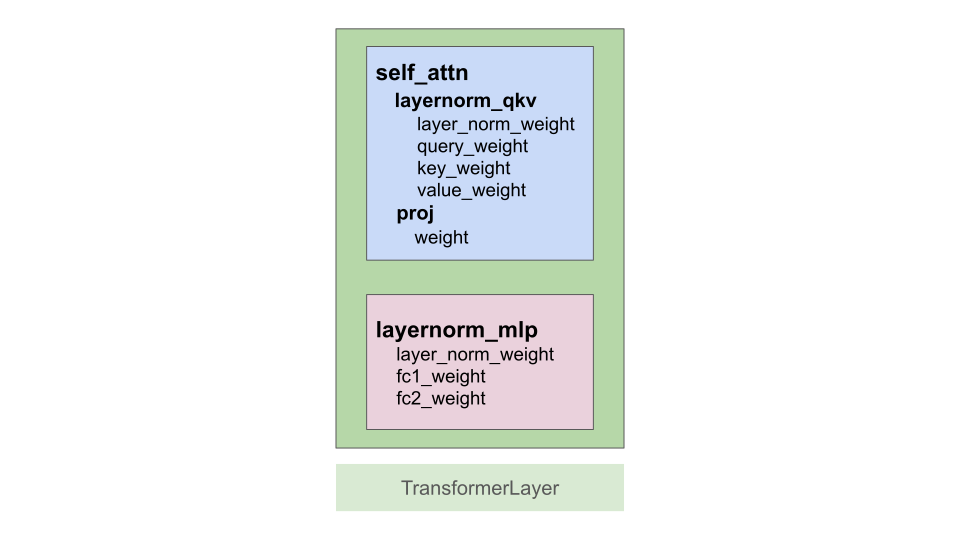
Fig 7: Transformer Engine’s TransformerLayer
Just like Hugging Face’s LlamaDecoderLayer, Transformer Engine’s TransformerLayer encapsulates self_attention (as MultiheadAttention) and mlp (as LayerNormMLP). A major difference is that the two Norms are included in the MultiheadAttention and LayerNormMLP layers as shown in the following output prompt:
TransformerLayer(
    (self_attention): MultiheadAttention(
      (layernorm_qkv): LayerNormLinear()
      (core_attention): DotProductAttention()
      (proj): Linear()
    )
    (layernorm_mlp): LayerNormMLP()
)
Another difference is that Transformer Engine implements an efficient version of feedforward layer with SwiGLU in which the weights from the up_proj and gate_proj modules are merged together and SwiGLU is applied using a custom fused kernel. This is done so that only one big and efficient Matrix Multiplication operation is issued to the GPU instead of two smaller ones.
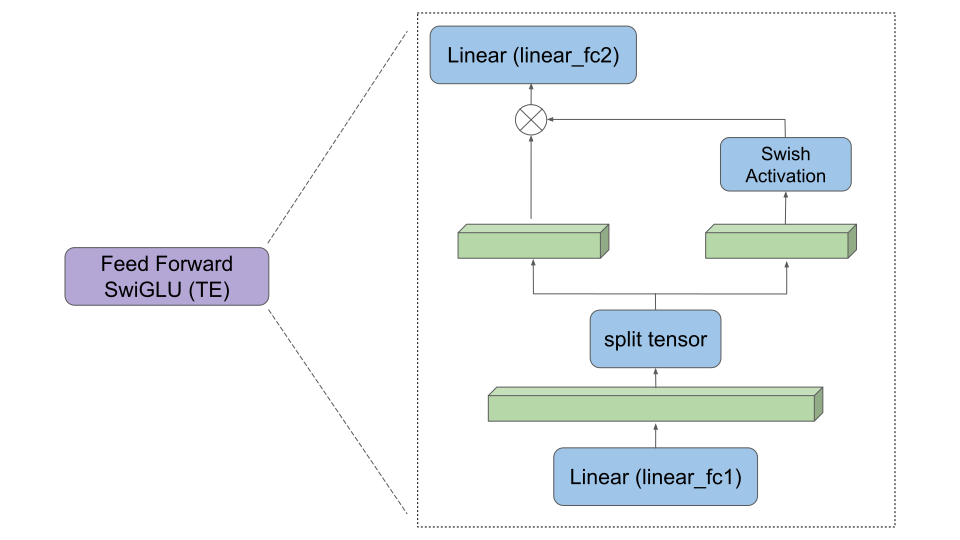
Fig 8: Abstract illustration of the SwiGLU implementation in Transformer Engine.
TransformerLayer options explained
Note
Here, we go over some of the options in TransformerLayer that are needed for the tutorial. For a complete list of options, refer the TransformerLayer API documentation.
In the accompanying te_llama.py file, TELlamaDecoderLayer is defined as a wrapper over TE’s TransformerLayer with a few needed options that make TransformerLayer a plug-in replacement for the HF’s LlamaDecoderLayer.
class TELlamaDecoderLayer(te.pytorch.TransformerLayer):
    def __init__(self, config):
        super().__init__(
            config.hidden_size,
            config.intermediate_size,
            config.num_attention_heads,
            bias=False,
            layernorm_epsilon=config.rms_norm_eps,
            hidden_dropout=0,
            attention_dropout=0,
            fuse_qkv_params=False,
            normalization="RMSNorm",
            activation="swiglu",
            attn_input_format="bshd",
        )
        te_rope = RotaryPositionEmbedding(config.hidden_size//config.num_attention_heads)
        self.te_rope_emb = te_rope(max_seq_len=config.max_position_embeddings).cuda()
Here’s a list summarizing each option briefly:
hidden_size: size of each input sample.ffn_hidden_size: intermediate size to which samples are projected.num_attention_heads: number of attention heads in the transformer layer.bias: switch to add additive biases to the submodule layers.layernorm_epsilon: a value added to the denominator of layer normalization for numerical stability. Default is1e-5.hidden_dropout: dropout probability for the dropout op after FC2 layer (fully connected layer no. 2). Default is0.1.attention_dropout: dropout probability for the dropout op during multi-head attention. Default is0.1.fuse_qkv_params: if set to True, TransformerLayer module exposes a single fused parameter for query-key-value. This enables optimizations such as QKV fusion without concatentations/splits and also enables the argument fuse_wgrad_accumulation.normalization: type of normalization applied. Default isLayerNorm.activation: type of activation used in the MLP block. Default isgelu.attn_input_format: controls whether the dimensions of the intermediate hidden states is ‘batch first’ (‘bshd’) or ‘sequence first’ (‘sbhd’).sstands for the sequence length,bbatch size,hthe number of heads,dhead size. Note that these formats are very closely related to theqkv_formatin theMultiHeadAttentionandDotProductAttentionmodules.
Further, note that RotaryPositionEmbedding is defined as part of the TE’s TransformerLayer itself since it expects this rope cache if RoPE is used in the model.
Let’s revisit how LlamaDecoderLayers form the core of the decoder layer stack in HF’s llama implementation:
ModuleList(
  (0-31): 32 x LlamaDecoderLayer(
    (self_attn): LlamaAttention(
      (q_proj): Linear(in_features=4096, out_features=4096, bias=False)
      (k_proj): Linear(in_features=4096, out_features=4096, bias=False)
      (v_proj): Linear(in_features=4096, out_features=4096, bias=False)
      (o_proj): Linear(in_features=4096, out_features=4096, bias=False)
      (rotary_emb): LlamaRotaryEmbedding()
    )
    (mlp): LlamaMLP(
      (gate_proj): Linear(in_features=4096, out_features=11008, bias=False)
      (up_proj): Linear(in_features=4096, out_features=11008, bias=False)
      (down_proj): Linear(in_features=11008, out_features=4096, bias=False)
      (act_fn): SiLU()
    )
    (input_layernorm): LlamaRMSNorm()
    (post_attention_layernorm): LlamaRMSNorm()
  )
)
A major portion of the Hugging Face model implementation (32 LlamaDecoderLayer layers) could be potentially replaced with Transformer Engine’s TransformerLayer layers. Let’s see how it is made possible.
Mapping weights from HF’s LlamaDecoderLayer to TE’s TransformerLayer
Refer the accompanying file te_llama.py which provides a reference to create a Llama 2 model with TE’s TransformerLayer after replacing HF’s LlamaDecoderLayer.
Briefly, following pieces of code are put together:
TELlamaDecoderLayeris added as a wrapper forTransformerLayer.
class TELlamaDecoderLayer(te.pytorch.TransformerLayer):
    """
    Wrapper class over TE's `TransformerLayer`. This makes the wrapper very
    similar to HF's `LlamaDecoderLayer` and easier to replace it in the code.

    Args:
        config: LlamaConfig
        args: positional args (for compatibility with `LlamaDecoderLayer`)
        kwargs: keyword args (for compatibility with `LlamaDecoderLayer`)
    """
    def __init__(self, config, *args, **kwargs):
        super().__init__(
            hidden_size=config.hidden_size,
            ffn_hidden_size=config.intermediate_size,
            num_attention_heads=config.num_attention_heads,
            bias=False,
            layernorm_epsilon=config.rms_norm_eps,
            hidden_dropout=0,
            attention_dropout=0,
            fuse_qkv_params=False,
            normalization="RMSNorm",
            activation="swiglu",
            attn_input_format="bshd",
        )
        te_rope = RotaryPositionEmbedding(config.hidden_size//config.num_attention_heads)
        self.te_rope_emb = te_rope(max_seq_len=config.max_position_embeddings).cuda()

    def forward(self,
                hidden_states,
                *args,
                attention_mask,
                **kwargs):
        """
        Custom forward to make sure we only pass relevant arguments to the
        forward pass of the `TransformerLayer`. Also, make sure the output
        format matches the output of the HF's `LlamaDecoderLayer`.
        """
        return (super().forward(hidden_states, attention_mask=attention_mask, rotary_pos_emb=self.te_rope_emb),)
Before creating a
LlamaForCausalLM,replace_decodercontext manager is used to monkey-patchLlamaDecoderLayerwithTELlamaDecoderLayer.
@contextmanager
def replace_decoder(te_decodder_cls):
    """
    Replace `LlamaDecoderLayer` with custom `TELlamaDecoderLayer`.
    """
    original_llama_decoder_cls = transformers.models.llama.modeling_llama.LlamaDecoderLayer
    transformers.models.llama.modeling_llama.LlamaDecoderLayer = te_decodder_cls
    try:
        yield
    finally:
        transformers.models.llama.modeling_llama.LlamaDecoderLayer = original_llama_decoder_cls
.
.
.
class TELlamaForCausalLM:
    """
    Causal LM created with `LlamaModel`. The underlying `LlamaDecoderLayer`
    class is monkey-patched with `TELlamaDecoderLayer` class before
    initializing the causal LM with `LlamaForCausalLM`.

    Args:
        config: LlamaConfig
    """

    def __new__(cls, config: LlamaConfig):
        with replace_decoder(te_decodder_cls=TELlamaDecoderLayer):
            llama_for_causal_lm = LlamaForCausalLM(config)
        return llama_for_causal_lm
.
.
.
A custom
pretrained_from_localmethod is added that copies the weights from the checkpoint (which is meant for HF Llama implementation) to the modifiedTELlamaForCausalLMby carefully mapping the weights from theLlamaDecoderLayer(HF) toTransformerLayer(TE). The methodreplace_paramsmaps and copies apt weights fromLlamaDecoderLayerto theTransformerLayer. Refer to the following diagram for more details.
def replace_params(hf_state_dict, te_state_dict):
    # collect all layer prefixes to update
    all_layer_prefixes = set()
    for param_key in hf_state_dict.keys():
        layer_prefix_pat = 'model.layers.\d+.'
        m = re.match(layer_prefix_pat, param_key)
        if m is not None:
            all_layer_prefixes.add(m.group())

    for layer_prefix in all_layer_prefixes:
        # When loading weights into models with less number of layers, skip the
        # copy if the corresponding layer doesn't exist in TE model
        if layer_prefix + 'self_attention.layernorm_qkv.layer_norm_weight' in te_state_dict:
            te_state_dict[layer_prefix + 'self_attention.layernorm_qkv.layer_norm_weight'].data[:] = hf_state_dict[layer_prefix + 'input_layernorm.weight'].data[:]

        if layer_prefix + 'self_attention.layernorm_qkv.query_weight' in te_state_dict:
            te_state_dict[layer_prefix + 'self_attention.layernorm_qkv.query_weight'].data[:] = hf_state_dict[layer_prefix + 'self_attn.q_proj.weight'].data[:]

        if layer_prefix + 'self_attention.layernorm_qkv.key_weight' in te_state_dict:
            te_state_dict[layer_prefix + 'self_attention.layernorm_qkv.key_weight'].data[:] = hf_state_dict[layer_prefix + 'self_attn.k_proj.weight'].data[:]
    .
    .
    .

    return all_layer_prefixes
The following figure shows how the weights get mapped from the HF’s LlamaDecoderLayer to TE’s TransformerLayer.
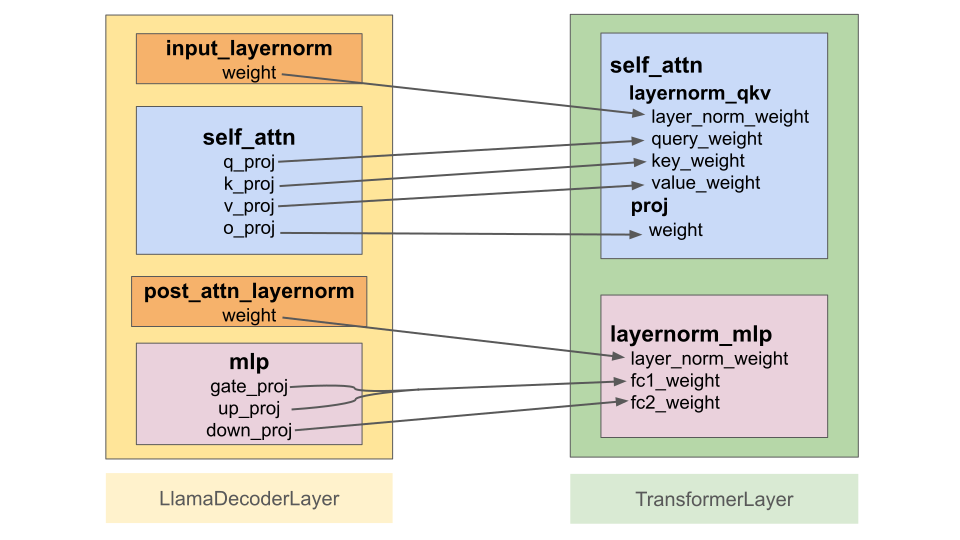
Fig 9: Replace LlamaDecoderLayer with TransformerLayer.
After initializing the modified Llama model this way, the core decoder layers get changed to TELlamaDecoderLayer (wrapper around TransformerLayer) as shown in the following output:
ModuleList(
  (0-31): 32 x TELlamaDecoderLayer(
    (self_attention): MultiheadAttention(
      (layernorm_qkv): LayerNormLinear()
      (core_attention): DotProductAttention(
        (flash_attention): FlashAttention()
        (fused_attention): FusedAttention()
        (unfused_attention): UnfusedDotProductAttention(
          (scale_mask_softmax): FusedScaleMaskSoftmax()
          (attention_dropout): Dropout(p=0, inplace=False)
        )
      )
      (proj): Linear()
    )
    (layernorm_mlp): LayerNormMLP()
  )
)
In summary, the model gets changed as follows with a large chunk of the implementation (core decoder layers) coming from Transformer Engine.
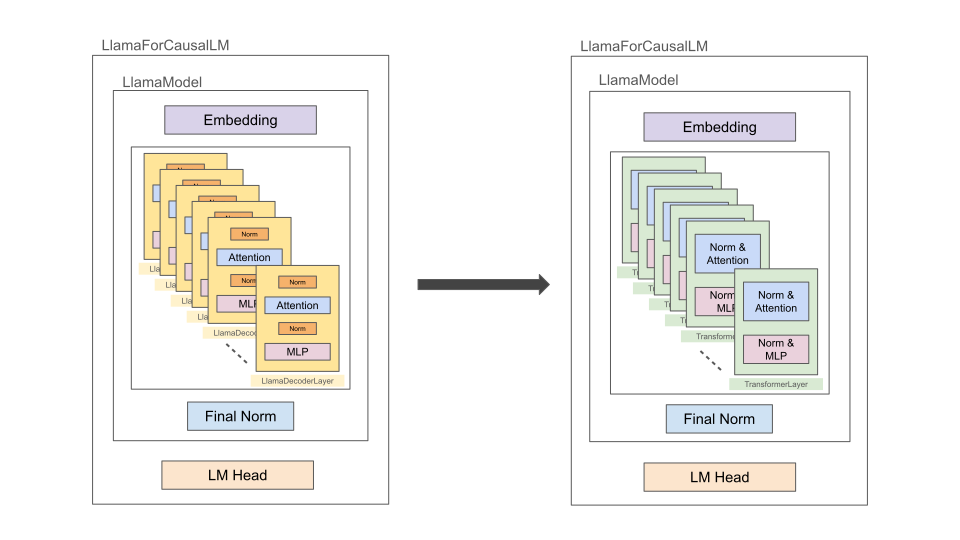
Fig 10: Language model after the HF’s LlamaDecoderLayers are replaced with TE’s TransformerLayers.
Note
Let’s first run this “TELlama” implementation in BF16 precision.
[1]:
# Restart the notebook (to flush the GPU memory)
from utils import restart_jupyter_notebook
restart_jupyter_notebook()


# Import necessary packages and methods
from utils import *


# Default hyperparams, also defined in `utils.py` in class `Hyperparameters`
## !!! `model_name` attr must point to the location of the model weights !!!
## Weights can be downloaded from: https://llama.meta.com/llama-downloads/
hyperparams.model_name = "" # <== Add model weight location here e.g. "/path/to/downloaded/llama/weights"
hyperparams.mixed_precision = "bf16"


# Init the model and accelerator wrapper
model = init_te_llama_model(hyperparams)
accelerator, model, optimizer, train_dataloader, lr_scheduler = wrap_with_accelerator(model, hyperparams)


# Finetune the model
finetune_model(model, hyperparams, accelerator, train_dataloader, optimizer, lr_scheduler)
10 finetuning steps complete!
Average time taken per step: 242 milliseconds
Compared to the “baseline” implementation, we see that using Transformer Engine’s TransformerLayer in place of Huggging Face’s LlamaDecoderLayer gives a speedup of 19% even when using only BF16 precision!
Models |
Precision |
Step Time (or ms per batch) |
Speedup (over baseline) |
|---|---|---|---|
HF (baseline) |
BF16 |
289 |
1 |
TE (replace |
BF16 |
242 |
1.19 |
[Improvement 2] Replace HF’s LlamaDecoderLayer with TE’s TransformerLayer (Precision: FP8)
Now that most of the HF Llama model implementation (LlamaDecoderLayers) has been swapped with Transformer Engine implementation (TELlamaDecoderLayer or TransformerLayer), let’s see how finetuning in FP8 precision helps improve performance.
How to run the model in FP8 precision
After the substitution, the model can be run in FP8 precision by the following change over the previous BF16 runs. (For more information, refer the corresponding wrap_with_accelerator function in the accompanying utils.py file).
# Specify the `FP8RecipeKwargs` (additional argument required to run in `fp8` precision)
fp8_kwarg_handler = [FP8RecipeKwargs(backend="te")]

# Pass the `FP8RecipeKwargs` to the `Accelerator` init call
accelerator = Accelerator(
    ...
    kwargs_handlers=fp8_kwarg_handler
)
[2]:
# Restart the notebook (to flush the GPU memory)
from utils import restart_jupyter_notebook
restart_jupyter_notebook()


# Import necessary packages and methods
from utils import *


# Default hyperparams, also defined in `utils.py` in class `Hyperparameters`
## !!! `model_name` attr must point to the location of the model weights !!!
## Weights can be downloaded from: https://llama.meta.com/llama-downloads/
hyperparams.model_name = "" # <== Add model weight location here e.g. "/path/to/downloaded/llama/weights"
hyperparams.mixed_precision = "fp8"


# Init the model and accelerator wrapper
model = init_te_llama_model(hyperparams)
accelerator, model, optimizer, train_dataloader, lr_scheduler = wrap_with_accelerator(model, hyperparams)


# Finetune the model
finetune_model(model, hyperparams, accelerator, train_dataloader, optimizer, lr_scheduler)
10 finetuning steps complete!
Average time taken per step: 231 milliseconds
Models |
Precision |
Step Time (or ms per batch) |
Speedup (over baseline) |
|---|---|---|---|
HF (baseline) |
BF16 |
289 |
1 |
TE (replace |
BF16 |
242 |
1.19 |
TE (replace |
FP8 |
231 |
1.25 |
After turning on FP8 precision, we get even more speedup of 25%!
Conclusion
Using TransformerLayer module from Transformer Engine as a substitute for Hugging Face’s LlamaDecoderLayer provides speedup over Hugging Face’s native Llama 2 implementation. This needs careful initializing of model such that the model weights (which are meant for LlamaDecoderLayer) are correctly mapped to their counterparts in TE’s TransformerLayer. Even with BF16 precision, TransformerLayer provides a speedup over the baseline implementation. With FP8 precision, the
speed up is even more pronounced!