


BMC Credentials and Factory Reset#
Compute Tray BMC Default Credentials#
When the compute tray is shipped from the factory, the BMC is configured with default credentials: username admin and password admin. No other users are enabled.
The password must be changed to meet the current password complexity requirements through any supported credential management method (Redfish, IPMI, or WebUI) before the account can be used.
Compute Tray BMC Username#
Verify that the BMC has a user named admin configured. From the compute tray host OS, run:
ipmitool user list 1 | grep admin
To check the username from the BCM console, run:
cmsh; device use <device-name> ; bmcsettings ; get username
If the username in use is not admin, use the following commands from the compute tray host OS to create and enable it:
ipmitool user set name 3 admin
ipmitool user set password 3 Get_NVIDIA_2025!
ipmitool channel setaccess 1 3 link=on ipmi=on callin=on privilege=4
ipmitool user enable 3
sleep 5
ipmitool user list 1 | grep admin
Alternatively, you can view the currently enabled users through the BMC web GUI by going to Security and access > User Management.
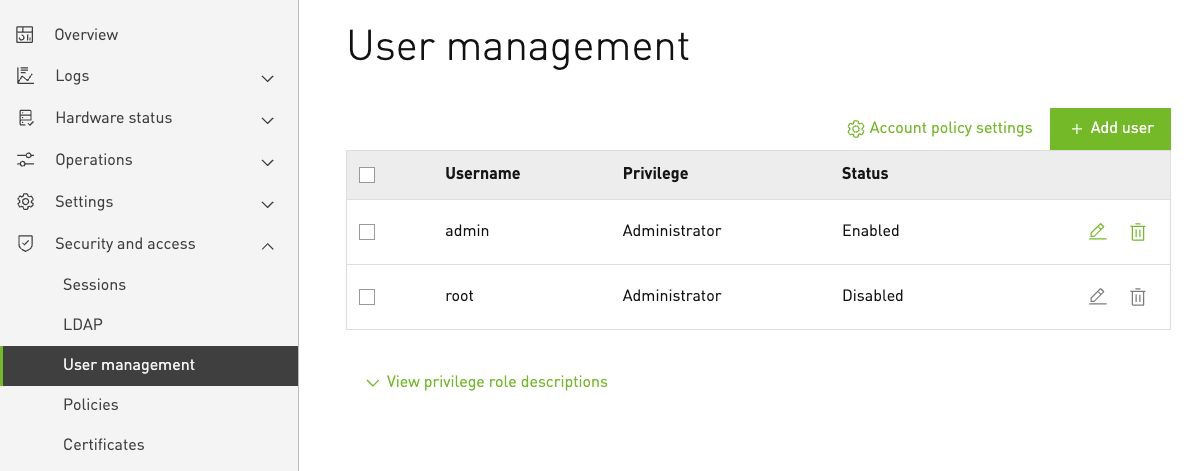
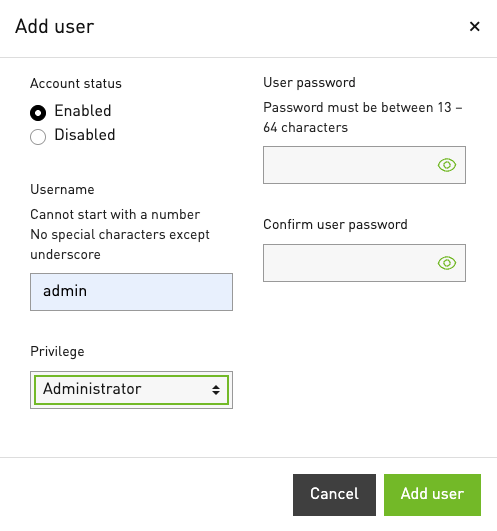
You can also add the admin account with Administrator privileges through this interface by selecting Add User.
Compute Tray BMC Default Username and Password Recovery#
If you are not able to reset the password for the default admin account, press and hold the UID button on the chassis for at least 30 seconds.
This resets the BMC admin account password to the default value admin.
Note
Some UID buttons may be capacitive and require a conductive touch to activate.
After resetting the password, log in to the BMC with the default password admin.
You will be prompted to change the password to one that meets the password complexity requirements.
An example Redfish command to update the password for the default “admin” account is:
curl -k -u "admin:admin" -X PATCH -H "Content-Type: application/json" -d '{"Attributes":{"Password": "<new-password>"}}' https://<bmc-ip-address>/redfish/v1/AccountService/Accounts/admin
Compute Tray BMC Factory Reset#
To perform a full factory reset of the BMC, use the following Redfish command:
curl -k -u "<username>:<password>" -X POST -H "Content-Type: application/json" -d '{"ResetToDefaultsType": "ResetAll"}' https://<bmc-ip-address>/redfish/v1/Managers/BMC_0/Actions/Manager.ResetToDefaults
If you have lost access credentials to the BMC, you can also perform a factory reset by pressing and holding the UID button on the chassis for at least 60 seconds.
This performs a factory reset of the BMC and resets the username and password to the default values admin and admin (see Compute Tray BMC Default Credentials).
Note that this also resets all other BMC settings to their factory defaults, removes all other user accounts, and erases logs.
Note
Some UID buttons may be capacitive and require a conductive touch to activate.