

Stable Diffusion v2#
Note
CUDA Graph optimization for Stable Diffusion v2 text-to-image generation, based on NVIDIA’s MLPerf Training implementation for Stable Diffusion v2 (v3.1, 2023/11 - v5.0, 2025/06). This example demonstrates full-iteration CUDA graph capture with PyTorch Lightning.
Overview#
Stable Diffusion v2 is a latent diffusion model for text-to-image generation, capable of generating high-quality images from text prompts. Released by StabilityAI in November 2022 as an improved version of the original Stable Diffusion, SDv2 uses a denoising diffusion process in the latent space of a pretrained autoencoder to generate images efficiently with better quality and composition.
Note
MLPerf Training v5.1 Update
In October 2025, MLPerf Training v5.1 replaced Stable Diffusion v2 with Flux.1, an 11.9B-parameter transformer-based text-to-image model. Flux.1 better reflects the current state of generative AI with modern DiT (Diffusion Transformer) architecture and significantly larger scale. This example documents the SDv2 implementation (MLPerf Training v3.1-v5.0, 2023/11-2025/06), which remains valuable for understanding CUDA graph techniques applicable to diffusion models.
The model consists of three major components:
VAE (Variational Autoencoder): Encodes images into a compressed latent representation (8× downscaling) and decodes latents back to images
Text Encoder (CLIP): Encodes text prompts into embeddings that condition the diffusion process
UNet: A U-Net architecture with attention mechanisms that predicts noise to be removed from latents at each denoising timestep
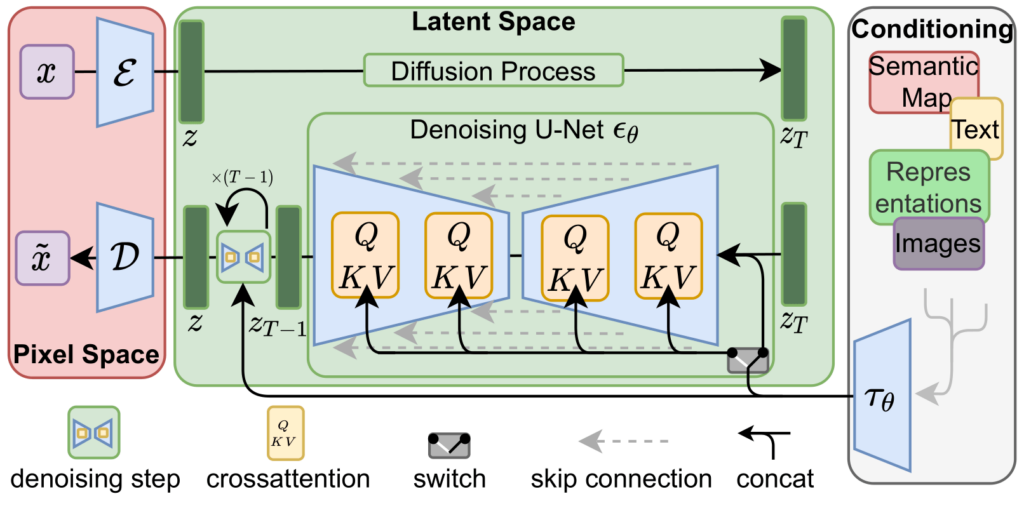
Figure: Stable Diffusion architecture showing VAE encoder/decoder, text encoder (CLIP), and UNet denoising process (Image source: Ommer Lab - LDM & Stable Diffusion)
During training, the model learns to denoise latent representations given text conditioning and random timesteps, enabling it to generate images from text at inference time.
MLPerf Training Stable Diffusion v2#
The NVIDIA MLPerf Training v5.0 Stable Diffusion v2 implementation has the following characteristics:
Model Architecture:
Model size: ~865M parameters for the UNet (860M trainable parameters)
UNet: 320 base channels, 4 resolution levels (1×, 2×, 4×, 4× channel multipliers), 2 residual blocks per level
Attention: 64 attention heads, linear transformers with cross-attention on text embeddings (context_dim=1024)
VAE: Frozen pretrained KL-autoencoder with 4-channel latent space (not used during training)
Text encoder: Frozen OpenCLIP ViT-H-14 (not used during training)
Training Setup:
Software stack: NVIDIA NeMo + PyTorch Lightning, using PyTorch’s native CUDA graph support
Training scope: Only the UNet is trained; VAE and CLIP text encoder are pre-frozen and used for offline preprocessing only
Fixed batch size: Training uses a constant micro-batch size per GPU (e.g., 64 on H100 GPUs)
Fixed sequence shapes: All inputs are fixed-size tensors (latent moments: bs×8×64×64, text embeddings: bs×77×1024)
Distributed training: Multi-GPU/multi-node training with APEX MegatronFusedAdam optimizer
Mixed precision: FP16 training with gradient scaling, channels-last memory format for convolutions
Dataset:
Training data: Filtered subset of LAION-400M dataset (~6.5M training samples per epoch)
Offline preprocessing: Images and captions are pre-encoded offline to eliminate VAE/CLIP encoding overhead during training
Why this works: VAE and CLIP encoders are frozen (no training), and no random data augmentation is applied to the dataset
Benefit: Running VAE/CLIP once on the entire dataset and saving outputs to disk significantly reduces UNet training time
Latent moments:
first_stage_key: images_momentswith shape bs×8×64×64Contains mean (first 4 channels) and std (last 4 channels) of VAE encoder output
Used for sampling latents during training (not raw latents themselves)
Text embeddings:
cond_stage_key: clip_encodedwith shape bs×77×1024Pre-encoded with OpenCLIP ViT-H-14 text encoder
Fixed sequence length of 77 tokens, embedding dimension 1024
Detection: NeMo automatically detects precaching based on key suffixes (
*_moments,*_encoded,*_clip_encoded)
Evaluation:
Quality metrics: FID score (target ≤ 90) and CLIP score (target ≥ 0.15) evaluated on 30K COCO-2014 validation images
Timing exclusion: Evaluation is expensive (generating 30K images for FID/CLIP scoring) and excluded from the MLPerf timing region
Checkpoint saving: Checkpoints are saved periodically at specified sample intervals (e.g., every 512K samples) during training
Evaluation timing: Evaluation runs after training completes, not during the timed training period
Integration Approach for CUDA Graph#
The Stable Diffusion v2 implementation uses CUDA graphs to accelerate the full training iteration. The main challenge is capturing the entire training step (forward, backward, optimizer) while maintaining compatibility with PyTorch Lightning’s training loop.
This section describes the integration infrastructure - the capture mechanisms, code organization, and tooling created to enable CUDA graphs, which simplifies adoption but is not strictly required for correctness.
Capture Scope (Full Iteration)#
Stable Diffusion v2 applies full-iteration graphing: capturing the complete training step from forward pass through optimizer update as a single CUDA graph. This aggressive approach maximizes performance gains by eliminating all kernel launch overhead within the training loop.
Training (Full Iteration):
Graphed components: UNet forward propagation, loss computation (MSE), backward pass (autograd), gradient scaling (FP16/AMP), gradient clipping, optimizer step (MegatronFusedAdam), and gradient zeroing
Non-graphed components: Data loading (with static buffers), LR scheduling (tensor-based, runs outside graph), MLPerf logging, checkpoint saving, and validation
Rationale: The UNet dominates computation time, and capturing the entire iteration eliminates all CPU-GPU synchronization gaps between forward, backward, and optimizer steps
No Evaluation Graphing: Evaluation is excluded from timing and runs asynchronously, so graph optimization is not applied to the inference/generation phase.
Scale: CUDA graphs were successfully deployed across a wide range of training scales:
H100: Single-node (8 GPUs) to multi-node (up to 2,048 GPUs across 256 nodes)
B200: Single-node (8 GPUs) to multi-node (up to 768 GPUs across 96 nodes)
GB200: Multi-node (up to 576 GPUs across 144 nodes, 4 GPUs per node)
No Dynamic Shapes: Stable Diffusion v2 training operates on fixed-size inputs (latents and text embeddings). A single graph handles all training iterations without runtime selection or padding logic.
CUDA Graph Callback#
The Challenge: With native PyTorch code, inserting CUDA graph capture into the training loop is straightforward:
# Native PyTorch - easy to insert graph capture
for data in dataloader:
    optimizer.zero_grad()
    loss = model(data)
    loss.backward()
    optimizer.step()
    # Can wrap the above in torch.cuda.graph() directly!
With PyTorch Lightning, the training loop is abstracted away:
# PyTorch Lightning - no direct loop access
class MyModel(pl.LightningModule):
    def training_step(self, batch, batch_idx):
        return loss  # Only define per-step logic

trainer = Trainer()
trainer.fit(model)  # Loop hidden inside Lightning
# How to capture the full iteration graph?
Users call trainer.fit(model) and lose direct access to the iteration logic. This makes full-iteration CUDA graph capture challenging, as the forward/backward/optimizer code is buried deep inside Lightning’s internal execution flow.
The Solution: Implement a CUDA graph callback using PyTorch Lightning’s callback API and monkey-patch the optimizer_step() method, which Lightning calls for each training iteration. This method internally triggers the optimizer_closure that contains forward propagation, backward propagation, and optimizer step.
Implementation (cuda_graph.py#L365-L367):
# Monkey-patch the optimizer_step method
pl_module.__orig_optimizer_step__ = pl_module.optimizer_step
optimizer_step = get_optimizer_step(self.state)
pl_module.optimizer_step = MethodType(optimizer_step, pl_module)
Note
About Monkey-Patching
Monkey-patching is generally not an ideal software engineering practice, as it modifies objects at runtime and can make code harder to maintain. However, for integrating CUDA graphs with PyTorch Lightning’s abstracted training loop, this approach provides the fastest and most practical solution. The alternative would require extensive modifications to PyTorch Lightning’s internal code or forking the framework, which would be significantly more complex and harder to maintain across Lightning versions.
The patched optimizer_step() wraps the original method with CUDA graph capture logic (cuda_graph.py#L177-L191):
with torch.cuda.graph(state.graph, stream=state.stream, capture_error_mode="global"):
    optimizer.zero_grad(set_to_none=True)
    self.__orig_optimizer_step__(epoch, batch_idx, optimizer, optimizer_closure=optimizer_closure)
    # This captures: forward pass, backward pass, optimizer step
Saving Training Step Outputs: PyTorch Lightning relies on return values from training_step() to track metrics and loss values. Since graph replay doesn’t actually call the function, the callback must save these outputs during capture. NeMo’s get_training_step() helper wraps the training step to save outputs to state.output (callbacks.py#L47, #L397-L398):
# Apply wrapper to save training step outputs
pl_module.__orig_training_step__ = pl_module.training_step
training_step = get_training_step(self.state)
pl_module.training_step = MethodType(training_step, pl_module)
After graph replay, the saved outputs are used to reconstruct PyTorch Lightning’s ClosureResult:
# In the patched optimizer_step (after graph replay)
if state.current_iteration >= state.capture_iteration >= 0:
    state.graph.replay()
    # Reconstruct PyTorch Lightning's result from saved outputs
    optimizer_closure._result = ClosureResult.from_training_step_output(state.output)
This ensures PyTorch Lightning can continue tracking training progress, computing epoch-level metrics, and managing callbacks correctly despite the graph replay bypassing the normal function call.
What Gets Captured: The optimizer_closure inside optimizer_step() contains forward propagation, loss computation, backward propagation, gradient scaling (FP16/AMP), gradient clipping, and the optimizer update.
What Stays Outside: The LR scheduler runs outside the graph in eager mode. This is acceptable because it consists of only a few small operations that write learning rates to static GPU tensors, adding negligible overhead.
Benefits: This callback-based approach provides a clean integration with PyTorch Lightning while enabling full-iteration graph capture. The model code remains unchanged - no need to reorganize the forward/backward logic - as the callback intercepts at the right point in Lightning’s execution flow. The reusable infrastructure ensures consistent handling across different models.
MLPerf SD’s Extensions to CUDA Graph Callback#
Tip
Optional for Most Users
If you’re not submitting to MLPerf benchmarks, you can skip this section. The extensions described here solve specific MLPerf timing compliance issues. For general CUDA graph adoption, the base NeMo callback (described above) is sufficient.
The MLPerf Stable Diffusion implementation extends NeMo’s base CUDAGraphCallback with several critical features required for MLPerf compliance and stable graph capture.
The Core Challenge: MLPerf timing rules require that timing starts when the model first touches real training data. However, CUDA graph capture requires warmup iterations to stabilize memory allocations, various JIT compilers, etc. This creates a problem: if we run warmup with real data, it counts toward MLPerf timing; if we skip warmup, graph capture may fail.
The Solution: Run warmup iterations with fake data before MLPerf timing starts, then reset all states before capturing the graph with real data.
Key Extensions (callbacks.py):
Warmup with Fake Data (callbacks.py#L77-L78):
The data loader yields fake inputs (pre-created random tensors) for warmup iterations
After warmup completes, switches to real training data
Ensures memory allocator and JIT compilers reach stable state before capture
Optimizer State Recovery (callbacks.py#L124-L167):
Problem: Optimizer accumulates momentum during warmup, polluting the initial state
Solution: Disable momentum (set
betas=[1.0, 1.0]) and bias correction during warmupBefore graph capture, restore original optimizer settings and reset step counter to 1
Ensures actual training starts with clean optimizer state as if warmup never happened
LR Scheduler State Reset (callbacks.py#L104-L111):
Sets learning rate to 0.0 during warmup (no effective parameter updates)
After warmup, resets LR to initial value and resets scheduler’s step counter
Ensures LR schedule starts fresh for actual training
PyTorch Lightning Global Step Reset (callbacks.py#L416-L426):
PyTorch Lightning’s
trainer.global_stepincrements during warmupAfter warmup, manually resets Lightning’s internal step counters to 0
Critical for correct MLPerf timing, checkpointing, and logging schedules
MLPerf Logging Integration (callbacks.py#L271-L297):
Logs hyperparameters (batch size, optimizer settings, LR schedule) at initialization
Logs
init_stopandrun_startevents after warmup completes (callbacks.py#L426)Logs training progress with
block_start/block_stopfor timing compliance
Extended State Management (callbacks.py#L202-L209):
Extends
CUDAGraphStatewithwarmup_iterationsandwarmup_inputsfieldsTracks both warmup and capture iterations independently
Provides fine-grained control over the warmup→capture→replay flow
Result: The model runs 15+ warmup iterations with fake data (outside MLPerf timing), captures the CUDA graph on iteration 15, then starts actual training from step 0 with clean optimizer/scheduler/Lightning states. This satisfies both CUDA graph stability requirements and MLPerf timing rules.
Essential Modifications for CUDA Graph Compatibility#
This section details the essential modifications required to make CUDA graphs work correctly with Stable Diffusion v2. Without these changes, graph capture would fail or produce incorrect results due to dynamic behavior, CPU-GPU synchronization, or PyTorch Lightning state management issues.
1. Eliminating CPU-GPU Synchronization#
Problem: CUDA graphs cannot capture operations that involve CPU-GPU synchronization (e.g., torch.cuda.synchronize(), .item(), .cpu(), tensor-to-Python conversions). Both PyTorch Lightning and the model code contain synchronization points that must be eliminated.
Why this matters: Any CPU-GPU synchronization inside the captured region will cause capture to fail or create a graph that deadlocks during replay. The entire training iteration (forward pass, backward pass, gradient scaling, gradient clipping, and optimizer step) must execute entirely on GPU without host interaction for CUDA graphs to work.
Solution: The following modifications ensure sync-free execution within the CUDA graph capture range:
Smart metrics logging: PyTorch Lightning’s default
__to_tensor__method moves all metrics toself.device(usually GPU). Later when these metrics are logged to console or progress bar, they must be moved back to CPU for display, causing synchronization. For example, CPU scalars likelr,global_step, andconsumed_samplesget converted to GPU tensors viatorch.tensor(value, device=self.device), then require GPU→CPU transfer for display. The “smart” fix keeps each metric on its natural device: CPU scalars stay on CPU (no transfer needed), GPU tensors likelossstay on GPU (only one unavoidable GPU→CPU transfer for display). This eliminates unnecessary CPU→GPU→CPU round-trips.
# Before: PyTorch Lightning v1.9.4 moves everything to self.device
def __to_tensor(self, value, name):
    value = value.clone().detach().to(self.device) if isinstance(value, Tensor) else torch.tensor(value, device=self.device)
    # Later logging requires GPU→CPU transfer for display, causing sync
    return value.squeeze()

# After: NeMo's "smart" version keeps tensors on their original device
def to_tensor(self, value, name):
    value = value.clone().detach() if isinstance(value, torch.Tensor) else torch.tensor(value)
    # No .to(device) - metrics stay where they are (loss on GPU, lr/step on CPU)
    return value.squeeze()

# Monkey-patch PyTorch Lightning
LightningModule._LightningModule__to_tensor = to_tensor
Note
PyTorch Lightning v2.0+ Has Native Support
These synchronization issues were fixed in PyTorch Lightning v2.0+ through PR #17334 and PR #21233. If using the lastest Lightning, this monkey-patch may not be necessary. However, the MLPerf implementation uses Lightning v1.9.4, which requires the workaround.
Progress bar disabled: Displaying metrics on the progress bar requires moving tensors to CPU for formatting, which causes synchronization. The implementation disables progress bar display when CUDA graphs are enabled.
show_metric = (self.cfg.get("capture_cudagraph_iters", -1) < 0)
self.log('lr', lr, prog_bar=show_metric, ...)  # prog_bar=False when graphing
Preemption callback disabled: NeMo’s preemption callback periodically checks system signals and file existence to handle job preemption, which involves file I/O and can cause synchronization. This callback is disabled during CUDA graph training.
exp_manager:
  create_preemption_callback: False  # Disable to avoid sync checks
Tensor creation on target device: Creating tensors on CPU then transferring with
.to(device)causes implicit synchronization. Instead, specify the target device directly in the tensor creation call to avoid any CPU-GPU transfer.
# Before: Creates on CPU then transfers (causes sync)
freqs = torch.exp(...).to(device=timesteps.device)
x = torch.randn(self.mean.shape).to(device=self.parameters.device)

# After: Create directly on target device
freqs = torch.exp(-math.log(max_period) / half * idx)  # idx already on device
x = self.mean + self.std * torch.randn(self.mean.shape, device=self.parameters.device)
The CLIP text encoder had similar issues where attention masks were created on CPU then moved to GPU. Additionally, wrapping scalar values with torch.tensor() causes synchronization.
# Before: CLIP builds mask on CPU then transfers to device later
def _build_causal_attention_mask(self, bsz, seq_len, dtype):
    # lazily create causal attention mask, with full attention between the vision tokens
    # pytorch uses additive attention mask; fill with -inf
    mask = torch.empty(bsz, seq_len, seq_len, dtype=dtype)  # Created on CPU
    mask.fill_(torch.tensor(torch.finfo(dtype).min))  # torch.tensor() wrapper causes sync
    mask.triu_(1)  # zero out the lower diagonal
    mask = mask.unsqueeze(1)  # expand mask
    return mask

# In forward() - mask moved to device after creation:
causal_attention_mask = self._build_causal_attention_mask(bsz, seq_len, hidden_states.dtype).to(
    hidden_states.device  # .to(device) causes sync
)

# After: Pass device parameter, create directly on target device
def _build_causal_attention_mask(self, bsz, seq_len, dtype, device=None):
    # lazily create causal attention mask, with full attention between the vision tokens
    # pytorch uses additive attention mask; fill with -inf
    mask = torch.empty(bsz, seq_len, seq_len, dtype=dtype, device=device)  # Created on target device
    mask.fill_(torch.finfo(dtype).min)  # Direct scalar fill, no wrapper
    mask.triu_(1)  # zero out the lower diagonal
    mask = mask.unsqueeze(1)  # expand mask
    return mask

# In forward() - mask created on target device directly:
causal_attention_mask = self._build_causal_attention_mask(
    bsz, seq_len, hidden_states.dtype, device=hidden_states.device
)
Note
HuggingFace Transformers CLIP Fix
Similar synchronization issues in CLIP’s text model were fixed in HuggingFace Transformers through PR #22711. This removes .to(device) calls and torch.tensor() wrappers in _build_causal_attention_mask. This is relevant for MLPerf SD’s first submission where CLIP encoding was included in the training iteration.
Non-blocking transfers: When CPU-to-GPU transfers are unavoidable (e.g., tokenized input IDs), using
non_blocking=Trueallows the transfer to happen asynchronously without blocking the CPU thread. This prevents synchronization points in the data pipeline.
tokens = batch_encoding["input_ids"].to(self.device, non_blocking=True)
self.logvar = self.logvar.cuda(non_blocking=True)
Gradient clipping without sync: NeMo’s
clip_grad_norm_fp32()originally computedtotal_normas a Python float and used.item()to convert GPU tensors to CPU scalars for comparison. This caused synchronization. The fix keepstotal_normas a GPU tensor throughout the computation (norm calculation, all_reduce, scaling) and uses tensor operations for clipping, avoiding any CPU-GPU transfers.For better efficiency, the clipping coefficient application was later fused with the Adam kernel in
MegatronFusedAdam. The gradient norm is still calculated separately, but the fused Adam kernel applies gradient unscaling, clipping coefficient, and parameter/state updates in a single pass.
# Before: total_norm as Python float, requires .item() calls
def clip_grad_norm_fp32(parameters, max_norm, norm_type=2):
    total_norm = 0.0  # Python float

    # Calculate norm
    total_norm_cuda = torch.cuda.FloatTensor([...])
    all_reduce(total_norm_cuda, ...)
    total_norm = total_norm_cuda[0].item()  # GPU→CPU sync!

    # Scale gradients
    clip_coeff = max_norm / (total_norm + 1.0e-6)  # CPU scalar
    if clip_coeff < 1.0:  # CPU comparison
        multi_tensor_applier(amp_C.multi_tensor_scale, ..., clip_coeff)  # Pass scalar

# After: total_norm stays on GPU
def clip_grad_norm_fp32(parameters, max_norm, norm_type=2):
    # Calculate norm - stays on GPU
    total_norm = grad_norm ** norm_type  # GPU tensor
    all_reduce(total_norm, ...)  # Direct all_reduce, no .item()
    total_norm = total_norm ** (1.0 / norm_type)  # Still GPU tensor

    # Compute clipping coefficient - all GPU operations
    clip_coeff = max_norm / (total_norm + 1.0e-6)  # GPU tensor
    clip_coeff_clamped = torch.clamp(clip_coeff, max=1.0)  # GPU clamp instead of if
    # Can apply separately or fuse with optimizer

# Fused version in MegatronFusedAdam.step():
# 1. Calculate gradient norm (separate, stays on GPU)
total_norm = (fp32_grad_norm ** 2 + fp16_grad_norm ** 2).sqrt()
all_reduce(total_norm, ...)

# 2. Compute clipping coefficient (separate)
clip_coeff_clamped = torch.clamp(max_norm / (total_norm + 1e-6), max=1.0)

# 3. Fuse clipping coefficient with unscaling in Adam kernel
combined_scale = clip_coeff_clamped * inv_scale  # Single scale factor
multi_tensor_applier(fused_adam_kernel, ..., combined_scale, ...)
# Kernel internally: grad = grad * combined_scale, then Adam update
Note
Key Changes
Removed all
.item()calls that converted GPU tensors to CPU scalarsReplaced
if clip_coeff < 1.0CPU comparison withtorch.clamp(clip_coeff, max=1.0)GPU operationUsed
torch._foreach_mul_()for efficient batch gradient scaling instead of scalar multiplicationtotal_normremains a GPU tensor throughout, returned for logging without causing sync
Result: With these modifications, almost all critical CPU-GPU synchronization points are eliminated from the graphed region.
2. Moving Incompatible Operations Outside Graph#
Problem: Some operations like logging and checkpointing involve CPU-GPU synchronization or file I/O that cannot be captured in CUDA graphs.
Why this matters: These operations would break graph capture if included. Deferring them to run outside the graph allows capturing the compute-intensive parts (forward/backward/optimizer) while still supporting necessary monitoring and I/O.
Solution: Cache required tensors during the training step, then use a non_cuda_graph_capturable() method to defer incompatible operations until after graph replay (ldm/ddpm.py#L1865-L1894):
def training_step(self, batch):
    # ... forward pass, loss computation (inside graph) ...

    # Cache tensors needed for logging (inside graph)
    self.loss_mean = loss_mean_reduced  # Cache loss for later logging
    self.loss_dict = loss_dict          # Cache loss components

    # Call logging outside graph when not using CUDA graphs
    if self.cfg.get("capture_cudagraph_iters", -1) < 0:
        self.non_cuda_graph_capturable()

    return loss_mean

def non_cuda_graph_capturable(self):
    """Operations that cannot be captured in CUDA graph."""
    show_metric = self.cfg.get("show_prog_bar_metric", True)

    # All logging happens here, using cached tensors
    self.log('reduced_train_loss', self.loss_mean, prog_bar=show_metric, ...)
    self.log_dict(self.loss_dict, prog_bar=show_metric, ...)
    self.log('lr', lr, prog_bar=show_metric, ...)
    self.log('global_step', self.trainer.global_step + 1, ...)
    self.log('timestamp', torch.tensor(int(time.time() * 1e3)), ...)
Callback integration (callbacks.py#L194-L196):
# After graph replay, call non-capturable operations
if state.current_iteration >= state.capture_iteration >= 0:
    state.graph.replay()
    optimizer_closure._result = ClosureResult.from_training_step_output(state.output)

# Invoke logging and other incompatible operations outside graph
if hasattr(self, "non_cuda_graph_capturable"):
    self.non_cuda_graph_capturable()
Result: With the changes from subsections 1-2 (eliminating CPU-GPU synchronization and moving incompatible operations outside the graph), logging and I/O operations no longer interfere with graph capture. However, two critical synchronization points remain: the gradient scaler’s dynamic control flow and the conditional optimizer step based on gradient validity.
3. Capturing Conditional Gradient Scaler Step#
Problem: NeMo’s customized GradScaler includes hysteresis support (tolerating multiple Inf/NaN occurrences before reducing the scale factor) and model-parallel inf checking. The original implementation used Python dynamic control flow for hysteresis logic, preventing CUDA graph capture:
# Before: Python dynamic control flow with hysteresis tracker as Python int
def update(self, new_scale=None):
    # Collect and aggregate found_inf from all optimizer states
    found_infs = [found_inf for state in self._per_optimizer_states.values()
                  for found_inf in state["found_inf_per_device"].values()]
    found_inf_combined = found_infs[0]
    all_reduce(found_inf_combined, ...)  # Sync across model parallel
    for found_inf in found_infs[1:]:
        all_reduce(found_inf, ...)
        found_inf_combined += found_inf

    # Dynamic control flow based on found_inf value (cannot be captured)
    if found_inf_combined > 0:  # GPU tensor > Python scalar comparison causes sync!
        self._hysteresis_tracker -= 1  # Python int arithmetic
        if self._hysteresis_tracker <= 0:  # Nested dynamic control flow
            torch._amp_update_scale_(...)
        else:
            _growth_tracker.fill_(0.0)
    else:
        torch._amp_update_scale_(...)
        self._hysteresis_tracker = self.hysteresis  # Python assignment
Why this matters: The comparison if found_inf_combined > 0 requires moving the GPU tensor found_inf_combined to CPU for the Python if-statement, causing synchronization. Additionally, the hysteresis tracker was a Python integer, so any read or update (-= 1, <= 0) requires CPU operations and cannot be captured in a CUDA graph. The entire update logic uses Python if-else statements that create dynamic control flow based on GPU tensor values. Since gradient scaling is part of the optimizer step, which must be inside the CUDA graph for full-iteration capture, eliminating this dynamic control flow and moving the hysteresis tracker to GPU is critical for graph compatibility.
Note that _scale and _growth_tracker are already GPU tensors in PyTorch’s native GradScaler, so they don’t need conversion. The key change is moving self._hysteresis_tracker from Python int to GPU tensor to match the APEX kernel signature.
Solution: Move the hysteresis tracker to a GPU tensor and use a custom CUDA kernel (update_scale_hysteresis from APEX PR #1733) that performs all gradient scaler updates entirely on GPU.
Key Changes:
Remove redundant sync in gradient scaler: The original implementation calculated
found_infseparately in both_maybe_opt_step()andupdate(), causing redundant synchronization and all_reduce operations. The optimization calculatesfound_infonce in_maybe_opt_step()and caches both CPU and GPU versions for reuse (nlp_overrides.py#L1544-L1561):def _maybe_opt_step(self, optimizer, optimizer_state, *args, **kwargs): # Collect found_inf from all devices (no .item() calls during collection) found_infs = tuple(optimizer_state["found_inf_per_device"].values()) found_inf = torch.stack(found_infs).sum(dim=0, keepdim=True) # Single all_reduce across model parallel group torch.distributed.all_reduce( found_inf, op=torch.distributed.ReduceOp.MAX, group=parallel_state.get_model_parallel_group() ) # Cache both versions - one sync here for conditional optimizer step self._found_infs_cpu = found_inf.item() # CPU version for if-check self._found_infs_cuda = found_inf # GPU version for scaler update if self._found_infs_cpu == 0: retval = optimizer.step(*args, **kwargs) ...
In
update(), the cached GPU tensor is reused directly, avoiding redundant all_reduce and.item()calls:def update(self, new_scale=None): # ... (no need to recalculate found_inf_combined) ... # Reuse cached GPU tensor directly in kernel amp_C.update_scale_hysteresis(..., self._found_infs_cuda, ...)
Move hysteresis tracker to GPU tensor (nlp_overrides.py#L1531-L1536):
The hysteresis tracker was originally a Python integer. While scalars can be passed to CUDA kernels, they become constants when captured in a CUDA graph and cannot be updated across replays. Moving it to a GPU tensor allows the kernel to read and update the value across multiple graph replays.
def _lazy_init_scale_growth_tracker(self, dev):
    super()._lazy_init_scale_growth_tracker(dev)
    if HAVE_AMP_C:
        self._hysteresis_tracker = torch.tensor([self.hysteresis], dtype=torch.int32, device=dev)
    else:
        self._hysteresis_tracker = self.hysteresis  # Fallback to Python int
Use custom CUDA kernel for scale update (nlp_overrides.py#L1612-L1622):
def update(self, new_scale=None):
    if HAVE_AMP_C:
        # Custom CUDA kernel - all operations on GPU
        amp_C.update_scale_hysteresis(
            _scale,
            _growth_tracker,
            self._hysteresis_tracker,  # GPU tensor
            self._found_infs_cuda,     # Reuse cached GPU tensor
            self._growth_factor,
            self._backoff_factor,
            self._growth_interval,
            self.hysteresis,
        )
    else:
        # Fallback: Python implementation with hysteresis as int
        if found_inf_combined > 0:
            self._hysteresis_tracker -= 1
            if self._hysteresis_tracker <= 0:
                torch._amp_update_scale_(...)
            else:
                _growth_tracker.fill_(0.0)
        else:
            torch._amp_update_scale_(...)
            self._hysteresis_tracker = self.hysteresis
CUDA kernel implementation (APEX PR #1733, update_scale_hysteresis.cu):
The kernel consolidates all scaler state updates into a single GPU operation, handling hysteresis logic, scale factor adjustments, and growth tracking without any CPU involvement:
__global__ void update_scale_hysteresis_cuda_kernel(
    float* current_scale,
    int* growth_tracker,
    int* hysteresis_tracker,
    const float* found_inf,
    double growth_factor,
    double backoff_factor,
    int growth_interval,
    int hysteresis
) {
    if (*found_inf > 0) {
        *hysteresis_tracker -= 1;
        if (*hysteresis_tracker > 0) {
            *growth_tracker = 0;
            return;
        }
    }

    if (*found_inf) {
        *current_scale = (*current_scale) * backoff_factor;
        *growth_tracker = 0;
    } else {
        auto successful = (*growth_tracker) + 1;
        if (successful == growth_interval) {
            auto new_scale = (*current_scale) * growth_factor;
            if (isfinite(new_scale)) {
                *current_scale = new_scale;
            }
            *growth_tracker = 0;
        } else {
            *growth_tracker = successful;
        }
    }

    if (*found_inf <= 0) {
        *hysteresis_tracker = hysteresis;
    }
}
Result: The gradient scaling workflow executes entirely on GPU. All scaler state (scale, growth tracker, hysteresis counter) is maintained as GPU tensors, and the custom CUDA kernel handles all updates in a single operation without CPU involvement. This eliminates the Python control flow bottleneck and enables CUDA graph capture of the entire gradient scaling process.
4. Capturing Conditional Optimizer Step#
Problem: After gradient clipping, the optimizer step is conditionally executed based on whether gradients are finite (no Inf/NaN detected by the gradient scaler). This creates dynamic control flow:
# Traditional approach - cannot be captured
found_inf = grad_scaler.check_for_inf()
if found_inf.item() == 0:  # CPU check - causes sync!
    optimizer.step()
    step_count += 1
else:
    # Skip step, don't increment counter
    pass
The conditional check requires .item() to move found_inf from GPU to CPU, causing synchronization that breaks CUDA graph capture.
Why this matters: This is the last remaining synchronization point in the training iteration. Without eliminating this sync, full-iteration graph capture would fail. The key challenge is that the optimizer must step conditionally—only updating parameters when gradients are finite—which traditionally requires a CPU-side branch to decide whether to call optimizer.step() or not.
Solution: Always call optimizer.step() (so the kernel launch is captured in the graph), but pass a “noop flag” that tells the CUDA kernel to return immediately without doing any work when inf/NaN is detected. This eliminates the CPU-side branch while achieving the same conditional behavior—the kernel launches every time but only performs updates when gradients are valid. APEX’s DistributedFusedAdam was extended to support capturable mode (APEX PR #1832):
Key Changes:
Dummy overflow buffer as noop flag: The gradient scaler checks for Inf/NaN in gradients and stores the result in
found_inf(0 if finite, 1 if inf). This flag is copied to_dummy_overflow_bufand passed to the kernel:# Gradient scaler checks for inf/nan (already on GPU) found_inf = grad_scaler_state["found_inf_per_device"][self.device] # In optimizer.step() when capturable=True if self.capturable: self._dummy_overflow_buf.copy_(found_inf) # Copy to dummy buffer # Select capturable kernel variant adam_func = distributed_adam_cuda.multi_tensor_fused_adam_capturable \ if self.capturable else distributed_adam_cuda.multi_tensor_fused_adam
Early return in kernel: The CUDA kernel checks the noop flag at the start and returns immediately if set, skipping all work:
// At the start of the kernel
if (*noop_gmem == 1) return;  // Skip all work when inf found

// All parameter updates only happen when noop_gmem == 0
p[ii] -= lr * update;  // Normal update when gradients are finite
Move lr and step to GPU tensors: The capturable kernel moves
lrandstepfrom CPU scalars to GPU tensors. This is required because CPU scalars would be captured as constants in the graph and couldn’t be updated across iterations, while GPU tensors can be modified between graph replays:// Before: CPU scalar parameters (captured as constants) void multi_tensor_fused_adam_cuda( ..., float lr, ..., int step, ...); // After: GPU tensor parameters (can be updated across replays) void multi_tensor_fused_adam_capturable_cuda( ..., at::Tensor lr, ..., at::Tensor step, ...);
The kernel implementation is updated to read from these tensors and perform all computations on GPU.
Conditional step counter increment: The step counter behavior changes to support capturable mode:
# Before: optimizer.step() called conditionally based on CPU check
# - When called, step counter (CPU scalar) always increments by 1
if found_inf.item() == 0:  # CPU check
    optimizer.step()  # step += 1 (unconditional inside)

# After: optimizer.step() always called, step counter increments conditionally on GPU
optimizer.step()  # Always called (graph-compatible)
# Inside: step += (noop_flag != 1).to(torch.int)
# Result: step += 0 when inf found, step += 1 when finite
Result: The entire conditional optimizer step—parameter updates, momentum updates, and step counter increment—executes on GPU without any CPU involvement. When found_inf=1, the kernel launches but returns immediately without doing any work. When found_inf=0, it performs normal parameter updates. This simple early-return pattern is CUDA graph compatible because the kernel call itself is always present in the graph, but the actual computation is conditionally skipped at the GPU level.
With all the changes from subsections 1-4 (eliminating sync in logging/metrics, moving incompatible operations outside the graph, capturing conditional gradient scaler step, and capturing conditional optimizer step), the model is now completely sync-free. The CPU can queue work up to 10 iterations ahead of GPU execution without blocking, maximizing GPU utilization and minimizing idle time.
5. NCCL, AMP, and Warmup Configuration#
Problem: CUDA graphs require specific NCCL, AMP, and warmup settings to avoid incompatibilities.
Why each setting matters:
Warmup iterations (11+): DDP performs internal logging and state setup around iteration 10. Warmup also stabilizes CUDA memory allocator, cuDNN auto-tuner, and optimizer state. See DDP Setup for details.
NCCL synchronous mode: NCCL’s async error handling uses a watchdog thread incompatible with graph capture. See DDP Setup for details.
AMP cache disabled: Cached tensors created before capture become graph inputs that are invalidated when autocast exits. See AMP Integration for full explanation.
Solution: Configure prerequisites in the callback (cuda_graph.py):
class CUDAGraphCallback(Callback):
    def __init__(self, capture_iteration=-1):
        # Require warmup iterations before capture
        if 0 <= capture_iteration <= 11:
            raise Exception("Must run at least 11 warmup iterations before capture.")

        # Disable async NCCL error handling
        os.environ["TORCH_NCCL_ASYNC_ERROR_HANDLING"] = "0"

        # Disable AMP autocast cache
        torch.autocast.__orig_init__ = torch.autocast.__init__
        torch.autocast.__init__ = lambda self, *args, **kwargs: (
            kwargs.update({"cache_enabled": False}),
            self.__orig_init__(*args, **kwargs)
        )[1]
6. Stream Management for CUDA Graphs#
Problem: CUDA graphs cannot capture operations with dependencies on blocking streams, including the default stream.
Why this matters: The default CUDA stream is a blocking stream that synchronizes with all other streams. If DDP or training operations execute on the default stream, they create implicit synchronization points that prevent proper graph capture. All graphed operations must execute on a dedicated non-blocking stream to enable clean capture.
Solution: Initialize DDP on a side stream (implemented in PyTorch Lightning PR #17334) and run training on a dedicated stream (cuda_graph.py, main.py#L309):
# 1. Initialize DDP on side stream (in callback)
class CUDAGraphCallback(Callback):
    def setup(self, trainer, pl_module, stage):
        # Construct DDP on side stream to avoid default stream
        with torch.cuda.stream(torch.cuda.Stream()):
            # DDP initialization happens here in Lightning
            pass

# 2. Run entire training on dedicated stream
with torch.cuda.stream(torch.cuda.Stream()):
    trainer.fit(model)
Why these changes are necessary:
DDP on side stream: Ensures DDP gradient operations execute on non-blocking streams compatible with graph capture. See DDP Setup for details.
Training on dedicated stream: Ensures the entire training loop executes on a non-blocking stream, avoiding implicit synchronization with the default stream and isolating graphed operations from non-graphed operations (logging, checkpointing).
7. Static Buffer Data Loader#
Problem: For full-iteration CUDA graph capture with PyTorch Lightning, tensors from the dataloader must be at static GPU addresses, but PyTorch Lightning’s default behavior creates new tensors each iteration.
Why this matters:
Partial CUDA graph capture: We typically don’t need to modify the dataloader. Lightning handles batches internally, and we can copy dataloader outputs to static buffers within your model’s
training_step().Full-iteration graph capture: When capturing the entire training iteration (including
training_step()), the batch tensors become graph inputs. PyTorch Lightning has twotraining_step()signatures:training_step(self, batch)- PyTorch Lightning loads batch from dataloader and passes it as argument (standard signature)training_step(self, dataloader_iter)- User callsnext(dataloader_iter)to load data (used for pipeline parallelism in Megatron-LM/NeMo)
For full-iteration graphs, signature #2 is incompatible because
next(dataloader_iter)would be called inside the graph capture region, may invoke CPU-side dataloader work (data loading, preprocessing, batching) that cannot be captured by CUDA graphs. The solution is to use signature #1 with a wrapped dataloader that generates static tensors.
Solution: Wrap the dataloader with StaticBufferLoader and use training_step(self, batch) signature (callbacks.py#L66-L94, ddpm.py#L1805-L1815):
class StaticBufferLoader:
    """Wraps dataloader to produce tensors at fixed GPU addresses"""
    def __init__(self, loader, state):
        self.loader = loader
        self.stream = torch.cuda.Stream()
        self.static = None  # Allocated on first use

    def __iter__(self):
        for inputs in self.loader:
        if self.static is None:
                # Allocate static buffers matching input structure
            self.static = struct_copy_one(inputs)

            # Copy new data into existing buffers (in-place)
        struct_copy_two(self.static, inputs)
            yield self.static  # Always same addresses

# Model uses standard signature (not dataloader_iter)
class MegatronLatentDiffusion(MegatronBaseModel):
    def training_step(self, batch):  # Batch from StaticBufferLoader
        dataloader_iter = iter([batch])  # Wrap for compatibility
        loss_mean, loss_dict = self.fwd_bwd_step(dataloader_iter, False)
        return loss_mean
8. CLIP Tokenizer and CPU Operations#
Problem: During early CUDA graph integration, encountered segmentation faults at large scale that were difficult to reproduce consistently.
Context: In early MLPerf Stable Diffusion submissions, the CLIP text encoder (including tokenizer) was part of the model, so tokenization happened during training_step() within the CUDA graph capture range.
Root cause: The CLIP tokenizer (FrozenCLIPEmbedder.forward) runs entirely on CPU. When tokenization was invoked within the CUDA graph capture range, the following sequence occurred:
During capture iteration:
Tokenizer runs on CPU, allocating CPU tensor for token IDs at address
cpu_ptr(e.g.,0x7ffe1234)tokens.to('cuda')triggers H2D copy:cudaMemcpyAsync(gpu_dst, cpu_ptr, size, cudaMemcpyHostToDevice)CUDA graph captures the H2D copy operation with source pointer
cpu_ptrAfter
training_step()completes, CPU token tensor is freed,cpu_ptrbecomes invalid
During replay iterations:
Tokenizer does NOT run (only captured GPU operations are replayed)
Graph replay executes the captured
cudaMemcpyAsync(gpu_dst, cpu_ptr, ...)operationAttempts to read from
cpu_ptrwhich no longer exists (freed during capture iteration)Results in:
Segmentation fault (most common): reading from freed/unmapped CPU memory
Silent corruption: if
cpu_ptrwas reused for other data, copies wrong valuesStale data: if memory wasn’t freed but not updated, always same tokens
Why segfaults happen: The CUDA graph records the source CPU pointer in the H2D copy operation. During replay, it tries to copy from that CPU address, but the tokenizer doesn’t run to allocate/populate that memory. The CPU tensor was freed after capture, so the pointer is invalid, causing segmentation faults when CUDA runtime attempts to read from it.
Solution: Move tokenization to dataloader’s collate_fn so it runs in dataloader workers (outside graph capture range), then rely on StaticBufferLoader to copy tokens to static GPU addresses (NeMo implementation):
# ❌ Wrong - tokenizer runs in training loop (inside graph capture)
class MegatronLatentDiffusion(MegatronBaseModel):
    def training_step(self, batch):
        # batch contains raw text strings
        text_embeddings = self.cond_stage_model(batch['text'])  # Tokenizer runs here during capture!
        loss = self.forward(batch['image'], text_embeddings)
        return loss

# ✅ Correct - tokenization in collate_fn (runs in dataloader worker, before graph)
def get_collate_fn(first_stage_key="images_moments", cond_stage_key="captions"):
    def collate_fn_with_tokenize(batch):
        images_moments = [s[first_stage_key] for s in batch]
        cond_inputs = [s[cond_stage_key] for s in batch]

        if cond_stage_key == "captions":
            # Tokenize on CPU in worker process (outside capture range)
            tokens = open_clip.tokenize(cond_inputs)
        else:
            tokens = torch.stack(cond_inputs)

        return {
            first_stage_key: torch.cat(images_moments),
            cond_stage_key: tokens,  # Pre-tokenized, ready for GPU transfer
        }
    return collate_fn_with_tokenize

# Setup dataloader (in setup_training_data)
if self.cfg.cond_stage_key.endswith("clip_encoded"):
    collate_fn = get_collate_fn(
        first_stage_key=self.cfg.first_stage_key,
        cond_stage_key=self.cfg.cond_stage_key,
    )
else:
    collate_fn = None

self._train_dl = torch.utils.data.DataLoader(
    self._train_ds,
    batch_size=self._micro_batch_size,
    num_workers=cfg.num_workers,
    collate_fn=collate_fn,  # Runs in worker, before main training loop
)
Key insight: Two distinct requirements for CPU workloads to work correctly with CUDA graphs:
Necessary CPU operations must be moved outside CUDA graph: Tokenization (or any CPU preprocessing that needs to run every iteration with new input data) must be outside the CUDA graph capture range. If captured inside the graph, it only runs once during capture.
Graph inputs must remain valid: H2D copy operations (
cudaMemcpyAsync) captured in the graph record CPU source pointers as graph inputs. These CPU pointers must remain valid for the entire CUDA graph lifecycle. Temporary CPU tensors (allocated/freed each iteration) violate this constraint.
Solution approach:
Move tokenization to dataloader’s
collate_fn(satisfies requirement #1: runs every iteration outside graph)Use
StaticBufferLoaderto copy tokens to static GPU addresses (satisfies requirement #2: eliminates CPU pointers as graph inputs, uses stable GPU addresses instead)
9. Learning Rate Scheduler with Static Buffers#
Problem: Standard LR schedulers return new Python floats each step, which would become constants if captured in a CUDA graph.
Why this matters: When capturing a full training iteration, multiple operations reference the learning rate (optimizer step, logging, etc.). If LR is a Python float, it becomes a constant in the captured graph. During graph replay, the LR would remain fixed at its capture-time value regardless of scheduler updates, breaking any LR schedule. Using static GPU tensors allows the LR to be updated between replays while keeping the tensor address constant.
Solution: Write LR values to static GPU tensors that persist across replays (callbacks.py#L96-L117):
def get_lr_func(state):
    def get_lr(lr_scheduler):
        if not hasattr(lr_scheduler, "static_lrs"):
            lrs = lr_scheduler.__orig_get_lr__()
            lr_scheduler.static_lrs = lrs  # Create static tensor buffers

        # Calculate new learning rate
        lrs = lr_scheduler.__orig_get_lr__()

        # Copy to static tensors (in-place update)
        for i in range(len(lr_scheduler.static_lrs)):
            lr_scheduler.static_lrs[i].copy_(lrs if isinstance(lrs, float) else lrs[i])

        return lr_scheduler.static_lrs  # Return static tensor references

    return get_lr
Integration (callbacks.py#L381-L387):
# Override scheduler's get_lr() method
for config in trainer.lr_scheduler_configs:
    config.scheduler.__orig_get_lr__ = config.scheduler.get_lr
    get_lr = get_lr_func(self.state)
    config.scheduler.get_lr = MethodType(get_lr, config.scheduler)
Note: The LR scheduler step itself runs outside the graph in our implementation(low overhead), but the learning rate values it produces are written to static tensors that the optimizer references during replay.
10. Random Generator Configuration for CUDA Graphs#
Problem: Stable Diffusion generates noise maps during the diffusion process, requiring random number generation. Custom random generators maintain separate RNG state that must be properly handled for CUDA graph compatibility.
Why this matters:
During graph capture, random operations need to produce different values on each replay (e.g., different noise maps each iteration). PyTorch handles this by storing RNG state (seed and offset) in GPU tensors and updating them between replays. However, custom torch.Generator instances require explicit registration with CUDAGraph.register_generator_state() before capture. Without registration, the RNG state is captured as constants, causing identical random sequences on every replay.
For details on how CUDA RNG works with graphs, see:
RNG State Management - Overview of registration requirements
Random Number Generator State - Detailed internals
Solution: Either register custom generators or use the global generator (automatically registered by PyTorch) (ldm/ddpm.py#L162-L170):
# Option 1: Use global generator (simplest - auto-registered)
cuda_graph_enabled = cfg.get("capture_cudagraph_iters", -1) >= 0
if not cuda_graph_enabled:
    logging.info("Use custom random generator")
    self.rng = torch.Generator(device=torch.cuda.current_device())
else:
    logging.info("Use global generator (auto-registered with CUDA graphs)")
    self.rng = None  # Use default generator

# Option 2: Register custom generator (if needed)
custom_gen = torch.Generator(device='cuda')
g = torch.cuda.CUDAGraph()
g.register_generator_state(custom_gen)  # Required for custom generators
with torch.cuda.graph(g):
    noise = torch.randn(shape, generator=custom_gen)
11. Multi-Threading Considerations#
Problem: At large scale (e.g., 512 GPUs), CUDA graph capture sometimes fails randomly with cudaErrorStreamCaptureInvalidated.
Root cause: PyTorch’s pin memory thread in the dataloader periodically checks if specific tensors have ended their lifecycle by calling cudaEventQuery() (source). This happens concurrently while the main thread is capturing a CUDA graph. The default capture mode (cudaStreamCaptureModeGlobal) forbids operations like cudaEventQuery() on any thread when another thread is actively capturing, causing the capture to fail. The failure is random because it depends on the timing of when the pin memory thread happens to call cudaEventQuery() relative to the main thread’s capture window—if the call occurs during capture, it fails; otherwise, capture succeeds.
Solution: Two approaches to avoid multi-threading conflicts:
Delay main thread until other threads are ready (used in this implementation):
class CUDAGraphCallback(Callback):
    def on_train_batch_end(self, trainer, pl_module, outputs, batch, batch_idx):
        if batch_idx == self.capture_iteration:
            torch.cuda.synchronize()
            time.sleep(1)  # Let pin memory threads complete pending work

            with torch.cuda.graph(self.graph, stream=self.stream):
                # Capture happens here
                pass
The 1-second sleep ensures pin memory threads finish any pending
cudaEventQuery()calls before graph capture starts, preventing interference.Use thread-local capture mode:
with torch.cuda.graph(g, capture_error_mode="thread_local"):
    # Capture is isolated to this thread
    pass
Thread-local mode allows independent per-thread captures, so pin memory threads can continue their work without invalidating the main thread’s graph capture.
For more details on capture modes and their trade-offs, see Multi-Threading and Capture Modes.
12. Process Hang on Exit#
Problem: When using CUDA graphs with NCCL collectives, processes may hang indefinitely during program exit, even without calling destroy_process_group().
Root cause: The hang is caused by a destruction order issue between CUDA graphs and NCCL communicators. When NCCL collectives are captured in a graph, NCCL registers a destructor callback with the graph and increments a reference counter. During communicator destruction, NCCL polls in a busy-wait loop until all graphs release their references. However, during Python program exit, the global ProcessGroup (NCCL communicator) is destroyed first. If CUDA graphs are stored in global/class variables, their destructors haven’t run yet, leaving references unreleased. NCCL polls indefinitely, causing the process to hang.
Solution: Manually release CUDA graphs before program exit. Either register a cleanup handler with atexit, or explicitly call graph.reset() before destroy_process_group(). This ensures graphs are destroyed before NCCL communicators, allowing clean exit.
Performance Impact#
CUDA graph optimization for Stable Diffusion v2 was implemented in three progressive stages, each delivering incremental speedup:
Partial graph with component-level capture (~1.33× speedup):
Removed almost all
torch.cuda.synchronize()calls, keeping only one before optimizer stepCaptured UNet using
make_graphed_callables()Reduced kernel launch overhead for the most compute-intensive component
Remove remaining synchronization (~1.09× additional speedup):
Eliminated the final sync before optimizer step
Achieved 100% GPU utilization
Full-iteration CUDA graph (~1.09× additional speedup):
Captured entire training iteration (forward + backward + optimizer) as single graph
Maximum reduction in CPU overhead and GPU submission latency
Total cumulative speedup: Up to 1.58× (58% faster) compared to baseline without CUDA graphs.
Key factors affecting speedup:
Small batch sizes benefit most: Configurations with small batch sizes have higher kernel launch overhead relative to compute, making graph optimization more impactful
Large-scale training sees greater gains: Multi-node setups (16+ nodes) amplify per-GPU overhead savings across the entire cluster. At large scale, performance jitter from CPU overhead becomes the dominant factor, and CUDA graphs provide more consistent, predictable performance
Key Lessons#
This Stable Diffusion v2 implementation demonstrates successful full-iteration CUDA graph deployment with PyTorch Lightning at scale. The key lessons learned:
Eliminate CPU-GPU synchronization: Removing synchronization points throughout the training loop is critical for full-iteration graph capture. Learning rate updates, gradient norm computation, and optimizer state access must all be moved to GPU tensors to avoid breaking the graph.
Move incompatible operations outside the graph: Operations that cannot be captured (logging, checkpointing, validation) must execute outside the graph. This includes isolating these operations on separate streams and ensuring they don’t interfere with the captured training iteration.
Gradient scaler needs GPU-side state: NeMo’s custom
GradScalermoves the hysteresis tracker to GPU and uses a custom CUDA kernel (amp_C.update_scale_hysteresis) to eliminate Python control flow during scale updates, making the scaler fully graph-compatible.Graph-compatible optimizer is essential: The optimizer must store its step counter and all state (momentum, variance) as GPU tensors rather than Python variables. APEX’s
MegatronFusedAdamwithcapturable=Truemeets these requirements and fuses gradient clipping directly into the optimizer kernel.DDP and AMP setup requires specific configuration: Capturing CUDA graphs with DDP requires 11+ warmup iterations to stabilize DDP’s internal state,
TORCH_NCCL_ASYNC_ERROR_HANDLING=0to prevent multi-threading conflicts, and DDP construction on a side stream. Additionally, autocast cache must be disabled (cache_enabled=False) to prevent stale tensor caching across graph replays.Stream isolation prevents capture conflicts: Training runs on a dedicated side stream, isolating captured work from default stream operations like logging and I/O. This enables clean synchronization before and after capture.
Static buffer data loader is necessary: Full-iteration graph capture with PyTorch Lightning requires the data loader to copy batches to static GPU addresses.
StaticBufferLoaderwraps the dataloader and maintains fixed-address buffers that persist across iterations, ensuring graph inputs remain valid during replay.CPU operations must be moved outside the graph: Tokenization and other CPU-side preprocessing must run in the dataloader’s
collate_fnbefore data reaches the GPU. If captured inside the graph, CPU operations only execute once during capture, causing incorrect behavior during replay. Combined withStaticBufferLoader, this ensures valid CPU pointers for the graph’s lifecycle.Learning rate scheduler uses static GPU tensors: The LR scheduler runs outside the graph (in eager mode) but writes updated learning rates to static GPU tensors. Multiple operations in the graph (optimizer, logging) reference these tensors. The scheduler is patched to handle warmup correctly (LR=0 during warmup, then reset).
Random generators require registration: Custom
torch.Generatorinstances need explicit registration viaregister_generator_state()before capture. The simplest approach is using the global generator (rng=None), which PyTorch auto-registers, eliminating manual state management.Multi-threading needs careful handling: At large scale (512+ GPUs), PyTorch’s pin memory thread can randomly invalidate graph capture by calling
cudaEventQuery()during capture. The solution is to synchronize and sleep briefly (1 second) before capture, allowing background threads to complete pending work.Cleanup order matters on exit: CUDA graphs must be destroyed before NCCL communicators to avoid process hangs. NCCL polls for graph reference release during communicator destruction, so graphs stored in global/class variables should be explicitly released via
atexitor manual cleanup.Fixed shapes simplify adoption: Stable Diffusion v2’s fixed tensor sizes (latents 4×64×64, text 77×1024) eliminate the need for bucketing, padding, or graph selection logic. A single graph covers all training iterations.
Warmup with fake data stabilizes memory: Running 15+ iterations with fake inputs before capture primes the CUDA memory allocator, finalizes cuDNN heuristics, and allows optimizer momentum to accumulate. All optimizer state is reset before actual training begins.
References#
MLPerf Training v5.0 Implementation: NVIDIA Stable Diffusion v2 Implementation
callbacks.py - SDCallback with warmup, static buffers, optimizer/LR reset, and MLPerf logging
main.py - Training setup with Torch Inductor integration and side stream execution
conf/sd2_mlperf_train_moments.yaml - Model and optimizer configuration
conf/custom.yaml - CUDA graph, Inductor, and channels-last configuration
NeMo Framework Code (25.04-alpha.rc1):
nemo/utils/callbacks/cuda_graph.py - Base CUDAGraphCallback with graph capture logic and state management
nemo/collections/nlp/parts/nlp_overrides.py - Custom GradScaler with GPU-side hysteresis tracker
nemo/core/optim/megatron_fused_adam.py - MegatronFusedAdam optimizer with fused gradient clipping
nemo/collections/multimodal/models/text_to_image/stable_diffusion/ldm/ddpm.py - DDPM model with non_cuda_graph_capturable() method and random generator configuration
nemo/collections/multimodal/data/common/utils.py - Dataloader utilities with tokenization in collate_fn
nemo/collections/multimodal/modules/stable_diffusion/encoders/modules.py - CLIP text encoder with CPU-side tokenization
APEX Optimizations:
APEX PR #1733 - Custom CUDA kernel for gradient scaler hysteresis update
APEX PR #1832 - DistributedFusedAdam capturable mode with dummy overflow buffer
PyTorch Lightning and Transformers Fixes:
PyTorch Lightning PR #17334 - DDP initialization on side stream
PyTorch Lightning PR #21233 - Remove sync in optimizer step wrapper
HuggingFace Transformers PR #22711 - Remove sync in CLIP attention mask
Related Documentation:
Handling Dynamic Patterns - Solutions for dynamic shapes, scalars, and RNG state management
PyTorch Integration - DDP setup, AMP, and RNG state for CUDA graphs
What’s Next?#
Explore more examples:
RNN Transducer: Speech recognition with dynamic shapes and control flow
Llama 3.1 405B: Large-scale transformer training and inference
Continue learning:
Troubleshooting: Debug common issues and failures
Best Practices: General CUDA graph adoption guidance
Reference: Additional resources and documentation