1 # Copyright (c) 2016, NVIDIA CORPORATION. All rights reserved.
3 @page dwx_object_tracker_sample Basic Object Tracker Sample
5 The basic object tracker sample demonstrates the 2D object tracking capabilities
6 of the @ref boxtracker_group module.
7 It reads video streams sequentially. For each frame, it detects the
8 object locations and tracks the objects between video frames. Currently, the
9 object tracker resorts to image feature detection and tracking. The tracker uses
10 features motion to predict the object location.
12 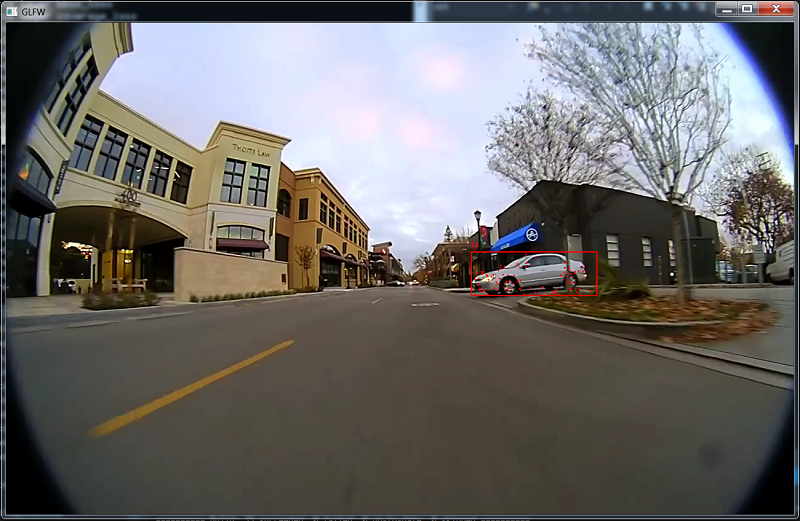
18 ./sample_object_tracker
20 The sample can process up to 4 video streams. The video file must be an H.264 stream.
21 Video containers such as MP4, AVI, MKV, etc. are not supported.
23 The sample usage with NVIDIA<sup>®</sup> TensorRT<sup>&tm;</sup> is:
25 ./sample_object_tracker --video=video_file.h264
26 --tensorRT_model=TensorRT_model_file --tracker=config_file.txt
28 Note that this sample loads its DataConditioner parameters from DNN metadata. This metadata
29 can be provided to DNN module by placing the json file in the same directory as the model file
30 with json extension; i.e. TensorRT_model_file.json.
31 Please see data/samples/detector/tensorRT_model.bin.json as an example of DNN metadata file.
33 The tracker configuration file includes the following parameters:
35 - `maxFeatureCount`: Max number of features to track. Set this value between 1000 and 8000.
36 - `iterationLK`: Optimization iteration to locate features. By default, it is set to 40.
37 - `windowSizeLK`: Search window for Lucas Kanade features. By default, it is set to 14.
38 - `detectInterval`: The frequency of calling detection routine. Set this value between 1 and n.
39 - `trackInterval`: The life span of object tracker. Default is 10. The tracker resets after this interval.
40 - `maxObjectCount`: Max number of 2D objects to track.
41 - `maxFeatureCountPerObject`: Max number of features to track for each object. By default, it is set to 500.
42 - `maxObjectImageScale`: Max image scale of the object to track. Set this value between 0 and 1. The multiplication
43 of this parameter with the image size gives the maximum object size, in pixels.
44 - `minObjectImageScale`: Min image scale of the object to track. Set this value between 0 and 1. The multiplication
45 of this parameter with the image size gives the maximum object size, in pixels.
46 - `similarityThreshold`: Similarity threshold to group close-by object bounding boxes. By default, it is set to 0.2.
47 - `groupThreshold`: Min possible number of bounding boxes minus 1. By default, it is set to 0.
51 The sample creates a window, displays the video streams, and overlays the list
52 of features and detected/tracked bounding boxes of the objects with IDs.
54 The color coding of the overlay is:
56 - Red squares: Successfully tracked bounding boxes.
57 - Red cross: Successfully tracked 2D features.