1 # Copyright (c) 2017, NVIDIA CORPORATION. All rights reserved.
3 @page dwx_hd_maps_access_sample HD Maps Access Sample
5 The maps sample demonstrates how to access map data from the maps module. The sample
6 mimics a car driving along a GPS path, visualizing the map around the car.
7 The map geometry is stored as polylines of WGS84 coordinate points. It is shown
8 how to query the map data around a current position, how to transform the
9 geometry into a local cartesian coordinate space, and how to render that
10 data from various views.
12 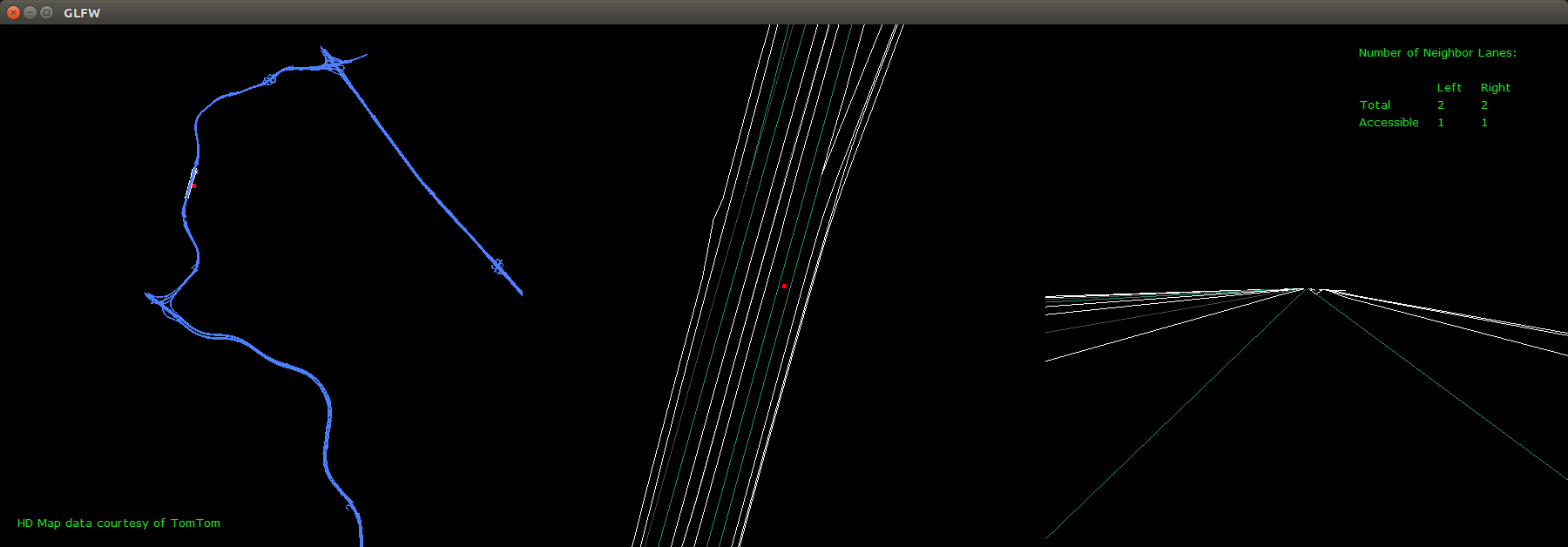
16 The command line for the sample is:
20 The sample plays automatically, running through a fixed route of GPS points.
21 'Esc' closes the application.
25 The output window is split into 3 parts:
26 - left side showing an overview of complete map data
27 - middle showing a zoomed top view of the current location
28 - right side showing the current view from a car driving along the GPS path
32 - Blue lines = all lane divider lines
33 - White lines = local non-traversable lane divider lines
34 - Green lines = local traversable lane divider lines
35 - Grey lines = local invisible lane divider lines
36 - Red dot = current gps position
39 This sample contains a DriveWorks map format representation of
40 map data from TomTom HD Maps.
42 To learn more about TomTom HD Maps, see: <br>
43 <a href="http://automotive.tomtom.com/products-services/hd-map-roaddna/">http://automotive.tomtom.com/products-services/hd-map-roaddna/</a>