1 # Copyright (c) 2017, NVIDIA CORPORATION. All rights reserved.
3 @page dwx_video_rectifier_sample Video Rectification sample
5 The Video Rectification sample demonstrates how to remove fisheye distortion
6 from a video captured on a camera with a fisheeye lens.
8 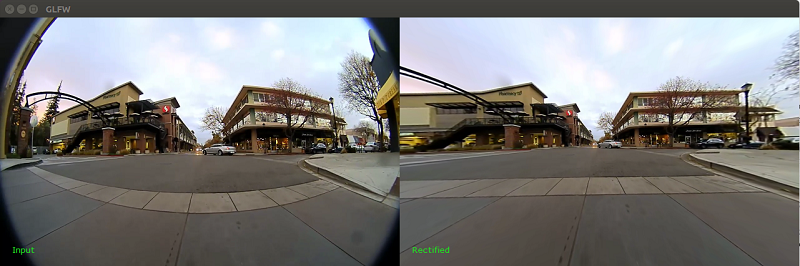
10 The sample reads frames from a video input recorded from an 180 fov camera and takes the
11 calibration from the `rig.xml` file. It then performs rectification and displays
12 both the original and rectified video side-by-side.
14 ./sample_video_rectifier
16 To play a custom video and with a corresponding rig calibration file, the options `--video` and `--rig` can be used:
18 ./sample_video_rectifier --video=<video file.h264> --rig=<rig.xml>
20 It is possible to change the field of view the output by using `--fovX=0..n` and `--fovY=0..n`. By default this is set
21 to 120 and 90 degrees respectively. This property is only part of pinhole cameras.
23 If the rig.xml contains more cameras, to select the camera index specify `--cameraIdx=0...n`, 0 by default
25 It is possible to take a screenshot of the rectified image by pressing S, or it is possible to specify
26 the flag `--dumpToFile=0/1` to save all rectified frames.