1 # Copyright (c) 2016, NVIDIA CORPORATION. All rights reserved.
3 @page dwx_radar_replay_sample Radar Point Clouds Sample
5 The Radar Replay sample demonstrates how to connect to a Radar and displays the generated point cloud in 3D.
7 For a list of currently supported Radar devices, see the <em>Release Notes</em>.
9 #### Point Cloud Dispay
10 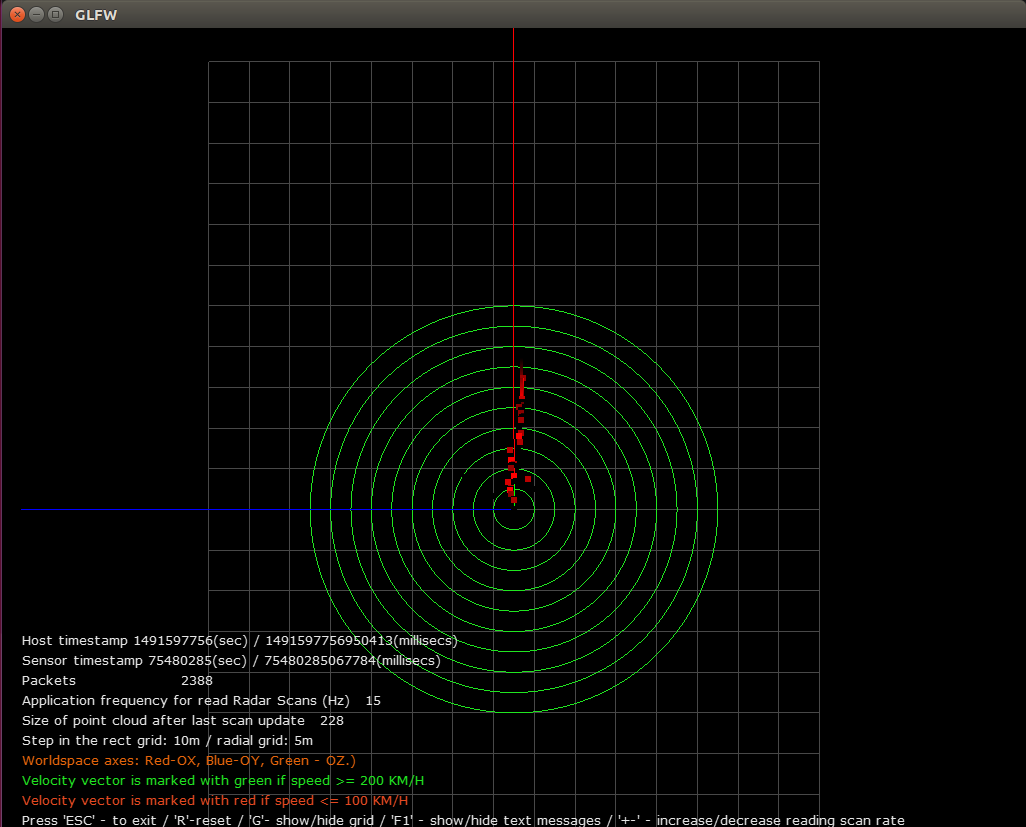
15 - The Radar must be up and running, and connected to the network.
19 The command line for the sample to display live radar point clouds is:
21 ./sample_radar_replay --ip=[radar IP address] --port=[lidar port] --device=[type of device]
23 Where [type of device] is one of the following:
27 The command line for the sample to display recorded Radar point clouds is:
29 ./sample_radar_replay --file=[radar bin file]
31 - The Radar file can be obtained with the provided recording tools.
32 - If no arguments are passed, a default Radar file is loaded.
36 The sample opens an X window to display a 3D point cloud. Beside points the output contains directed unit velocity vectors.
37 If velocity is 100 km/h or less then the directed vectors are red. If greater or equal to 200 then they are green.
38 Worldspace axes: Red-OX, Blue-OY, Green-OZ.
40 Use the mouse and keyboard to interact with the visualization:
42 - Mouse left button: rotate the point cloud
43 - Mouse wheel: zoom in or out
45 - R: reset camera view and also reset artificially increased or decreased frame rate
46 - G: show/hide circular and rectangular grid
47 - F1 show/hide text messages hints