1 # Copyright (c) 2019-2020 NVIDIA CORPORATION. All rights reserved.
3 @page imageprocessing_tracking_usecase2 2D Box Tracking
5 @note SW Release Applicability: This tutorial is applicable to modules in both **NVIDIA DriveWorks** and **NVIDIA DRIVE Software** releases.
9 NVIDIA<sup>®</sup> DriveWorks includes a sample pipeline demonstrating tracking of multiple cars across multiple video frames. The following summarizes the sample’s initialization steps:
12 std::vector<dwBox2D> initBoxes;
13 dwBoxTracker2DHandle_t boxTracker;
15 // CODE: initialize the Box Tracker parameter
16 // CODE: initialize the Box Tracker
17 // CODE: allocate initBoxes
18 // CODE: fill initBoxes with detected bounding boxes
20 // Feed initBoxes to Box Tracker
21 dwBoxTracker2D_add(initBoxes.data(), initBoxes.size(), boxTracker);
24 #### Initializing the Box Tracking Parameters
26 The DriveWorks dwBoxTracker2D_initParams() function initializes the Box Tracker parameter with default values. You can revise the tracker parameters for their specific use case. For a definition of the `dwBoxTracker2DParams()` fields, see DriveWorks API Reference.
28 #### Initializing the Box Tracker
30 After you have customized the tracking parameters, you must call the `dwBoxTracker2D_initialize()` function to initialize the Box Tracker internal states and memory.
32 #### Initializing Initial 2D Object Locations
34 The Box Tracker module requires initial 2D object locations represented by 2D rectangles. You can feed detection results to the Box Tracker.
36 #### Applying Clustering
38 DriveWorks provides two methods for applying clustering to reduce redundant/adjacent “raw” detection results:
40 - With `dwBoxTracker2D_add()`, which is internal to the Box Tracker module
41 - With `dwBoxTracker2D_addPreClustered()`, which applies clustering outside Box Tracker. This function assumes you first cluster the bounding boxes and add it to Box Tracker afterwards.
42 - Manually specify the object locations to start with. For example:
46 int32_t width, height;
49 // CODE: specify top left of the bounding box (x, y)
50 // CODE: specify width and height of the bounding box (width, height)
55 userBox.width = width;
56 userBox.height = height;
58 dwBoxTracker2D_add(userBox, ...);
63 Given the initial bounding boxes, the Box Tracker module computes and associates 2D image features in adjacent image frames. The module uses such feature displacement to estimate the bounding box motion in the next frame. In the figure below, blue, and black crosses represent the successfully tracked 2D image features from frame N to frame N+1. Red cross failed to find association in frame N+1 is thus not used to update the red rectangle in frame N+1. For more information, see 2D Tracker Module in this chapter.
65 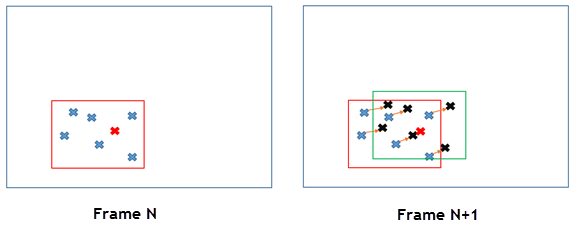
67 To predict the bounding box locations in the current frame using the tracked 2D image features, call the `dwBoxTracker2D_track()` function. Tracking features in multiple frames could suffer from failure association such that the tracked feature number decreases. To avoid such a degradation, the DriveWorks sample Box Tracker application detects 2D image feature for each frame, after previous frame features are tracked. In this way, there are new features available for the next frame to use. Once the 2D feature detection is complete, Box Tracker updates each tracked bounding box with the detected 2D image features. The DriveWorks `dwBoxTracker2D_updateFeatures()` function offers the update mechanism.
69 The Box Tracker sample shows how to use `dwBoxTracker2D_track()` and `dwBoxTracker2D_updateFeatures()`.
71 To obtain the tracked bounding boxes, call `dwBoxTracker2D_get()`. That function returns information such as:
73 - List of 2D rectangles and tracking states, i.e. confidence
75 - Total number of tracked frames
76 - 2d feature locations used to predict the bounding boxes
78 #### Additional Information
80 2D Object tracking is used in @ref dwx_object_detector_tracker_sample.