1 # Copyright (c) 2019-2020, NVIDIA CORPORATION. All rights reserved.
3 @page maps_usecase6 Lane Tree Helper Functions
6 @note SW Release Applicability: This tutorial is applicable to modules in **NVIDIA DRIVE Software** releases.
8 @section maps_usecase6_space Local Space Lane Divider Line Segments
12 dwStatus dwMaps_transformLaneDividersToLocalLines(
13 dwMapsLaneDividerLineBuffer* lineSegments,
14 const dwMapsLaneDividerBuffer* laneDividers,
15 const dwMapsGeoPoint* localOrigin,
16 const float64_t* localToENURotation33,
17 const dwMapsLocalBounds* bounds,
18 const dwVector3f* directionFilterVector,
19 float32_t directionFilterAngleRadian,
20 dwBool ignoreLaneDirection);
22 This helper function combines a few things to transform and filter the lane divider geometry. It does the following:
24 - Transforms from WGS84 coordinates into in a user-defined local Cartesian coordinate space.
25 - Transforms the polylines into a list of line segments.
26 - Filters the line segments by a bounding box defined in local space.
27 - Filters the line segments by direction.
29 <a name="local_cartesian_coordinate_system">
30 @section maps_usecase6_cartesian Local Cartesian Coordinate System
32 The local coordinate system is defined by:
34 - Point in WGS84 coordinates
37 The point defines the origin of the east-north-up (ENU) coordinate system on the tangent plane of the Earth spheroid. The basis vectors of the ENU space are:
43 The rotation matrix transforms from the local coordinate system into the ENU space. It defines the user local space of the returned coordinates. The basis vectors of the user local space can be interpreted as:
49 This means that if the rotation matrix is an identity matrix, the local space is facing east.
51 There is also a helper function `dwMaps_computeRotationFromBearing()` that creates the rotation matrix from a single bearing value.
53 @section maps_usecase6_filtering Filtering
55 The direction filtering allows to discard all line segments that do not point into a desired direction. For example, providing a direction filter vector of (1,0,0) with an angle of 0.25*Pi will only return line segments that have an angle of less than 45 degrees compared to the viewing direction. This can be used to filter out bridges that cross the current Road Segment horizontally, as shown in the following images:
57 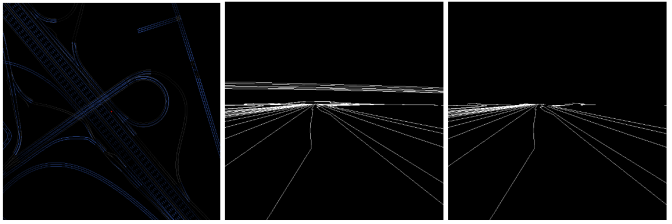
59 @section maps_usecase6_segments Local Space Feature Line Segments
62 dwStatus dwMaps_transformRoadFeaturesToLocalSpace(
63 dwMapsPolyline3fBuffer* localPolylines,
64 dwMapsPointBuffer* pointBuffer,
65 const dwMapsFeatureBuffer* features,
66 const dwMapsGeoPoint* localOrigin,
67 const float64_t* localToENURotation33,
68 const dwMapsLocalBounds* localBounds);
71 This function has the same functionality as `dwMaps_transformLaneDividersToLocalLines()`, but for features instead of lane dividers.
73 @section maps_usecase6_bounds Compute Bounds
76 dwStatus dwMaps_computeBounds(
78 const dwMapsGeoPoint* p,
79 float32_t radiusMeter);
82 The query functions require a bounding box in WGS84 coordinates to define the area of interest. The size of the longitude/latitude box for a given radius in meters varies with latitude, so it is not obvious how big the WGS84 bounding box must be to cover a desired radius in meters. The `dwMaps_computeBounds()` function does this calculation. It returns the bounds that fully contain a given circle on the earth surface.
84 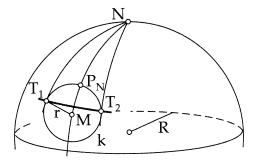
86 @section maps_usecase6_bearing Compute Bearing
88 There is a helper function to compute the bearing (clock-wise angle from north) from a current and a target position:
91 dwStatus dwMaps_computeBearingFromGeoPoints(
92 float64_t* bearingRadian,
93 const dwMapsGeoPoint* position,
94 const dwMapsGeoPoint* headingPoint);
97 @section maps_usecase6_localToEnu Compute Local To ENU
100 dwStatus dwMaps_computeRotationFromBearing(
101 dwMatrix3d* localToENURotation33,
102 float32_t bearingRadian);
105 The coordinate space in the functions that transform into local space is defined by a position and a rotation matrix that transforms from local coordinate space into the ENU coordinate system. `dwMaps_computeRotationFromBearing()` is a helper function that creates the rotation matrix from a bearing angle. It is a clockwise rotation around the z-axis by bearing angle. The a helper for the opposite calculation is also available: `dwMaps_computeBearingFromRotation()`. It projects the forward direction onto the x-y-plane of the ENU space, and expresses the direction as a bearing angle (clockwise relative to north).
107 @section maps_usecase6_transformPolylines Transform Polylines
110 dwStatus dwMaps_transformPolylines(
111 dwMapsPointBuffer* transformedPoints,
112 const dwMapsGeoPolyline* polylines,
113 uint32_t polylineCount,
114 const dwMapsGeoPoint* localOrigin,
115 const float64_t* localToENURotation33);
118 All map data polylines are defined in WGS84 coordinates by longitude angle, latitude angle and height above the earth spheroid surface. `dwMaps_transformPolylines()` transforms an array of WGS84 coordinate polylines into a Cartesian local space, the same way it is done for the getLaneDividerLinesLocal query, however it just returns the polylines in local space (as opposed to returning filtered line segments).
120 @section maps_usecase6_transformPoint Transform Point
123 dwStatus dwMaps_transformPoint(
124 dwVector3f* transformedPoint,
125 const dwMapsGeoPoint* point,
126 const dwMapsGeoPoint* localOrigin,
127 const float64_t* localToENURotation33);
130 The `dwMaps_transformPoint` function does the same as `dwMaps_transformPolylines`, but for a single point only.
132 @section maps_usecase6_interpolation Interpolation Between Polylines
134 Interpolation between two Polylines
137 dwStatus dwMaps_interpolatePolylines(
138 uint32_t* srcStartIndex,
139 uint32_t* targetEndIndex,
140 dwMapsGeoPointBuffer* interpolatedPoints,
141 const dwMapsGeoPoint* srcPoints,
142 uint32_t srcPointCount,
143 const dwMapsGeoPoint* targetPoints,
144 uint32_t targetPointCount,
148 float32_t (*interpolationFn)(float32_t, void*),
149 void *interpolationFnContext);
152 This helper function provides interpolation between 2 polylines. It can be used to create a path that connects two parallel polylines, for example to model a lane change.
156 - the source polyline
157 - the target polyline
158 - the start of the interpolation (distance in meters from first source polyline point)
159 - the end of the interpolation (distance in meters from the first target polyline point)
160 - the step size to define where interpolation points are evaluated
161 - a function callback to define the interpolation curve (linear by default)
163 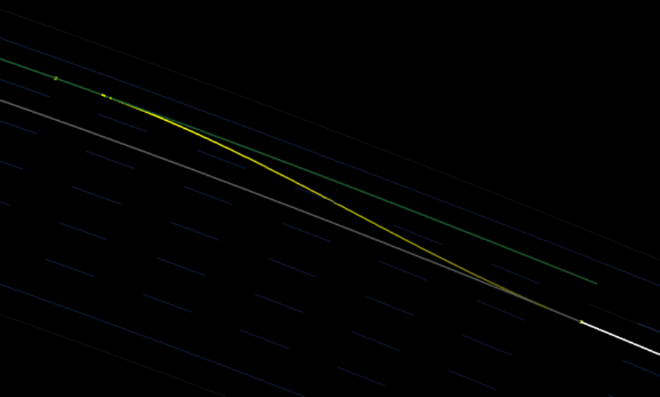
165 In the above example image, the interpolation function is:
167 1.0 - 0.5*(cos(d * Pi) + 1.0);
169 It maps the input parameter d, which goes from 0.0 to 1.0 and represents the distance from interpolation start to interpolation target (horizontal distance in the example image), to the target range 0.0 to 1.0 that represents the weight between source and target polyline.
171 @section maps_usecase6_neighbor Neighbor Lanes
173 Given a `dwMapsLane`, it is possible to figure out how many lanes are left and right on the current road segment.
174 To query the number of lanes on a side, call:
177 dwStatus dwMaps_getNeighborLaneCount(
179 uint32_t* laneCountAccessible,
180 const dwMapsLane* lane,
182 dwBool sideRelativeToDrivingDirection);
185 There are two return values, the total number of lanes on that side, and the number accessible ones. Accessible lanes are the ones that can be reached from the current lanes through a lane change, i.e. all lane dividers in between can be legally crossed.
187 The side can be requested either relative to the polyline directions on the road segment, or relative to the driving direction on the input lane (these directions are not necessarily the same).
189 A neighbor lane can be access by calling:
192 dwStatus dwMaps_getNeighborLane(
193 const dwMapsLane** otherLane,
194 const dwMapsLane* currentLane,
197 dwBool sideRelativeToDrivingDirection);
199 offset = 1 returns the directly adjacent lane, offset = 2 the next one, etc.
201 @section maps_usecase6_stitching Stitching of Lane Geometry
203 Given a list of connected dwMapsLane objects, this helper functions stitches the requested geometry (lane center line, left lane divider, right lane divider) into one connected polyline:Distance CalculationsDistance Calculations
206 dwStatus dwMaps_stitchLaneGeometry(
207 dwMapsGeoPointBuffer* polyline,
208 const dwMapsLane* lanes,
210 dwMapsLaneGeometry geometrySelection);
213 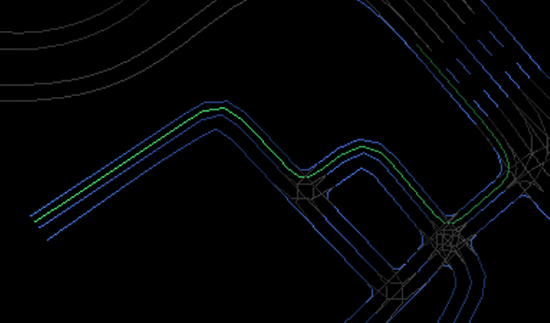
215 @section maps_usecase6_distance Distance Calculations
217 The length of a polyline of WGS84 points can be computed with the helper function
220 dwStatus dwMaps_computePolylineLength(
222 const dwMapsGeoPoint* points,
223 uint32_t pointCount);
226 There is also a helper function that computes the Euclidean distance between two WGS84 points:
229 dwStatus dwMaps_computeDistance(
231 const dwMapsGeoPoint* p1,
232 const dwMapsGeoPoint* p2);
235 For more information see @ref dwx_hd_map_access_sample .