1 # Copyright (c) 2019-2020 NVIDIA CORPORATION. All rights reserved.
3 @page dwx_imu_calibration_sample IMU Calibration Sample
6 @note SW Release Applicability: This sample is available in both **NVIDIA DriveWorks** and **NVIDIA DRIVE Software** releases.
8 @section dwx_imu_calibration_description Description
10 This sample demonstrates estimating IMU extrinsics with the
11 NVIDIA<sup>®</sup> DriveWorks Calibration Engine.
13 @section dwx_imu_calibration_running Running the Sample
15 The IMU calibration sample, `sample_calibration_imu`, accepts the following
16 optional parameters. If none are specified, the IMU extrinsics are estimated on
19 ./sample_calibration_imu --rig=[path/to/rig/configuration/file]
20 --imu-sensor=[integer/sensor-name]
21 --can-sensor=[integer/sensor-name]
22 --camera-sensor=[integer/sensor-name]
26 --rig=[path/to/rig/configuration/file]
27 Path to the rig configuration file.
28 Default value: path/to/data/samples/recordings/suburb0/imu_offset_rig.json
30 --imu-sensor=[integer]
31 The index or name of the IMU sensor in the rig configuration file to calibrate
34 --can-sensor=[integer]
35 The index or name of the CAN sensor in the rig configuration file
38 --camera-sensor=[integer]
39 The index or name of the camera sensor in the rig configuration file (used for visualization only)
42 @section dwx_imu_calibration_output Output
44 The sample does the following:
46 - Displays a video. The speed at which the video is displayed differs, depending
48 - Before convergence, the sample does not limit the video playback. As a result,
49 the visualization appears to be sped up.
50 - After convergence, the sample slows the video playback to the usual 30-frames
52 - Displays nominal calibration indicators (blue) and, after convergence, a
53 corrected calibration indicator (green). The indicator shows the estimated
54 rig horizon as seen in the camera's frame. The rig horizon shows the estimated
57 After convergence, the sample runs the sample data in a loop, during which the
58 calibration is further refined.
60 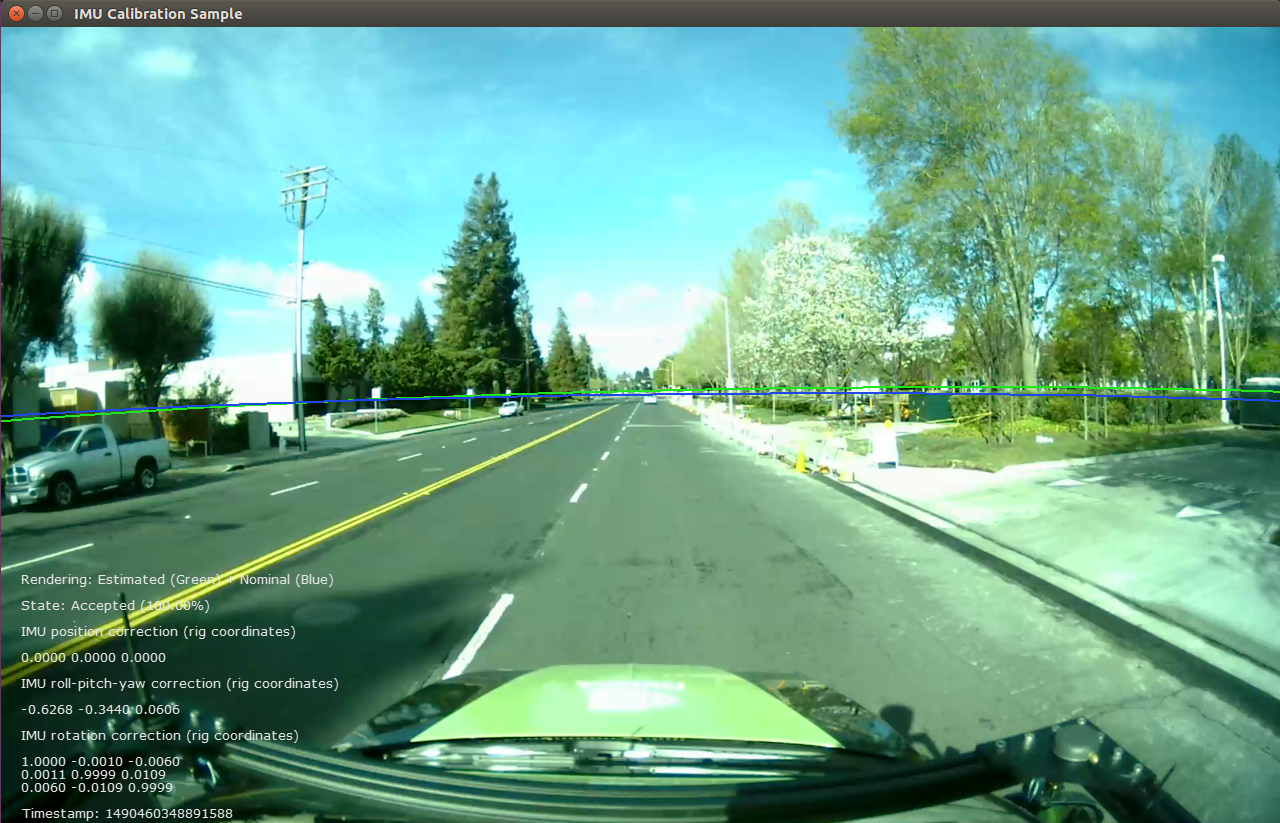
62 @section dwx_imu_calibration_more Additional information
64 For more information on IMU calibration, see @ref calibration_usecase_imu .