1 # Copyright (c) 2019-2020 NVIDIA CORPORATION. All rights reserved.
3 @page dwx_drivenet_sample DriveNet Sample
6 @note SW Release Applicability: This sample is available in **NVIDIA DRIVE Software** releases.
8 @section dwx_drivenet_description Description
10 The NVIDIA<sup>®</sup> DriveNet sample is a sophisticated, multi-class, higher-
11 resolution example that uses the NVIDIA<sup>®</sup> DriveNet proprietary deep neural
12 network (DNN) to perform object detection.
14 The DriveNet sample application detects objects by performing inferences on each frame of a RAW video or camera stream.
15 It clusters these objects with parameters defined within the sample application.
17 A follow-up algorithm clusters detections from both images to compute a more stable response.
19 @section dwx_drivenet_sample_running Running the Sample
21 The DriveNet sample, sample_drivenet, accepts the following optional parameters. If none are specified, it performs detections on a supplied pre-recorded video.
23 ./sample_drivenet --input-type=[video|camera]
24 --video=[path/to/video]
25 --camera-type=[camera]
26 --camera-group=[a|b|c|d]
27 --camera-index=[0|1|2|3]
31 --precision=[int8|fp16|fp32]
39 --input-type=[video|camera]
40 Defines if the input is from live camera or from a recorded video.
41 Live camera is supported only on NVIDIA DRIVE(tm) platforms.
42 It is not supported on Linux (x86 architecture) host systems.
45 --video=[path/to/video]
46 Specifies the absolute or relative path of a raw, lraw or h264 recording.
47 Only applicable if --input-type=video.
48 Default value: path/to/data/samples/raw/rccb.raw
50 --camera-type=[camera]
51 Only applicable if --input-type=camera.
52 Default value: ar0231-rccb-bae-sf3324
54 --camera-group=[a|b|c|d]
55 Is the group where the camera is connected to.
56 Only applicable if --input-type=camera.
59 --camera-index=[0|1|2|3]
60 Indicates the camera index on the given port.
64 Setting this parameter to 1 when running the sample on Xavier B accesses the camera
66 Applicable only when --input-type=camera.
70 Setting this parameter to 1 runs the DriveNet DNN inference on one of the DLA engines.
74 Chooses the DLA engine to be used.
75 Only applicable if --dla=1
78 --precision=[int8|fp16|fp32]
79 Defines the precision of the DriveNet DNN. The following precision levels are supported.
81 - 8-bit signed integer precision.
82 - Supported GPUs: compute capability >= 6.1.
83 - Faster than fp16 and fp32 on GPUs with compute capability = 6.1 or compute capability > 6.2.
85 - 16-bit floating point precision.
86 - Supported GPUs: compute capability >= 6.2
88 - If fp16 is selected on a Pascal GPU, the precision will be set to fp32.
90 - 32-bit floating point precision.
91 - Supported GPUs: Only Pascal GPUs (compute capability 6.1)
92 - Default for Pascal GPUs.
93 When using DLA engines only fp16 is allowed.
97 Setting this parameter to 1 runs Drivenet DNN inference by CUDAGraph if the hardware supports.
101 Runs DriveNet only on the first <number> frames and then exits the application.
102 The default value for `--stopFrame` is 0, for which the sample runs endlessly.
105 --enableUrgency=[0|1]
106 Enables the object urgency prediction by a temporal model.
107 Only supports predicting the urgency for cars and pedestrians on the front camera with 60° field of view.
111 Setting this parameter to 0 runs the stateful temporal model. Setting it to 1 runs the stateless temporal model.
112 The stateful model uses all past frames to predict urgency, while the stateless model only uses the most recent frames.
113 Only applicable if --enableUrgency=1.
116 @subsection dwx_drivenet_sample_examples Examples
118 ### To run the sample on a video
120 ./sample_drivenet --input-type=video --video=<video file.raw>
122 ### To run the sample on a camera on NVIDIA DRIVE platforms
124 ./sample_drivenet --input-type=camera --camera-type=<camera type> --camera-group=<camera group> --camera-index=<camera idx on camera group>
126 where `<camera type>` is a supported `RCCB` sensor.
127 See @ref supported_sensors for the list of supported cameras for each platform.
129 ### To run the sample on a DLA engine on an NVIDIA DRIVE platform
131 On NVIDIA DRIVE<sup>™</sup> platforms, you can run DriveNet on DLA engines with the following command line:
133 ./sample_drivenet --dla=1 --dlaEngineNo=0
135 ### To run the sample on a video for the first 3000 frames
137 ./sample_drivenet --video=<video file.raw> --stopFrame=3000
139 ### To run the sample with different precisions
141 ./sample_drivenet --precision=int8
143 ### To run the sample with urgency predictions
145 ./sample_drivenet --enableUrgency=1
147 @section dwx_drivenet_sample_output Output
149 The sample creates a window, displays a video, and overlays bounding boxes for detected objects.
150 The color of the bounding boxes represents the classes that the sample detects, as follows:
152 * Red: Cars and Trucks (both labeled as cars).
153 * Green: Traffic Signs.
155 * Magenta: Pedestrians.
156 * Orange: Traffic Lights.
161 When urgency prediction is enabled, the predicted urgency value is displayed behind the object class name.
162 The color of the bounding boxes represents urgency value with a green, white, red smoothly transitioned color map.
163 In this color map, green indicates negative urgency, white indicates zero urgency, and red indicates positive urgency.
165 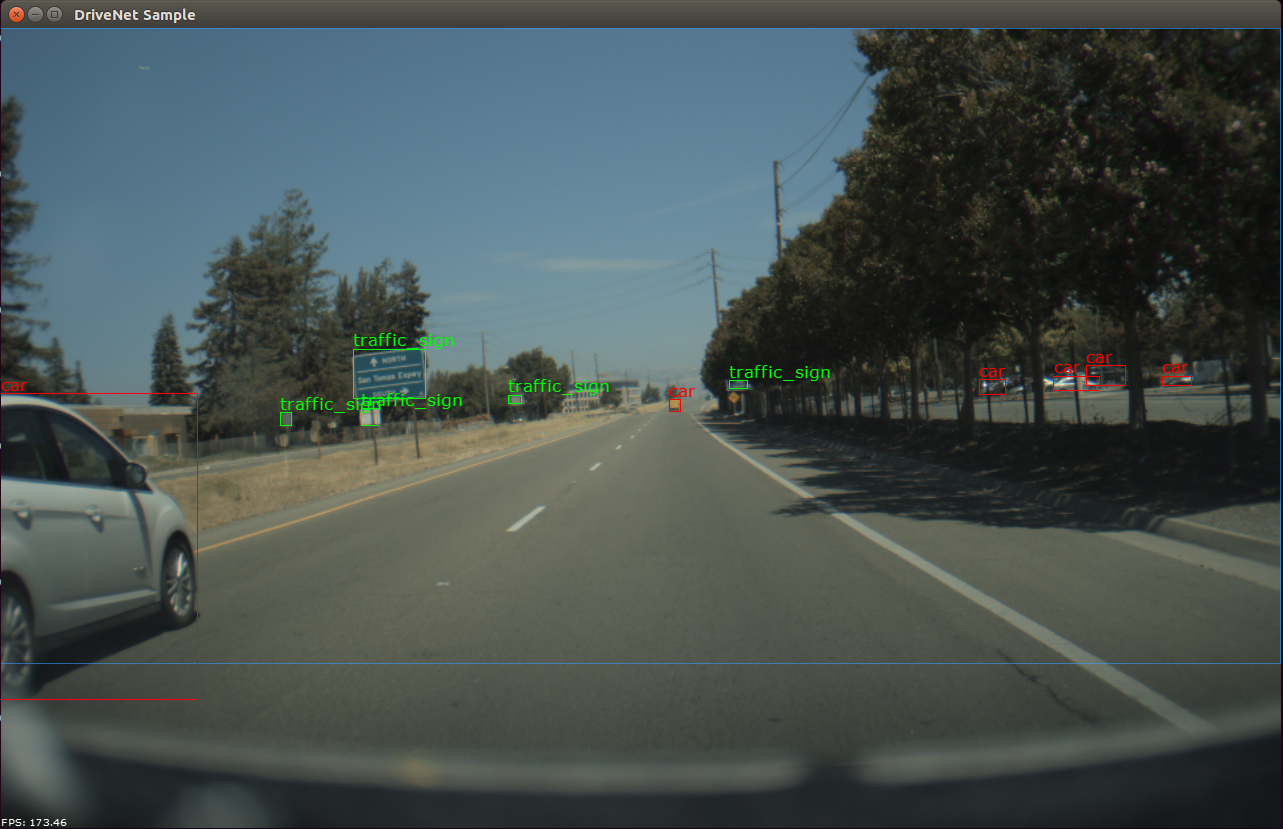
167 @section dwx_drivenet_sample_limitations Limitations
169 @warning DriveNet DNN currently has limitations that could affect its performance:
170 - It is optimized for daytime, clear-weather data. As a result, it
171 does not perform well in dark or rainy conditions.
172 - It is trained primarily on data collected in the United States.
173 As a result, it may have reduced accuracy in other locales,
174 particularly for road sign shapes that do not exist in the U.S.
176 @section dwx_drivenet_sample_more Additional Information
178 For more information, see @ref drivenet_mainsection.