1 # Copyright (c) 2019-2020, NVIDIA CORPORATION. All rights reserved.
3 @page dwx_egomotion_sample Egomotion Sample
6 @note SW Release Applicability: This sample is available in both **NVIDIA DriveWorks** and **NVIDIA DRIVE Software** releases.
8 @section dwx_egomotion_description Description
10 The Egomotion sample application shows how to use steering angle and velocity CAN measurements.
11 It also explains how to use IMU and GPS measurements to compute vehicle position and orientation
12 within the world coordinate system.
14 @section dwx_egomotion_running Running the Sample
16 The command line for the sample is:
18 ./sample_egomotion --camera-sensor-name=[name]
19 --can-sensor-name=[name]
20 --imu-sensor-name=[name]
21 --gps-sensor-name=[name]
23 --output=[path/to/output/file]
24 --outputkml=[path/to/output/file]
25 --rig=[path/to/rig/file]
26 --use-rear-wheel=[0|1]
27 --enable-suspension=[0|1]
31 --camera-sensor-name=[name]
32 Name of the camera sensor in the given rig file.
33 Default value: First camera sensor found in the rig file.
35 --can-sensor-name=[name]
36 Name of the CAN sensor in the given rig file.
37 Default value: First CAN sensor found in the rig file.
39 --gps-sensor-name=[name]
40 Name of the GPS sensor in the given rig file.
41 Default value: First GPS sensor found in the rig file.
43 --imu-sensor-name=[name]
44 Name of the IMU sensor in the given rig file.
45 Default value: First IMU sensor found in the rig file.
48 The sample application supports different egomotion estimation modes.
49 To switch the mode, pass `--mode=0/1` as the argument.
50 Mode 0 represents odometry-based egomotion estimation.
51 The vehicle motion is estimated using Ackerman principle.
52 Mode 1 uses IMU measurements to estimate vehicle motion.
53 Gyroscope and linear accelerometers are filtered and fused to estimate vehicle orientation.
54 Using speed vehicle odometry reading, the vehicle's traveling path can be estimated.
55 This mode also filters GPS locations if they are passed to the module.
58 --output=[path/to/output/file]
59 If specified, the sample application outputs the odometry data to this file. The vehicle's position
60 in world coordinates (x,y) together with a timestamp in microseconds will be written out as:
62 5680571648,-7.67,118.30
63 5680604981,-7.75,118.33
64 5680638314,-7.83,118.36
65 5680671647,-7.91,118.38
66 5680704980,-7.98,118.41
69 --outputkml=[path/to/output/file]
70 If specified, the sample application outputs the GPS and estimated location.
73 --rig=[path/to/rig/file]
74 Rig file containing all information about vehicle sensors and calibration.
75 Default value: path/to/data/samples/recordings/suburb0/rig.json
77 --use-rear-wheel=[0|1]
78 Specifies if rear wheel speed should be used as speed measurement. For this to work
79 `dwVehicleIOState` must provide wheel speed measurements.
82 --enable-suspension=[0|1]
83 Enables egomotion suspension modeling. It requires Odometry+IMU [--mode=1].
86 You must provide the following file:
87 - CAN file: contains the CAN messages with the speed and steering angle.
89 @note for more details on sensors parameters and usage refer to @ref canbus_mainsection, @ref gps_mainsection, @ref imu_mainsection.
91 @subsection dwx_egomotion_examples Examples
93 #### Running the sample with default arguments
97 #### Running the sample with output file
99 sudo ./sample_egomotion --output=/home/nvidia/out.txt
101 @section dwx_egomotion_output Output
103 The sample application creates a window, displays a video, and plots the vehicle's position at a 30 Hertz sampling rate.
104 Current speed, roll, pitch, and yaw are also printed.
106 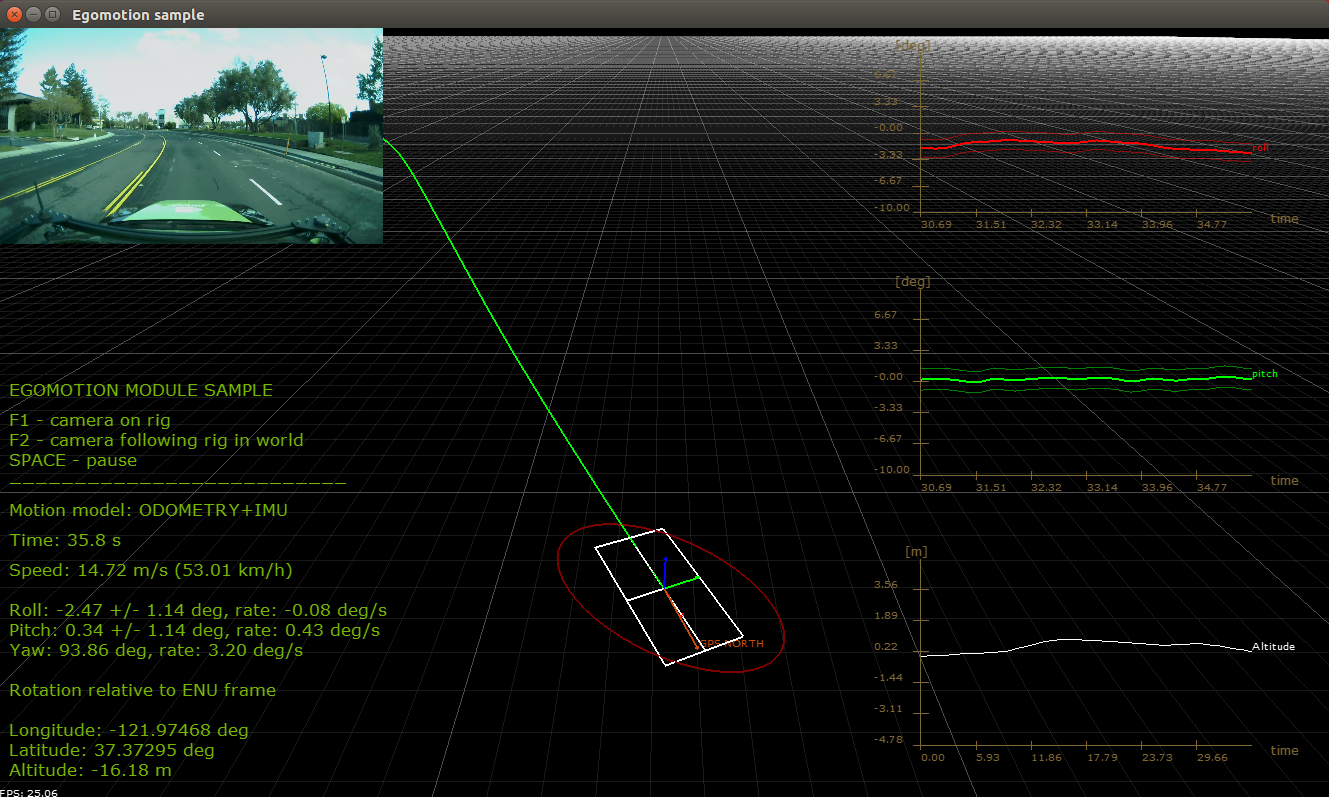
108 @section dwx_egomotion_more Additional Information
110 For more details see @ref egomotion_mainsection.