1 # Copyright (c) 2019-2020, NVIDIA CORPORATION. All rights reserved.
3 @page dwx_headlightcontroller_sample Headlight Controller Sample
6 @note SW Release Applicability: This sample is available in **NVIDIA DRIVE Software** releases.
8 @section dwx_headlightcontroller_description Description
10 The Headlight Controller sample demonstrates the usage of `dwHeadlightController` related APIs. Headlight Controller is an module to provide the feature that automatically turn on/off the headlight(low beam) according to environment ambient intensity change without driver's intervention.
12 @note The video file is expected to be an RCCB RAW/LRAW file.
14 @section dwx_headlightcontroller_running Running the Sample
16 The command line for the sample application is:
18 ./sample_headlight_controller --input-type=[video|camera]
19 --video=[path/to/video]
20 --camera-type=[camera]
21 --camera-group=[a|b|c|d]
22 --camera-index=[0|1|2|3]
26 --input-type=[video|camera]
27 Defines if the input is from live camera or from a recorded video.
28 Live camera is supported only on NVIDIA DRIVE(tm) platforms.
29 It is not supported on Linux (x86 architecture) host systems.
32 --video=[path/to/video]
33 Specifies the absolute or relative path of a raw, lraw or h264 recording.
34 Only applicable if --input-type=video
35 Default value: path/to/data/samples/headlight/into-tunnel.lraw
37 --camera-type=[camera]
38 Only applicable if --input-type=camera.
39 Default value: ar0231-rccb-bae-sf3324
41 --camera-group=[a|b|c|d]
42 Is the group where the camera is connected to.
43 Only applicable if --input-type=camera.
46 --camera-index=[0|1|2|3]
47 Indicates the camera index on the given port.
50 @subsection dwx_headlightcontroller_examples Examples
52 ### To run the sample on a video
54 ./sample_headlight_controller --input-type=video --video=<video file.raw>
56 ### To run the sample on a camera on NVIDIA DRIVE platforms
58 ./sample_headlight_controller --input-type=camera --camera-type=<camera type> --camera-group=<camera group> --camera-index=<camera idx on camera group>
60 @section dwx_headlightcontroller_output Output
62 The output of the sample code is a video window, on the right side, it will display current control level and headlight control status.
64 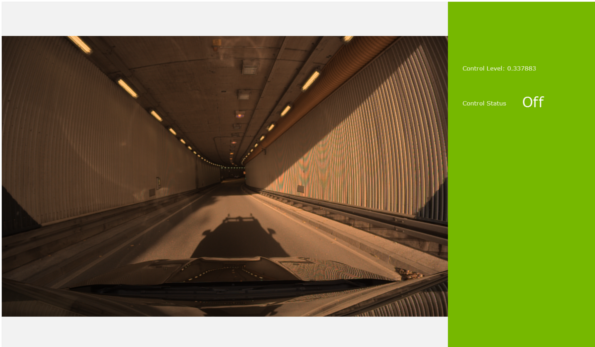
66 For headlight device without intensity output control, threshold 0.5 should be used for the indicator of on/off, value greater equal with 0.5 should be treated as turn on signal.
68 For headlight device with intensity output control, you could choose the mapping range from [0.5, 1] to your can message control signal value according to fit you calibration requirement.
70 @section dwx_headlightcontroller_more Additional Information
72 For more information, see @ref headlightcontroller_mainsection.