1 # Copyright (c) 2019-2020, NVIDIA CORPORATION. All rights reserved.
3 @page dwx_landmark_perception_sample Segmentation-based Landmark Detection Sample (MapNet)
6 @note SW Release Applicability: This sample is available in **NVIDIA DRIVE Software** releases.
8 @section dwx_landmark_perception_description Description
10 The Segmentation-based Landmark Detection sample demonstrates how to use the NVIDIA<sup>®</sup>
11 proprietary deep neural network (DNN) MapNet to perform landmark detection.
12 MapNet has been trained with RCB images and its performance is invariant to RGB encoded H.264 videos.
13 @ref mapnet_mainsection
15 This sample can also stream a H.264 or RAW video and computes the binary likelihood map of
16 landmarks on each frame. A user assigned threshold value binarizes a likelihood map into clusters of
17 landmarks, then image post-processing steps are employed to fit polylines onto the landmark clusters. The
18 sample can also be operated with cameras.
20 @subsection dwx_landmark_det_sensor_details Sensor Details
22 The image datasets used to train MapNet have been captured by a View Sekonix Camera Module (SS3323) with
23 AR0231 RCCB sensor. The camera is mounted high up at the rear view mirror position. Demo videos are
24 captured at 2.3 MP and down-sampled to 960 x 604.
26 To achieve the best landmark detection performance, NVIDIA recommends to adopt a similar camera setup and align
27 the video center vertically with the horizon before recording new videos.
29 @section dwx_landmark_det_running Running the Sample
31 The Segmentation-based Landmark Detection sample, `sample_landmark_detection_by_segmentation`, accepts the following optional parameters.<br>
33 ./sample_landmark_detection_by_segmentation --video=[path/to/video]
39 --video=[path/to/video]
40 Specifies the absolute or relative path of a raw, lraw or h264 recording.
41 Only applicable if --input-type=video
42 Default value: path/to/data/samples/laneDetection/video_lane.h264
45 Setting this parameter to 1 runs MapNet DNN inference by CUDAGraph if the hardware supports.
49 The threshold parameter is used to binarize a likelihood map.
50 Any likelihood value above the threshold is considered a landmark pixel.
51 By default, the value is 0.3, which provides the best accuracy based on the NVIDIA
52 test data set. Reduce the threshold value if landmark polylines flicker or cover
57 @subsection dwx_landmark_det_examples Examples
59 The command lines for running the sample on Linux:
61 ./sample_landmark_detection_by_segmentation --video=<video file.h264> --threshold=<floating-point number in (0,1)>
64 ./sample_landmark_detection_by_segmentation --video=<video file.raw> --threshold=<floating-point number in (0,1)>
66 @note The Segmentation-based Landmark Detection sample directly resizes video frames to the network
67 input resolution. Therefore, to get the best performance, it is recommended to
68 use videos with a similar aspect ratio to the demo video. Or you can set the Region
69 of Interest (ROI) to perform inference on a sub-window of the full frame.
71 @section dwx_landmark_det_output Output
73 MapNet creates a window, displays a video, and overlays polylines of the detected landmarks.
74 Colors indicate the following:
75 - Orange - Pole Detection
76 - Light Blue - Adjacent Left Lane Boundary
77 - Red - Current Driving Lane Left Boundary
78 - Green - Current Driving Lane Right Boundary
79 - Dark Blue - Adjacent Right Lane Boundary
81 Letters indicate the following:
82 - S - Solid Lane Line Type
83 - D - Dashed Lane Line Type
84 - B - Road Boundary Line Type
85 - P - Vertical Pole Line Type
87 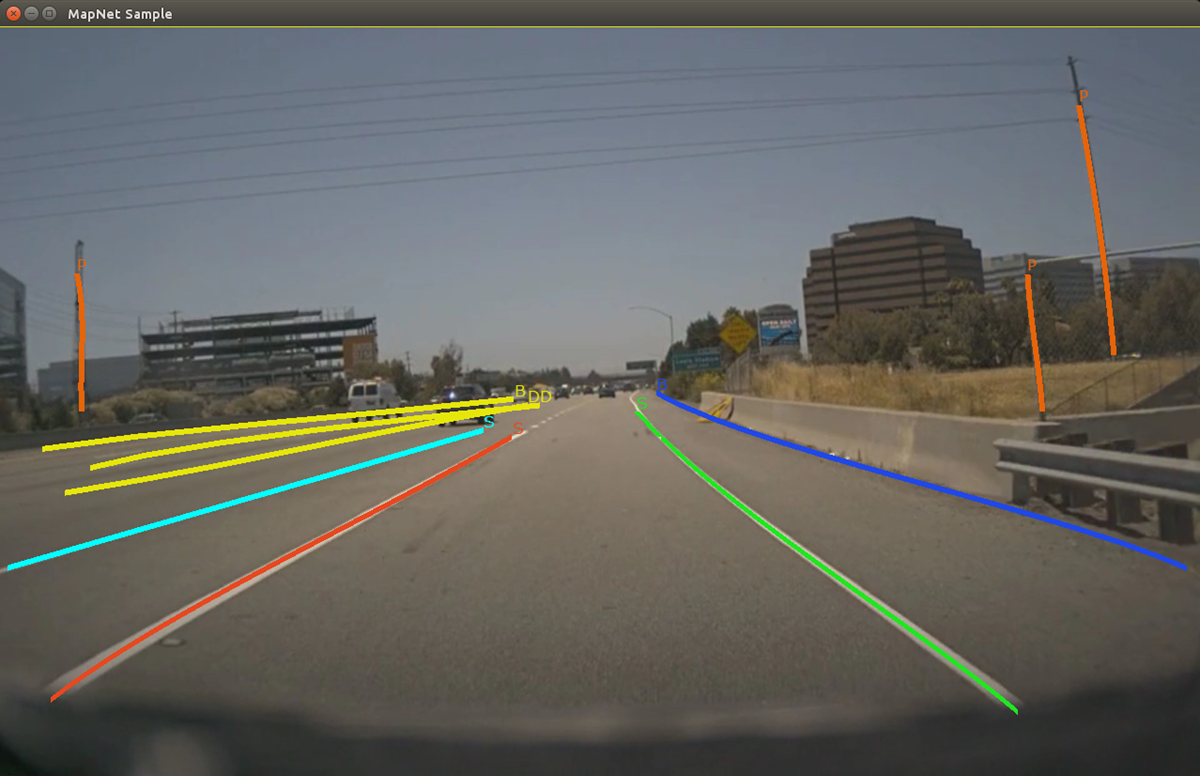
89 For more details see @ref landmarks_mainsection.