1 # Copyright (c) 2019-2020, NVIDIA CORPORATION. All rights reserved.
3 @page dwx_clearsightnet_sample Camera Blindness Detection Sample (ClearSightNet)
6 @note SW Release Applicability: This sample is available in **NVIDIA DRIVE Software** releases.
8 @section dwx_clearsightnet_sample_description Description
10 The ClearSightNet sample streams frames from a live camera or recorded video. It runs ClearSightNet DNN inference on each frame to generate a mask. This mask indicates image regions that are blurred, blocked, sky or otherwise clean.
12 @section dwx_clearsightnet_sample_running Running the Sample
14 The ClearSightNet sample, `sample_clearsightnet`, accepts the following optional parameters. If none are specified, it performs detections on a supplied pre-recorded video.
16 /sample_clearsightnet --input-type=[video,camera]
17 --video=[path/to/video]
18 --camera-type=[camera]
19 --camera-group=[a|b|c|d]
20 --camera-index=[0|1|2|3]
22 --customModelPath=[customModelPath]
23 --filter-window=[window]
24 --numRegionsX=[numRegionsX]
25 --numRegionsY=[numRegionsY]
26 --dividersX=[regionDividersX]
27 --dividersY=[regionDividersY]
28 --precision=[int8|fp16|fp32]
34 --input-type=[video,camera]
35 Specifies whether the input is from a live camera or a recorded video.
36 Live camera input is supported only on NVIDIA DRIVE(tm) platforms.
37 It is not supported on Linux (x86 architecture) host systems.
40 --video=[path/to/video]
41 Specifies the absolute or relative path of a raw or h264 recording.
42 Only applicable if --input-type=video.
43 Default value: path/to/data/samples/clearsightnet/sample.mp4.
45 --camera-type=[camera]
46 Specifies a supported AR0231 `RCCB` sensor.
47 Only applicable if --input-type=camera.
48 Default value: ar0231-rccb-bae-sf3324
50 --camera-group=[a|b|c|d]
51 Specifies the group to which the camera is connected.
52 Only applicable if --input-type=camera.
55 --camera-index=[0|1|2|3]
56 Indicates the camera index on the given port.
60 Runs ClearSightNet only on the first <number> frames and then exits the application.
61 The default value for `--stopFrame` is 0, for which the sample runs endlessly.
64 --customModelPath=[customModelPath]
65 Name of a non-default model or path to where a custom or non-default model is located.
66 Default value: "" (loads default model)
68 --filter-window=[window]
69 Temporal filter window. The output overall blindness ratio is median filtered over
70 this many frames. This sets the dwBlindnessDetectorParams.temporalFilterWindow parameter.
73 --numRegionsX=[numRegionsX]
74 Number of image sub-regions in X direction. Maximum allowed regions is 8. This sets the
75 dwBlindnessDetectorParams.numRegionsX parameter.
78 --numRegionsY=[numRegionsY]
79 Number of image sub-regions in Y direction. Maximum allowed regions is 8. This sets the
80 dwBlindnessDetectorParams.numRegionsY parameter.
83 --dividersX=[regionDividersX]
84 Comma separated list of locations of sub-region dividers (expressed in image fractions)
85 in X direction. Number of dividers must equal numRegionsX-1. This sets the
86 dwBlindnessDetectorParams.regionDividersX parameter.
87 Default value: 0.2,0.8
89 --dividersY=[regionDividersY]
90 Comma separated list of locations of sub-region dividers (expressed in image fractions)
91 in Y direction. Number of dividers must equal numRegionsY-1. This sets the
92 dwBlindnessDetectorParams.regionDividersY parameter.
93 Default value: 0.2,0.8
95 --precision=[int8|fp16|fp32]
96 Defines the precision of the ClearSightNet DNN. The following precision levels are supported.
98 - 8-bit signed integer precision.
99 - Supported GPUs: compute capability >= 6.1.
100 - Faster than fp16 and fp32 on GPUs with compute capability = 6.1 or compute capability > 6.2.
102 - 16-bit floating point precision.
103 - Supported GPUs: compute capability >= 6.2
106 - 32-bit floating point precision.
107 - Supported GPUs: compute capability >= 5.0
108 When using DLA engines only fp16 is allowed.
112 Setting this parameter to 1 runs the ClearSightNet DNN inference on one of the DLA engines.
116 Chooses the DLA engine to be used.
117 Only applicable if --dla=1
120 @subsection dwx_clearsightnet_sample_examples Examples
122 To run a default (H264) video in a loop:
124 ./sample_clearsightnet
126 To use the `--video` option to run a custom RAW or H264 video file:
128 ./sample_clearsightnet --video=PATH_TO_VIDEO [--stopFrame=<frame idx>]
130 This runs `sample_experimental_clearsightnet` until frame
131 `<frame_idx>`. The default value is 0, where the sample runs
134 In order to run the sample on a live video feed on NVIDIA DRIVE platform,
135 set the `--input-type` option to `camera`.
137 ./sample_clearsightnet --input-type=camera [--camera-type=<rccb camera type> --camera-group=<camera group> --camera-index=<camera idx on camera group>]
139 where default values are:
140 - `ar0231-rccb-bae-sf3324` for `--camera-type`.
141 - `a` for `--camera-group`.
142 - `0` for `--camera-index`.
144 In order to run the sample on a DLA engine on an NVIDIA DRIVE platform,
145 set the `--dla` option to `1`. Optionally you can provide `--dlaEngineNo` to `0` or `1`.
146 By default it takes `--dlaEngineNo` as `0`.
148 ./sample_clearsightnet --dla=1 --dlaEngineNo=0
150 @section dwx_clearsightnet_sample_output Output
152 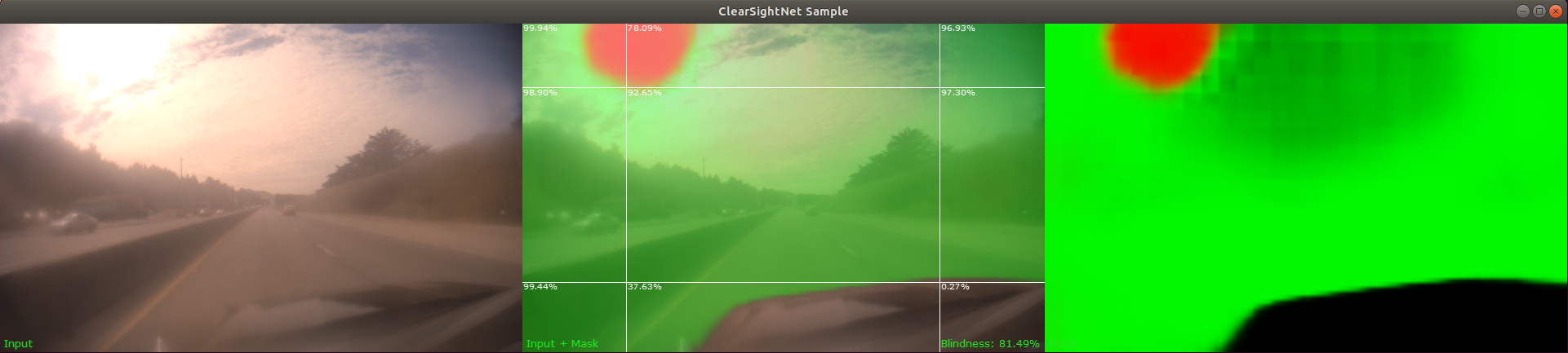
154 @note A red overlay in the sample indicates fully blocked or blind regions,
155 green overlay indicates partially blocked or blurred regions and blue overlay
156 indicates sky regions. In addition, the percentage shown at the top-left
157 corner of each sub-region is the corresponding value in `regionBlindnessRatio`
160 @section dwx_clearsightnet_sample_more Additional Information
162 For more details see @ref clearsightnet_mainsection.