1 # Copyright (c) 2019-2020 NVIDIA CORPORATION. All rights reserved.
3 @page dwx_sample_dnn_tensor Basic Object Detector Using DNN Tensor Sample
6 @note SW Release Applicability: This sample is available in both **NVIDIA DriveWorks** and **NVIDIA DRIVE Software** releases.
8 @section dwx_sample_dnn_tensor_description Description
10 The Basic Object Detector Using DNN Tensor sample demonstrates how the @ref dnn_group can be used for
11 object detection using `dwDNNTensor`.
13 The sample streams a H.264 or RAW video and runs DNN inference on each frame to
14 detect objects using NVIDIA<sup>®</sup> TensorRT<sup>&tm;</sup> model.
16 The interpretation of the output of a network depends on the network design. In this sample,
17 2 output blobs (with `coverage` and `bboxes` as blob names) are interpreted as coverage and bounding boxes.
19 For each frame, it detects the object locations, uses `dwDNNTensorStreamer` to get the output of the inference from GPU to CPU, and finally traverses through the tensor to extract the detections.
21 @section dwx_sample_dnn_tensor_sample_running Running the Sample
23 The Basic Object Detector Using dwDNNTensor sample, `sample_dnn_tensor`, accepts the following optional parameters. If none are specified, it performs detections on a supplied pre-recorded video.
25 ./sample_dnn_tensor --input-type=[video|camera]
26 --video=[path/to/video]
27 --camera-type=[camera]
28 --camera-group=[a|b|c|d]
29 --camera-index=[0|1|2|3]
31 --tensorRT_model=[path/to/TensorRT/model]
35 --input-type=[video|camera]
36 Defines if the input is from live camera or from a recorded video.
37 Live camera is supported only on NVIDIA DRIVE platforms.
40 --video=[path/to/video]
41 Specifies the absolute or relative path of a raw or h264 recording.
42 Only applicable if --input-type=video
43 Default value: path/to/data/samples/sfm/triangulation/video_0.h264.
45 --camera-type=[camera]
46 Specifies a supported AR0231 `RCCB` sensor.
47 Only applicable if --input-type=camera.
48 Default value: ar0231-rccb-bae-sf3324
50 --camera-group=[a|b|c|d]
51 Specifies the group where the camera is connected to.
52 Only applicable if --input-type=camera.
55 --camera-index=[0|1|2|3]
56 Specifies the camera index on the given port.
60 Setting this parameter to 1 when running the sample on Xavier B allows to access a camera that
61 is being used on Xavier A. Only applicable if --input-type=camera.
64 --tensorRT_model=[path/to/TensorRT/model]
65 Specifies the path to the NVIDIA<sup>®</sup> TensorRT<sup>™</sup>
67 The loaded network is expected to have a coverage output blob named "coverage" and a bounding box output blob named "bboxes".
68 Default value: path/to/data/samples/detector/<gpu-architecture>/tensorRT_model.bin, where <gpu-architecture> can be `Pascal` or `Volta`.
70 @note This sample loads its DataConditioner parameters from DNN metadata JSON file.
71 To provide the DNN metadata to the DNN module, place the JSON file in the same
72 directory as the model file. An example of the DNN metadata file is:
74 data/samples/detector/pascal/tensorRT_model.bin.json
76 @subsection dwx_sample_dnn_tensor_sample_examples Examples
82 The video file must be a H.264 or RAW stream. Video containers such as MP4, AVI, MKV, etc. are not supported.
84 #### To run the sample on a video on NVIDIA DRIVE or Linux platforms with a custom TensorRT network
86 ./sample_dnn_tensor --input-type=video --video=<video file.h264/raw> --tensorRT_model=<TensorRT model file>
88 #### To run the sample on a camera on NVIDIA DRIVE platforms with a custom TensorRT network
90 ./sample_dnn_tensor --input-type=camera --camera-type=<rccb_camera_type> --camera-group=<camera group> --camera-index=<camera idx on camera group> --tensorRT_model=<TensorRT model file>
92 where `<rccb_camera_type>` is a supported `RCCB` sensor.
93 See @ref supported_sensors for the list of supported cameras for each platform.
95 @section dwx_sample_dnn_tensor_sample_output Output
97 The sample creates a window, displays the video streams, and overlays detected bounding boxes of the objects.
99 The color coding of the overlay is:
101 - Red bounding boxes: Indicate detected objects.
102 - Yellow bounding box: Identifies the region which is given as input to the DNN.
104 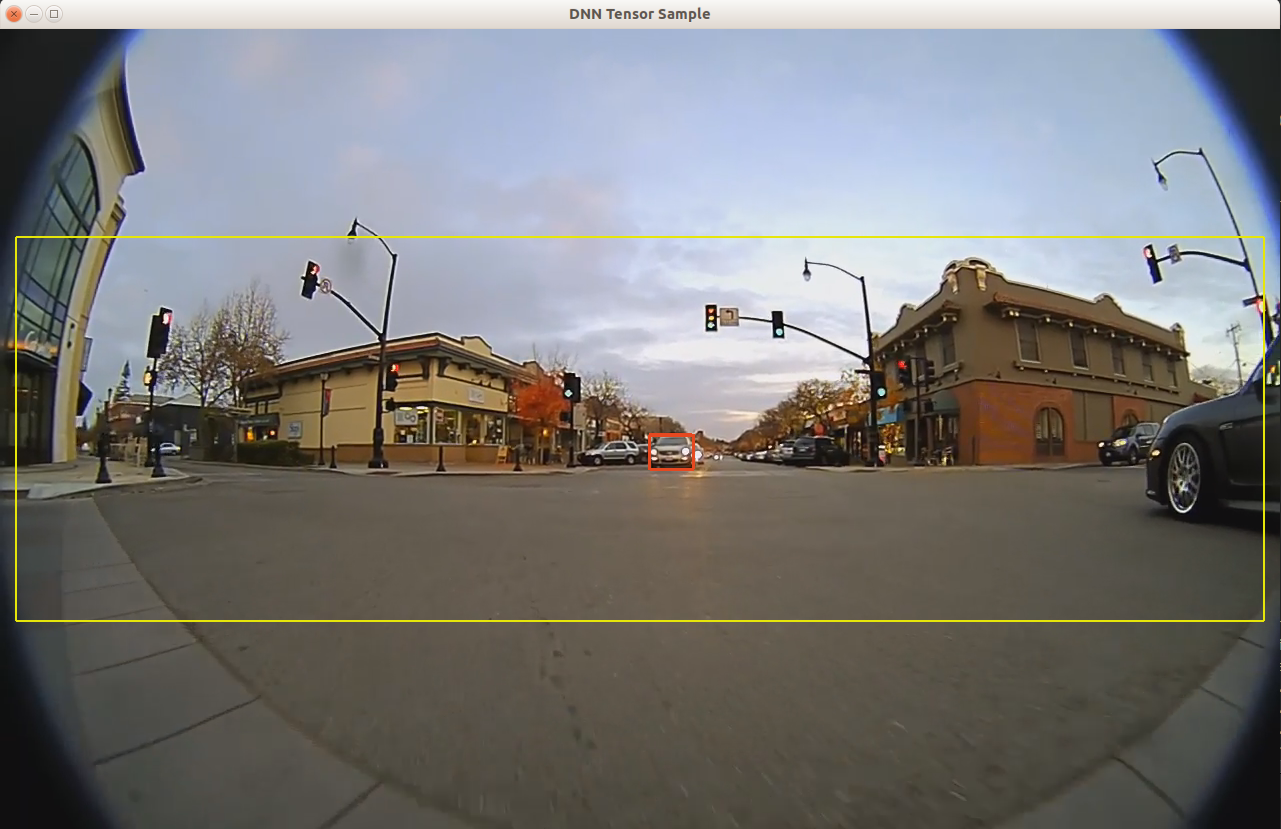
106 @section dwx_sample_dnn_tensor_sample_more Additional Information
108 For more information, see:
109 - @ref dnn_mainsection
110 - @ref dataconditioner_mainsection