1 # Copyright (c) 2019-2020, NVIDIA CORPORATION. All rights reserved.
3 @page dwx_landmark_detection_by_regressor_net_sample Regressor-based Landmark Detection Sample (MapNet)
6 @note SW Release Applicability: This sample is available in **NVIDIA DRIVE Software** releases.
8 @section dwx_lane_detection_by_lrn_description Description
10 The Regressor-based and End-to-End Landmark Detection sample demonstrates how to use the NVIDIA<sup>®</sup>
11 proprietary deep neural network (DNN) MapNet to perform lane marking detection<br>
12 and landmark detection on the road. It detects the lane you are in (ego-lane),
13 and the left and right adjacent lanes when they are present. Landmarks include<br>
14 vertical poles, intersection markings (e.g., crosswalks) and roadmarkings (e.g., arrows) on the road.<br>
15 MapNet has been trained with RCB images and its performance is invariant to RGB encoded H.264 videos.
17 This sample can also stream a H.264 or RAW video and computes the multi-class likelihood map of
18 lane markings on each frame. A user assigned<br>
19 threshold value binarizes a likelihood map into clusters of lane markings, then image post-processing steps are employed to fit polylines onto the lane clusters<br>
20 and assign them with lane position and appearance types. The sample can also be operated with cameras.
24 The image datasets used to train MapNet have been captured by a View Sekonix Camera Module (SF3324/5)
25 with AR0231 RCCB sensor.<br>
26 The camera is mounted high up at the rear view mirror position. Demo videos are captured at 2.3 MP and down-sampled to 960 x 604.
28 To achieve the best lane detection performance, adopt a similar camera setup and align
29 the video center vertically with the horizon before recording new videos.
31 @section dwx_landmark_by_lrn_detection_running Running the Sample
33 The Regressor-based and End-to-End Landmark Detection sample, `sample_landmark_detection_by_regressor` accepts the following optional parameters.<br>
34 If none are specified, it will perform detections on supplied pre-recorded video.
36 ./sample_landmark_detection_by_regressor --input-type=[video|camera]
37 --video=[path/to/video]
38 --model-type=[regressor|e2e]
39 --camera-type=[camera]
40 --camera-group=[a|b|c|d]
41 --camera-index=[0|1|2|3]
46 --input-type=[video|camera]
47 Defines if the input is from live camera or from a recorded video.
48 Live camera is only supported on On NVIDIA DRIVE platform.
51 --video=[path/to/video]
52 Is the absolute or relative path of a raw or h264 recording.
53 Only applicable if '--input-type=video'.
54 Default value: path/to/data/samples/laneDetection/video_lane.h264.
56 --model-type=[regressor|e2e]
57 Specifies which type of MapNet model to use for landmark detection.
60 --camera-type=[camera]
61 Is a supported AR0231 `RCCB` sensor.
62 Only applicable if '--input-type=camera'.
63 Default value: ar0231-rccb-bae-sf3324
65 --camera-group=[a|b|c|d]
66 Is the group where the camera is connected to.
67 Only applicable if '--input-type=camera'.
70 --camera-index=[0|1|2|3]
71 Indicates the camera index on the given port.
75 Defines a Region of Interest (ROI) where detections occur:
80 Default value: No ROI.
82 @subsection dwx_landmark_by_lrn_det_examples Examples
84 #### To run the sample on Linux
86 ./sample_landmark_detection_by_regressor --video=<video file.h264>
89 ./sample_landmark_detection_by_regressor --video=<video file.raw>
91 #### To run the sample on an NVIDIA DRIVE platform with cameras
93 ./sample_landmark_detection_by_regressor --input-type=camera --camera-type=<camera_type> --camera-group=<camera_group>
95 where `<camera type>` is a supported `RCCB` sensor.
96 See @ref supported_sensors for the list of supported cameras for each platform.
98 #### To run the End-to-End MapNet (default option)
100 ./sample_landmark_detection_by_regressor --model-type e2e
102 #### To run the regressor based MapNet
104 ./sample_landmark_detection_by_regressor --model-type regressor
106 @note The Regressor-based and End-to-End Landmark Detection sample directly resizes video frames to the network input resolution.<br>
107 To get the best performance, use videos with a similar aspect ratio as the demo video (which has a resolution of 960 x 600).<br>
108 You can also set a Region of Interest (ROI) to perform inference on a sub-window of the full frame.
110 @section dwx_landmark_by_lrn_detection_sample_output Output
112 MapNet creates a window and displays the final landmark polyline outputs overlaid on top of the video.<br>
113 The polyline colors represent the detected landmark attribute type as follows:
116 - Red: Solid lane marking.
117 - Blue: Dashed lane marking.
118 - Light Gray: Road boundary lane marking.
121 - White: General pole type.
122 - Green: Roadsign pole type.
123 - Dark green: Light pole type.
124 - Light green: Utility pole type.
128 - Dark Blue: Crosswalk type.
129 - Orange: Intersection type.
130 - Purple: Crossing intersection type.
131 - Pink: Gore area type.
134 - Cyan: Road text shape marking.
136 Numbers are displayed on top of landmark detections indicating a track ID for a specific detection.<br>
137 This track ID is a number that corresponds to the same detection(such as a lane) across camera frames so the same lane detected in multiple frames will have the same track ID associated with it.<br>
138 The letter E is appended in front of a track ID to indicate a landmark (poles, intersections, road markings) other than lanes to differentiate lane tracks from other landmark tracks.
140 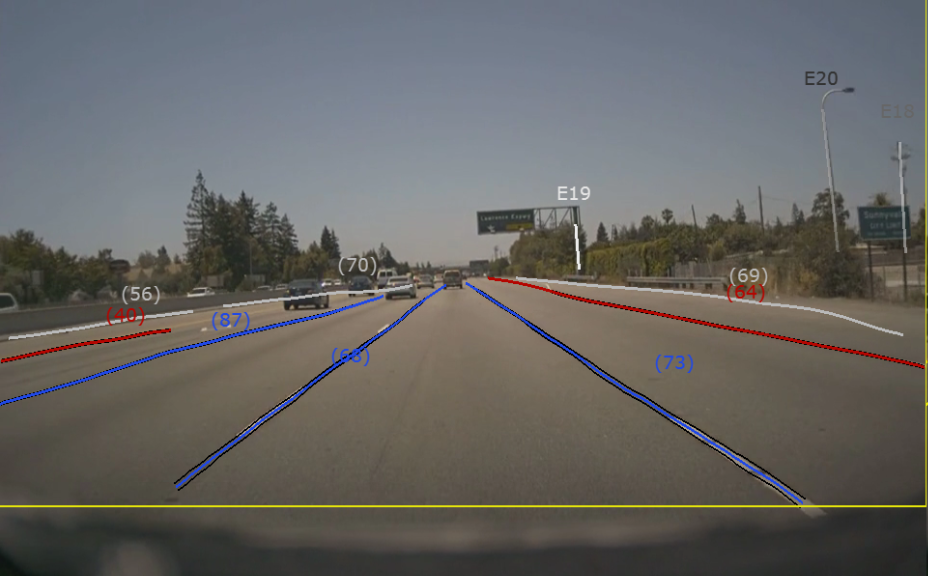
142 @section dwx_landmark_by_lrn_det_more Additional Information
144 For more details see @ref landmarks_mainsection.