1 # Copyright (c) 2019-2020, NVIDIA CORPORATION. All rights reserved.
3 @page dwx_hd_map_access_sample Map Access Sample
6 @note SW Release Applicability: This sample is available in **NVIDIA DRIVE Software** releases.
8 @section dwx_hd_map_access_description Description
10 The Map Access sample demonstrates how to access map data from the @ref maps_mainsection module. The sample
11 mimics a car driving along a GPS path, visualizing the map around the car.
12 The map geometry is stored as polylines of WGS84 coordinate points. It shows
13 how to query the map data around a current position, how to transform the
14 geometry into a local Cartesian coordinate space, and how to render that
15 data from various views.
17 @section dwx_hd_map_access_running Running the Sample
19 The command line for the Map Access sample, sample_mapaccess, is:
23 The sample plays automatically, running through a fixed route of GPS points.
25 While the application is running the following actions are possible:
27 - 'F1' displays controls on screen.
28 - 'Esc' closes the application.
29 - 'Spacebar' pauses the application.
30 - 'Mouse Wheel' allows to control camera zoom.
31 - 'right' mouse button allow to move the camera when the sample is paused.
32 - 'Up' and 'Down' arrow keys move the vehicle forward or backward.
34 @section dwx_hd_map_access_output Output
36 The output window is split into 3 parts:
37 - left side showing an overview of complete map data.
38 - middle showing a zoomed top view of the current location.
39 - right side showing the current view from a car driving along the GPS path.
43 - Blue lines = all lane divider lines.
44 - White lines = local non-traversable lane divider lines.
45 - Green lines = local traversable lane divider lines.
46 - Grey lines = local invisible lane divider lines.
47 - Yellow Box = current car position.
49 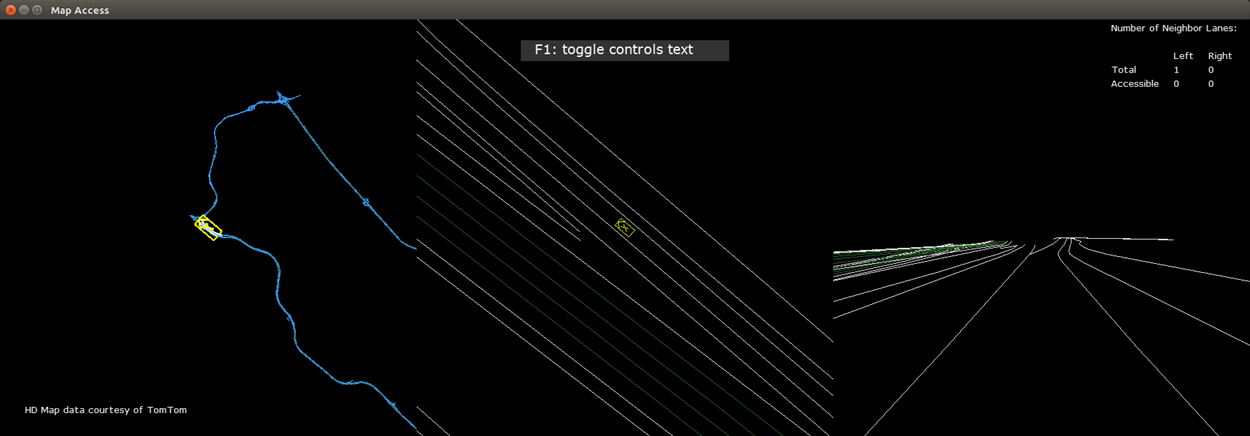
51 @section dwx_hd_map_access_more Additional Information
53 This sample contains an NVIDIA<sup>®</sup> DriveWorks map format representation of TomTom HD Maps. This data is for evaluation purposes only and may not be used for any commercial application without prior approval from TomTom. Further restrictions to the use of this data are set out in your evaluation agreement with NVIDIA.
55 The NVIDIA<sup>®</sup> DriveWorks @ref dwx_maptool_tomtom_to_dw_maps contains the TomTom AutoStream Client software, owned by TomTom. This tool can download TomTom HD Maps from the TomTom AutoStream server and generate DriveWorks maps files. Users will need to contact TomTom to obtain a license and credentials to access TomTom AutoStream HD Maps.
57 To learn more about TomTom HD Maps, see: <br>
58 <a href="https://www.tomtom.com/automotive/automotive-solutions/automated-driving/hd-map-roaddna/" target="_blank">
59 https://www.tomtom.com/automotive/automotive-solutions/automated-driving/hd-map-roaddna/
62 For more details see @ref maps_mainsection.