2 * Copyright (c) 2019-2020, NVIDIA CORPORATION. All rights reserved.
4 * NVIDIA Corporation and its licensors retain all intellectual property
5 * and proprietary rights in and to this software, related documentation
6 * and any modifications thereto. Any use, reproduction, disclosure or
7 * distribution of this software and related documentation without an express
8 * license agreement from NVIDIA Corporation is strictly prohibited.
11 @page dwx_intrinsics_constraints Intrinsics Constraints Tool
14 @section dwx_intrinsics_constraints_description Description
16 The NVIDIA<sup>®</sup> DriveWorks Intrinsics Constraints tool extracts intrinsics constraints used during
17 calibration for each individual camera. It takes any of the following as input:
19 - A [recorded video with a checkerboard pattern](@ref dwx_intrinsics_constraints_checkerboard).
20 - A [recorded video with an AprilTag target](@ref dwx_intrinsics_constraints_AprilTag_video) moved in front of the cameras.
21 - A [sequence of still frames containing the AprilTag target](@ref dwx_intrinsics_constraints_AprilTag_still) in front of the cameras. This is useful when modelling the intrinsics for DLSR cameras.
23 It then exports all required constraints in a JSON file, placed in the `intrinsics` subfolder in the directory structure.
25 @section dwx_intrinsics_constraints_prerequisites Prerequisites
27 This tool is available on the x86 Host System and NVIDIA DRIVE<sup>™</sup> OS Linux.
29 This tool creates output files that are placed into the current working directory by default. Please ensure the following for your convenience:
30 - Write permissions are enabled for the current working directory.
31 - Include the tools folder in the binary search path of the system.
32 - Execute from your home directory.
34 @section dwx_intrinsics_constraints_usage Running the Tool
36 The Intrinsics Constraints tool accepts the following parameters. Several of these parameters are required based on the input type.<br>
37 For more information, please refer to the @ref dwx_intrinsics_constraints_examples.
39 ./calibration-intrinsics-constraints --use-checkerboard=12x9
40 --targetDB=[targetDB_file_path]
41 --input-video=/[video_path]/camera-0.h264
42 --input-folder=[folder_path]
43 --output=/[calib_data_path]/intrinsics/camera-0.json
44 --camera-model=[ftheta]
45 --rig=[path/to/rig/file]
49 @subsection dwx_intrinsics_constraints_parameters Parameters
51 --use-checkerboard=[NxN checkerboard grid]
52 Description: The input NxN checkerboard grid.
53 Example: --use-checkerboard=12x9
55 --targetDB=[path to targetDB file, default=]
56 Description: Path to AprilTag target database. Enables detection of AprilTag targets. Either this or [targetDB] must be supplied.
58 --apriltags=[{CPU, CPU_FAST, GPU}, default=CPU]
59 Description: April tag detection backend. The CPU backend is most accurate, while CPU_FAST/GPU provide faster but potentially less accurate detections.
61 --input-video=[path to input video]
62 Description: The file path where the input video is, for checkerboards and AprilTag videos.
64 --input-folder=[path to input folder]
65 Description: The file path where the input folder is, for still frames with AprilTag targets.
67 --output=[path to output file]
68 Description: The file path where the intrinsics constraints will be saved.
69 If this parameter is blank, they will automatically be saved to '[input-video].json'.
71 --camera-model=[camera model, default=ftheta]
72 Description: Camera model used for calibration. Available options are: [pinhole, ocam, ftheta]. The camera model is not used in any way for extracting the constraints. It is passed directly into the produced json file and may be used by other tools.
74 --rig=[path to rig file, default=]
75 Description: Rig file with initial guess of camera intrinsics. Only available for `ftheta` calibration.
77 --max-constraints=[integer, default=0]
78 Description: If non-zero, the maximum number of constraints after which stopping the intrinsic constraint extraction process.
80 --skipFrameCount=[integer, default=0]
81 Description: Number of frames to skip at the beginning of the video.
83 @section dwx_intrinsics_constraints_examples Examples
85 @subsection dwx_intrinsics_constraints_checkerboard For a 12x9 Checkerboard
87 ./calibration-intrinsics-constraints --use-checkerboard=12x9
88 --input-video=/[video_path]/camera-0.h264
89 --output=/[calib_data_path]/intrinsics/camera-0.json
91 @subsection dwx_intrinsics_constraints_AprilTag_video For an AprilTag Video
93 ./calibration-intrinsics-constraints --targetDB=/[calib_data_path]/targets.json
94 --input-video=/[video_path]/camera-0.h264
95 --output=/[calib_data_path]/intrinsics/camera-0.json
97 @subsection dwx_intrinsics_constraints_AprilTag_still For a Sequence of Still Frames with an AprilTag Target
99 ./calibration-intrinsics-constraints --targetDB=/[calib_data_path]/targets.json
100 --input-folder=[folder_path]
101 --output=/[calib_data_path]/intrinsics/external.json
103 @section dwx_intrinsics_constraints_output Output
105 The tool will open a window playing back the input video and indicate with a red or green border if a new intrinsic constraint has been collected (i.e. target or checkerboard has been found)
107 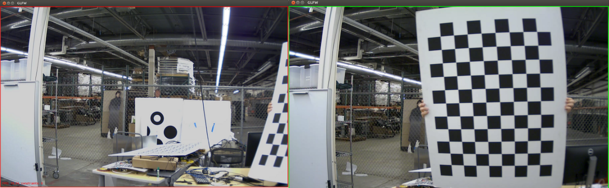
109 @warning For correct results, the tool must be able to find at least 30
110 checkerboard squares per camera.