Camera Color Correction Sample
Table of Contents
Description
The Camera Color Correction sample demonstrates H.264 playback with color correction. The sample opens a window to play back the 4 provided video files and corrects their color based on a selected master camera index.
- Note
- The sample performs color correction by reprojecting all cameras into a common plane, where the common plane is the ground plane. Further, when color correction is enabled, the sample equalizes the hue of the ground texture to the selected master camera. As a result, other parts of the image may have hues that appear slightly different than you might intuitively expect.
The sample uses the NvMedia engine to decode the stream.
Running the Sample
The command line for the Camera Color Correction sample is:
./sample_color_correction --factor=[0.0f...1.0f]
                          --ref=[0|1|2|3]
                          --rig=[path/to/rig/file]
                          --video1=[path/to/the/first/video]
                          --video2=[path/to/the/second/video]
                          --video3=[path/to/the/third/video]
                          --video4=[path/to/the/fourth/video]
where
--factor=[0.0f...1.0f]
    Specifies the color correction factor. 0 means no correction (original video) and 1 means fully using the master camera's color.
    Default value: 0.8

--ref=[0|1|2|3]
    Specifies the reference camera.
    Default value: 2

--rig=[path/to/rig/file]
    Points to the rig file that contains calibration information.
    Default value: path/to/data/samples/sfm/triangulation/rig.json

--video1=[path/to/the/first/video]
    Points to a video recorded from the first camera.
    Default value: path/to/data/samples/sfm/triangulation/video_0.h264

--video2=[path/to/the/second/video]
    Points to a video recorded from the second camera.
    Default value: path/to/data/samples/sfm/triangulation/video_1.h264

--video3=[path/to/the/third/video]
    Points to a video recorded from the third camera.
    Default value: path/to/data/samples/sfm/triangulation/video_2.h264

--video4=[path/to/the/fourth/video]
    Points to a video recorded from the fourth camera.
    Default value: path/to/data/samples/sfm/triangulation/video_3.h264
To activate or deactivate color correction while the sample is running, press the C key.
Examples
To run the sample with four videos
./sample_color_correction --video1=filename1 --video2=filename2 --video2=filename3 --video2=filename4
To run the sample with a specific rig configuration file
./sample_color_correction --rig=filename'
To run the sample with a specific reference camera
./sample_color_correction --ref=3
To run the sample with a specific correction factor
./sample_color_correction --factor=0.75
Output
The sample creates a window and displays four videos.
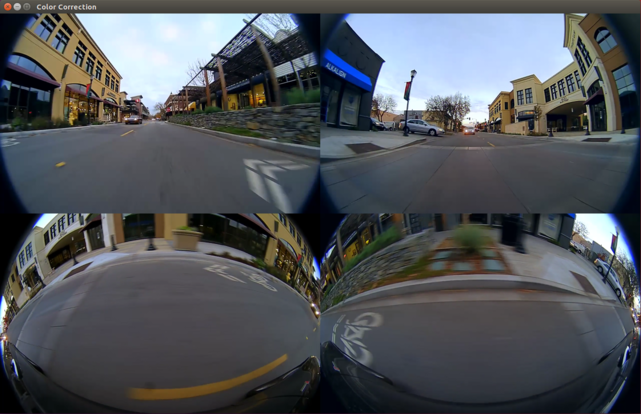
Four parallel H.264 streams
Additional Information
For more information, see Camera Color Correction.