1 # Copyright (c) 2019-2020 NVIDIA CORPORATION. All rights reserved.
3 @page isp_mainsection Image Signal Processing (ISP)
6 @section isp_mainsection_intro Introduction
8 The NVIDIA<sup>®</sup> DriveWorks Image Signal Processing (ISP) Pipeline processes raw images acquired from GMSL cameras and outputs images that can be used for human vision (HV) or machine vision (MV) applications. Refer to Figure 1 for the DriveWorks ISP Pipeline for common use cases.
10 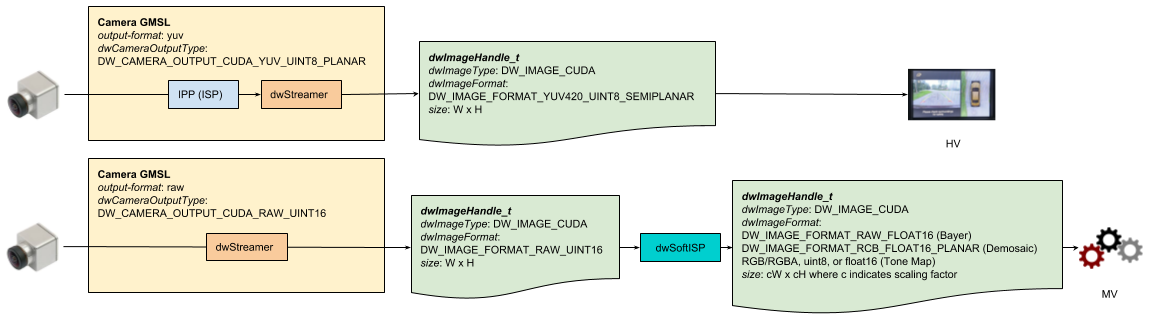
12 The ISP is a hardware component on the DRIVE platform whose interface resides in the lower level NvMedia API (Image Processing Pipeline - IPP) used by the camera sensor (see @ref camera_mainsection). This HW ISP is automatically triggered by the camera sensor (gmsl) when a processed image is requested by the user. The output is suitable for HV applications. As it currently stands, the user has no control over this HW ISP component, besides the creation of it by means of camera parameters (see @ref dwx_camera_sample). If no processed output is requested, then the HW ISP component will not be activated and the camera sensor would output non-processed raw images (see @ref camera_mainsection for the details about output formats).
14 For MV vision applications, a more flexible Software ISP component exists, which operates in a different and independent way of the camera sensor. In order to be able to use this component, a RAW image must be acquired by the camera sensor (HW ISP off) or read from a video source (For information on recording and replaying, see: @ref dwx_recording_tools and @ref dwx_recording_devguide_group) and given to the SoftISP. The processed image output depends on the setup of the SoftISP and its use cases include deep learning inference.
16 Recording using the DriveWorks Recording Tools is available for both of the HW and Soft ISP paths; however, the format of the stored images and subsequent usage is dependent on the path. Images produced through HW ISP can be recorded in .h264 or .h265 format; playback of these recorded images is suitable for HV use cases only. In the Soft ISP path, RAW (or LRAW) images can be captured prior to entering Soft ISP processing. During playback of RAW images, DriveWorks provides the capability to perform Soft ISP processing on these stored images so that they can been used in downstream MV algorithms.
18 
20 @section isp_mainsection_assumptions Assumptions
22 The SoftISP is optimized for specific modules of ar0231 Sekonix cameras, where the supported module is dependent on the NVIDIA DRIVE platform. These cameras output RAW images with Bayer patterns of RCCB/RCCC. The pipeline also assumes Bracketed Auto Exposure (BAE) control. For more information, see @ref camera_mainsection.
24 SoftISP is available for the following sensors on NVIDIA DRIVE<sup>™</sup> AGX Developer Kit:
26 - ar0231-rccb-bae-sf3325, Sekonix rev 7
27 - ar0231-rccb-bae-sf3324, Sekonix rev 7
29 There is limited capability with CCCC for ar0144 cameras.
31 @section isp_mainsection_pipeline ISP Pipeline
33 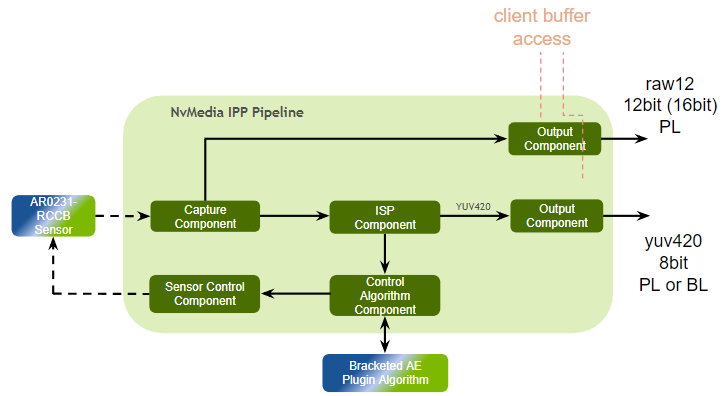
35 @subsection isp_mainsection_pipeline_hw Hardware ISP for HV Use Cases
37 The NvMedia ISP component processes Bayer images to YUV formatted images using Xavier-configurable ISP hardware (HW ISP). Refer to the "Image Processing and Management" section in the *NVIDIA DRIVE OS 5.1 Linux Development Guide* for more information.
39 @subsection isp_mainsection_pipeline_sw Software ISP for MV Use Cases
41 The DriveWorks SoftISP module processes RAW12 RCCB images into images that are compatible with subsequent DriveWorks MV applications, such as DriveNet. Unlike the NvMedia IPP framework, DriveWorks ISP processing is not done in the ISP hardware, but in software (Soft ISP). The DriveWorks Soft ISP flow is depicted in Figure 4.
43 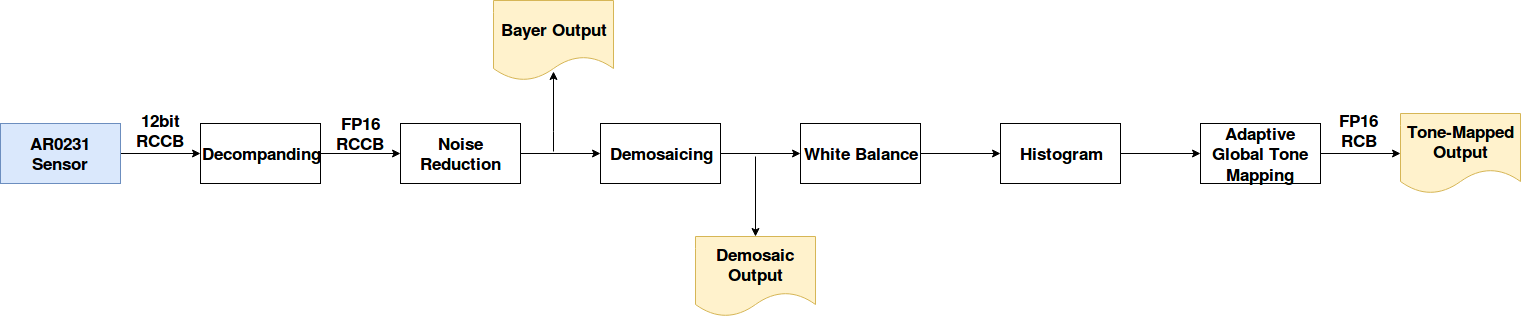
45 @section softisp SoftISP Module Overview
47 The SoftISP module functions as a pipeline with multiple outcomes and outputs, depending on configuration. The input is a raw image from camera or from raw/lraw video and the input parameters are the size of the input image, the camera raw format, and the tone map type. The output is one, two, or all three of the following images:
52 @subsection softisp_bayer Bayer
53 The Bayer output is enabled only if the following conditions are satisfied:
54 - The requested output type, @ref dwSoftISPProcessType enum, is `::DW_SOFTISP_PROCESS_TYPE_BAYER`
55 - The @ref dwSoftISPDenoiseMethod enum is set to `::DW_SOFTISP_DENOISE_METHOD_BILATERAL`.
56 - The User has allocated a Bayer output image with the properties from dwSoftISP_getBayerImageProperties() and bound with dwSoftISP_bindOutputBayer().
58 In this case, the module decompands the raw input and applies a bilateral filter. It then stores the result in the bound image.
60 @subsection softisp_demosaic Demosaic
61 The demosaic output is enabled if the following conditions are satisfied:
62 - The requested output type, @ref dwSoftISPProcessType enum, is `::DW_SOFTISP_PROCESS_TYPE_DEMOSAIC`
63 - The User has allocated an image with the properties from dwSoftISP_getDemosaicImageProperties() and bound with dwSoftISP_bindOutputDemosaic().
65 In this case, the bound image will contain a demosaiced non-raw, RCB/RCC float16 image.
67 @subsection softisp_tonemap Tone Map
68 The tone-mapped output is enabled if the following conditions are satisifed:
69 - The requested output type, @ref dwSoftISPProcessType enum, is `::DW_SOFTISP_PROCESS_TYPE_TONEMAP`
70 - The User has allocated an image using the properties of the demosaiced image, with the exception of the format, which can be RGB/RGBA, uint8, or float16.
71 - A demosaic image must be allocated and bound even if the requested output is not demosaic (see table below).
72 - The SoftISP has been created with a `dwTonemapType` set in the parameters using dwSoftISP_setTonemapType().
74 @section softisp_behavior SoftISP Behavior
76 The following table specifies the behavior and characteristics of the SoftISP.
78 The Pipeline Behavior column describes the expected processing behavior given the configuration. The "state" of the ISP depends solely on what images are bound and the parameters given, so
79 no memory is implicitly stored. For this reason we show special behaviors that might be less intuitive. Failure cases are also included for completeness. The different behaviors are shown for informative purposes, we advise the user to always go for the most efficient path.
83 - Output : The output image types, based on @ref dwSoftISPProcessType. For convenience, the the values used in this column are given by:
84 - bayer = `::DW_SOFTISP_PROCESS_TYPE_BAYER`, note that when this output is requested, a valid denoise method must be set
85 - demosiac = `::DW_SOFTISP_PROCESS_TYPE_DEMOSAIC`
86 - tonemap = `::DW_SOFTISP_PROCESS_TYPE_TONEMAP`
87 - Note that there can be 1, 2, or 3 output images, depending on configuration.
88 - bound : the image X corresponding to Bayer, Demosaic or Tonemap has been bound to the SoftISP through dwSoftISP_bindOutputX
89 - unbound : the image X corresponding to Bayer, Demosaic or Tonemap has not been bound (default or by binding a nullptr)
90 - any : any state, won't influence the behavior
91 - -> : the processing steps are sequential
92 - & : the processing steps are performed in one pass
94 - raw : raw image bound by dwSoftISP_bindInputRaw()
95 - bayer : The bayer image currently bound by dwSoftISP_bindOutputBayer() will be used as input instead of the raw image.
97 | Output | Bayer | Demosaic | Tonemap |@ref dwSoftISPDenoiseMethod | Input | Pipeline Behavior | Comment |
98 |:----------------------:|:---------:|:---------:|:-----------:|:--------------------: |:--:|:-----------------------------:|:--:|
99 | bayer | bound | any | any |`::DW_SOFTISP_DENOISE_METHOD_BILATERAL`|raw| debayering | |
100 | bayer+demosaic | bound | bound | any |`::DW_SOFTISP_DENOISE_METHOD_BILATERAL`|raw| debayering&demosaicing | |
101 | demosaic | unbound | bound | any |any |raw| demosaicing | |
102 | demosaic | bound | bound | any |any |bayer| demosaicing | |
103 | demosaic+tonemap | bound | bound | bound |any |raw| demosaicing->tonemapping | |
104 | demosaic+tonemap | unbound | bound | bound |any |bayer| demosaicing->tonemapping | |
105 | bayer+demosaic+tonemap | bound | bound | bound |`::DW_SOFTISP_DENOISE_METHOD_BILATERAL`|raw| debayering&demosaicing->tonemapping | |
106 | bayer+tonemap | bound | any | bound |any |any| FAIL | demosaic must be requested as output when tonemap is requested |
107 | tonemap | any | unbound | bound |any |any| FAIL | demosaic must be also bound when tonemap is requested |
108 | tonemap | any | bound | bound |any |demosaic| demosaicing->tonemaping | |
110 Any deviation from the above table, will result in either failure or undefined behavior.
113 | bayer+demosaic | bound | bound | any |::DW_SOFTISP_DENOISE_METHOD_BILATERAL| raw | debayer&demosaic |
115 Interpretation: You have set @ref dwSoftISPProcessType to `::DW_SOFTISP_PROCESS_TYPE_BAYER` \| `::DW_SOFTISP_PROCESS_TYPE_DEMOSAIC`, you have called dwSoftISP_bindOutputBayer(), dwSoftISP_bindOutputDemosaic(), and optionally dwSoftISP_bindOutputTonemap(). The resultant pipeline will take the raw input and perform bayer and demosaicing together and output a Bayer image and a Demosaiced image.
118 | demosaic | bound | bound | any |any | bayer | demosaic |
120 Interpretation: You have set @ref dwSoftISPProcessType to `::DW_SOFTISP_PROCESS_TYPE_DEMOSAIC`, you have called dwSoftISP_bindOutputBayer(), dwSoftISP_bindOutputDemosaic(), and optionally dwSoftISP_bindOutputTonemap(). The resultant pipeline will take Bayer input and output a demosaiced image.
123 The following table shows outputs based on Pipeline Behavior of the bayer and demosaic steps. (DW_IMAGE_FORMAT is omitted). Please see the above description for Pipeline Behavior.
125 | Pipeline Behavior | Demosaic ROI | @ref dwSoftISPDemosaicMethod | Input | Bayer Output |Demosaic Output|Comment |
126 |:------------------:|:---------------:|:----------------------:|:--------------:|:------------------:|:-----:|:-----: |
127 |raw->demosaic |Full Image (WxH) |DEMOSAIC\_DOWNSAMPLE |RAW_UINT16, WxH|n.a.|RCB_FLOAT16, W/2xH/2|Optimized path (Fused Kernel) |
128 |raw->demosaic |Subregion (CWxCH)|DEMOSAIC\_DOWNSAMPLE |RAW_UINT16, WxH|n.a.|RCB_FLOAT16, CW/2xCH/2|- |
129 |raw->demosaic |Full Image (WxH) |DEMOSAIC\_INTERPOLATION |RAW_UINT16, WxH|n.a.|RCB_FLOAT16, WxH|- |
130 |raw->demosaic |Subregion (CWxCH)|DEMOSAIC\_INTERPOLATION |RAW_UINT16, WxH|n.a.|RCB_FLOAT16, CWxCH|- |
131 |raw->bayer |Full Image (WxH) |DEMOSAIC\_DOWNSAMPLE |RAW_UINT16, WxH|RAW_FLOAT16, WxH|n.a.|- |
132 |raw->bayer |Subregion (CWxCH)|DEMOSAIC\_DOWNSAMPLE |RAW_UINT16, WxH|RAW_FLOAT16, WxH|n.a.|- |
133 |raw->bayer |Full Image (WxH) |DEMOSAIC\_INTERPOLATION |RAW_UINT16, WxH|RAW_FLOAT16, WxH|n.a.|- |
134 |raw->bayer |Subregion (CWxCH)|DEMOSAIC\_INTERPOLATION |RAW_UINT16, WxH|RAW_FLOAT16, WxH|n.a.|- |
135 |bayer->demosaic |Full Image (WxH) |DEMOSAIC\_DOWNSAMPLE |RAW_FLOAT16, WxH |n.a.|RCB_FLOAT16, W/2xH/2 |- |
136 |bayer->demosaic |Subregion (CWxCH)|DEMOSAIC\_DOWNSAMPLE |RAW_FLOAT16, WxH |n.a.|RCB_FLOAT16, CW/2xCH/2|- |
137 |bayer->demosaic |Full Image (WxH) |DEMOSAIC\_INTERPOLATION |RAW_FLOAT16, WxH |n.a.|RCB_FLOAT16, WxH |- |
138 |bayer->demosaic |Subregion (CWxCH)|DEMOSAIC\_INTERPOLATION |RAW_FLOAT16, WxH |n.a.|RCB_FLOAT16, CWxCH |- |
139 |raw->bayer&demosaic |Full Image (WxH) |DEMOSAIC\_DOWNSAMPLE |RAW_UINT16, WxH|RAW_FLOAT16, WxH |RCB_FLOAT16, W/2xH/2|Optimized path (Fused Kernel) |
140 |raw->bayer&demosaic |Subregion (CWxCH)|DEMOSAIC\_DOWNSAMPLE |RAW_UINT16, WxH|RAW_FLOAT16, WxH |RCB_FLOAT16, CW/2xCH/2|- |
141 |raw->bayer&demosaic |Full Image (WxH) |DEMOSAIC\_INTERPOLATION |RAW_UINT16, WxH|RAW_FLOAT16, WxH |RCB_FLOAT16, WxH|- |
142 |raw->bayer&demosaic |Subregion (CWxCH)|DEMOSAIC\_INTERPOLATION |RAW_UINT16, WxH|RAW_FLOAT16, WxH |RCB_FLOAT16, CWxCH|- |
144 @note If the starting image format in the Pipeline Behavior section is not raw, then the module assumes that the input is a valid bound image.
146 @note For ar0144 cameras, the output can only be TONEMAP RGB/RGBA uint8.
148 @section isp_mainsection_faqs FAQS
150 Refer to @ref dwx_faq
152 @section softisp_usecases Relevant Tutorials
156 @section softisp_APIs SoftISP APIs