1 # Copyright (c) 2019-2020, NVIDIA CORPORATION. All rights reserved.
3 @page dwx_denseopticalflow_sample Dense Optical Flow Sample
6 @section dwx_denseopticalflow_description Description
8 The Dense Optical Flow module sample demonstrates the Dense Optical Flow pipeline on multiple hardware units:
9 - VIC (Video Image Compositor).
10 - NVIDIA NVENC (NVIDIA Video Encoder).
11 - PVA (Programmable Vision Accelerator).
13 The Dense Optical Flow sample accepts RAW videos, h264 videos, or live camera input data from an AR0231 (revision >= 4) sensor. It then applies an optical flow algorithm to estimate motion vectors between frames.
15 @section dwx_denseopticalflow_sample_running Running the Sample
17 The DenseOpticalFlow sample, sample_denseopticalflow, accepts the following optional parameters. If none are specified, it performs detections on a supplied pre-recorded video.
19 ./sample_denseopticalflow --input-type=[video|camera]
20 --video=[path/to/video]
21 --camera-type=[camera]
22 --camera-group=[a|b|c|d]
23 --camera-index=[0|1|2|3]
24 --estimationMode=[UHP|HP|HQ]
30 --input-type=[video|camera]
31 Defines if the input is from live camera or from a recorded video.
32 Live camera is supported only on NVIDIA DRIVE(tm) platforms.
33 It is not supported on Linux (x86 architecture) host systems.
36 --video=[path/to/video]
37 Specifies the absolute or relative path of a raw, lraw or h264 recording.
38 Only applicable if --input-type=video
39 Default value: path/to/data/samples/stereo/left_1.h264
41 --camera-type=[camera]
42 Specifies a supported AR0231 `RCCB` sensor.
43 Only applicable if --input-type=camera.
44 Default value: ar0231-rccb-bae-sf3324
46 --camera-group=[a|b|c]
47 Is the group where the camera is connected to.
48 Only applicable if --input-type=camera.
51 --camera-index=[0|1|2|3]
52 Indicates the camera index on the given port.
55 --estimationMode=[UHP|HP|HQ]
56 Indicates the quality and the performance of Dense Optical Flow algorithm:
57 - HP: High Performance
58 - UHP: Ultra High Performance
63 Indicates on which Nvidia Video Encoder the corresponding stage of the pipeline is to be executed.
67 Indicates on which PVA engine the corresponding stage of the pipeline is to be executed.
70 @subsection dwx_denseopticalflow_sample_examples Examples
72 ### To run the sample on a video
74 ./sample_denseopticalflow --input-type=video --video=<video file>
76 ### To run the sample on a camera on NVIDIA DRIVE platforms
78 ./sample_dense_opticalflow --input-type=camera --camera-type=<camera type> --camera-group=<camera group> --camera-index=<camera idx on camera group>
80 ### To run the sample on non-default engines
82 ./sample_denseopticalflow --nvencNo=1 --pvaNo=1
85 @section dwx_denseopticalflow_sample_output Output
87 The sample creates a window and displays a video with two sections. The section above demonstrates the original video,
88 whereas the section below shows the result of Dense Optical Flow with color coding presented at https://hci.iwr.uni-heidelberg.de/Correspondence_Visualization/.
90 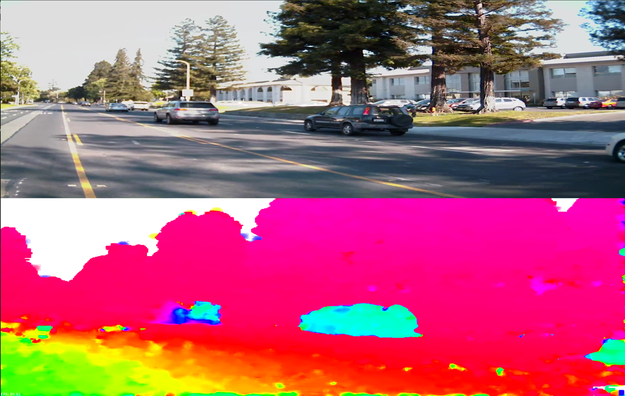
92 @subsection dwx_denseopticalflow_sample_more Additional information
94 For more information, see @ref denseopticalflow_mainsection.