1 # Copyright (c) 2018-2019, NVIDIA CORPORATION. All rights reserved.
3 @page dwx_stereo_disparity_pva_sample Stereo Disparity PVA Sample
6 @section dwx_stereo_disparity_pva_description Description
8 The Stereo Disparity sample demonstrates the stereo pipeline running on multiple hardware engines, namely:
10 - CPU: Input images are converted from YUV420 Semiplanar to Y for the stereo pipeline.
11 - VIC: Input images are transformed according to the requirements of the engines.
12 - PVA: Hints are generated in the preprocessing step, and the output is refined in the postprocessing step.
13 - NVENC: Stereo disparity is computed.
14 - GPU: Operations are performed on the output to get the disparity values.
16 The sample reads frames from two stereo videos and rectifies them on the basis
17 of the camera calibration contained in the rig configuration file. Then, it runs the
18 frames through the stereo pipeline mentioned above and displays final stereo
21 @section dwx_stereo_disparity_pva_running Running the Sample
23 The command line for the sample is:
25 ./sample_stereo_disparity_pva --rigconfig=[path/to/rig/configuration/file]
26 --video-left=[path/to/the/left/video]
27 --video-right=[path/to/the/right/video]
28 --sensor-left=[name/of/left/camera/in/rig/file]
29 --sensor-right=[name/of/right/camera/in/rig/file]
30 --maxDistance=[maximum/distance/in/meters/for/depth/rendering]
31 --estimationMode=[LQ|MQ|HQ]
37 --rigconfig=[path/to/rig/configuration/file]
38 Points to the rig file that contains the intrinsics and extrinsics for the stereo camera.
39 Default value: path/to/data/samples/stereo/full.json
41 --video-left=[path/to/the/left/video]
42 Is the path to the video recorded from the left camera.
43 Default value: path/to/data/samples/stereo/left_1.h264
45 --sensor-left=[name/of/left/camera/in/rig/file]
46 Is the name of the left input sensor in the rig file.
47 Defaul value: left_60FOV
49 --sensor-right=[name/of/right/camera/in/rig/file]
50 Is the name of the right input sensor in the rig file.
51 Defaul value: right_60FOV
53 --video-right=[path/to/the/right/video]
54 Is the path to the video recorded from the right camera.
55 Default value: path/to/data/samples/stereo/right_1.h264
57 --maxDistance=[maximum/distance/in/meters/for/depth/rendering]
58 Maximum distance in meters for depth rendering.
59 Every pixel with a depth greater than maxDistance is rendered as blue
62 --estimationMode=[LQ|MQ|HQ]
63 Indicates the quality and the performance of Stereo algorithm:
70 Indicates on which Nvidia Video Encoder the corresponding stage of the pipeline is to be executed.
74 Indicates on which PVA engine the corresponding stage of the pipeline is to be executed.
77 @section dwx_stereo_disparity_pva_output Output
79 The sample creates a window and displays the disparity view composed by:
81 - Left: Anaglyph of left and right image
82 - Right: Stereo disparity
84 The stereo output is color coded for clarity.
86 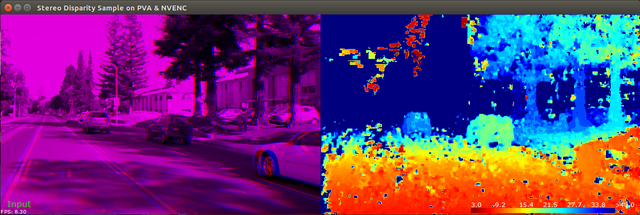
88 @section dwx_stereo_disparity_pva_more Additional information
90 For more details see @ref stereo_mainsection .