1 # Copyright (c) 2019-2020, NVIDIA CORPORATION. All rights reserved.
3 @page dwx_stereo_disparity_sample Stereo Disparity Sample
6 @section dwx_stereo_disparity_description Description
8 The Stereo Disparity sample demonstrates the stereo pipeline.
10 The sample reads frames from two stereo videos and rectifies them on the basis
11 of the camera calibration contained in the rig configuration file. Then, it runs the
12 frames through the stereo pipeline and displays a confidence map and final stereo
15 @section dwx_stereo_disparity_running Running the Sample
17 The command line for the sample is:
19 ./sample_stereo_disparity --rigconfig=[path/to/rig/configuration/file]
20 --video-left=[path/to/the/left/video]
21 --video-right=[path/to/the/right/video]
22 --sensor-left=[name/of/left/camera/in/rig/file]
23 --sensor-right=[name/of/right/camera/in/rig/file]
26 --maxDisparity=[maximum/disparity/for/stereo/match]
27 --maxDistance=[maximum/distance/in/meters/for/depth/rendering]
31 --rigconfig=[path/to/rig/configuration/file]
32 Points to the rig file that contains the intrinsics and extrinsics for the stereo camera.
33 Default value: path/to/data/samples/stereo/full.json
35 --video-left=[path/to/the/left/video]
36 Is the path to the video recorded from the left camera.
37 Default value: path/to/data/samples/stereo/left_1.h264
39 --sensor-left=[name/of/left/camera/in/rig/file]
40 Is the name of the left input sensor in the rig file.
41 Defaul value: left_60FOV
43 --sensor-right=[name/of/right/camera/in/rig/file]
44 Is the name of the right input sensor in the rig file.
45 Defaul value: right_60FOV
47 --video-right=[path/to/the/right/video]
48 Is the path to the video recorded from the right camera.
49 Default value: path/to/data/samples/stereo/right_1.h264
52 Defines the pyramid level to display the disparity, depends on the number of levels.
56 If `--single_side` is 0, the sample computes left and right stereo images
57 and performs complete stereo pipeline. Otherwise, it computes only the left
58 image and approximates occlusions by thresholding the confidence map.
61 --maxDisparity=[maximum/disparity/for/stereo/match]
62 Maximum disparity value for stereo matching between left and right camera.
65 --maxDistance=[maximum/distance/in/meters/for/depth/rendering]
66 Maximum distance in meters for depth rendering.
67 Every pixel with a depth greater than maxDistance is rendered as blue
70 It is possible to use keyboard input to change parameters at runtime:
72 0-6: changes the level of refinement (0 no refinement)
73 O : toggles occlusions
74 K : infills occlusions (only if on)
75 +,-: changes invalidy threshold (appears as white pixels)
76 I : toggle horizontal infill of invalidity pixels
77 L : switch between disparity view and rectification view
79 It is possible to left click on the disparity images to obtain the correspoding point depth value.
81 @section dwx_stereo_disparity_output Output
83 The sample creates a window and displays the disparity view composed by:
85 - Top: Anaglyph of left and right image
86 - Bottom: Stereo images
88 The stereo output is color coded for clarity and some pixels are masked if they
89 are occluded or invalid.
91 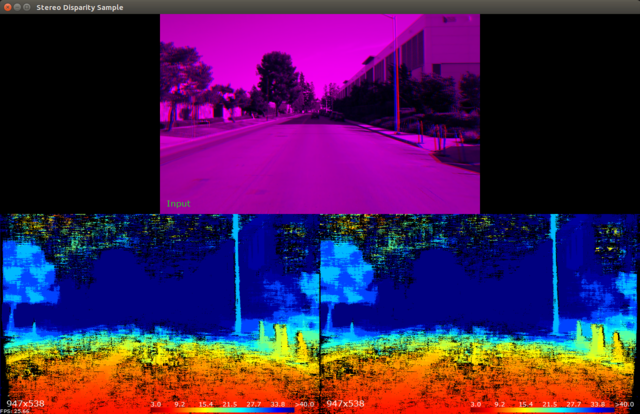
93 By pressing `L` the view switches the rectification view composed by:
94 - Top: Input left and right image with parallel red line showing that epipolar lines are not parallel.
95 - Bottom: Rectified images.
97 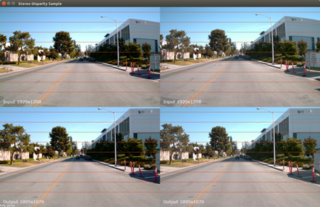
99 @section dwx_stereo_disparity_more Additional information
101 For more details see @ref stereo_mainsection .