1 # Copyright (c) 2019-2020 NVIDIA CORPORATION. All rights reserved.
3 @page dwx_vehicleio_sample VehicleIO Sample
6 @section dwx_vehicleio_description Description
8 The VehicleIO sample demonstrates how to read and write the state of
9 the vehicle actuators (i.e. throttle, brake, steering, etc.) It can talk to
10 different vehicle control systems, one of which is Dataspeed. The
11 @ref vehicleio_mainsection module abstracts the underlying physical protocols and
12 connections. The internal "driver layer" handles the protocol interface and
13 the VehicleIO module handles the state.
15 The VehicleIO sample has been tested with CAN-based Dataspeed vehicle control system and
16 validated with Ford MKZ and Ford Fusion vehicles. To send the
17 steering, brake or throttle commands, use a keyboard or a USB joystick
18 (tested with Logitech Gamepad F310).
20 The VehicleIO sample can run with the Dataspeed drive-by-wire (DbW) systems.
21 It can also run with a generic NVIDIA DbW driver. The
22 `AutonomousVehicleCANSignals.dbc` DBC file describes the CAN commands for that
25 If you run the vehicleIO sample with the generic driver, you must also run the
26 DataspeedBridge utility. That utility converts the CAN messages and commands
27 to/from DbW systems to a generic type.
29 @section dwx_vehicleio_running Running the Sample
31 The command line for the sample is:
33 ./sample_vehicleio [--rig=path/to/rig/file] [--allow-no-safety=[no|yes]]
37 --rig=[path/to/rig/file]
38 Points to the rig file.
39 Default value: path/to/data/samples/samples/vehicleio/rig.json
41 --allow-no-safety=[no|yes]
42 Set to 'yes' to allow issuing actuation commands without
43 software-imposed limits.
46 While the sample is running, the following commands are available:
48 - E - enable the vehicle control system
49 - D - disable the vehicle control system
50 - Arrow key UP - incrementel throttle with every arrow key UP press
51 - Arrow key DOWN - incremental braking with every arrow key DOWN press
52 - Arrow key LEFT - incremental steering rotation (counter-clockwise) with every key press
53 - Arrow key RIGHT - incremental steering rotation (clockwise) with every key press
55 @note The vehicle control system is only available when using real CAN or linux VCAN.
57 @subsection dwx_vehicleio_examples Examples
59 #### Run VehicleIO sample with the Dataspeed driver
61 To use with the pre-recorded CAN data, which is provided with the sample,
62 run the sample without any arguments:
66 To use a custom pre-recorded CAN data or to run live, one should provide a
67 custom rig file and use `--rig` argument:
69 ./sample_vehicleio --rig=rig.json
71 One can use the provided (default) rig.json file as a template (exact location
72 of that file can be found using `./sample_vehicleio --help`.)
74 #### Run VehicleIO sample with the generic DbW Driver
76 Before you can run the sample with a generic driver, you must run the utility
77 DataspeedBridge. This sample converts the messages from Dataspeed to a generic type and
80 You can use the CAN0 interface in a vehicle equipped with the Dataspeed DbW
81 system. With that setup, you can use the generic vehicleIO driver directly in a
82 CAR, where the Dataspeed system is connected to CAN0.
84 The following steps assume your DbW system is connected to CAN0.
86 After running the dataspeedBridge, run the vehicleio sample with a Rig
87 Configuration that has only generic VehicleIO node:
95 "parent-sensor": "can:vehicle:generic",
96 "dbc-file": "AutonomousVehicleCANSignals.dbc"
101 "name": "can:vehicle:generic",
102 "parameter": "device=can0",
103 "protocol": "can.socket",
105 "nominalSensor2Rig": { "quaternion": [ 0.0, 0.0, 0.0, 1.0 ], "t": [ 0.0, 0.0, 0.0 ] },
106 "sensor2Rig": { "quaternion": [ 0.0, 0.0, 0.0, 1.0 ], "t": [ 0.0, 0.0, 0.0 ] }
113 Then run the sample with this new rig.json file:
115 ./sample_vehicleio --rig=rig.json
117 #### Using Generic VehicleIO via VCAN0 interface on Bench
119 If you want to use the generic vehicleio driver in a bench setup, you can use
122 1. Enable the VCAN interface.
125 sudo ip link add dev vcan0 type vcan
126 sudo ip link set up vcan0
128 2. Start transmitting Dataspeed can messages over the VCAN interface.
130 while true; do cat candump_dataspeed.log | canplayer -l i vcan0=can0; done
132 3. Run `sample_dataspeedBridge` to convert Dataspeed messages to generic
133 vehicleio messages (refer to @ref dwx_dataspeedBridge_sample for details).
135 4. Prepare a rig file that has vcan0 sensor and Generic VehicleIO node (as
136 described above), then run the sample:
138 ./sample_vehicleio --rig=rig.json
140 @section dwx_vehicleio_output Output
142 The sample opens a window to display the various vehicle control parameters,
143 such as throttle, braking, and steering. Once the window is in the focus, the
144 throttle, brakes, steering of the vehicle can be controlled via a keyboard or a
145 USB joystick, as described above.
147 The sample prints the basic vehicle state information to the terminal.
149 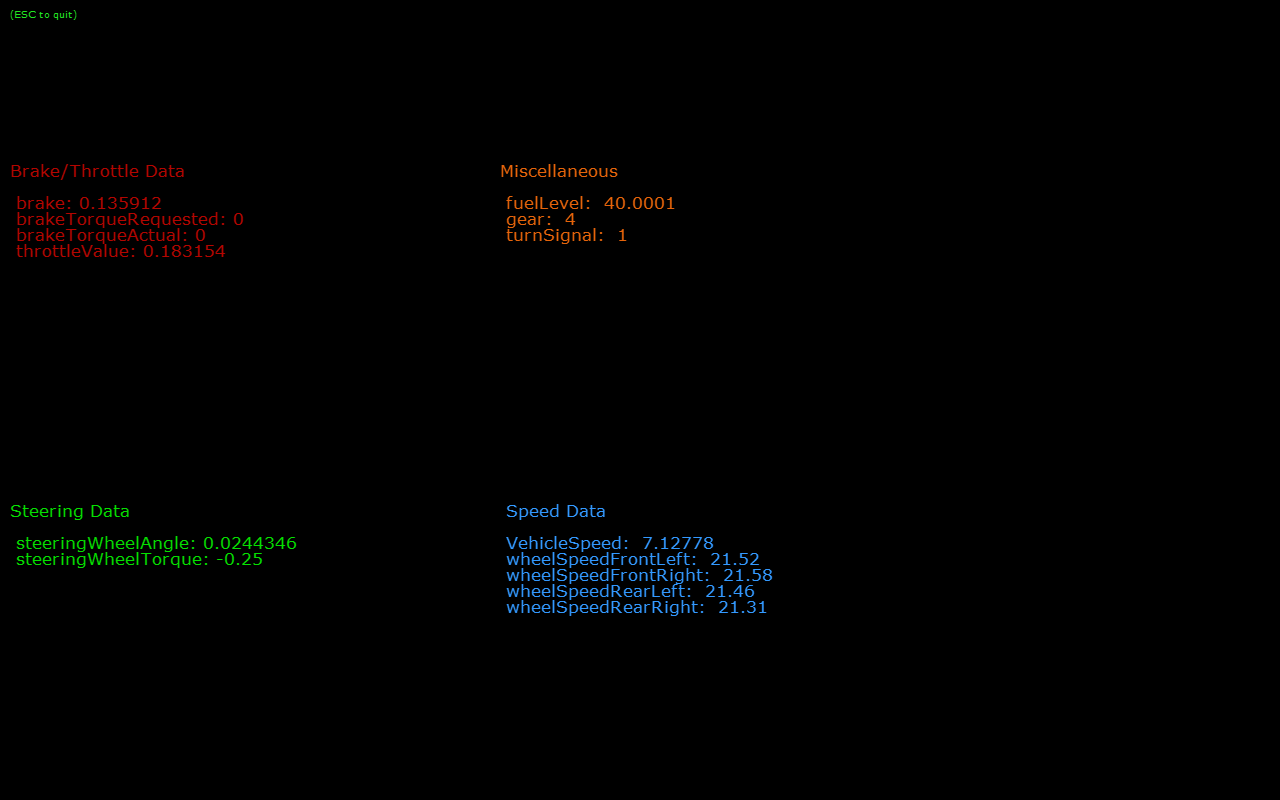
151 @section dwx_vehicleio_more Additional information
153 For more information, see @ref vehicleio_mainsection .