
System Overview and Architecture#
This paper was validated on Enterprise Reference Architecture in the 2-8-5-200 configuration using RTX PRO 6000 Blackwell Server Edition GPUs, with Cluster Software Reference stack version 25.09 and AI-Q, and RAG deployed on top of it.
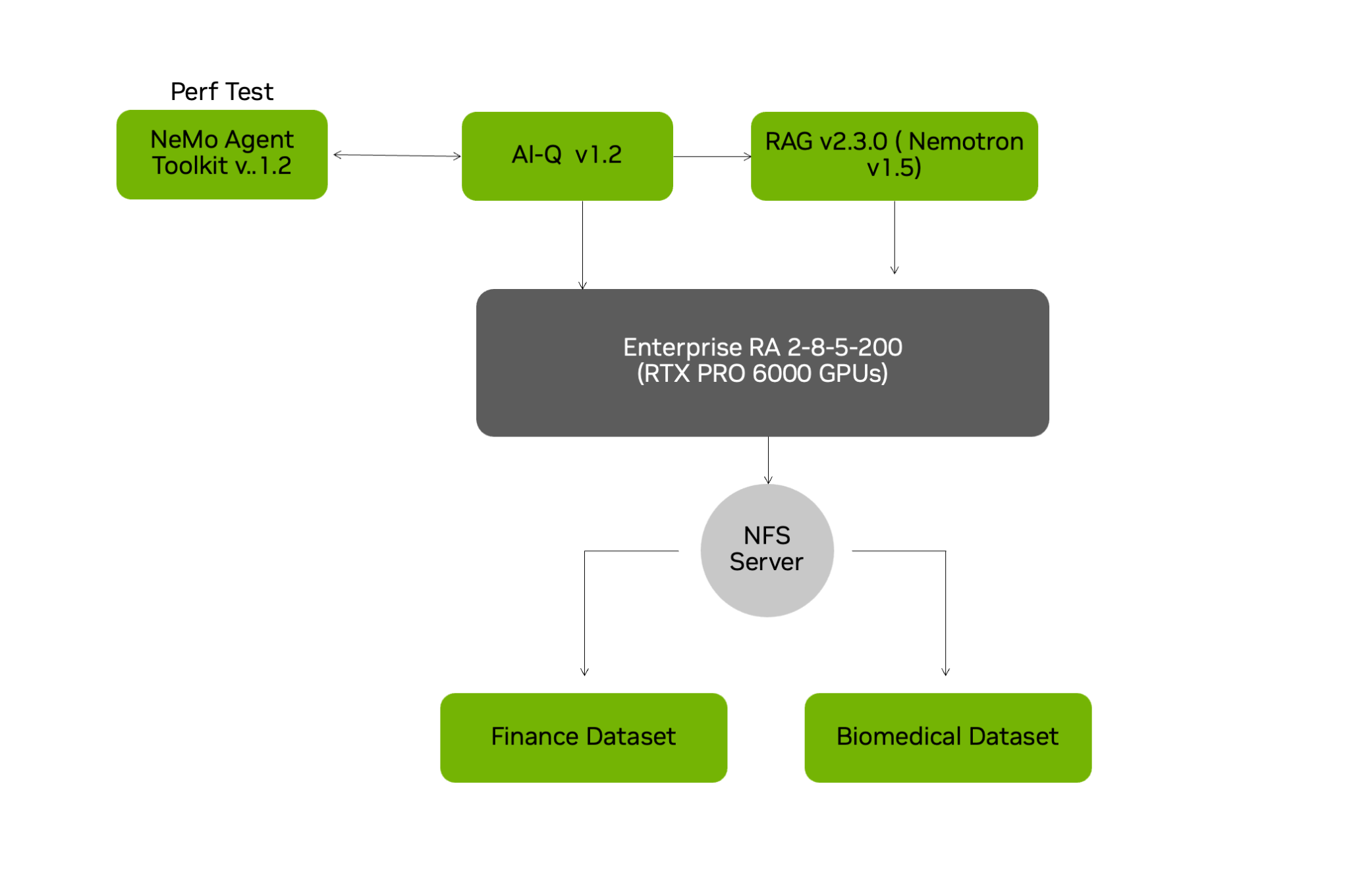
Figure 1 System Overview#
AI-Q NVIDIA Research Agent#
AI-Q is an advanced agentic framework designed for deep, comprehensive research. It functions by employing a Retrieval-Augmented Generation (RAG) system to extract and contextualize information from existing enterprise documents. It leverages Tavily internet search agent for external information gathering. This combination allows AI-Q to correlate and reason about topics from disparate internal files, integrate external data, and ultimately synthesize all fetched information into a complete report.
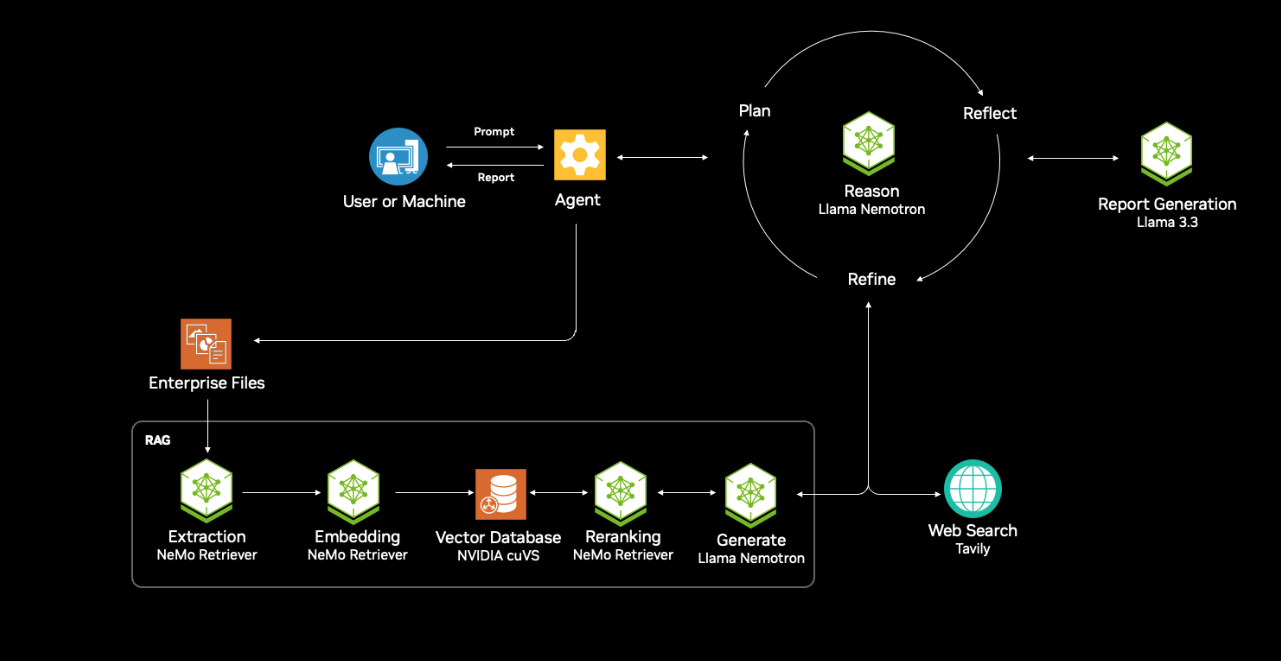
Figure 2 AI-Q Blueprint Architecture#
Here are the key components of AI-Q
Data Ingestion and Preparation Pipeline#
This component handles enterprise data onboarding and indexing. NeMo Retriever extraction is used to chunk and embed multi-modal data from multiple sources, the embeddings are then stored in a Vector Database like Milvus. This pipeline is part of the NVIDIA RAG Blueprint. The tests conducted for performance used two different datasets, these are uploaded and part of the blueprint on Github.
The datasets used were:
Biomedical_Dataset: Scientific journals on the Cystic Fibrosis CFTR gene from 2021-2024
Financial_Dataset: Financial reports from Apple, Facebook, Google, Meta from 2020-2024
RAG (Retrieval-Augmented Generation) Framework#
The RAG layer provides grounded context retrieval for LLM inference, this executes semantic and hybrid search across our datasets. Applies metadata filtering, reranking, returns high-relevance context to minimize hallucination. The RAG blueprint used here uses Nemotron 49B Super v1.5 as the NIM LLM to perform the reasoning for a given research. We call this the Reasoning NIM for reference hench forth in the document configs
AI-Q Instruct LLM and Toolchain#
This is part of the blueprint responsible for coming up with the initial plan based on the users instruction, the Instruct LLM used in the blueprint is Meta Llama 70B, it judges the response from the RAG and Reasoning LLM, determines if additional internet search is needed, if needed, it will kick off Tavily to perform a search. The Instruct LLM, then also synthesizes the final response by combining retrieved context with the user’s instruction, while enforcing format, tone, or policy constraints
Performance and Observability#
AI-Q helm charts can optionally also deploy Phoenix. Phoenix is an open source AI observability platform designed for experimentation, evaluation, and troubleshooting. Phoenix can help evaluate where the toolkit spends time, show traces of entire agentic workflows, records time series based metrics over open telemetry like tokens generated, latency etc. Phoenix is a great tool to visualize how the agentic workflow is behaving, where are the bottlenecks if any.
Enterprise Reference Architecture Overview (RA)#
This guide is part of NVIDIA Enterprise Reference Architecture, which covers certified hardware, software stack, and sizing recommendations to design, build, and scale an end-to-end accelerated computing cluster deployment with balanced CPU to GPU to NIC patterns. The Enterprise Reference architecture provides guided and detailed hardware and software architecture recommended by NVIDIA for optimal server, cluster, and network configuration needed to build and scale AI factories. NVIDIA Enterprise Reference Architecture includes hardware design recommendations, generic software stack configurations, and scalability.
Hardware Enterprise Reference Architecture#
For this version of the document, we used NVIDIA’s 2-8-5-200 Enterprise RA reference configuration for the overall stack. The PCIe-Optimized 2-8-5-200 (CPU-GPU-NIC-Bandwidth) reference configuration is for NVIDIA-Certified compute nodes using PCIe GPUs, allowing you to deploy up to 8 GPUs with up to 5 NICs balanced with 2 CPUs. This pattern can scale from 4 to up to 32 nodes in a cluster. The Enterprise RA design recommends using Spectrum-X Ethernet Networking Platform - Combining Spectrum-4 Ethernet switches and NVIDIA Bluefield-3 SuperNICs for optimized networking.
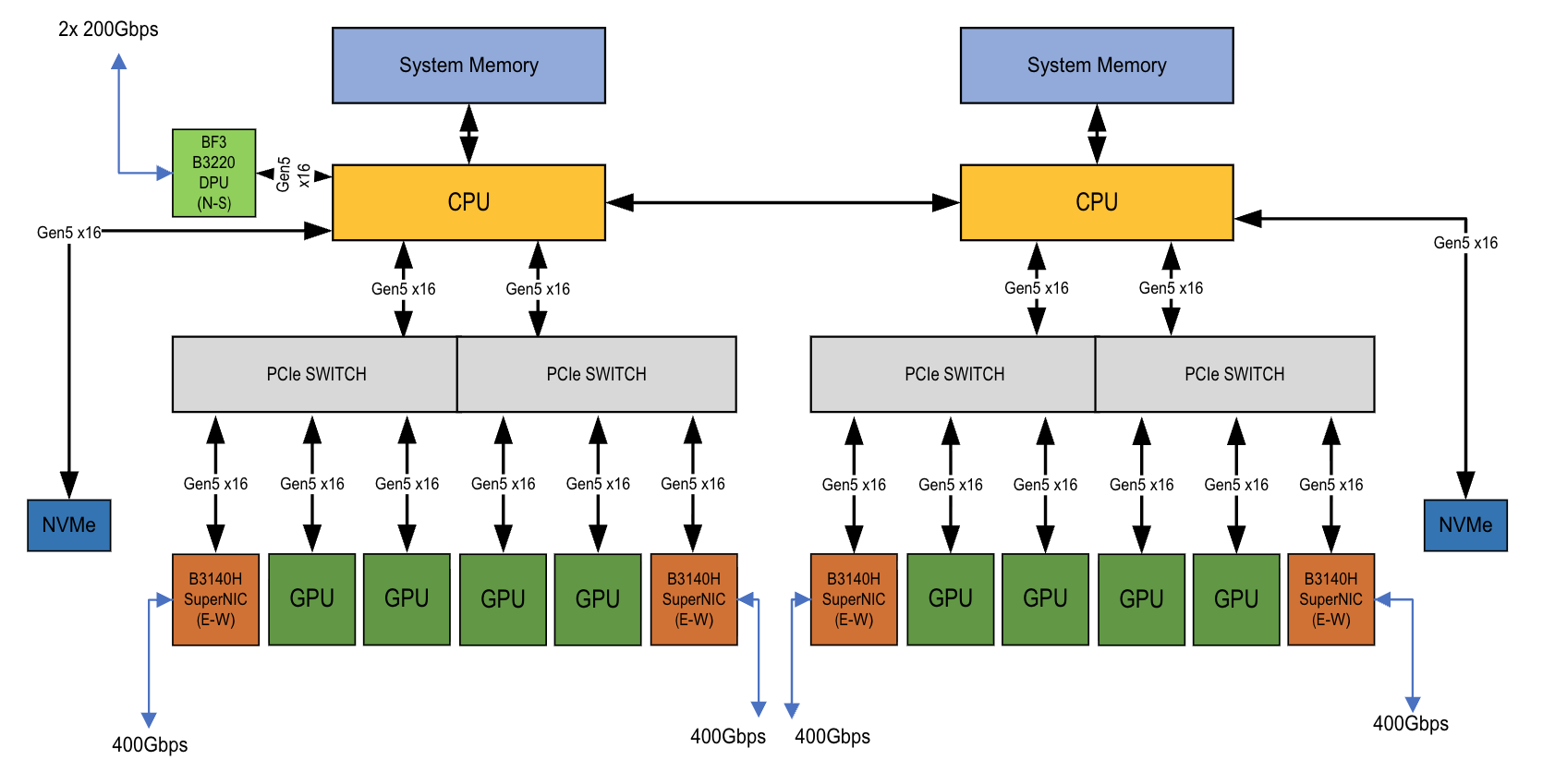
Figure 3 System architecture of Enterprise RA 2-8-5-200 reference configuration#
Note
For the detailed hardware design, refer to NVIDIA 2-8-5-200 with RTX PRO 6000 BSE NVIDIA Spectrum Platforms Enterprise Reference Architecture: NVOnline :1125114
Table 2: Specification of Individual Components in the server with NVIDIA RTX PRO 6000 Blackwell Server Edition GPUs
Component |
Specification |
|---|---|
CPUs |
AMD EPYC 9555 64-Core Processor 64 cores 3200 MT/s |
GPUs |
8 x NVIDIA RTX PRO 6000 BSE |
Networking – E/W |
4 x NVIDIA BlueField-3, B3140H |
Networking – N/S |
1 x NVIDIA BlueField-3, B3220 |
Host Memory |
32 x 64 GB DRAM (2048) |
Host Boot Drive |
2 x 896 GB ( ~1.8 TB) |
Host Storage |
2 x 3.84TB Storage (~7.6 TB) |
The systems are connected with NVIDIA SN5600 switches. For this particular guide, we are using NFS Storage that has been deployed on the BCM head node to provide Persistent Volumes for uploading embedded Enterprise documents. Enterprise customers can use their storage systems to provide storage volumes needed by Kubernetes and NIM inference microservices. For this test we used a pool of 9 servers with 8 NVIDIA RTX PRO 6000 BSE GPUs per node. The complete cluster has 72 GPUs in total.
Software Stack#
The software stack used for this environment leverages the bare-metal servers with Kubernetes as the cluster orchestration tool. BCM is part of the NVIDIA AI Enterprise software suite, and it provides all the tools you need to deploy and manage an AI datacenter. It also helps in deploying a Kubernetes cluster on top of the bare-metal servers to create a pool of GPU resources. BCM is then used to deploy all the operators like the GPU Operator, Network Operator, NIM Operator, etc. to run the GPUs and Network cards effectively. We then deploy a NIM service, picking the model for which the Inference service needs to be tested and scaled. We installed Run:ai version 2.2 using the SaaS format.
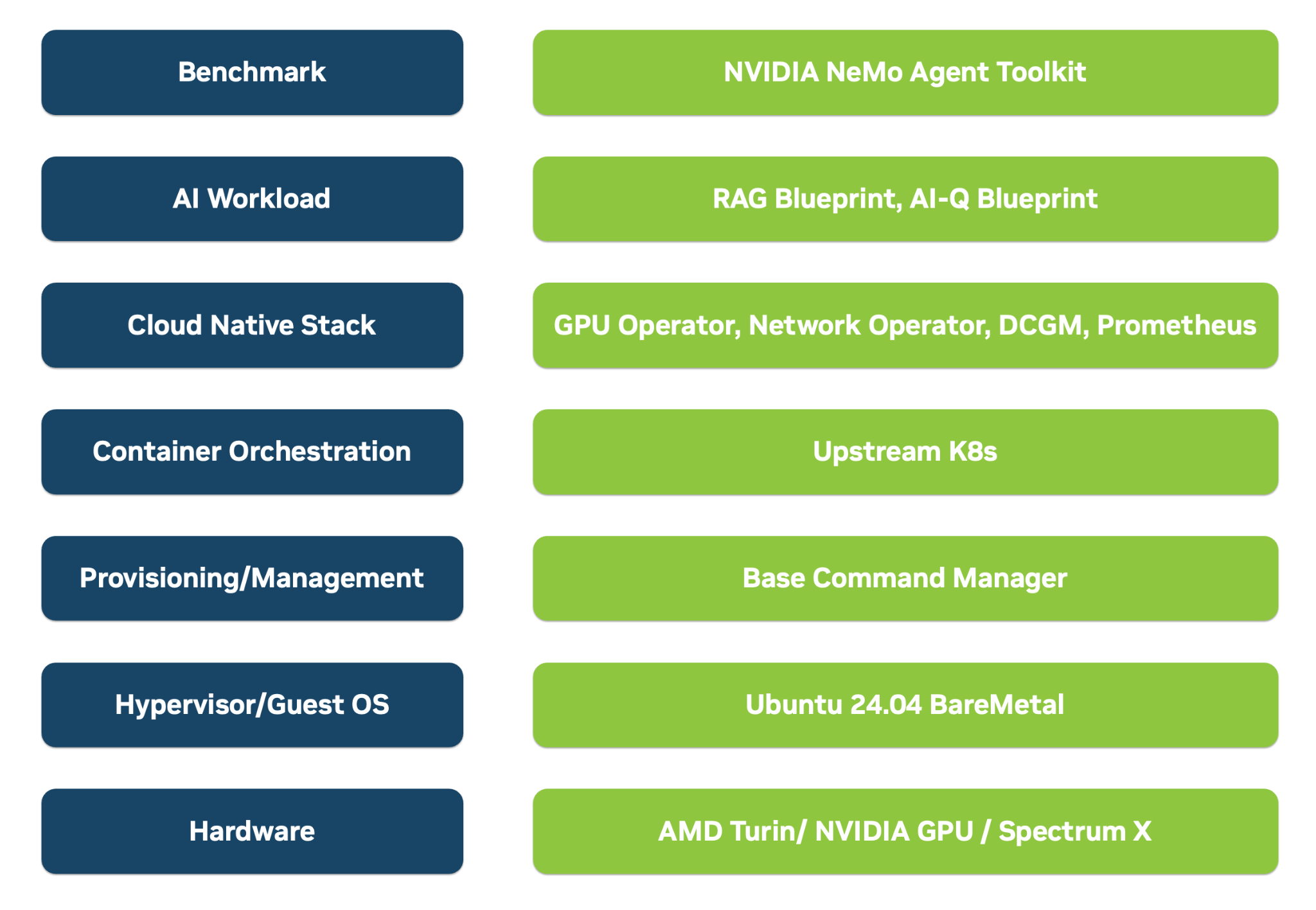
Figure 4 Overview of the overall deployment stack#
This test environment uses NVIDIA AI Enterprise software to install and configure the necessary software and tools required to efficiently deploy and operate an AI factory. Once servers are racked and networked, NVIDIA BCM is used to image individual servers, deploying Ubuntu 24.04 as the operating system, installing NVIDIA GPU and network drivers, and setting up Kubernetes clusters. Beyond these core capabilities, the deployment also aligns the software dependencies for various components required for Kubernetes cluster operations, such as a Container Network Interface (CNI) for managing container networks, NGINX Ingress Controller for handling cluster ingress traffic, and MetalLB for load balancing services, Prometheus and Grafana to visualize overall stack metrics and also provides firmware to configure and optimize OS like Cumulus Linux for the NVIDIA Spectrum switches, firmware for the Bluefield Super NICs etc.
Note
For detailed Software reference design, refer to NVIDIA Software Reference Stack and automation for Enterprise RA - Vanilla Kubernetes: NVOnline : 1141332