
1. Functional Overview#
This section provides a functional overview of GDS. It covers basic usage, generality, performance considerations, and a scope of the solution. This documentation applies to the cuFile APIs, which are issued from the CPU.
1.1. Explicit and Direct#
GDS is a performance-centric solution, so the performance of an end-to-end transfer is a function of latency overheads and the maximal achievable bandwidth.
The following are some terms used in GDS:
- Explicit programmatic request
An explicit programmatic request that immediately invokes the transfer between the storage and the GPU memory is proactive.
- Implicit request
An implicit request to storage, which is induced by a memory reference that causes a page miss from the GPU back to the CPU, and potentially the CPU to storage, is reactive.
Note
Reactive activity tends to induce more overhead. As a result of being explicit and proactive, GDS maximizes performance with its explicit cuFile APIs.
Latency is lower when extra copies are avoided, and the highest bandwidth paths are taken. Without GDS, an extra copy through a bounce buffer in the CPU is necessary, which introduces latency and lowers effective bandwidth.
Note
The latency improvements from GDS are most apparent with small transfers.
With GDS, although there are exceptions, a zero-copy approach is possible. Additionally, when a copy through the CPU is no longer necessary, the data path does not include the CPU memory even if it must pass through CPU root ports because of the PCIe topology. On some systems, a direct path between local or remote storage that goes through a PCIe switch or a NIC acting as a PCIe switch offers at least twice the peak bandwidth as compared to taking a data path through the CPU. Using cuFile APIs to access GDS technology enables explicit and direct transfers, which offers lower latency and higher bandwidth.
For direct data transfers between GPU memory and storage, the file must be opened in O_DIRECT mode. If the
file is not opened in this mode, contents might be buffered in the CPU system memory, which is incompatible with
direct transfers. Refer to the GPUDirect Storage O_DIRECT Requirements Guide
for more details.
Note
Starting from CUDA Toolkit 12.2 (GDS version 1.7.x) even for files opened in non-O_DIRECT mode, the cuFile library takes the GDS driven O_DIRECT path for transfers between GPU memory and storage for page aligned buffers with aligned sizes and offsets.
Explicit Copy versus Using mmap
The following code samples compare the code sequences of an explicit copy versus using mmap and incurring an implicit page fault where necessary.
This code sample uses explicit copy:
int fd = open(file_name,...)
void *sysmem_buf, *gpumem_buf;
sysmem_buf = malloc(buf_size);
cudaMalloc(gpumem_buf, buf_size);
pread(fd, sysmem_buf, buf_size);
cudaMemcpy(sysmem_buf,
  gpumem_buf, buf_size, H2D);
doit<<<gpumem_buf, ...>>>
// no faults;
This code sample uses mmap:
int fd = open(file_name, O_DIRECT,...)
void *mgd_mem_buf;
cudaMallocManaged(mgd_mem_buf, buf_size);
mmap(mgd_mem_buf, buf_size, ..., fd, ...)
doit<<<mgd_mem_buf, ...>>>
// fault on references to mgdmem_buf
In the first sample, pread is used to move data from storage into a CPU bounce buffer, sysmem_buf,
and cudaMemcpy is used to move that data to the GPU. In the second sample, mmap makes the managed
memory backed by the file. The references to managed memory from the GPU that are not present in GPU memory
will induce a fault back to the CPU and then to storage, which causes an implicit transfer.
GDS enables DMA between agents (NICs or NVMe drives) near storage and GPU memory. Traditional POSIX read and write APIs only work with addresses of buffers that reside in CPU system memory. cuFile APIs, in contrast, operate on addresses of buffers that reside in GPU memory. So they look very similar, but have a few differences, as shown in Figure 2.
Comparing the POSIX APIs and the cuFile APIs
The following code samples compare the POSIX APIs and cuFile APIs. POSIX pread and pwrite require buffers in CPU system memory and an extra copy, but cuFile read and write only require file handle registration.
This code sample uses the POSIX APIs:
int fd = open(...)
void *sysmem_buf, *gpumem_buf;
sysmem_buf = malloc(buf_size);
cudaMalloc(gpumem_buf, buf_size);
pread(fd, sysmem_buf, buf_size);
cudaMemcpy(sysmem_buf,
           gpumem_buf, buf_size, H2D);
cuStreamSynchronize(0);
doit<<<gpumem_buf, ...>>>
This code sample uses the cuFile APIs:
int fd = open(file_name, O_DIRECT,...)
CUfileHandle_t *fh;
CUFileDescr_t desc;
desc.type=CU_FILE_HANDLE_TYPE_OPAQUE_FD;
desc.handle.fd = fd;
cuFileHandleRegister(&fh, &desc);
void *gpumem_buf;
cudaMalloc(gpumem_buf, buf_size);
cuFileRead(&fh, gpumem_buf, buf_size, ...);
doit<<<gpumem_buf, ...>>>
The essential cuFile functionalities are:
Explicit data transfers between storage and GPU memory, which closely mimic POSIX
preadandpwrite.Performing IO in a CUDA stream, so that it is both async and ordered relative to the other commands in that same stream.
The direct data path that GDS provides relies on the availability of file system drivers that are enabled with GDS. These drivers run on the CPU and implement the control path that sets up the direct data path.
1.2. Performance Optimizations#
After there is a viable path to explicitly and directly move data between storage and GPU memory, there are additional opportunities to improve performance.
1.2.1. Implementation Performance Enhancements#
GDS provides a user interface that abstracts the implementation details. With the performance optimizations in that implementation, there are trade offs that are enhanced over time and are tuned to each platform and topology.
The following graphic shows you a list of some of these performance optimizations:
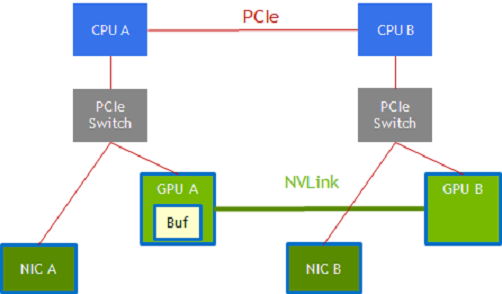
Figure 1.1 Performance Optimizations#
Path selection
There might be multiple paths available between endpoints. In an NVIDIA DGX-2 system, for example, GPU A and GPU B that are connected to CPU sockets CPU A and CPU B respectively may be connected via two paths.
GPU A –> CPU A PCIe root port –> CPU A to CPU B via the CPU interconnect –> CPU B along another PCIe path to GPU B.
GPU A –> GPU B using NVLink.
Similarly, a NIC that is attached to CPU A and to GPU A via PCIe by using an intervening switch has a choice of data paths to GPU B:
The NIC –> CPU A PCIe root port, CPU A –> CPU B via CPU interconnect, and CPU B along another PCIe path –> GPU B.
The NIC –> a staging buffer in GPU A and NVLink –> GPU B.
Staging in intermediate buffers
Bulk data transfers are performed with DMA copy engines. Not all paths through a system are possible with a single-stage transfer, and sometimes a transfer is broken into multiple stages with a staging buffer along the way.
In the NIC-GPU A-GPU B example in the graphic, a staging buffer in GPU A is required, and the DMA engine in GPU A or GPU B is used to transfer data between GPU A’s memory and GPU B’s memory.
Data might be transferred through the CPUs along PCIe only or directly between GPUs over NVLink. Although DMA engines can reach across PCIe endpoints, paths that involve the NVLink may involve staging through a buffer (GPU A).
Dynamic routing
Paths and staging. The two paths in the previous graphic are available between endpoints on the left half and the right half, the red PCIe path or the green NVLink path.
1.2.2. Concurrency Across Threads#
Note
All APIs are thread safe.
Using GDS is a performance optimization. After the applications are functionally enabled to move data directly between storage and a GPU buffer by passing a pointer to the GPU buffer down through application layers, performance is the next concern. IO performance at the system level comes from concurrent transfers on multiple links and across multiple devices. Concurrent transfers for each 4 x 4 NVMe PCIe device are necessary to get full bandwidth from one x16 PCIe link. Since there are PCIe links to each GPU and to each NIC, many concurrent transfers are necessary to saturate the system. GDS does not boost concurrency, so this level of performance tuning is managed by the application.
1.2.3. Asynchrony#
Another form of concurrency, between the CPU and one or more GPUs, can be achieved in an application thread through asynchrony.
In this process, work is submitted for deferred execution by the CPU, and the CPU can continue to submit more work to a GPU or complete the work on the CPU. This process adds support in CUDA for async IO, which can enable a graph of interdependent work that includes IO to be submitted for deferred execution.
1.2.4. Batching#
There is a fixed overhead involved with each submission from an application into the cuFile implementation. For usage models where many IO transactions get submitted simultaneously, batching reduces the overhead by amortizing that fixed overhead across the transactions in the batch, which improves performance.
Batch APIs are asynchronous in nature. Refer to the cuFile API Reference Guide for more information.
1.2.5. Use of CUDA Streams in cuFile#
Provides a mechanism to perform asynchronous submission and asynchronous execution of I/Os following CUDA stream semantics.
The data size, offsets in buffer and file may dynamically change within the valid range based on the execution of the previous CUDA kernel or function.
1.3. Compatibility and Generality#
Although the purpose of GDS is to avoid using a bounce buffer in CPU system memory, the ability to fall back to this approach allows the cuFile APIs to be used ubiquitously even under suboptimal circumstances. A compatibility mode is available for unsupported configurations that maps IO operations to a fallback path.
This path stages through CPU system memory for systems where one or more of the following conditions is true:
Explicit configuration control by using the user version of the
cufile.jsonfile.Refer to the cuFile API Reference Guide for more information.
The lack of availability of the
nvidia-fs.kokernel driver, for example, because it was not installed on the host machine, where a container with an application that uses cuFile, is running. Thenvidia-fs.kokernel driver is not necessary for the case of mounts of NVMe (local or with NVIDIA DOCA SNAP) for cuFile in CUDA version 12.8 and higher.The lack of availability of relevant GDS-enabled filesystems on the selected file mounts, for example, because one of several used system mounts does not support GDS.
File-system-specific conditions, such as when
O_DIRECTcannot be applied.Vendors, middleware developers, and users who are doing a low-level analysis of file systems should review the GPUDirect Storage O_DIRECT Requirements Guide for more information.
Refer to cuFileHandleRegister in the cuFile API Reference Guide
for more information. Performance on GPU-based applications that transfer between the storage and GPU memory in
compatibility mode is generally at least the same or better than current CPU-based APIs when GDS is not used. Testing
for the CPU path is limited to POSIX-based APIs and qualified platforms and filesystems that do not include GDS.
Even when transfers are possible with GDS, a direct transfer is not always possible. Here is a sampling of cases that are handled seamlessly by the cuFile APIs:
The buffer is not aligned, such as the following:
The offsets of the file are not cufile block size aligned.
The GPU memory buffer address is not cufile block size aligned.
The IO request size is not a multiple of cufile block size.
The requested IO size is too small, and the filesystem cannot support RDMA.
The size of the transfer exceeds the size of the GPU BAR1 aperture.
The optimal transfer path between the GPU memory buffer and storage involves an intermediate staging buffer, for example, to use NVLink.
The compatibility mode and the seamless handling of cases that require extra steps broaden the generality of GDS and make it easier to use.
1.4. Monitoring#
This section provides information about the monitoring facilities that are available to track functional and performance issues in GDS.
GDS supports the following monitoring facilities for tracking functional and performance issues:
FtraceExported symbols for GDS functions can be traced using
Ftrace. You can also use static tracepoints in thelibcufile.solibrary, but the tracepoints are not yet supported fornvidia-fs.ko. Refer to the GPUDirect Storage Troubleshooting Guide for more information.LoggingError conditions and debugging outputs can be generated in a log file. This information is useful for conditions that affect many of the APIs but need only be reported once or affect APIs with no return value to report errors. The
cufile.jsonfile is used to select at least reporting level, such asERROR,WARN,INFO,DEBUG, andTRACE.ProfilingGDS can be configured to collect a variety of statistics.
These facilities, and the limitations of third-party tools support, are described in greater detail in the GPUDirect Storage Troubleshooting Guide.
1.5. Scope of the Solutions in GDS#
GDS has added new APIs with functionality that is not supported by today’s operating systems, including direct transfers to GPU buffers, asynchrony, and batching. These APIs offer a performance boost, with a platform-tuned and topology-tuned selection of paths and staging, which add enduring value.
The implementations under cuFile APIs overcome limitations in current operating systems. Some of those limitations are transient and may be removed in future versions of operating systems. Although these solutions are not currently available and may require time for adoption, other GDS-enabled solutions are needed today. Here are the solutions currently available in GDS:
Third-party vendor solutions for distributed file systems.
Long-term support through open source, upstreamed Linux that future GDS implementations will seamlessly use.
Local filesystem support by using modified storage drivers.
The overall cuFile architecture involves a combination of components, some from NVIDIA and some from third parties.
Here is a list of the NVIDIA-originated content:
User-level cuFile library,
libcufile.so, which implements the following in the closed source code:cuFile Driver APIs:
cuFileDriver{Open, Close}cuFileDriver{GetProperties, Set*}
cuFile synchronous IO APIs:
cuFileHandle{Register, Deregister}cuFileBuf(Register, Deregister}cuFile{Read, Write}
Stream subset of the cuFile APIs:
cuFile{Read, Write}Async, cuFileStreamRegister, cuFileStreamDeregister
cuFileBatch APIs:
cuFileBatchIO{SetUp, Submit, GetStatus, Cancel, Destroy}Calls to VFS components in standard Linux whether the filesystem is standard Linux for all kernel-based file systems and raw device files.
nvidia-fs.ko, the kernel-level driver:Implements callbacks from modified Linux kernel modules or from proprietary filesystems that enable direct DMA to GPU memory.
Licensed under GPLv2.
Likewise, any third-party kernel components that call the nvidia-fs APIs should expect to be subject to GPLv2.
Not needed for NVMe (local drives or DOCA SNAP) as of CUDA 12.8
Third-party content
Proprietary code stacks that replace portions of the Linux filesystem and block system, and so on.
1.6. Dynamic Routing#
GDS Dynamic Routing is a feature for choosing the optimal path for cuFileReads and cuFileWrites to and from files on network-based file systems such as DDN-EXAScaler, VAST-NFS, and WekaFS. For hardware platforms, where GPUs do not share the same Root Port with the Storage NICs, peer-to-peer transactions (p2p) may have higher latency and are inefficient compared to p2p traffic under PCIe switches.
With this feature, based on platform configuration, the cuFile library tries to efficiently route the I/O to and from GPU without paying the penalty of cross-root port p2p traffic. For example, if the storage NIC shares a common PCIe root port with another allowed GPU (say GPU1) and the target GPU (say GPU0) is across the CPU root complex, cuFile library can use a bounce buffer on GPU1 to perform the p2p transaction to GPU1 and copy the data to target GPU0. The presence of NVLINKs across GPUs can further accelerate the subsequent device to device (GPU1->GPU0) I/O transfers using NVLINK instead of PCIe.
For each mount/volume, cuFile library pre-computes the best GPUs having the smallest PCI-distance with the available storage NICs for routing the I/O. During reads and writes cuFile checks if the target GPU shares a common PCIe switch and does not need traffic to cross the CPU root complex. If the path is already optimal, then dynamic routing does not apply, otherwise cuFile library selects a candidate GPU for intermediate bounce buffer and performs a device-to-device copy to the target GPU buffer.
Note
There is a possibility that there might be multiple candidate GPUs for staging the intermediate buffer and they may not be equidistant from all the Storage NICs, in that case, cuFile relies on the underlying file system driver to pick the best storage NIC for the candidate GPU based on the nvidia-fs callback interface to choose the best NIC based on the GPU buffer.
1.6.1. cuFile Configuration for Dynamic Routing#
The "properties.rdma_dynamic_routing" enables/disables dynamic routing feature for distributed file systems
(Lustre, WekaFS, NFS). By default, this feature is turned off.
In platforms where I/O transfer to a GPU will cause cross RootPort PCie transfers, enabling this feature might
help improve overall BW provided there exists a GPU(s) with Root Port common to that of the storage NIC(s). If
this feature is enabled, provide the IP addresses used by the mount either in file system-specific section
for mount_table or in the rdma_dev_addr_list property in the properties section.
"rdma_dynamic_routing": false
The properties.rdma_dynamic_routing order expresses routing rules. The routing policy is selected based on
the order in which they are specified if they are applicable. By default the routing order is as shown below.
If the first policy is not applicable, fall back to the next, and so on.
policy GPU_MEM_NVLINKS: use GPU memory with NVLink to transfer data between GPUs
policy GPU_MEM: use GPU memory with PCIe to transfer data between GPUs
policy SYS_MEM: use system memory with PCIe to transfer data to GPU
policy P2P: use P2P PCIe to transfer across between NIC and GPU
"rdma_dynamic_routing_order": [ "GPU_MEM_NVLINKS", "GPU_MEM", "SYS_MEM", "P2P" ]
The table below summarizes the use cases where dynamic routing can apply and describes each routing policy.
Use Case |
GPU_MEM_NVLINKS |
GPU_MEM |
SYS_MEM |
P2P |
|---|---|---|---|---|
NIC and GPU do not share a common parent PCIe switch Dynamic Routing will be used if enabled |
GPUs in the system have NVLinks Use GPU memory with NVLink to transfer data between GPUs. This policy applies only:
|
GPUs in the system do not have NVLinks Use GPU memory with PCIe to transfer data between GPUs. This policy applies only if there is a GPU which is in the same PCIe tree as the NIC. |
No GPUs share a common Root-Port with the storage NIC(s) Use pinned system memory and PCIe to transfer data to GPU |
This is default mode without dynamic routing. Use P2P PCIe to transfer between NIC and GPU. The PCIe traffic will be across RootPorts. |
NIC and GPU reside in the same PCIe Tree Dynamic Routing will not be used even if enabled |
P2P/Compatible Mode |
P2P/Compatible Mode |
P2P/Compatible Mode |
P2P/Compatible Mode |
A sample routing order could be:
"rdma_dynamic_routing_order": [ "GPU_MEM_NVLINKS", "SYS_MEM"]
A use case could be if there exists a pair of GPUs but without NVLinks, the routing policy shall fall back to using system memory for I/O transfer.
Another sample routing order could be:
"rdma_dynamic_routing_order": [ "SYS_MEM"]
If such an order is specified, then even if there exists a pair of GPUs with NVLinks, the routing policy will use system memory for I/O transfer.
1.6.2. cuFile Configuration for DFS Mount#
The user can specify to the library the list of Storage NICs used by the distributed filesystem mount through the json
property rdma_dev_addr_list. This information is used by the library to compute the best GPUs which can be used for
routing the IO. The device addresses list can be specified in a hierarchical format.
Property Name |
Description |
|---|---|
property.rdma_dev_addr_list : {}
|
Applies to a Single File System, Single Mount. This is the global config which is used only if the per file system or the per-mount IP address list is empty. |
fs.lustre.rdma_dev_addr_list : {}
|
Applies to all Lustre file system mounts. This is the per-file system IP address list. This overrides the global IP address list for a file belonging to this file system. Please note that if this key is set, the user should not configure the per mount_table and it is treated as a config error. |
fs.lustre.mount_table : {
   /mnt/001 : { rdma_dev_addr_list : []
}
|
Applies to multiple Lustre mounts. |
/mnt/002 : {
   rdma_dev_addr_list : [] }
}
|
This is the per mount IP address list. This overrides the per-file system IP address list. This setting has the highest priority in terms of the address list configuration and overrides all above settings for that mount. |
fs.nfs.rdma_dev_addr_list : {}
|
Applies to all NFS mounts. |
fs.nfs.mount_table : {
   /mnt/003 : { rdma_dev_addr_list : [] }
   /mnt/004 : { rdma_dev_addr_list : [] }
}
|
Applies to NFS shares. |
A Sample RDMA Configuration
{
   "lustre": {
      // IO threshold for read/write (param should be 4K aligned)) equal to or below which
      // cuFile will use posix read/write
      "posix_gds_min_kb" : 0,
      "rdma_dev_addr_list" : [],
      "mount_table" : {
         "/lustre/ai200/client1" : {
            "rdma_dev_addr_list" : ["172.172.1.40"]
         },
         "/lustre/ai200/client2" : {
            "rdma_dev_addr_list" : ["172.172.2.40"]
         }
      }
   },
   "nfs": {
      "rdma_dev_addr_list" : [],
      "mount_table" : {
         "/mnt/nfs/ib0/data/0" : {
            "rdma_dev_addr_list" : ["192.168.0.12"]
         },
         "/mnt/nfs/ib1/data/0" : {
            "rdma_dev_addr_list" : ["192.168.1.12"]
         },
         "/mnt/nfs/ib2/data/0" : {
            "rdma_dev_addr_list" : ["192.168.2.12"]
         },
         "/mnt/nfs/ib3/data/0" : {
            "rdma_dev_addr_list" : ["192.168.3.12"]
         }
      },
      "weka": {
         // enable/disable RDMA write
         "rdma_write_support" : false
      },
   }
}
Limitation:
The library cannot distinguish multiple mount points which use the same network shared file system share specified through the config; and considers all such IP addresses as a unique mount entry. So it is advised to provide configuration only for unique shares in the configuration.
1.6.3. cuFile Configuration Validation for Dynamic Routing#
Once the cuFile configuration is enabled for dynamic routing with the required IP address configuration, users
can use gdscheck to validate the same.
$ ./gdscheck -p
...
properties.rdma_dynamic_routing : 1
properties.rdma_dynamic_routing_order : GPU_MEM_NVLINKS GPU_MEM SYS_MEM P2P
fs.lustre.mount_table :
/lustre/ai200/client1 dev_id 64768 : 172.172.1.40
/lustre/ai200/client2 dev_id 64769 : 172.172.2.40
fs.weka.rdma_write_support: 0
fs.nfs.mount_table :
/mnt/nfs/ib0/data/0 dev_id 58 : 192.168.0.12
/mnt/nfs/ib1/data/0 dev_id 59 : 192.168.1.12
/mnt/nfs/ib2/data/0 dev_id 60 : 192.168.2.12
/mnt/nfs/ib3/data/0 dev_id 61 : 192.168.3.12
 ...