# Getting More from Your Data
[Source code](/apis-and-interfaces/vega/vega-tutorials/tutorial-getting-more-from-your-data#source-code) can be found at the end of this tutorial.
This tutorial builds on the [Getting Started with Vega](/apis-and-interfaces/vega/vega-tutorials/tutorial-getting-started-with-vega) tutorial by color-coding tweets according to language:
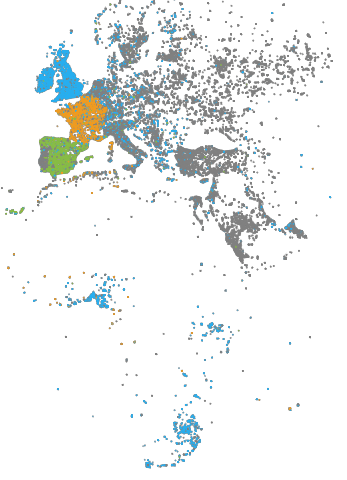
* Tweets in English are blue.
* Tweets in French are orange.
* Tweets in Spanish are green.
* All other tweets are light or dark gray.
To highlight language in the visualization, the example specifies the language column query in the Vega `data` property, and associates language with `color`.
```
"data:" [
{
"name": "tweets",
"sql": "SELECT goog_x as x, goog_y as y, lang as color, tweets_nov_feb.rowid FROM tweets_nov_feb"
}
```
The [Scales](/apis-and-interfaces/vega/vega-reference-overview/scales-property) property maps the language abbreviation string to a color value. Because we want to map discrete domain values to discrete range values, we specify a `color` scale with an ordinal [type](/apis-and-interfaces/vega/vega-reference-overview/scales-property#type) scale:
```
"scales:" [
.
.
.
{
"name": "color",
"type": "ordinal",
"domain": ["en", "es", "fr"],
"range": ["#27aeef", "#87bc45", "#ef9b20"],
"default": "gray",
"nullValue": "#cacaca"
}
]
```
You can specify a `default` color values for values not specified in `range` and for data items with a value of `null`. In this example, tweets in languages other than English, Spanish, or French are colored gray and tweets with a language value of `null` are colored light gray (`#cacaca`).
Similar to using `x` and `y` scales to map [Marks](/apis-and-interfaces/vega/vega-reference-overview/marks-property) property `x` and `y` fields to the visualization area, you can scale the `fillColor` property to the visualization area.
In previous examples the fill color of points representing tweets was statically specified as `blue`:
```
"marks:" [
{
"type:" "points",
"from:" {
"data:" "tweets"
},
"properties:" {
.
.
.
},
"fillColor": "blue",
"size:" {"value:" 3}
}
}
]
```
This example, uses [Value Reference](/apis-and-interfaces/vega/vega-reference-overview/marks-property#value-reference) to specify the fill color:
```
"marks:" [
{
"type:" "points",
"from:" {
"data:" "tweets"
},
"properties:" {
.
.
.
},
"fillColor:" {
"scale": "color",
"field": "color"
},
"size:" 3
}
}
]
```
The `fillColor` references the `color` scale and performs a lookup on the current language value, from the `color` data table field.
## Source Code
Getting More Insight Tutorial Directory Structure
```
index.html
/js
browser-connector.js
vegaspec.js
vegademo.js
```
### HTML
Getting More Insight Tutorial index.html
```
OmniSci
```
#### JavaScript
Getting More Insight Tutorial vegademo.js
```
function init() {
var vegaOptions = {}
var connector = new MapdCon()
.protocol("http")
.host("my.host.com")
.port("6273")
.dbName("omnisci")
.user("omnisci")
.password("changeme")
.connect(function(error, con) {
con.renderVega(1, JSON.stringify(exampleVega), vegaOptions, function(error, result) {
if (error) {
console.log(error.message);
}
else {
var blobUrl = `data:image/png;base64,${result.image}`
var body = document.querySelector('body')
var vegaImg = new Image()
vegaImg.src = blobUrl
body.append(vegaImg)
}
});
});
}
```
Getting More Insight Tutorial vegaspec.js
```
const exampleVega = {
"width": 384,
"height": 564,
"data": [
{
"name": "tweets",
"sql": "SELECT goog_x as x, goog_y as y, lang as color, tweets_data_table.rowid FROM tweets_data_table"
}
],
"scales": [
{
"name": "x",
"type": "linear",
"domain": [
-3650484.1235206556,
7413325.514451755
],
"range": "width"
},
{
"name": "y",
"type": "linear",
"domain": [
-5778161.9183506705,
10471808.487466192
],
"range": "height"
},
{
"name": "color",
"type": "ordinal",
"domain": ["en", "es", "fr"],
"range": ["#27aeef", "#87bc45", "#ef9b20"],
"default": "gray",
"nullValue": "#cacaca"
}
],
"marks": [
{
"type": "points",
"from": {
"data": "tweets"
},
"properties": {
"x": {
"scale": "x",
"field": "x"
},
"y": {
"scale": "y",
"field": "y"
},
"fillColor": {
"scale": "color",
"field": "color"
},
"size": 3
}
}
]
};
```