NVIDIA HPC C and C++ Compilers Reference Guide
Preface
This guide is part of a set of manuals that describe how to use the NVIDIA HPC C++ and C compilers. These compilers include the NVC++ and NVC compilers. They work in conjunction with an assembler, linker, libraries and header files on your target system, and include a CUDA toolchain, libraries and header files for GPU computing. You can use the NVIDIA HPC C and C++ compilers to develop, optimize and parallelize applications for NVIDIA GPUs and x86-64 and Arm Server multicore CPUs.
The NVIDIA HPC C and C++ Compilers User’s Guide provides operating instructions for the NVC++ and NVC command-level development environment. The NVIDIA HPC C and C++ Compilers Reference Guide contains details concerning the NVIDIA compilers’ interpretation of the C++ and C language standards, implementation of language extensions, and command-level compilation. Users are expected to have previous experience with or knowledge of the C++ and C programming languages. These guides do not teach the C++ or C programming languages.
The NVIDIA HPC Fortran compiler, NVFORTRAN, is described in a separate pair of manuals, the NVIDIA HPC Fortran Compiler User’s Guide and the NVIDIA HPC Fortran Compiler Reference Guide.
Audience Description
This manual is intended for scientists and engineers using the NVIDIA HPC C and C++ compilers. To use these compilers, you should be aware of the role of high-level languages, such as C++ and C as well as parallel programming models such as CUDA, OpenACC and OpenMP in the software development process, and you should have some level of understanding of programming. The NVIDIA HPC C and C++ compilers are available on a variety of NVIDIA GPUs and x86-64 and Arm CPU-based platforms and operating systems. You need to be familiar with the basic commands available on your system.
Compatibility and Conformance to Standards
Your system needs to be running a properly installed and configured version of the NVIDIA HPC compilers. For information on installing NVIDIA HPC compilers, refer to the Release Notes and Installation Guide included with your software.
For further information, refer to the following:
American National Standard Programming Language C, ANSI X3.159-1989.
ISO/IEC 9899:1990, Information technology – Programming Languages – C, Geneva, 1990 (C90).
ISO/IEC 9899:1999, Information technology – Programming Languages – C, Geneva, 1999 (C99).
ISO/IEC 9899:2011, Information Technology – Programming Languages – C, Geneva, 2011 (C11).
ISO/IEC 14882:2011, Information Technology – Programming Languages – C++, Geneva, 2011 (C++11).
ISO/IEC 14882:2014, Information Technology – Programming Languages – C++, Geneva, 2014 (C++14).
ISO/IEC 14882:2017, Information Technology – Programming Languages – C++, Geneva, 2017 (C++17).
OpenACC Application Program Interface, Version 2.7, November 2018, http://www.openacc.org.
OpenMP Application Program Interface, Version 5.0, November 2018, http://www.openmp.org.
Organization
This manual contains detailed reference information about specific aspects of the compilers, such as the details of compiler options, pragmas, data types supported, and more. It contains these sections:
C and C++ Data Types describes the data types that are supported by the NVIDIA HPC C++ and C compilers.
Command-Line Options Reference provides a detailed description of most command-line options, including C++ and C-specific options.
C++ Name Mangling describes the name mangling facility and explains the transformations of names of entities to names that include information on aspects of the entity’s type and a fully qualified name.
Pre-defined Compiler Macros lists the HPC compiler-specific macros that the compilers pre-define.
Runtime Environment describes details related to compiler code generation, including register conventions and calling conventions for Linux/x86-64 and Linux/Arm processor-based systems.
C++ Dialect Supported lists more details of the version of the C++ language that NVC++ supports.
x86-64 C++ and C MMX/SSE/AVX Intrinsics provides tables that list the MMX and SSE/SSE2/SSE3/SSSE3/SSE4a/ABM/AVX Inline Intrinsics supported in C++ and C programs.
Messages describes the general diagnostic messages and phase invocation messages issued by the compilers.
Hardware and Software Constraints
This guide describes versions of the NVIDIA HPC C and C++ compilers that target NVIDIA GPUs and x86-64 and Arm CPUs. Details concerning environment-specific values and defaults and system-specific features or limitations are presented in the release notes delivered with the NVIDIA HPC compilers.
Conventions
This guide uses the following conventions:
- italic
is used for emphasis.
Constant Widthis used for filenames, directories, arguments, options, examples, and for language statements in the text, including assembly language statements.
- Bold
is used for commands.
- [ item1 ]
in general, square brackets indicate optional items. In this case item1 is optional. In the context of p/t-sets, square brackets are required to specify a p/t-set.
- { item2 | item 3 }
braces indicate that a selection is required. In this case, you must select either item2 or item3.
- filename …
ellipsis indicate a repetition. Zero or more of the preceding item may occur. In this example, multiple filenames are allowed.
C++ and CC++ and C language statements are shown in the text of this guide using a reduced fixed point size.
Terms
The following table lists the NVIDIA HPC C and C++ compilers and their corresponding commands:
Compiler or Tool |
Language or Function |
Command |
|---|---|---|
NVC++ |
ISO/ANSI C++17 with GNU compatibility |
nvc++ |
NVC |
ISO/ANSI C11 |
nvc |
In general, the designation NVC++ is used to refer to the NVIDIA C++ compiler, and nvc++ is used to refer to the command that invokes the compiler. A similar convention is used for NVC and nvc.
Examples of command-line invocation of the compilers reference the nvc command for C source files and the nvc++ command for C++ source files. Use of NVC is consistent with NVC++, though there are command-line options and features of these compilers that apply to only one of them.
There are a wide variety of x86-64 CPUs in use. Most of these CPUs are forward-compatible, but not backward-compatible, meaning that code compiled to target a given processor will not necessarily execute correctly on a previous-generation processor.
A table listing the processor options that NVIDIA HPC compilers support is available in the Release Notes. The table also includes the features utilized by the compilers that distinguish them from a compatibility standpoint.
In this manual, the convention is to use “x86-64” to specify the group of CPUs that are x86-compatible, 64-bit enabled, and run a 64-bit operating system. x86-64 processors can differ in terms of their support for various prefetch, SSE and AVX instructions. Where such distinctions are important with respect to a given compiler option or feature, it is explicitly noted in this manual.
1. C and C++ Data Types
This section describes the scalar and aggregate data types recognized by the NVIDIA HPC C++ and C compilers, the format and alignment of each type in memory, and the range of values each type can have on 64-bit operating systems.
1.1. C and C++ Data Types
1.1.1. C and C++ Scalars
Table 2 lists C and C++ scalar data types, providing their size and format. The alignment of a scalar data type is equal to its size. The alignment applies to individual variables, elements of an array, and members of a class/struct/union.
Data Type |
Size (bytes) |
Format |
Range |
|---|---|---|---|
unsigned char |
1 |
ordinal |
0 to 255 |
signed char |
1 |
2’s complement integer |
-128 to 127 |
char (on x86 targets) |
1 |
2’s complement integer |
-128 to 127 |
char (on Arm targets) |
1 |
ordinal |
0 to 255 |
char8_t |
1 |
ordinal |
0 to 255 |
char16_t |
2 |
ordinal |
0 to 65535 |
char32_t |
4 |
ordinal |
0 to 232 -1 |
wchar_t (on x86 targets) |
4 |
2’s complement integer |
-231 to 231-1 |
wchar_t (on Arm targets) |
4 |
ordinal |
0 to 232 -1 |
unsigned short |
2 |
ordinal |
0 to 65535 |
[signed] short |
2 |
2’s complement integer |
-32768 to 32767 |
unsigned int |
4 |
ordinal |
0 to 232 -1 |
[signed] int |
4 |
2’s complement integer |
-231 to 231-1 |
unsigned long [int] |
8 |
ordinal |
0 to 264-1 |
[signed] long [int] |
8 |
2’s complement integer |
-263 to 263-1 |
unsigned long long [int] |
8 |
ordinal |
0 to 264-1 |
[signed] long long [int] |
8 |
2’s complement integer |
-263 to 263-1 |
unsigned __int128 |
16 |
ordinal |
0 to 2128-1 |
[signed] __int128 |
16 |
2’s complement integer |
-2127 to 2127-1 |
float |
4 |
IEEE single-precision floating-point |
10-37 to 1038(1) |
double |
8 |
IEEE double-precision floating-point |
10-307 to 10308(1) |
long double (on x86 targets) |
16 |
IEEE extended-precision floating-point |
10-4931 to 104932(1) |
long double (on Arm targets) |
16 |
IEEE quad-precision floating-point |
10-4931 to 104932(1) |
pointer |
8 |
address |
0 to 264-1 |
(1) Approximate values
1.1.2. C and C++ Aggregate Data Types
An aggregate data type consists of one or more scalar data type objects. You can declare the following aggregate data types:
- array
consists of one or more elements of a single data type placed in contiguous locations from first to last.
- class
(C++ only) is a class that defines an object and its member functions. The object can contain fundamental data types or other aggregates including other classes. The class members are allocated in the order they appear in the definition but may not occupy contiguous locations.
- struct
is a structure that can contain different data types. The members are allocated in the order they appear in the definition but may not occupy contiguous locations. When a struct is defined with member functions, its alignment rules are the same as those for a class.
- union
is a single location that can contain any of a specified set of scalar or aggregate data types. A union can have only one value at a time. The data type of the union member to which data is assigned determines the data type of the union after that assignment.
1.1.3. Class and Object Data Layout
Class and structure objects with no virtual entities and with no base classes, that is just direct data field members, are laid out in the same manner as C structures. The following section describes the alignment and size of these C-like structures. C++ classes (and structures as a special case of a class) are more difficult to describe. Their alignment and size is determined by compiler generated fields in addition to user-specified fields. The following paragraphs describe how storage is laid out for more general classes. The user is warned that the alignment and size of a class (or structure) is dependent on the existence and placement of direct and virtual base classes and of virtual function information. The information that follows is for informational purposes only, reflects the current implementation, and is subject to change. Do not make assumptions about the layout of complex classes or structures.
All classes are laid out in the same general way, using the following pattern (in the sequence indicated):
First, storage for all of the direct base classes (which implicitly includes storage for non-virtual indirect base classes as well):
When the direct base class is also virtual, only enough space is set aside for a pointer to the actual storage, which appears later.
In the case of a non-virtual direct base class, enough storage is set aside for its own non-virtual base classes, its virtual base class pointers, its own fields, and its virtual function information, but no space is allocated for its virtual base classes.
Next, storage for the class’s own fields.
Next, storage for virtual function information (typically, a pointer to a virtual function table).
Finally, storage for its virtual base classes, with space enough in each case for its own non-virtual base classes, virtual base class pointers, fields, and virtual function information.
1.1.4. Aggregate Alignment
The alignment of an array, a structure or union (an aggregate) affects how much space the object occupies and how efficiently the processor can address members.
- Arrays
align according to the alignment of the array elements. For example, an array of short data type aligns on a 2-byte boundary.
- Structures and Unions
align according to the most restrictive alignment of the enclosing members. In the following example, the union un1 aligns on a 4-byte boundary since the alignment of c, the most restrictive element, is four:
union un1 {
 short a; /* 2 bytes */
 char b; /* 1 byte */
 int c; /* 4 bytes */
 };
Structure alignment can result in unused space, called padding. Padding between members of a structure is called internal padding. Padding between the last member and the end of the space occupied by the structure is called tail padding. Figure 1 illustrates structure alignment. Consider the following structure:
struct strc1 {
 char a; /* occupies byte 0 */
 short b; /* occupies bytes 2 and 3 */
 char c; /* occupies byte 4 */
 int d; /* occupies bytes 8 through 11 */
 };
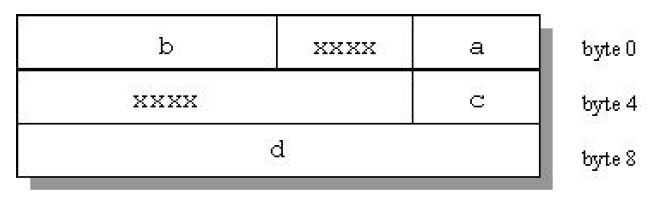
Figure 1 Internal Padding in a Structure
Figure 2 shows how tail padding is applied to a structure aligned on a doubleword (8 byte) boundary.
struct strc2{
 int m1[4]; /* occupies bytes
0 through 15 */
 double m2; /* occupies bytes 16 through 23 */
 short m3; /* occupies bytes 24 and 25 */
} st;
1.1.5. Bit-field Alignment
Bit-fields have the same size and alignment rules as other aggregates, with several additions to these rules:
Bit-fields are allocated from right to left.
A bit-field must entirely reside in a storage unit appropriate for its type. Bit-fields never cross unit boundaries.
Bit-fields may share a storage unit with other structure/union members, including members that are not bit-fields.
Unnamed bit-field’s types do not affect the alignment of a structure or union.
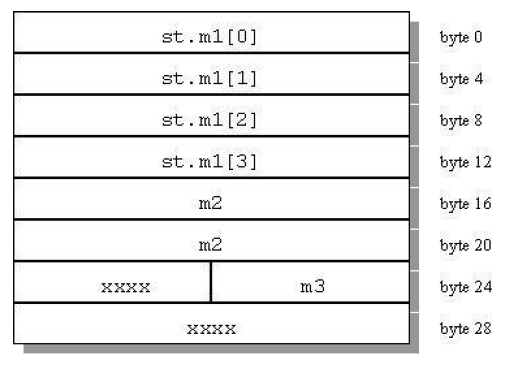
Figure 2 Tail Padding in a Structure
1.1.6. Other Type Keywords in C and C++
The void data type is an incomplete type that is neither a scalar nor an aggregate. You can use void or void* as the return type of a function to indicate the function does not return a value, or as a pointer to an unspecified data type, respectively.
Extended integer types __int128 and unsigned __int128 are supported by default by NVC and NVC++. 128-bit integer support is available on all targets, including GPUs, except in OpenACC.
2. Command-Line Options Reference
A command-line option allows you to specify specific behavior when a program is compiled and linked. Compiler options perform a variety of functions, such as setting compiler characteristics, describing the object code to be produced, controlling the diagnostic messages emitted, and performing some preprocessor functions. Most options that are not explicitly set take the default settings. This reference section describes the syntax and operation of each NVC and NVC++ compiler option. For easy reference, the options are arranged in alphabetical order.
For an overview and tips on options usage and which options are best for which tasks, refer to the ‘Using Command-line Options’ section of the HPC C and C++ Compilers User’s Guide, which also provides summary tables of the different options.
This section uses the following notation:
- [item]
Square brackets indicate that the enclosed item is optional.
- {item | item}
Braces indicate that you must select one and only one of the enclosed items. A vertical bar (|) separates the choices.
- ...
Horizontal ellipses indicate that zero or more instances of the preceding item are valid.
2.1. HPC C and C++ Compilers Option Summary
The following tables include the NVIDIA HPC C and C++ compiler (NVC and NVC++) options; options that apply only to NVC++ are marked (C++ only). The options are separated by category for easier reference.
For a complete description of each option, refer to the detailed information later in this section.
2.2. Generic Compiler Options
The following descriptions are for compiler options common to the NVIDIA HPC C and C++ compilers (NVC and NVC++). For easy reference, the options are arranged in alphabetical order. For a list of options by tasks, refer to the tables in the beginning of this section.
2.2.1. -#
Displays the invocations of the compiler, assembler and linker.
Default
The compiler does not display individual phase invocations.
Usage
The following command-line requests verbose invocation information.
$ nvc -# prog.c
Description
The -# option displays the invocations of the compiler, assembler and linker. These invocations are command-lines created by the driver from your command-line input and the default value.
Related options
2.2.2. -[no]acc
Enable [disable] OpenACC directives. The following suboptions may be used following an equals sign (“=”), with multiple sub-options separated by commas:
gpuOpenACC directives are compiled for GPU execution only.
hostCompile for serial execution on the host CPU.
multicoreCompile for parallel execution on the host CPU.
legacySuppress warnings about deprecated NVIDIA accelerator directives.
[no]autoparEnable [disable] loop autoparallelization within acc parallel. The default is to autoparallelize, that is, to enable loop autoparallelization.
[no]routineseqCompile every routine for the devicee. The default behavior is to not treat every routine as a seq directive.
strictInstructs the compiler to issue warnings for non-OpenACC accelerator directives.
syncIgnore async clauses
verystrictInstructs the compiler to fail with an error for any non-OpenACC accelerator directive.
[no]waitWait for each device kernel to finish. Kernel launching is blocked by default unless the async clause is used.
Default
By default OpenACC directives are compiled for GPU and sequential CPU host execution (i.e. equivalent to explicitly setting -acc=gpu,host).
Usage
The following command-line requests that OpenACC directives be enabled and that an error be issued for any non-OpenACC accelerator directive.
$ nvc -acc=verystrict prog.c
Predefined Macros
The following macros corresponding to the target compiled for are added implicitly:
__NVCOMPILER_OPENACC_GPUwhen the OpenACC directives are compiled for GPU.__NVCOMPILER_OPENACC_MULTICOREwhen the OpenACC directives are compiled for multicore CPU.__NVCOMPILER_OPENACC_HOSTwhen the OpenACC directives are compiled for serial execution on CPU.
2.2.3. -Bdynamic
Compiles for and links to the shared object version of the NVIDIA HPC Compilers runtime libraries.
Default
Dynamic linking is the default behavior for Linux.
Usage
% nvc -Bdynamic myprogram.c
When you use the nvc or nvc++ flag -Bdynamic to create an executable that links to the shared object form of the runtime, the executable built is smaller than one built without -Bdynamic. The NVIDIA HPC Compilers runtime shared object(s), however, must be available on the system where the executable is run. The -Bdynamic flag must be used when an executable is linked against a shared object built by the NVIDIA HPC compilers.
Related options
2.2.4. -c
Halts the compilation process after the assembling phase and writes the object code to a file.
Default
The compiler produces an executable file and does not use the -c option.
Usage
In this example, the compiler produces the object file myprog.o in the current directory.
$ nvc -c myprog.c
Description
Use the -c option to halt the compilation process after the assembling phase and write the object code to a file. If the input file is filename.c, the output file is filename.o.
Related options
2.2.5. -c++libs
Used on the link line of the NVFORTRAN compiler, instructs the Fortran compiler to append C++ runtime libraries to the link line for programs built using NVFORTRAN. Use this option when you link object files compiled with nvc++ into a Fortran main program.
Default
The NVFORTRAN compiler does not append the C++ runtime libraries to the link line.
Usage
In the following example the C++ runtime libraries are linked with an object file compiled with NVFORTRAN
$ nvfortran main.f90 mycpp.o -c++libs
Description
Use this option to instruct the NVIDIA Fortran compiler to append C++ runtime libraries to the link line.
Related options
2.2.6. -cuda
Enable CUDA; please refer to -gpu for target-specific options.
Usage
The following command-line requests that CUDA interoperability be enabled and CUDA C++ syntax be recognized and processed.
$ nvc++ -cuda myprog.cpp
2.2.7. -cudalib
Add CUDA-optimized libraries to the link line. When no sub-option is specified the compiler will link all necessary CUDA-optimized libraries. -cudalib will use the version of the library appropriate to the CUDA version being used. The following libraries may be specified following an equals sign (“=”), with multiple libraries separated by commas:
cublasLink in the cuBLAS library.
cufftLink in the cuFFT library.
cufftwLink in the cuFFTW library.
curandLink in the cuRAND library.
cusolverLink in the cuSOLVER library.
cusparseLink in the cuSPARSE library.
cutensorLink in the cuTENSOR library.
nvblasLink in the NVBLAS library.
ncclLink in the NCCL library.
nvlamathLink in the NVLAmath library.
nvshmemLink in the NVSHMEM library.
Usage
The following command-line links in all necessary CUDA libraries.
$ nvc++ -acc -cudalib myprog.cpp
2.2.8. -D
Creates a preprocessor macro with a given value.
Note
You can use the -D option more than once on a compiler command line. The number of active macro definitions is limited only by available memory.
Syntax
-Dname[=value]
Where name is the symbolic name and value is either an integer value or a character string.
Default
If you define a macro name without specifying a value, the preprocessor assigns the string 1 to the macro name.
Usage
In the following example, the macro PATHLENGTH has the value 256 until a subsequent compilation. If the -D option is not used, PATHLENGTH is set to 128.
$ nvc -DPATHLENGTH=256 myprog.c
The source text in myprog.c is this:
#ifndef PATHLENGTH
#define PATHLENGTH 128
#endif
void sub(void)
{
    char path[PATHLENGTH];
    ...
}
Description
Use the -D option to create a preprocessor macro with a given value. The value must be either an integer or a character string.
You can use macros with conditional compilation to select source text during preprocessing. A macro defined in the compiler invocation remains in effect for each source file on the command line, unless you remove the macro with an #undef preprocessor directive or with the -U option. The compiler processes all of the -U options in a command line after processing the -D options.
Related options
2.2.9. -d<arg>
Prints additional information from the preprocessor. [Valid only for the C compiler (nvc) ]
Default
No additional information is printed from the preprocessor.
Syntax
-d[D|I|M|N]
-dDPrint macros and values from source files.
-dIPrint include file names.
-dMPrint macros and values, including predefined and command-line macros.
-dNPrint macro names from source files.
Usage
In the following example, the compiler prints macro names from the source file.
$ nvc -dN myprog.c
Description
Use the -d<arg> option to print additional information from the preprocessor.
Related options
2.2.10. -dryrun
Displays the invocations of the compiler, assembler, and linker but does not execute them.
Default
The compiler does not display individual phase invocations.
Usage
The following command line requests verbose invocation information.
$ nvc -dryrun myprog.c
Description
Use the -dryrun option to display the invocations of the compiler, assembler, and linker but not have them executed. These invocations are command lines created by the compiler driver from the rc files and the command-line supplied with -dryrun.
Related options
2.2.11. -drystdinc
Displays the standard include directories and then exits the compiler.
Default
The compiler does not display standard include directories.
Usage
The following command line requests a display for the standard include directories.
$ nvc -drystdinc myprog.c
Description
Use the -drystdinc option to display the standard include directories and then exit the compiler.
Related options
None.
2.2.12. -E
Halts the compilation process after the preprocessing phase and displays the preprocessed output on the standard output.
Default
The compiler produces an executable file.
Usage
In the following example the compiler displays the preprocessed myprog.c on the standard output.
$ nvc -E myprog.c
Description
Use the -E option to halt the compilation process after the preprocessing phase and display the preprocessed output on the standard output.
Related options
2.2.13. -fast
Enables vectorization with SIMD instructions, cache alignment, and flushz for 64-bit targets.
Default
The compiler does not enable vectorization with SIMD instructions, cache alignment, and flushz.
Usage
In the following example the compiler produces vector SIMD code when targeting a 64-bit machine.
$ nvc -fast vadd.c
Description
When you use this option, a generally optimal set of options is chosen for targets that support SIMD capability. In addition, the appropriate -tp option is automatically included to enable generation of code optimized for the type of system on which compilation is performed. This option enables vectorization with SIMD instructions, cache alignment, and flushz.
Note
Auto-selection of the appropriate -tp option means that programs built using the -fast option on a given system are not necessarily backward-compatible with older systems.
Note
The C and C++ compilers enable -Mautoinline with -fast.
Related options
-O<level>, -Munroll[=option [,option…]], -Mnoframe, -M[no]vect[=option [,option,…]], -Mcache_align, -tp <target>, -M[no]autoinline[=option[,option,…]]
2.2.14. -fcx-limited-range
-fcx-limited-range specifies that complex division does not need range reduction. -fno-cx-limited-range specifies that complex division does need range reduction.
Default
-fcx-limited-range with -Ofast
Otherwise: -fno-cx-limited-range
Related options
2.2.15. –flagcheck
Causes the compiler to check that flags are correct and then exit without any compilation occuring.
Default
The compiler begins a compile without the additional step to first validate that flags are correct.
Usage
In the following example the compiler checks that flags are correct, and then exits.
$ nvc --flagcheck myprog.c
Description
Use this option to make the compiler check that flags are correct and then exit. If flags are all correct then the compiler returns a zero status. No compilation occurs.
Related options
None.
2.2.16. -fortranlibs
Instructs the C++ or C compiler to append NVFORTRAN runtime libraries to the link line. Use this option when you link object files compiled with nvfortran into a C++ or C main program.
Default
The C++ and C compilers do not append the NVFORTRAN runtime libraries to the link line.
Usage
In the following example a .c main program is linked with an object file compiled with nvfortran.
$ nvc main.c myfort.o -fortranlibs
Description
Use this option to instruct the C++ or C compiler to append NVFORTRAN runtime libraries to the link line.
Related options
2.2.17. -fmax-errors=<n>
Set
Default
Abort compilation after a user defined error limit.
Usage
In the following example the compiler error limit is set to 5.
$ nvc -fmax-errors=5 myprog.c
Use the -fmax-errors option to increase or decrease the default compilation error limit.
Related options
2.2.18. -fpic
Generates position-independent code suitable for inclusion in shared object (dynamically linked library) files.
Default
The compiler does not generate position-independent code.
Usage
In the following example the resulting object file, myprog.o, can be used to generate a shared object.
$ nvc -fpic myprog.c
Use the -fpic option to generate position-independent code suitable for inclusion in shared object (dynamically linked library) files.
Related options
2.2.19. -fPIC
Equivalent to -fpic. Provided for compatibility with other compilers.
2.2.20. -g
Instructs the compiler to include symbolic debugging information in the object module; sets the optimization level to zero unless a -O option is present on the command line.
Default
The compiler does not put debugging information into the object module.
Usage
In the following example, the object file myprog.o contains symbolic debugging information.
$ nvc -c -g myprog.c
Description
Use the -g option to instruct the compiler to include symbolic debugging information in the object module. Debuggers require symbolic debugging information in the object module to display and manipulate program variables and source code.
If you specify the -g option on the command-line, the compiler sets the optimization level to -O0 (zero), unless you specify the -O option. For more information on the interaction between the -g and -O options, refer to the -O entry. Symbolic debugging may give confusing results if an optimization level other than zero is selected.
Note
Note: Including symbolic debugging information increases the size of the object module.
Related options
2.2.21. –gcc-toolchain=<path>
Specify the gcc toolchain location for use during compilation.
Default
Compiles using the default gcc toolchain location (selected during installation).
Usage
The following examples compile using the specified gcc 9.3.0 toolchain.
$ nvc++ --gcc-toolchain=~/gcc/gcc-9.3.0/ myprog.cpp
$ nvc++ --gcc-toolchain=~/gcc/gcc-9.3.0/bin/ myprog.cpp
$ nvc++ --gcc-toolchain=~/gcc/gcc-9.3.0/bin/gcc myprog.cpp
Description
The argument can either be gcc root directory, <root directory>/bin, or the gcc executable itself.
Related options
None.
2.2.22. -gopt
Instructs the compiler to include symbolic debugging information in the object file, and to generate optimized code identical to that generated when -g is not specified.
Default
The compiler does not put debugging information into the object module.
Usage
In the following example, the object file myprog.o contains symbolic debugging information.
$ nvc -c -gopt myprog.c
Description
Using -g alters how optimized code is generated in ways that are intended to enable or improve debugging of optimized code. The -gopt option instructs the compiler to include symbolic debugging information in the object file, and to generate optimized code identical to that generated when -g is not specified.
Related options
2.2.23. -gpu
Used in combination with the -acc, -cuda, -mp, and -stdpar flags to specify options for GPU code generation. The following sub-options may be used following an equals sign (“=”), with multiple sub-options separated by commas:
autocompareAutomatically compare CPU vs GPU results at execution time: implies redundant
ccXYGenerate code for a device with compute capability X.Y. Multiple compute capabilities can be specified, and one version will be generated for each. By default, the compiler will detect the compute capability for each installed GPU. Use -help -gpu to see the valid compute capabilities for your installation.
ccallGenerate code for all compute capabilities supported by this platform and by the selected or default CUDA Toolkit.
ccall-majorCompile for all major supported compute capabilities.
ccnativeDetects the visible GPUs on the system and generates codes for them. If no device is available, the compute capability matching NVCC’s default will be used.
cudaX.YUse CUDA X.Y Toolkit compatibility, where installed
[no]debugEnable [disable] debug information generation in device code
fastmathUse routines from the fast math library
[no]flushzEnable [disable] flush-to-zero mode for floating point computations on the GPU
[no]fmaGenerate [do not generate] fused multiply-add instructions; default at
-O1. This is an alias of -M[no]fma.[no]implicitsectionsChange [do not change] array element references in a data clause into an array section. For example, the
implicitsectionsoption will changeupdate device(a[n])toupdate device(a[0:n]). The default behavior,noimplicitsections, can also be changed using rcfiles; for example, one could addset IMPLICITSECTIONS=0;to siterc or another rcfile.[no]interceptdeallocationsIntercept [do not intercept] calls to standard library memory deallocations (e.g.
free) and call the corresponding CUDA memory deallocation version if address is in pinned or managed memory, regular version otherwise.keepKeep the kernel files (.cubin, .ptx, source)
[no]lineinfoEnable [disable] GPU line information generation
loadcache:{L1|L2}Choose what hardware level cache to use for global memory loads; options include the default,
L1, orL2[no]managedAllocate [do not allocate] any dynamically allocated data in CUDA Managed memory. Use
-gpu=nomanagedwith-stdparto prevent that flag’s implicit use of-gpu=managedwhen CUDA Managed memory capability is detected. This option is deprecated.maxregcount:nSpecify the maximum number of registers to use on the GPU; leaving this blank indicates no limit
mem:{separate|managed|unified}Select GPU memory mode for the generated binary. This controls CUDA memory capability to be utilised such as separate GPU memory only (
separate), GPU Managed Memory for the dynamically allocated data (managed), or system memory aka full CUDA Unified Memory (unified). Use of Managed or Unified Memory facilitates simpler programming by eliminating the need to detect all data to be copied into and outside of the code region executing on the GPU.pinnedUse CUDA Pinned Memory. This option is deprecated.
ptxinfoPrint PTX info
[no]rdcGenerate [do not generate] relocatable device code.
redundantRedundant CPU/GPU execution
safecacheAllow variable-sized array sections in cache directives; compiler assumes they fit into CUDA shared memory
sm_XYGenerate code for a device with compute capability X.Y. Multiple compute capabilities can be specified, and one version will be generated for each. By default, the compiler will detect the compute capability for each installed GPU. Use -help -gpu to see the valid compute capabilities for your installation.
stacklimit:<l>nostacklimitSets the limit (l) of stack variables in a procedure or kernel, in KB. This option is deprecated.
[no]unifiedCompile [do not compile] for CUDA Unified memory capability, where system memory is accessible from the GPU. This mode utilizes system and managed memory for dynamically allocated data unless explicit behavior is set through
-gpu=[no]managed. Use-gpu=nounifiedwith-stdparto prevent that flag’s implicit use of-gpu=unifiedwhen CUDA Unified memory capability is detected. This option must appear in both the compile and link lines. This option is deprecated.[no]unrollEnable [disable] automatic inner loop unrolling; default at
-O3zeroinitInitialize allocated device memory with zero
Usage
In the following example, the compiler generates code for NVIDIA GPUs with compute capabilities 8.0 and 9.0.
$ nvc -acc -gpu=cc80,cc90 myprog.c
The compiler automatically invokes the necessary software tools to create the kernel code and embeds the kernels in the object file.
To link in the appropriate GPU libraries, you must link an OpenACC program with the -acc flag, and similarly for -cuda, -mp, or -stdpar.
DWARF Debugging Formats
Use the -g option to enable generation of full DWARF information on both the host and device; in the absence of other optimization flags, -g sets the optimization level to zero. If a -O option raises the optimization level to one or higher, only GPU line information is generated in device code even when -g is specified. To enforce full DWARF generation for device code at optimization levels above zero, use the debug sub-option to -gpu. Conversely, to prevent the generation of dwarf information for device code, use the nodebug sub-option to -gpu. Both debug and nodebug can be used independently of -g.
2.2.24. -help
Used with no other options, -help displays options recognized by the driver on the standard output. When used in combination with one or more additional options, usage information for those options is displayed to standard output.
Default
The compiler does not display usage information.
Usage
In the following example, usage information for -Minline is printed to standard output.
$ nvc -help -Minline
-Minline[=lib:<inlib>|<maxsize>|<func>|except:<func>|name:<func>|maxsize:<n>|
totalsize:<n>|smallsize:<n>|reshape]
                    Enable function inlining
    lib:<inlib>     Use extracted functions from inlib
    <maxsize>       Set maximum function size to inline
    <func>          Inline function func
    except:<func>   Do not inline function func
    name:<func>     Inline function func
    maxsize:<n>     Inline only functions smaller than n
    totalsize:<n>   Limit inlining to total size of n
    smallsize:<n>   Always inline functions smaller than n
    reshape         Allow inlining in Fortran even when array shapes do not
                    match
    pragma          Fortran Only: Inline only those procedures that have the
                    ``!NVF$ INLINE`` pragma on the source line
                    immediately before the procedure's SUBROUTINE or
                    FUNCTION statement.
    -Minline        Inline all functions that were extracted
In the following example, usage information for -help shows how groups of options can be listed or examined according to function.
$ nvc -help -help
-help[=groups|asm|debug|language|linker|opt|other|
overall|phase|prepro|suffix|switch|target|variable]
Description
Use the -help option to obtain information about available options and their syntax. You can use -help in one of three ways:
Use
-helpwith no parameters to obtain a list of all the available options with a brief one-line description of each.Add a parameter to -help to restrict the output to information about a specific option. The syntax for this usage is this:
-help <command line option>
Add a parameter to -help to restrict the output to a specific set of options or to a building process. The syntax for this usage is this:
-help=<subgroup>
The following table lists and describes the subgroups available with -help.
For more examples of -help, refer to ‘Help with Command-line Options.’
Related options
2.2.25. -I
Adds a directory to the search path for files that are included using the preprocessor directive #include.
Default
The compiler searches only certain directories for included files.
For gcc-lib includes:
/usr/lib64/gcc-libFor system includes:
/usr/include
Syntax
-Idirectory
Where directory is the name of the directory added to the standard search path for include files.
Usage
In the following example, the compiler first searches the directory mydir and then searches the default directories for include files.
$ nvc -Imydir
Description
Adds a directory to the search path for files that are included using the preprocessor directive #include. Use the -I option to add a directory to the list of where to search for the included files. The compiler searches the directory specified by the -I option before the default directories.
Related options
2.2.26. -K<flag>
Requests that the compiler provide special compilation semantics with regard to conformance to IEEE 754.
Default
The default is -Knoieee and the compiler does not provide special compilation semantics.
Syntax
-K<flag>
Where flag is one of the following:
ieeePerform floating-point operations in strict conformance with the IEEE 754 standard. Some optimizations are disabled, and on some systems a more accurate math library is linked if
-Kieeeis used during the link step.noieeeDefault flag. Use the fastest available means to perform floating-point operations, link in faster non-IEEE libraries if available, and disable underflow traps.
PICorpicGenerate position-independent code. Equivalent to
-fpic. Provided for compatibility with other compilers.trap=option[,option]...Controls the behavior of the processor when floating-point exceptions occur. Possible options include:
fpalign(ignored)invdenormdivzovfunfinexactnone
Note
Same floating-point exception functionality as -Ktrap=flag[,flag] can be achieved with the runtime environment variable NVCOMPILER_FPU_STATE
Usage
In the following example, the compiler performs floating-point operations in strict conformance with the IEEE 754 standard
$ nvc -Kieee myprog.c
Description
Use -K to instruct the compiler to provide special compilation and runtime
semantics.
-Ktrap=flag[,flag] controls Floating-point Exception (FPE) behavior
during compilation and runtime.
This option has a dual role:
At compilation, -Ktrap instructs the compiler to maintain the exact FPE
behavior defined in the source code. The compiler won’t introduce new FPEs
through optimizations and will preserve all existing ones. The -Ktrap option
applies to the treatment of all FPEs in compiled code; the individual flags
provided to -Ktrap=flag[,flag] do not influence code generation.
At runtime, -Ktrap=flag[,flag] uses the provided flags to unmask specific
FPEs when the program starts. Normally, a processor’s FPEs are masked, which
means it will recover from the error and continue running. By unmasking them
with -Ktrap=flag[,flag], the program will terminate with a SIGFPE signal
(an arithmetic exception) if one of those specified FPEs occurs. The FPE flags
are only processed when compiling the main function.
Flags
The flags provided to -Ktrap=flag[,flag] correspond to different types of
floating-point exceptions. These are given as a comma-separated list, and the
last flag in the list takes precedence if there are conflicting settings.
denorm:  Denormalized operand, an extremely small number near zero.
divz:    Divide-by-zero, a division where the divisor is zero.
inexact: Inexact, a loss of precision during a calculation.
inv:     Invalid operation, like taking the square root of a negative number.
ovf:     Overflow, when a number is too large to be represented.
unf:     Underflow, when a number is too small to be represented.
The special flag -Ktrap=none is used to preserve FPEs during compilation
without unmasking any of them at runtime.
The inv, divz, and ovf flags are often the most interesting, as they
signify abnormal floating-point behavior in the program. These can be enabled with
the useful shorthand -Ktrap=fp.
Note
The NVIDIA HPC C and C++ compilers do not support exception-free execution for -Ktrap=inexact. The purpose of this hardware support is for those who have specific uses for its execution, along with the appropriate signal handlers for handling exceptions it produces. It is not designed for normal floating point operation code support.
Related options
None.
2.2.27. -L
Specifies a directory to search for libraries.
Note
Multiple -L options are valid. However, the position of multiple -L options is important relative to -l options supplied.
Default
The compiler searches the standard library directory.
Syntax
-Ldirectory
Where directory is the name of the library directory.
Usage
In the following example, the library directory is /lib and the linker links in the standard libraries required by NVC from this directory.
$ nvc -L/lib myprog.c
In the following example, the library directory /lib is searched for the library file libx.a and both the directories /lib and /libz are searched for liby.a.
$ nvc -L/lib -lx -L/libz -ly myprog.c
Description
Use the -L option to specify a directory to search for libraries. Using -L allows you to add directories to the search path for library files.
Related options
2.2.28. -l<library>
Instructs the linker to load the specified library. The linker searches <library>in addition to the standard libraries.
Note
The linker searches the libraries specified with -l in order of appearance before searching the standard libraries.
Syntax
-llibrary
Where library is the name of the library to search.
Usage: In the following example, if the standard library directory is /lib the linker loads the library /lib/libmylib.a, in addition to the standard libraries.
$ nvc myprog.c -lmylib
Description
Use this option to instruct the linker to load the specified library. The compiler prepends the characters lib to the library name and adds the .a extension following the library name. The linker searches each library specified before searching the standard libraries.
Related options
2.2.29. -M
Generate make dependence lists. You can use -MD,filename (nvc++ only) to generate make dependence lists and print them to the specified file.
2.2.30. -M<nvflag>
Selects options for code generation. The options are divided into the following categories:
Code generation |
C/C++ Language Controls |
Optimization |
Environment |
Inlining |
Miscellaneous |
The following table lists and briefly describes the options alphabetically and includes a field showing the category. For more details about the options as they relate to these categories, refer to ‘-M Options by Category’.
nvflag |
Description |
Category |
|---|---|---|
|
Annotate the assembly code with source code. |
Miscellaneous |
|
When a C/C++ function is declared with the inline keyword, inline it at -O2. |
Inlining |
|
Specifies whether the compiler allows the asm keyword in C/C++ source files. |
C/C++ Language |
|
Specifies whether array bounds checking is enabled or disabled. |
Miscellaneous |
|
Do/don’t compile with math subroutine builtin support, which causes selected math library routines to be inlined. |
Optimization |
|
Where possible, align data objects of size greater than or equal to 16 bytes on cache-line boundaries. |
Optimization |
|
Check the stack for available space upon entry to and before the start of a parallel region. Useful when many private variables are declared. |
Miscellaneous |
|
Enable auto-concurrentization of loops. Multiple processors or cores will be used to execute parallelizable loops. |
Optimization |
|
Run the NVIDIA cpp-like preprocessor without performing subsequent compilation steps. |
Miscellaneous |
|
Do/don’t treat denormalized operands as zero (default). |
Code Generation |
|
Checks for potential data dependencies. |
Optimization |
|
Enables [disables] dead store elimination phase for programs making extensive use of function inlining. |
Optimization |
|
Specifies the character (char) to which the compiler maps the dollar sign symbol. |
C/C++ Language |
|
Specifies [not] to add DWARF debug information. |
Code Generation |
|
When used with -g, generate DWARF2 format debug information. |
Code Generation |
|
When used with -g, generate DWARF3 format debug information. |
Code Generation |
|
invokes the function extractor. |
Inlining |
|
Perform certain floating point intrinsic functions using relaxed precision. |
Optimization |
|
Do [not] treat denormalized results as zero (default). |
Code Generation |
|
Specifies not to use low-precision fp approximation operations. |
Optimization |
|
The compiler aligns all functions to 32-byte boundaries. |
Code Generation |
|
Matches behavior of certain gcc bugs |
Miscellaneous |
|
Prints informational messages regarding optimization and code generation to standard output as compilation proceeds. |
Miscellaneous |
|
Specifies the minimum level of error severity that the compiler displays. |
Miscellaneous |
|
Invokes the function inliner. |
Inlining |
|
Generates additional code to enable instrumentation of functions. |
Code Generation |
|
Preserve intermediate assembly language file. |
Miscellaneous |
|
Enables support for 64-bit indexing and single static data objects of size larger than 2GB. |
Code Generation |
|
Specifies whether the compiler creates a listing file. |
Miscellaneous |
|
Aligns [does not align] innermost loops on 32-byte boundaries. |
Code Generation |
|
Enable [disable] loop-carried redundancy elimination. |
Optimization |
|
Recognizes [ignores] __m128, __m128d, and __m128i datatypes. (nvc only) |
Code Generation |
|
Instructs the compiler to treat floating-point constants as float data types rather than the default double data type. |
C/C++ Language |
|
Instructs the compiler to produce information on why certain optimizations are not performed. |
Miscellaneous |
|
Eliminates operations that set up a true stack frame pointer for functions. |
Optimization |
|
On Linux, do not add -rpath paths to the link line. |
Miscellaneous |
|
Instructs the compiler to not recognize the standard preprocessor macros. |
Environment |
|
Instructs the compiler to not search the standard location for include files. |
Environment |
|
Instructs the linker to not link in the standard libraries. |
Environment |
|
Disable idiom recognition and generation of calls to optimized vector functions. |
Optimization |
|
Perform cpp-like preprocessing on assembly language input source files. |
Miscellaneous |
|
Specifies whether the compiler avoids optimizations that can prevent code from being reentrant. |
Code Generation |
|
Instructs the compiler to override data dependencies between pointers and arrays. |
Optimization |
|
In the case where a scalar is used after a loop, but is not defined on every iteration of the loop, the compiler does not by default parallelize the loop. However, this option tells the compiler it is safe to parallelize the loop. For a given loop, the last value computed for all scalars make it safe to parallelize the loop. |
Code Generation |
|
Specifies signed char for characters (also see uchar). |
C/C++ Language |
|
Do [do not] extend the sign bit, if it is set. |
Code Generation |
|
Do [do not] convert float parameters to double parameter characters. |
C/C++ Language |
|
Specifies unsigned char for characters (also see schar). |
C/C++ Language |
|
Controls loop unrolling. |
Optimization |
|
Do [do not] invoke the code vectorizer. |
Optimization |
2.2.31. -m
Displays a link map on the standard output.
Default
The compiler does not display the link map.
Usage
When the following example is executed, nvc writes the link map to stdout.
$ nvc -m myprog.c
Description
Use this option to display a link map.
On Linux, the map is written to
stdout.
Related options
2.2.32. -march=<target>
An alias for -mcpu=<target>[<+extension…>]. Please see -mcpu=<target>[<+extension…>] for details.
Related options
-tp <target>, -mcpu=<target>[<+extension…>], -mtune=<target>, and all -M<nvflag> options that control environments, as listed in Environment Controls
2.2.33. -mcmodel=<size>
Generates code for the requested memory model in the Linux execution environment.
Default: The compiler generates code for the small memory model on Arm and x86-64 targets.
Usage
The following command line requests the medium memory model:
$ nvc -mcmodel=medium myprog.c
Arm Description
The tiny memory model limits the combined area for a user’s object or executable to 1MB. The maximum code size is 1MB.
The small memory model limits the combined area for a user’s object or executable to 4GB. The maximum code size is 2GB.
The medium memory model is not supported on Arm. This will automatically select the large memory model.
The large memory model allows unrestricted data size. The maximum code size is 2GB. -mcmodel=large is not compatible with -fPIC on Arm systems.
x86-64 Description
The tiny memory model is not supported on x86-64.
The small memory model limits the combined area for a user’s object or executable to 2GB. Implies -Mlarge_arrays on x86-64 targets.
The medium memory model allows unrestricted data size. The maxmium code size is 2GB.
The Linux environment provides static libxxx.a archive libraries, that are built both with and without -fpic, and dynamic libxxx.so shared object libraries that are compiled with -fpic. Using the link switch -mcmodel=medium implies the -fpic switch and utilizes the shared libraries by default.
The large memory model is not supported on x86-64.
Details
The tiny and small code models are the fastest and should be suitable for the majority of programs. The medium and large code models allow for larger code and data sizes, at the cost of extra instructions. Please see the respective SysV ABI documents for more detail.
Related options
2.2.34. -mcpu=<target>[<+extension…>]
Sets the target processor. An optional list of architecture extensions may follow the target processor. Architecture extensions are disabled by prepending no to the extension name. For example, +nocrypto. Extensions are processed in order, from left-to-right.
Default
The NVIDIA HPC C and C++ compilers (NVC and NVC++) produce code specifically targeted to the type of processor on which compilation is performed. In particular, the default is to use all supported instructions wherever possible when compiling on a given system.
The default target processor is auto-selected depending on the processor on which the compilation is performed. You can specify a target processor different than the auto-selected default, but that target must be within the same CPU family as the processor on which compilation is performed. NVC and NVC++ support 2 different families of CPUs: x86_64 and 64-bit Arm Server CPUs.
Executables created on a given system without the -mcpu= flag may not be usable on previous generation systems. For example, executables created on an Intel Skylake processor may use AVX-512 or other instructions that are not available on earlier Intel processors or certain AMD processors.
Usage
In the following example, nvc sets the target processor to Arm Neoverse-v2 with Crypto support:
$ nvc -mcpu=neoverse-v2+crypto myprog.c
Description
Use this option to set the target architecture. By default, nvc and nvc++ use all supported instructions wherever possible when compiling on a given system.
Processor-specific optimizations can be specified or limited explicitly by using the -mcpu option. Thus, it is possible to create executables that are usable on previous-generation systems.
The following list contains the possible suboptions for -mcpu and the processors that each suboption is intended to target.
x86-64
pxgenerate code that is usable on any x86-64 processor-based system.
hostgenerate code targeted for host processor. Link native version of HPC SDK cpu math library.
nativegenerate code targeted for host processor. Alias for -tp host.
x86-64-v2generate code for the x86-64 microarchitectural level including SSE.
x86-64-v3generate code for the x86-64 microarchitectural level including AVX2.
x86-64-v4generate code for the x86-64 microarchitectural level including some AVX512 extensions.
bulldozergenerate code for AMD Bulldozer and compatible processors.
piledrivergenerate code that is usable on any AMD Piledriver processor-based system.
bdver3generate code for AMD Steamroller and compatible processors.
bdver4generate code for AMD Excavator and compatible processors.
zengenerate code that is usable on any AMD Zen processor-based system (e.g. Naples, Ryzen).
zen2generate code that is usable on any AMD Zen 2 processor-based system (e.g. Rome, 3rd Gen Ryzen).
zen3generate code that is usable on any AMD Zen 3 processor-based system (e.g. Milan, Ryzen 5000).
zen4generate code that is usable on any AMD Zen 4 processor-based system (e.g. Genoa).
zen5generate code that is usable on any AMD Zen 5 processor-based system (e.g. Turin).
sandybridgegenerate code for Intel Sandy Bridge and compatible processors.
haswellgenerate code that is usable on any Intel Haswell processor-based system.
skylakegenerate code that is usable on an Intel Skylake Xeon processor-based system.
icelakegenerate code that is usable on an Intel Ice Lake Xeon processor-based system.
cannonlakegenerate code that is usable on an Intel Cannon Lake Xeon processor-based system.
cascadelakegenerate code that is usable on an Intel Cascade Lake Xeon processor-based system.
cooperlakegenerate code that is usable on an Intel Cooper Lake Xeon processor-based system.
tigerlakegenerate code that is usable on an Intel Tiger Lake Xeon processor-based system.
alderlakegenerate code that is usable on an Intel Alder Lake Xeon processor-based system.
rocketlakegenerate code that is usable on an Intel Rocket Lake Xeon processor-based system.
sapphirerapidsgenerate code that is usable on an Intel Sapphire Rapids Xeon processor-based system.
graniterapidsgenerate code that is usable on an Intel Granite Rapids Xeon processor-based system.
Arm
pxgenerate code that is usable on any Arm processor-based system.
hostgenerate code targeted for host processor. Link native version of HPC SDK cpu math library.
nativegenerate code targeted for host processor. Alias for -tp host.
a64fxgenerate code that is usable on a Fujitsu A64fx processor-based system (SVE x 512).
neoverse-n1generate code that is usable on any Arm Neoverse-N1 processor-based system.
neoverse-v1generate code that is usable on any Arm Neoverse-V1 processor-based system (SVE x 256).
neoverse-v2generate code that is usable on any Arm Neoverse-V2 processor-based system (SVE x 128).
olympusgenerate code that is usable on any NVIDIA Olympus processor-based system (SVE x 128).
gracegenerate code that is usable on a NVIDIA Grace processor-based system (SVE x 128).
veragenerate code that is usable on a NVIDIA Vera processor-based system (SVE x 128).
graviton3generate code that is usable on an AWS Graviton3 processor-based system (SVE x 256).
graviton4generate code that is usable on an AWS Graviton4 processor-based system (SVE x 128).
thunderx2t99generate code that is usable on a Cavium Vulcan processor-based system.
Related options
-tp <target>, -march=<target>, -mtune=<target>, and all -M<nvflag> options that control environments, as listed in Environment Controls
2.2.35. -[no]mp
Enable [disable] OpenMP pragmas. When enabled, it instructs the compiler to interpret user-inserted OpenMP parallel programming pragmas, and to generate an executable file which will utilize multiple processors in a parallel system.
Default
The compiler does not interpret user-inserted OpenMP parallel programming pragmas.
Usage
The following command line requests processing of any OpenMP pragmas present in myprog.c:
$ nvc -mp myprog.c
Description
Use the -mp option to instruct the compiler to interpret user-inserted OpenMP parallel programming pragmas and to generate an executable file which utilizes multiple processors in a parallel system.
The suboptions are one or more of the following:
[no]alignForces loop iterations to be allocated to OpenMP processes using an algorithm that maximizes alignment of vector sub-sections in loops that are both parallelized and SIMD vectorized. This allocation can improve performance in program units that include many such loops. It can also result in load-balancing problems that significantly decrease performance in program units with relatively short loops that contain a large amount of work in each iteration.
[no]autoparAuto-parallelization of loops within
omp loopis enabled by default. To disable this optimization, use thenoautoparsuboption.gpuOpenMP pragmas are compiled for GPU execution as well as host fallback to the CPU. For target-specific options, refer to the documentation for
-gpu.multicoreOpenMP pragmas are compiled for multicore CPU execution only; this sub-option is the default.
omptLink against the OMPT-enabled OpenMP runtime library. OMPT is an interface that helps a first-party tool monitor the execution of an OpenMP program.
For more information about how NVC and NVC++ support OpenMP, refer to the “Using OpenMP” section of the HPC C and C++ Compilers User’s Guide.
Related options
-Mconcur[=option [,option,…]], -M[no]vect[=option [,option,…]]
2.2.36. -mtune=<target>
-mtune= is provided for compatibility. It performs no operation.
Related options
-tp, -march=<target>, -mcpu=<target>[<+extension…>], and all -M<nvflag> options that control environments, as listed in Environment Controls
2.2.37. -noswitcherror
Issues warnings instead of errors for unknown switches. Ignores unknown command line switches after printing a warning message.
Default
The compiler prints an error message and then halts.
Usage
In the following example, the compiler ignores unknown command line switches after printing a warning message.
$ nvc -noswitcherror myprog.c
Description
Use this option to instruct the compiler to ignore unknown command line switches after printing a warning message.
Tip
You can configure this behavior in the siterc file by adding: set NOSWITCHERROR=1.
Related options
None.
2.2.38. -[no]nvmalloc
Enable [disable] linking with a library containing a custom memory allocator.
Default
On Arm, the compiler links in the custom memory allocator library for dynamic allocations.
On x86-64, the compiler links in the system library for dynamic allocations.
Usage
In the following example, the compiler uses the custom host memory allocator in place of the system library.
$ nvc main.c -nvmalloc
Description
Use this option to make use of the alternate memory allocator library. Users may see a performance improvement in certain situations by using this library.
Related options
None.
2.2.39. -O<level>
Invokes code optimization at the specified level.
Default
The compiler enables classical global optimization.
Syntax
-O [level]
Where level is an integer from 0 to 4 or “fast”.
Usage
In the following example, since no -O option is specified, the compiler sets the optimization to level 1.
$ nvc myprog.c
In the following example, since no optimization level is specified and a -O option is specified, the compiler enables classical global optimizations.
$ nvc -O myprog.c
Description
Use this option to invoke code optimization. Using the nvc and nvc++ commands with the -Olevel option (the capital O is for Optimize), you can specify any of the following optimization levels:
-O0Level zero specifies no optimization. A basic block is generated for each language statement.
-O1Level one specifies local optimization. Scheduling of basic blocks is performed. Register allocation is performed.
-OWhen no level is specified, level global optimizations are performed, including traditional scalar optimizations, induction recognition, and loop invariant motion. No SIMD vectorization is enabled.
-O2Level two specifies all level-1 and global optimizations, and enables more advanced optimizations such as SIMD code generation, cache alignment, and partial redundancy elimination.
-O3Level three specifies aggressive global optimization. This level performs all level-one and level-two global optimizations and enables more aggressive hoisting and scalar replacement optimizations that may or may not be profitable.
-OfastEnables
-O3,-Mfprelaxed,-Mstack_arrays,-Mno-nan,-Mno-inf, and,-fcx-limited-range.Note
-Mstack_arrayis disabled when both command line options-Ofastand-stdparare enabled.-O4Level four performs all level-one, level-two, and level-three optimizations and enables hoisting of guarded invariant floating point expressions.
The following table shows the interaction between the -O option, -g option, -Mvect, and -Mconcur options.
Unoptimized code compiled using the option -O0 can be significantly slower than code generated at other optimization levels. Like the -Mvect option, the -Munroll option sets the optimization level to level-2 if no -O or -g options are supplied. The -gopt option is recommended for generation of debug information with optimized code. For more information on optimization, refer to the ‘Multicore CPU Optimization’ section of the HPC C and C++ Compilers User’s Guide.
Related options
2.2.40. -o
Names the executable file. Use the -o option to specify the filename of the compiler object file. The final output is the result of linking.
Default
The compiler creates executable filenames as needed. If you do not specify the -o option, the default filename is the linker output file a.out.
Syntax
-o filename
Where filename is the name of the file for the compilation output. The filename should not have a .c extension.
Usage
In the following example, the executable file is myprog instead of the default a.out.
$ nvc myprog.c -o myprog
Related options
2.2.41. -pg
Instructs the compiler to instrument the generated executable for gprof-style gmon.out sample-based profiling trace file.
Default
The compiler does not instrument the generated executable for gprof-style profiling.
Usage:
In the following example the program is compiled for profiling using gprof.
$ nvc -pg myprog.c
Description
Use this option to instruct the compiler to instrument the generated executable for gprof-style sample-based profiling. You must use this option at both the compile and link steps. A gmon.out style trace is generated when the resulting program is executed, and can be analyzed using gprof.
Related options
None.
2.2.42. -R<directory>
Instructs the linker to hard-code the pathname <directory> into the search path for generated shared object (dynamically linked library) files.
Note
There cannot be a space between R and <directory>.
Usage
In the following example, at runtime the a.out executable searches the specified directory, in this case /home/Joe/myso, for shared objects.
$ nvc -R/home/Joe/myso myprog.c
Description
Use this option to instruct the compiler to pass information to the linker to hard-code the pathname <directory> into the search path for shared object (dynamically linked library) files.
Related options
2.2.43. -r
Creates a relocatable object file.
Default
The compiler does not create a relocatable object file and does not use the -r option.
Usage
In this example, nvc creates a relocatable object file.
$ nvc -r myprog.c
Description
Use this option to create a relocatable object file.
Related options
2.2.44. -rc
Specifies the name of the driver startup configuration file. If the file or pathname supplied is not a full pathname, the path for the configuration file loaded is relative to the $DRIVER path (the path of the currently executing driver). If a full pathname is supplied, that file is used for the driver configuration file.
Syntax
-rc [path] filename
Where path is either a relative pathname, relative to the value of $DRIVER, or a full pathname beginning with “/”. Filename is the driver configuration file.
Usage
In the following example, the file .nvcrctest, relative to /opt/hpc_sdk/<target>/<release>/compilers/bin, the value of $DRIVER, is the driver configuration file.
$ nvc -rc .nvcrctest myprog.c
Description
Use this option to specify the name of the compiler driver startup configuration file. If the file or pathname supplied is not a full pathname, the path for the configuration file loaded is relative to the $DRIVER path – the path of the currently executing compiler driver. If a full pathname is supplied, that file is used for the compiler driver configuration file.
Related options
2.2.45. -S
Stops compilation after the compiling phase and writes the assembly-language output to a file.
Default
The compiler does not retain a .s file.
Usage
In this example, nvc produces the file myprog.s in the current directory.
$ nvc -S myprog.c
Description
Use this option to stop compilation after the compiling phase and then write the assembly-language output to a file. If the input file is filename.c, then the output file is filename.s.
Related options
2.2.46. -s
Strips the symbol-table information from the executable file.
Default
The compiler includes all symbol-table information and does not use the -s option.
Usage
In this example, nvc strips symbol-table information from the a.out. executable file.
$ nvc -s myprog.c
Description
Use this option to strip the symbol-table information from the executable.
Related options
2.2.47. -shared
Instructs the compiler to pass information to the linker to produce a shared object (dynamically linked library) file.
Default
The compiler does not pass information to the linker to produce a shared object file.
Usage
In the following example the compiler passes information to the linker to produce the shared object file:myso.so.
$ nvc -shared myprog.c -o myso.so
Description
Use this option to instruct the compiler to pass information to the linker to produce a shared object (dynamically linked library) file.
Related options
2.2.48. -show
Produces driver help information describing the current driver configuration.
Default
The compiler does not show driver help information.
Usage
In the following example, the driver displays configuration information to the standard output after processing the driver configuration file.
$ nvc -show myprog.c
Description
Use this option to produce driver help information describing the current driver configuration.
Related options
2.2.49. -silent
Do not print warning messages.
Default
The compiler prints warning messages.
Usage
In the following example, the driver does not display warning messages.
$ nvc -silent myprog.c
Description
Use this option to suppress warning messages.
Related options
2.2.50. -soname
The compiler recognizes the -soname option and passes it through to the linker.
Default
The compiler does not recognize the -soname option.
Usage
In the following example, the driver passes the soname option and its argument through to the linker.
$ nvc -soname library.so myprog.c
Description
Use this option to instruct the compiler to recognize the -soname option and pass it through to the linker.
Related options
None.
2.2.51. -static
Statically link all libraries, including the NVIDIA HPC Compilers runtime.
Default
Dynamic linking is the default behavior for Linux
Usage
The following command line explicitly compiles for and links to the static version of the NVIDIA HPC Compilers runtime libraries:
% nvc -static -c object1.c
Description
You can use this option to explicitly compile for and link to the static versions of the system libraries and NVIDIA HPC Compilers runtime libraries.
Related options
2.2.52. -static-nvidia
Linux only. Compile and statically link only to the NVIDIA HPC Compilers runtime libraries. Other libraries are dynamically linked. Implies -Mnorpath.
Default
The compiler uses static libraries.
Usage
The following command line explicitly compiles for and links to the static version of the NVIDIA HPC Compilers runtime libraries:
% nvc -static-nvidia -c object1.c
Description
You can use this option to explicitly compile for and link to the static version of the NVIDIA HPC Compilers runtime libraries.
Note
On Linux, -static-nvidia results in code that runs on most Linux systems without requiring a Portability package.
Related options
2.2.53. -stdpar
Enable ISO C++17 Parallel Algorithms behavior; please refer to -gpu for target-specific options. The supported sub-options may be used following an equals sign (“=”), with multiple sub-options separated by commas.
Default
Without sub-options, -stdpar requests generation of code for execution of C++ Parallel Algorithms on the GPU.
Sub-options
gpuExecute C++ Parallel Algorithms on the GPU; the default.
multicoreExecute C++ Parallel Algorithms in parallel on the CPU.
Usage
The following command-line enables parallelization of C++ Parallel Algorithms for offloading to a GPU.
$ nvc++ -stdpar myprog.cpp
2.2.54. -target
Select the target device for all parallel programming paradigms used (OpenACC, OpenMP, Standard Languages). The following suboptions may be used following an equals sign (“=”), with multiple sub-options separated by commas:
gpuGlobally set the target device to an NVIDIA GPU.
multicoreGlobally set the target device to a multicore CPU.
Usage
The following command-line enables parallelization of C++17 Parallel Algorithms and OpenACC, and globally designates the target device as an NVIDIA GPU.
$ nvc++ -stdpar -acc -target=gpu myprog.cpp
2.2.55. -time
Print execution times for various compilation steps.
Default
The compiler does not print execution times for compilation steps.
Usage
In the following example, nvc prints the execution times for the various compilation steps.
$ nvc -time myprog.c
Description
Use this option to print execution times for various compilation steps.
Related options
2.2.56. -tp <target>
Sets the target processor.
Default
The NVIDIA HPC C and C++ compilers (NVC and NVC++) produce code specifically targeted to the type of processor on which compilation is performed. In particular, the default is to use all supported instructions wherever possible when compiling on a given system.
The default target processor is auto-selected depending on the processor on which the compilation is performed. You can specify a target processor different than the auto-selected default, but that target must be within the same CPU family as the processor on which compilation is performed. NVC and NVC++ support 2 different families of CPUs: x86_64 and 64-bit Arm Server CPUs.
Executables created on a given system without the -tp flag may not be usable on previous generation systems. For example, executables created on an Intel Skylake processor may use AVX-512 or other instructions that are not available on earlier Intel processors or certain AMD processors.
Usage
In the following example, nvc sets the target processor to an Intel Skylake Xeon processor:
$ nvc -tp=skylake myprog.c
Description
Use this option to set the target architecture. By default, nvc and nvc++ use all supported instructions wherever possible when compiling on a given system.
Processor-specific optimizations can be specified or limited explicitly by using the -tp option. Thus, it is possible to create executables that are usable on previous-generation systems.
The following list contains the possible suboptions for -tp and the processors that each suboption is intended to target.
pxgenerate code that is usable on any x86-64 processor-based system.
hostgenerate code targeted for host processor. Link native version of HPC SDK cpu math library.
nativegenerate code targeted for host processor. Alias for -tp host.
x86-64-v2generate code for the x86-64 microarchitectural level including SSE.
x86-64-v3generate code for the x86-64 microarchitectural level including AVX2.
x86-64-v4generate code for the x86-64 microarchitectural level including some AVX512 extensions.
bulldozergenerate code for AMD Bulldozer and compatible processors.
piledrivergenerate code that is usable on any AMD Piledriver processor-based system.
bdver3generate code for AMD Steamroller and compatible processors.
bdver4generate code for AMD Excavator and compatible processors.
zengenerate code that is usable on any AMD Zen processor-based system (e.g. Naples, Ryzen).
zen2generate code that is usable on any AMD Zen 2 processor-based system (e.g. Rome, 3rd Gen Ryzen).
zen3generate code that is usable on any AMD Zen 3 processor-based system (e.g. Milan, Ryzen 5000).
zen4generate code that is usable on any AMD Zen 4 processor-based system (e.g. Genoa).
zen5generate code that is usable on any AMD Zen 5 processor-based system (e.g. Turin).
sandybridgegenerate code for Intel Sandy Bridge and compatible processors.
haswellgenerate code that is usable on any Intel Haswell processor-based system.
skylakegenerate code that is usable on an Intel Skylake Xeon processor-based system.
icelakegenerate code that is usable on an Intel Ice Lake Xeon processor-based system.
cannonlakegenerate code that is usable on an Intel Cannon Lake Xeon processor-based system.
cascadelakegenerate code that is usable on an Intel Cascade Lake Xeon processor-based system.
cooperlakegenerate code that is usable on an Intel Cooper Lake Xeon processor-based system.
tigerlakegenerate code that is usable on an Intel Tiger Lake Xeon processor-based system.
alderlakegenerate code that is usable on an Intel Alder Lake Xeon processor-based system.
rocketlakegenerate code that is usable on an Intel Rocket Lake Xeon processor-based system.
sapphirerapidsgenerate code that is usable on an Intel Sapphire Rapids Xeon processor-based system.
graniterapidsgenerate code that is usable on an Intel Granite Rapids Xeon processor-based system.
hostgenerate code targeted for host processor. Link native version of HPC SDK cpu math library.
nativegenerate code targeted for host processor. Alias for -tp host.
a64fxgenerate code that is usable on a Fujitsu A64fx processor-based system (SVE x 512).
neoverse-n1generate code that is usable on any Arm Neoverse-N1 processor-based system.
neoverse-v1generate code that is usable on any Arm Neoverse-V1 processor-based system (SVE x 256).
neoverse-v2generate code that is usable on any Arm Neoverse-V2 processor-based system (SVE x 128).
olympusgenerate code that is usable on any NVIDIA Olympus processor-based system (SVE x 128).
gracegenerate code that is usable on a NVIDIA Grace processor-based system (SVE x 128).
veragenerate code that is usable on a NVIDIA Vera processor-based system (SVE x 128).
graviton3generate code that is usable on an AWS Graviton3 processor-based system (SVE x 256).
graviton4generate code that is usable on an AWS Graviton4 processor-based system (SVE x 128).
thunderx2t99generate code that is usable on a Cavium Vulcan processor-based system.
Related options
All -M<nvflag> options that control environments, as listed in Environment Controls
2.2.57. -[no]traceback
Adds debug information for runtime traceback for use with the environment variable NVCOMPILER_TERM.
Default
The compiler disables traceback for C and C++.
Syntax
-traceback
Usage
In this example, nvc enables traceback for the program myprog.c.
$ nvc -traceback myprog.c
Description
Use this option to enable or disable runtime traceback information for use with the environment variable NVCOMPILER_TERM.
Setting set TRACEBACK=OFF; in siterc or .mynv*rc also disables default traceback.
Using ON instead of OFF enables default traceback.
Related options
None.
2.2.58. -U
Undefines a preprocessor macro.
Syntax
-Usymbol
Where symbol is a symbolic name.
Usage
The following examples undefine the macro test.
$ nvc -Utest myprog.c
$ nvc -Dtest -Utest myprog.c
Description
Use this option to undefine a preprocessor macro. You can also use the #undef pre-processor directive to undefine macros.
Related options
2.2.59. -u
Initializes the symbol-table with <symbol>, which is undefined for the linker. An undefined symbol triggers loading of the first member of an archive library.
Default
The compiler does not use the -u option.
Syntax
-usymbol
Where symbol is a symbolic name.
Usage
In this example, nvc initializes symbol-table with test.
$ nvc -utest myprog.c
Description
Use this option to initialize the symbol-table with <symbol>, which is undefined for the linker. An undefined symbol triggers loading of the first member of an archive library.
Related options
2.2.60. -V[release_number]
Displays additional information, including version messages. Further, if a release_number is appended, the compiler driver attempts to compile using the specified release instead of the default release.
Note
There can be no space between -V and release_number.
Default
The compiler does not display version information and uses the release specified by your path to compile.
Usage
The following command-line shows the output using the -V option.
% nvc -V myprog.c
The following command-line causes nvc to compile using the 20.7 release instead of the default release.
% nvc -V20.7 myprog.c
Description
Use this option to display additional information, including version messages or, if a release_number is appended, to instruct the compiler driver to attempt to compile using the specified release instead of the default release.
The specified release must be co-installed with the default release
Related options
2.2.61. -v
Displays the invocations of the compiler, assembler, and linker.
Default
The compiler does not display individual phase invocations.
Usage
In the following example you use -v to see the commands sent to compiler tools, assembler, and linker.
$ nvc -v myprog.c
Description
Use the -v option to display the invocations of the compiler, assembler, and linker. These invocations are command lines created by the compiler driver from the files and the -W options you specify on the compiler command-line.
Related options
-dryrun, -Minfo[=option [,option,…]], -V[release_number], -W
2.2.62. -W
Passes arguments to a specific phase.
Syntax
-W{0 | a | l },option[,option...]
Note
You cannot have a space between the -W and the single-letter pass identifier, between the identifier and the comma, or between the comma and the option.
0(the number zero) specifies the compiler.
aspecifies the assembler.
l(lowercase letter l) specifies the linker.
optionis a string that is passed to and interpreted by the compiler, assembler or linker. Options separated by commas are passed as separate command line arguments.
Usage
In the following example the linker loads the text segment at address 0xffc00000 and the data segment at address 0xffe00000.
$ nvc -Wl,-k,-t,0xffc00000,-d,0xffe00000 myprog.c
Description
Use this option to pass arguments to a specific phase. You can use the -W option to specify options for the assembler, compiler, or linker.
A given NVIDIA HPC C or C++ compiler command invokes the compiler driver, which parses the command-line, and generates the appropriate commands for the compiler, assembler, and linker.
Related options
2.2.63. -Werror
Turn all warning messages into error messages. Compilation fails when errors are detected.
Default
The compiler does not abort compilation when only warning messages are generated.
Usage
In the following example all warning messages are fatal messages.
$ nvc -Werror myprog.c
Description
Use the -Werror option to abort compilation upon encountering any warning message.
Related options
2.2.64. -w
Do not print warning messages.
Default
The compiler prints warning messages.
Usage
In the following example no warning messages are printed.
$ nvc -w myprog.c
Description
Use the -w option to inhibit warning messages.
Related options
2.2.65. -Xlinker
Pass options to the linker.
Syntax
-Xlinker option[,option...]
Default
None.
Usage
In the following example the option –trace-symbol=foo is passed to the linker, which will cause the Linux linker to list all the files that reference symbol foo.
$ nvc -Xlinker --trace-symbol=foo myprog.c
Description
Use this option pass options to the linker. This is useful when the link step needs to be customized but the compiler doesn’t understand the necessary linker options. The options supported by the linker are platform dependent and are not listed here. This option has the same effect as -Wl.
Related options
2.3. C++ and C-specific Compiler Options
The following options are specific to the C and C++ compilers, NVC and NVC++. Many of them apply only to the NVC++ compiler; these are marked (nvc++ only). This section provides details on several of these options, but is not exhaustive. For a complete list of available options, including an exhaustive list of NVC++ options, use the -help command-line option. For further detail on a given option, use -help and specify the option explicitly as described in -help.
2.3.1. -A
(nvc++ only) Instructs the NVC++ compiler to accept code conforming to the ISO C++ standard, issuing errors for non-conforming code.
Default
By default, the compiler accepts code conforming to the standard C++ Annotated Reference Manual.
Usage
The following command-line requests ISO conforming C++.
$ nvc++ -A hello.cc
Description
Use this option to instruct the NVC++ compiler to accept code conforming to the ISO C++ standard and to issues errors for non-conforming code.
Related options
2.3.2. -a
(nvc++ only) Instructs the NVC++ compiler to accept code conforming to the ISO C++ standard, issuing warnings for non-conforming code.
Default
By default, the compiler accepts code conforming to the standard C++ Annotated Reference Manual.
Usage
The following command-line requests ISO conforming C++, issuing warnings for non-conforming code.
$ nvc++ -a hello.cc
Description
Use this option to instruct the NVC++ compiler to accept code conforming to the ISO C++ standard and to issues warnings for non-conforming code.
Related options
2.3.3. -alias
Select optimizations based on type-based pointer alias rules in C and C++.
Syntax
-alias=[ansi|traditional]
Default
None.
Usage
The following command-line enables optimizations.
$ nvc++ -alias=ansi hello.cc
Description
Use this option to select optimizations based on type-based pointer alias rules in C and C++.
- ansi
Enable optimizations using ANSI C type-based pointer disambiguation
- traditional
Disable type-based pointer disambiguation
Related options
None.
2.3.4. –[no_]alternative_tokens
(nvc++ only) Enables or disables recognition of alternative tokens. These are tokens that make it possible to write C++ without the use of the {, }, [, ], #, &, |, ^, ~, and ! characters. The alternative tokens include the operator keywords (e.g., and, bitand, etc.) and digraphs.
Default
The default behavior is –alternative_tokens, that is, to enable recognition of alternative tokens.
Usage
The following command-line disables alternative token recognition.
$ nvc++ --no_alternative_tokens hello.cc
Related options
None.
2.3.5. –[no_]builtin
Compile with or without math subroutine builtin support.
Default
The default is to compile with math subroutine support: –builtin.
Usage
In the following example, the compiler does not build with math subroutine support.
$ nvc++ --no_builtin myprog.cc
Description
Use this option to enable or disable compiling with math subroutine builtin support. When you compile with math subroutine builtin support, the selected math library routines are inlined.
Related options
None.
2.3.6. –[no_]compress_names
Compresses long function names in the file.
Default
The compiler does not compress names: –no_compress_names.
Usage
In the following example, the compiler compresses long function names.
$ nvc++ --compress_names myprog.cc
Description
Use this option to specify to compress long function names. Highly nested template parameters can cause very long function names. These long names can cause problems for older assemblers. Users encountering these problems should compile all C++ code, including library code with --compress_names. Libraries supplied by NVIDIA work with –compress_names.
Related options
None.
2.3.7. –diag_error <number>
(nvc++ only) Overrides the normal severity of the specified diagnostic messages.
Default
The compiler does not override normal diagnostics severity.
Description
Use this option to override the normal severity of the specified diagnostic messages and have them treated as errors. The message(s) may be specified using a mnemonic tag or using a diagnostic number.
Related options
–diag_remark <number>, –diag_suppress <number>, –diag_warning <number>, –display_error_number
2.3.8. –diag_remark <number>
(nvc++ only) Overrides the normal severity of the specified diagnostic messages.
Default
The compiler does not override normal diagnostics severity.
Description
Use this option to override the normal severity of the specified diagnostic messages and have them treated as remarks. The message(s) may be specified using a mnemonic tag or using a diagnostic number.
Related options
–diag_error <number>, –diag_suppress <number>, –diag_warning <number>, –display_error_number
2.3.9. –diag_suppress <number>
(nvc++ only) Overrides the normal severity of the specified diagnostic messages.
Default
The compiler does not override normal diagnostics severity.
Usage
In the following example, the compiler suppresses the specified diagnostic messages.
$ nvc++ --diag_suppress error_tag prog.cc
Description
Use this option to override the normal severity of the specified diagnostic messages and have them suppressed. The message(s) may be specified using a mnemonic tag or using a diagnostic number.
Related options
–diag_error <number>, –diag_remark <number>, –diag_warning <number>, –display_error_number
2.3.10. –diag_warning <number>
(nvc++ only) Overrides the normal severity of the specified diagnostic messages.
Default
The compiler does not override normal diagnostics severity.
Usage
In the following example, the compiler overrides the severity of the specified diagnostic messages and treats them as warnings.
$ nvc++ --diag_warning an_error_tag myprog.cc
Description
Use this option to override the normal severity of the specified diagnostic messages and have them treated as warnings. The message(s) may be specified using a mnemonic tag or using a diagnostic number.
Related options
–diag_error <number>, –diag_remark <number>, –diag_suppress <number>, –display_error_number
2.3.11. –display_error_number
(nvc++ only) Displays the error message number in any diagnostic messages that are generated. The option may be used to determine the error number to be used when overriding the severity of a diagnostic message.
Default
The compiler does not display error message numbers for generated diagnostic messages.
Usage
In the following example, the compiler displays the error message number for any generated diagnostic messages.
$ nvc++ --display_error_number myprog.cc
Description
Use this option to display the error message number in any diagnostic messages that are generated. You can use this option to determine the error number to be used when overriding the severity of a diagnostic message.
Related options
–diag_error <number>, –diag_remark <number>, –diag_suppress <number>, –diag_warning <number>
2.3.12. -e<number>
(nvc++ only) Set the C++ front-end error limit to the specified <number>.
2.3.13. –no_exceptions
(nvc++ only) Disables exception handling support.
Default
Exception handling support is enabled.
Usage
In the following example, the compiler does not provide exception handling support.
$ nvc++ --no_exceptions myprog.cc
Description
Use this option to disable exception handling support. When exception handling is turned off, any try/catch blocks or throw expressions in the code will result in a compilation error, and any exception specifications will be ignored.
2.3.14. -ftrivial-auto-var-init
Controls the behavior of uninitialized automatic (i.e. function local) variables.
Syntax
-ftrivial-auto-var-init=[uninitialized|zero|pattern]
Default
When the -ftrivial-auto-var-init option is specified, it must have an argument. There is no default argument for the option.
When no -ftrivial-auto-var-init option is specified, the default behavior of the compiler is -ftrivial-auto-var-init=pattern in C++26 mode, and -ftrivial-auto-var-init=unitialized in all C modes and all other C++ modes.
Usage
In the following example, all local variables that don’t have an initial value specified in the source code will be zero-initialized:
$ nvc++ -ftrivial-auto-var-init=zero hello.cpp
Description
This option can be used to initialize automatic variables with either a pattern or with zeroes, which increases the security and predictability of a program by preventing the use of uninitialized memory. The three possible arguments for the option are:
uninitializedDon’t initialize automatic variables. This is the default in all C and C++ modes except for C++26.
zeroInitialize automatic variables with all bits set to zero.
patternInitialize every byte of automatic variables with an unspecified non-zero value. It is unlikely that this value will ever be a meaningful or correct value for the varibale. This is the default in C++26 mode.
Programs should never rely on -ftrivial-auto-var-init=zero or -ftrivial-auto-var-init=pattern for correctness. Using the value of an uninitialized variable is still erroneous behavior. The compiler may still warn that the variable is used before it is assigned a value. This option lessens the damage done by incorrect code; it does not turn incorrect code into correct code.
Variables that have the [[indeterminate]] attribute are always left unitialized, even if zero or pattern is in effect.
2.3.15. -fvisibility=<visibility>
(nvc++ only) Sets the visibility of ELF symbols.
Default
Sets the visibility of ELF symbols.
Usage
All symbols are marked with global visibility unless overridden with this switch or with the visibility attribute.
$ nvc++ -fvisibility=default hello.cpp
Description
The visibility argument can take on one of four values: default, internal, hidden, or protected.
2.3.16. –gnu_version <num>
(nvc++ only) Sets the GNU C++ compatibility version.
Default
The compiler uses the latest version installed on the system on which compilation is performed.
Usage
In the following example, the compiler sets the GNU version to 4.3.4.
$ nvc++ --gnu_version 4.3.4 myprog.cc
Description
Use this option to set the GNU C++ compatibility version to use when you compile.
2.3.17. –[no]llalign
(nvc++ only) Enables or disables alignment of long long integers on long long boundaries.
Default
The compiler aligns long long integers on long long boundaries: –llalign.
Usage
In the following example, the compiler does not align long long integers on long long boundaries.
$ nvc++ --nollalign myprog.cc
Description
Use this option to allow enable or disable alignment of long long integers on long long boundaries.
Related options
None.
2.3.18. -M
Generates a list of make dependencies and prints them to stdout.
Note
Note: The compilation stops after the preprocessing phase.
Default
The compiler does not generate a list of make dependencies.
Usage
In the following example, the compiler generates a list of make dependencies.
$ nvc++ -M myprog.cc
Description
Use this option to generate a list of make dependencies and print them to stdout.
Related options
2.3.19. -MD[<dfile>]
Generates a list of make dependencies and prints them to a file.
Default
The compiler does not generate a list of make dependencies.
Usage
In the following example, the compiler generates a list of make dependencies and prints them to the file myprog.d.
$ nvc++ -MD myprog.cc
Description
Use this option to generate a list of make dependencies and print them to a file. The name of the file is determined by the name of the file under compilation, or is as specified using the optional <dfile> argument.
Related options
2.3.20. –no-stdexec
(nvc++ only) Disable the C++26 asynchronous execution library features.
This option should be used when the application wants to use the stdexec Github project. The compiler’s implementation of asynchronous execution library features, mostly in the header <execution>, conflict with the contents of the stdexec project. The –no-stdexec option will disable the compiler’s asynchnosous execution features so that using the stdexec project won’t cause any conflicts.
2.3.21. –optk_allow_dollar_in_id_chars
(nvc++ only) Accepts dollar signs ($) in identifiers.
Default
The compiler does not accept dollar signs ($) in identifiers.
Usage
In the following example, the compiler allows dollar signs ($) in identifiers.
$ nvc++ --optk_allow_dollar_in_id_chars myprog.cc
Description
Use this option to instruct the compiler to accept dollar signs ($) in identifiers.
2.3.22. -P
Halts the compilation process after preprocessing and writes the preprocessed output to a file.
Default
The compiler produces an executable file.
Usage
In the following example, the compiler produces the preprocessed file myprog.i in the current directory.
$ nvc++ -P myprog.cc
Description
Use this option to halt the compilation process after preprocessing and write the preprocessed output to a file. If the input file is filename.c or filename.cc., then the output file is filename.i.
Related options
-c, -e<number>, -Mkeepasm, -o, -S
2.3.23. –pedantic
Prints warnings from included <system header files>.
Default
The compiler does not print warnings from the included system header files.
Usage
In the following example, the compiler prints the warnings from the included system header files.
$ nvc++ --pedantic myprog.cc
Related options
None.
2.3.24. –preinclude=<filename>
(nvc++ only) Specifies the name of a file to be included at the beginning of the compilation.
In the following example, the compiler includes the file incl_file.c at the beginning of the compilation. me
$ nvc++ --preinclude=incl_file.c myprog.cc
Description
Use this option to specify the name of a file to be included at the beginning of the compilation. For example, you can use this option to set system-dependent macros and types.
Related options
None.
2.3.25. –[no_]using_std
(nvc++ only) Enables or disables implicit use of the std namespace when standard header files are included.
Default
The compiler uses std namespace when standard header files are included: –using_std.
Usage
The following command-line disables implicit use of the std namespace:
$ nvc++ --no_using_std hello.cc
Description
Use this option to enable or disable implicit use of the std namespace when standard header files are included in the compilation.
Related options
2.3.26. -Xfilename
(nvc++ only) Generates cross-reference information and places output in the specified file.
Syntax:
-Xfoo
where foo is the specified file for the cross reference information.
Default
The compiler does not generate cross-reference information.
Usage
In the following example, the compiler generates cross-reference information, placing it in the file: xreffile.
$ nvc++ -Xxreffile myprog.cc
Description
Use this option to generate cross-reference information and place output in the specified file. This is an EDG option.
Related options
None.
2.4. -M Options by Category
This section describes each of the options available with -M by the categories:
Code Generation |
C/C++ Language Controls |
Optimization |
Environment |
Inlining |
Miscellaneous |
The following sections provide detailed descriptions of several, but not all, of the -M<nvflag> options. For a complete alphabetical list of all the options, refer to Table 3. These options are grouped according to categories and are listed with exact syntax, defaults, and notes concerning similar or related options.
For the latest information and description of a given option, or to see all available options, use the -help command-line option, described in -help.
2.4.1. Code Generation Controls
This section describes the -M<nvflag> options that control code generation.
Default: For arguments that you do not specify, the default code generation controls are these:
daz |
noreentrant |
flushz |
signextend |
Related options: -D, -I, -L, -l, -U.
The following list provides the syntax for each -M<nvflag> option that controls code generation. Each option has a description and, if appropriate, any related options.
-MdazSet IEEE denormalized floating point operands to zero; there is a performance benefit but misleading results can occur, such as when dividing a small normalized number by a denormalized number. To take effect, this option must be set when compiling the main program/function. [default - x86_64 and aarch64]
Note
Same functionality can be achieved with the runtime environment variable
NVCOMPILER_FPU_STATE-MnodazDo not treat denormalized numbers as zero. To take effect, this option must be set for the main program.
Note
Same functionality can be achieved with the runtime environment variable
NVCOMPILER_FPU_STATE-MnodwarfSpecifies not to add DWARF debug information.
-Mdwarf2Generate DWARF2 format debug information. To take effect, this option must be used in combination with
-g.-Mdwarf3Generate DWARF3 format debug information. To take effect, this option must be used in combination with
-g.-MflushzSet floating point control register to flush-to-zero mode; if a floating-point underflow occurs, the result is set to zero. To take effect, this option must be set when compiling the main program/function. [default - x86_64 and aarch64]
Note
Same functionality can be achieved with the runtime environment variable
NVCOMPILER_FPU_STATE-MnoflushzDo not set flush-to-zero mode; generate underflows. To take effect, this option must be set for the main program.
Note
Same functionality can be achieved with the runtime environment variable
NVCOMPILER_FPU_STATE-MfmaEnable FMA (fused multiply-add) generation on both the CPU and GPU; default at
-O1.Note
The global
-Mfmaoption can be used in conjunction with-gpu=[no]fmato explicitly enable/disable FMAs on either the CPU or GPU.Example:
-Mfma                   // Enable CPU and GPU FMAs.
-Mfma -gpu=nofma        // Enable CPU FMAs and disable GPU FMAs.
-Mnofma -gpu=fma        // Disable CPU FMAs and enable GPU FMAs.
-Mnofma                 // Disable CPU and GPU FMAs.
-MnofmaDisable FMA (fused multiply-add) generation on both the CPU and GPU.
Note
The global
-Mnofmaoption can be used in conjunction with-gpu=[no]fmato explicitly enable/disable FMAs on either the CPU or GPU.-Mfunc32Align functions on 32-byte boundaries.
-Minstrument [=functions]Generate additional code to enable instrumentation of functions.
Note
The option
-Minstrument=functionsis the same as-Minstrument.Just after function entry and just before function exit, the following profiling functions are called with the address of the current function and its call site.
void __cyg_profile_func_enter (void *this_fn, void *call_site);
void __cyg_profile_func_exit (void *this_fn, void *call_site);
Note
In these calls, the first argument is the address of the start of the current function.
Implies
-Mframe.-Minstrument-exclude-file-list=<filelist>Instruct the compiler not to instrument functions in files whose path contains <filelist>. Used in conjunction with
-Minstrument[=functions]-Minstrument-exclude-func-list=<functions>Instruct the compiler not to instrument functions that contain the substring <functions>. Used in conjunction with
-Minstrument[=functions]
-Mlarge_arraysEnable support for 64-bit indexing and single static data objects larger than 2 GB in size. On x86-64 targets, this option is the default in the presence of
-mcmodel=medium. It can be used separately together with the default small memory model for certain 64-bit applications that manage their own memory space. For more information, refer to the ‘Programming Considerations for 64-Bit Environments’ section of the HPC C and C++ Compilers User’s Guide-Mnolarge_arraysDisable support for 64-bit indexing and single static data objects larger than 2 GB in size. On x86-64 targets, when this option is placed after
-mcmodel=mediumon the command line, it disables use of 64-bit indexing for applications that have no single data object larger than 2 GB. For more information, refer to the ‘Programming Considerations for 64-Bit Environments’ section of the HPC C and C++ Compilers User’s Guide.-M[no]preenables [disables] partial redundancy elimination.
-Mreentrantinstructs the compiler to avoid optimizations that can prevent code from being reentrant.
-Mnoreentrantinstructs the compiler not to avoid optimizations that can prevent code from being reentrant.
-Msafe_lastvalWhen a scalar is used after a loop, but is not defined on every iteration of the loop, the compiler does not by default parallelize the loop. However, this option tells the compiler it’s safe to parallelize the loop. For a given loop, the last value computed for all scalars makes it safe to parallelize the loop.
-Msignextendinstructs the compiler to extend the sign bit that is set as a result of converting an object of one data type to an object of a larger signed data type.
-Mnosignextendinstructs the compiler not to extend the sign bit that is set as the result of converting an object of one data type to an object of a larger data type.
-Mstack_arraysplaces automatic arrays on the stack.
-Mnostack_arraysallocates automatic arrays on the heap.
-Mnostack_arraysis the default and what traditionally has been the approach used.
2.4.2. C/C++ Language Controls
This section describes the -M<nvflag> options that affect C++ and C language interpretations by the NVC++ and NVC compilers.
Default: For arguments that you do not specify, the defaults are as follows:
noasmkeyword |
nosingle |
dollar,_ |
schar |
Usage:
In this example, the compiler allows the asm keyword in the source file.
$ nvc -Masmkeyword myprog.c
In the following example, the compiler maps the dollar sign to the dot character.
$ nvc -Mdollar,. myprog.c
In the following example, the compiler treats floating-point constants as float values, rather than the default double.
$ nvc -Mfcon myprog.c
In the following example, the compiler does not convert float parameters to double parameters.
$ nvc -Msingle myprog.c
Without -Muchar or with -Mschar, the variable ch is a signed character:
char ch;
signed char sch;
If -Muchar is specified on the command line:
$ nvc -Muchar myprog.c
char ch in the preceding declaration is equivalent to:
unsigned char ch;
The following list provides the syntax for each -M<nvflag> option that controls code generation in C++ and C. Each option has a description and, if appropriate, any related options.
-Masmkeywordinstructs the compiler to allow the asm keyword in C source files. The syntax of the asm statement is as follows:
asm("statement");Where statement is a legal assembly-language statement. The quote marks are required.
Note
The current default is to support gcc’s extended asm, where the syntax of extended asm includes asm strings. The
-M[no]asmkeywordswitch is useful only if the target device is a Pentium 3 or older cpu type (-tp piii|p6|k7|athlon|athlonxp|px).-Mnoasmkeywordinstructs the compiler not to allow the asm keyword in C source files. If you use this option and your program includes the asm keyword, unresolved references are generated
-Mdollar,charchar specifies the character to which the compiler maps the dollar sign ($). The NVC compiler allows the dollar sign in names; ANSI C does not allow the dollar sign in names.
-M[no]eh_frameinstructs the linker to keep eh_frame call frame sections in the executable.
Note
The eh_frame option is available only on newer Linux systems that supply the system unwind libraries.
-Mfconinstructs the compiler to treat floating-point constants as float data types, instead of double data types. This option can improve the performance of single-precision code.
-M[no]m128instructs the compiler to recognize [ignore] __m128, __m128d, and __m128i datatypes.
-Mscharspecifies signed char characters. The compiler treats “plain” char declarations as signed char.
-Msingledo not to convert float parameters to double parameters in non-prototyped functions. This option can result in faster code if your program uses only float parameters. However, since ANSI C specifies that routines must convert float parameters to double parameters in non-prototyped functions, this option results in non-ANSI conformant code.
-Mnosingleinstructs the compiler to convert float parameters to double parameters in non-prototyped functions.
-Mucharinstructs the compiler to treat “plain” char declarations as unsigned char.
2.4.3. Environment Controls
This section describes the -M<nvflag> options that control environments.
Default: For arguments that you do not specify, the default environment option depends on your configuration.
The following list provides the syntax for each -M<nvflag> option that controls environments. Each option has a description and, if appropriate, a list of any related options.
-Mnostartupinstructs the linker not to link in the standard startup routine that contains the entry point (_start) for the program.
Note
If you use the -Mnostartup option and do not supply an entry point, the linker issues the following error message: Warning: cannot find entry symbol _start
-M[no]hugetlblinks in the huge page runtime library. Enables large 2-megabyte pages to be allocated. The effect is to reduce the number of TLB entries required to execute a program. This option is most effective on newer architectures; older architectures do not have enough TLB entries for this option to be beneficial. By itself, the huge suboption tries to allocate as many huge pages as required. You can also limit the pages allocated by using the environment variable
NVCOMPILER_HUGE_PAGES.
-M[no]stddefinstructs the compiler not to predefine any macros to the preprocessor when compiling a C program.
-Mnostdincinstructs the compiler to not search the standard location for include files.
-Mnostdlibinstructs the linker not to link in the standard libraries
libnvf.a,libm.a,libc.a, andlibnvc.ain the library directorylibwithin the standard directory. You can link in your own library with the -l option or specify a library directory with the -L option.
2.4.4. Inlining Controls
This section describes the -M<nvflag> options that control function inlining.
Usage: Before looking at all the options, let’s look at a few examples. In the following example, the compiler extracts functions that have 500 or fewer statements from the source file myprog.c and saves them in the file extract.il.
$ nvc -Mextract=500 -o extract.il myprog.c
In the following example, the compiler inlines functions with fewer than approximately 100 statements in the source file myprog.c.
$ nvc -Minline=maxsize:100 myprog.c
Related options: -o, -Mextract
The following list provides the syntax for each -M<nvflag> option that controls function inlining. Each option has a description and, if appropriate, a list of any related options.
-M[no]autoinline[=option[,option,...]]instructs the compiler to inline [not to inline] a C++ and C functions at -O2, where the option can be any of these:
maxsize:ninstructs the compiler not to inline functions of size > n. The default size is 100.
nostaticdo not inline static functions without the inline keyword
totalsize:ninstructs the compiler to stop inlining when the size equals n. The default size is 800.
-Mextract[=option[,option,...]]Extracts functions from the file indicated on the command line and creates or appends to the specified extract directory where option can be any of the following:
name:funcinstructs the extractor to extract function func from the file.
size:numberinstructs the extractor to extract functions with number or fewer statements from the file.
lib:filename.extinstructs the extractor to use directory
filename.extas the extract directory, which is required to save and re-use inline libraries.
If you specify both name and size, the compiler extracts functions that match func, or that have number or fewer statements. For examples of extracting functions, refer to the ‘Using Function Inlining’ section of the HPC C and C++ Compilers User’s Guide.
-Minline[=option[,option,...]]instructs the compiler to pass options to the function inliner, where the option can be any of the following:
except:funcInlines all eligible functions except
func, a function in the source text. You can use a comma-separated list to specify multiple functions.[name:]funcInlines all functions in the source text whose name matches
func. You can use a comma-separated list to specify multiple functions.The function name should be a non-numeric string that does not contain a period. You can also use a
name:prefix followed by the function name. Ifname:is specified, what follows is always the name of a function.[maxsize:]numberA numeric option is assumed to be a size. Functions of size
numberor less are inlined. If bothnumberandfunctionare specified, then functions matching the given name(s) or meeting the size requirements are inlined.The size number need not exactly equal the number of statements in a selected function; the size parameter is merely a rough gauge.
smallsize:numberAlways inline functions of size smaller than
numberregardless of other size limits.totalsize:numberStop inlining in a function when the function’s total inlined size reaches the
numberspecified.[lib:]filename.extinstructs the inliner to inline the functions within the library file
filename.ext. The compiler assumes that afilename.extoption containing a period is a library file.Tip
Create the library file using the
-Mextractoption. You can also use alib:prefix followed by the library name.If
lib:is specified, no period is necessary in the library name. Functions from the specified library are inlined.If no library is specified, functions are extracted from a temporary library created during an extract prepass.
If you specify both
funcandnumber, the compiler inlines functions that match the function name or havenumberor fewer statements.Inlining can be disabled with
-Mnoinline.For examples of inlining functions, refer to the ‘Using Function Inlining’ section of the HPC C and C++ Compilers User’s Guide.
2.4.5. Optimization Controls
This section describes the -M<nvflag> options that control optimization.
Default: Before looking at all the options, let’s look at the defaults. For arguments that you do not specify, the default optimization control options are as follows:
depchk |
nounroll |
nolre |
nofprelaxed |
novect |
noprefetch |
Usage: In this example, the compiler invokes the vectorizer with use of packed SIMD instructions enabled.
$ nvc -Mvect=simd -Mcache_align myprog.c
Note
If you do not supply any sub-options to -Mvect, the compiler uses defaults that are dependent upon the target system. Not all sub-options are valid on all target systems.
Related options: -g, -O
The following list provides the syntax for each -M<nvflag> option that controls optimization. Each option has a description and, if appropriate, a list of any related options.
-Mcache_alignAlign unconstrained objects of length greater than or equal to 16 bytes on cache-line boundaries. An unconstrained object is a data object that is not a member of an aggregate structure. This option does not affect the alignment of allocatable or automatic arrays. To effect cache-line alignment of stack-based local variables, the main program or function must be compiled with
-Mcache_align.
-Mconcur[=option [,option,...]]Instructs the compiler to enable auto-parallelization of loops for multicore CPUs. If
-Mconcuris specified, multiple CPU cores will be used to execute loops that the compiler determines to be parallelizable.optionis one of the following:allcoresInstructs the compiler to use all available cores. Use this option at link time.
[no]altcode:nInstructs the parallelizer to generate alternate serial code for parallelized loops.
If
altcodeis specified without arguments, the parallelizer determines an appropriate cutoff length and generates serial code to be executed whenever the loop count is less than or equal to that length.If
altcode:nis specified, the serial altcode is executed whenever the loop count is less than or equal to n.If
noaltcodeis specified, the parallelized version of the loop is always executed regardless of the loop count.
cncallIndicates that calls in parallel loops are safe to parallelize. Also, no minimum loop count threshold must be satisfied before parallelization will occur, and last values of scalars are assumed to be safe.
[no]innermostInstructs the parallelizer to enable parallelization of innermost loops. The default is to not parallelize innermost loops, since it is usually not profitable on dual-core processors.
levels:nParallelize loops nested at most n levels deep.
noassocInstructs the parallelizer to disable parallelization of loops with reductions.
When linking, the
-Mconcurswitch must be specified or unresolved references result.Note
This option applies only on shared-memory multi-processor (SMP) or multicore CPU-based systems.
-Mdepchkinstructs the compiler to assume unresolved data dependencies actually conflict.
-MnodepchkInstructs the compiler to assume potential data dependencies do not conflict. However, if data dependencies exist, this option can produce incorrect code.
-MdseEnables a dead store elimination phase that is useful for programs that rely on extensive use of inline function calls for performance. This is disabled by default.
-MnodseDisables the dead store elimination phase. This is the default.
-M[no]fpapprox [=option]Perform certain floating point operations using low-precision approximation.
-Mnofpapproxspecifies not to use low-precision fp approximation operations. By default-Mfpapproxis not used. If-Mfpapproxis used without suboptions, it defaults to use approximatediv,sqrt, andrsqrt. The available suboptions are these:divApproximate floating point division
sqrtApproximate floating point square root
rsqrtApproximate floating point reciprocal square root
-M[no]fpmisalignInstructs the compiler to allow (not allow) vector arithmetic instructions with memory operands that are not aligned on 16-byte boundaries. The default is
-Mnofpmisalignon all processors.-M[no]fprelaxed[=option]Instructs the compiler to use [not use] relaxed precision in the calculation of some intrinsic functions. Can result in improved performance at the expense of numerical accuracy. The possible values for option are:
divPerform divide using relaxed precision.
intrinsicEnables use of relaxed precision intrinsics.
noorderDo not allow expression reordering or factoring.
orderAllow expression reordering, including factoring.
recipPerform reciprocal using relaxed precision.
rsqrtPerform reciprocal square root (1/sqrt) using relaxed precision.
sqrtPerform square root with relaxed precision.
With no options,
-Mfprelaxedgenerates relaxed precision code for those operations that generate a significant performance improvement, depending on the target processor. The default is-Mnofprelaxedwhich instructs the compiler to not use relaxed precision in the calculation of intrinsic functions.-Mlre[=array \| assoc \| noassoc]Enables loop-carried redundancy elimination, an optimization that can reduce the number of arithmetic operations and memory references in loops. The available suboptions are:
assocallow expression re-association. Specifying this suboption can increase opportunities for loop-carried redundancy elimination but may alter numerical results.
noassocdisallow expression re-association.
-MnolreDisable loop-carried redundancy elimination.
-MnoframeEliminate operations that set up a true stack frame pointer for every function. With this option enabled, you cannot perform a traceback on the generated code and you cannot access local variables.
-MpreEnables partial redundancy elimination.
-Mprefetch[=option [,option...]]enables generation of prefetch instructions on processors where they are supported. Possible values for option include:
d:mset the fetch-ahead distance for prefetch instructions to
mcache lines.n:pset the maximum number of prefetch instructions to generate for a given loop to
p.ntause the prefetch instruction.
plainuse the prefetch instruction (default).
t0use the prefetcht0 instruction.
wuse the AMD-specific prefetchw instruction.
-MnoprefetchDisables generation of prefetch instructions.
-M[no]propcondEnables or disables constant propagation from assertions derived from equality conditionals. The default is enabled.
-Msafeptr[=option[,option,...]]instructs the C++ or C compiler to override data dependencies between pointers of a given storage class. Possible values of option include:
allassume all pointers and arrays are independent and safe for aggressive optimizations, and in particular that no pointers or arrays overlap or conflict with each other.
arginstructs the compiler to treat arrays and pointers with the same
copyinandcopyoutsemantics as Fortran dummy arguments.globalinstructs the compiler that global or external pointers and arrays do not overlap or conflict with each other and are independent.
local/autoinstructs the compiler that local pointers and arrays do not overlap or conflict with each other and are independent.
staticinstructs the compiler that static pointers and arrays do not overlap or conflict with each other and are independent.
-Munroll[=option [,option...]]invokes the loop unroller to execute multiple instances of the loop during each iteration. This also sets the optimization level to 2 if the level is set to less than 2, or if no
-Oor-goptions are supplied. The option is one of the following:c:minstructs the compiler to completely unroll loops with a constant loop count less than or equal to
m, a supplied constant. If this value is not supplied, the m count is set to 1.m:<n>instructs the compiler to unroll multi-block loops
ntimes. This option is useful for loops that have conditional statements. Ifnis not supplied, then the default value is 1. The default setting is not to enable-Munroll=m.n:<n>instructs the compiler to unroll single-block loops
ntimes, a loop that is not completely unrolled, or has a non-constant loop count. Ifnis not supplied, the unroller computes the number of times a candidate loop is unrolled.
-Mnounrollinstructs the compiler not to unroll loops.
-M[no]vect[=option [,option,...]]enable [disable] the code vectorizer, where option is one of the following:
[no]altcodeEnable [disable] generation of alternate code (altcode) for vectorized loops when appropriate. For each vectorized loop the compiler decides whether to generate altcode and what type or types to generate, which may be any or all of: altcode without iteration peeling, altcode with non-temporal stores and other data cache optimizations, and altcode based on array alignments calculated dynamically at runtime. The compiler also determines suitable loop count and array alignment conditionals for executing the al tcode. This option is enabled by default.
[no]assocEnable [disable] certain associativity conversions that can change the results of a computation due to roundoff error. A typical optimization is to change an arithmetic operation to an arithmetic operation that is mathematically correct, but can be computationally different, due to round-off error.
cachesize:nInstructs the vectorizer, when performing cache tiling optimizations, to assume a cache size of n. The default is set per processor type, either using the
-tpswitch or auto-detected from the host computer.[no]fuseEnable [disable] automatic loop fusion by the vectorizer.
[no]gatherEnable [disable] vectorization of loops containing indirect array references, such as this one:
sum = 0.0;
for (k = d[j]; k < d[j+1]; k++)
     sum = sum + a[k]*b[c[k]];
The default is gather.
[no]idiomEnable [disable] idiom recognition by the vectorizer.
levels:nMaximum nest level of loops to optimize
nocondDisable vectorization of loops with conditionals.
[no]partialEnable [disable] partial loop vectorization through innermost loop distribution.
prefetchInstructs the vectorizer to search for vectorizable loops and, wherever possible, make use of prefetch instructions.
[no]shortEnable [disable] short vector operations.
-Mvect=shortenables generation of packed SIMD instructions for short vector operations that arise from scalar code outside of loops or within the body of a loop iteration.[no]simd[:{128|256|512}]Enable [disable] vectorization using SIMD instructions and data, either 128 bits, 256 bits or 512 bits wide, on processors where there is a choice.
[no]simdresidualEnable [disable] vectorization using SIMD instructions of the residual iterations of a vectorized loop.
[no]sizelimit:nInstructs the vectorizer to generate vector code for all loops where possible regardless of the number of statements in the loop. This overrides a heuristic in the vectorizer that ordinarily prevents vectorization of loops with a number of statements that exceeds a certain threshold. The default is nosizelimit.
[no]uniformInstructs the vectorizer to perform the same optimizations in the vectorized and residual loops.
Note
This option may affect the performance of the residual loop.
-Mnovintrinstructs the compiler not to perform idiom recognition or introduce calls to hand-optimized vector functions.
2.4.6. Miscellaneous Controls
This section describes the -M<nvflag> options that do not easily fit into one of the other categories of -M<nvflag> options.
Default: Before looking at all the options, let’s look at the defaults. For arguments that you do not specify, the default miscellaneous options are as follows:
inform |
nobounds |
nolist |
warn |
Related options: -m, -S, -V, -v
Usage: In the following example, the compiler includes C source code with the assembly code.
$ nvc -Manno -S myprog.c
In the following example, the assembler does not delete the assembly file myprog.s after the assembly pass.
$ nvc -Mkeepasm myprog.c
In the following example, the compiler displays information about inlined functions with fewer than approximately 20 source lines in the source file myprog.c.
$ nvc -Minfo=inline -Minline=20 myprog.c
In the following example, the compiler creates the listing file myprog.lst.
$ nvc -Mlist myprog.c
In the following example, array bounds checking is enabled.
$ nvc -Mbounds myprog.c
The following list provides the syntax for each miscellaneous -M<nvflag> option. Each option has a description and, if appropriate, a list of any related options.
-Mannoannotate the generated assembly code with source code. Implies
-Mkeepasm.
-M[no]boundsEnables [disables] array bounds checking.
If an array bounds violation occurs during execution, an error message describing the error is printed and the program terminates. The text of the error message includes the name of the array, the location where the error occurred (the source file and the line number in the source), and information about the out of bounds subscript (its value, its lower and upper bounds, and its dimension).
-Mchkstkinstructs the compiler to check the stack for available space in the prologue of a function and before the start of a parallel region. Prints a warning message and aborts the program gracefully if stack space is insufficient. This option is useful when many local and private variables are declared in an OpenMP program.
-Mcpp[=option [,option,...]]run the cpp-like preprocessor without execution of any subsequent compilation steps. This option is useful for generating dependence information to be included in makefiles.
Note
Only one of the m, md, mm or mmd options can be present; if multiple of these options are listed, the last one listed is accepted and the others are ignored.
The option is one or more of the following:
mprint makefile dependencies to stdout.
mdprint makefile dependencies to
filename.d, where filename is the root name of the input file being processed, ignoring system include files.mmprint makefile dependencies to stdout, ignoring system include files.
mmdprint makefile dependencies to
filename.d, where filename is the root name of the input file being processed, ignoring system include files.[no]commentdo [do not] retain comments in output.
[suffix:]<suff>use <suff> as the suffix of the output file containing makefile dependencies.
-Mgccbug[s]instructs the compiler to match the behavior of certain gcc bugs.
-Minfo[=option [,option,...]]instructs the compiler to produce information on standard error, where option is one of the following:
allinstructs the compiler to produce all available
-Minfoinformation. Implies a number of suboptions:-Minfo=accel,inline,loop,lre,mp,opt,par,vect,stdpar
accelinstructs the compiler to enable accelerator information.
inlineinstructs the compiler to display information about extracted or inlined functions. This option is not useful without either the
-Mextractor-Minlineoption.intensityinstructs the compiler to provide informational messages about the intensity of the loop. Specify <n> to get messages on nested loops.
For floating point loops, intensity is defined as the number of floating point operations divided by the number of floating point loads and stores.
For integer loops, the loop intensity is defined as the total number of integer arithmetic operations, which may include updates of loop counts and addresses, divided by the total number of integer loads and stores.
By default, the messages just apply to innermost loops.
loopinstructs the compiler to display information about loops, such as information on vectorization.
lreinstructs the compiler to enable LRE, loop-carried redundancy elimination, information.
mpinstructs the compiler to display information about parallelization.
optinstructs the compiler to display information about optimization.
parinstructs the compiler to enable parallelizer information.
stdparinstructs the compiler to emit information about parallelization of C++ parallel algorithms.
timeinstructs the compiler to display compilation statistics.
unrollinstructs the compiler to display information about loop unrolling.
vectinstructs the compiler to enable vectorizer information.
-Minform=levelinstructs the compiler to display error messages at the specified and higher levels, where
levelis one of the following:fatalinstructs the compiler to display fatal error messages.
[no]fileinstructs the compiler to print or not print source file names as they are compiled. The default is to print the names:
-Minform=file.informinstructs the compiler to display all error messages (inform, warn, severe and fatal).
severeinstructs the compiler to display severe and fatal error messages.
warninstructs the compiler to display warning, severe and fatal error messages.
-Mkeepasminstructs the compiler to keep the assembly file as compilation continues. Normally, the assembler deletes this file when it is finished. The assembly file has the same filename as the source file, but with a .s extension.
-Mlistinstructs the compiler to create a listing file. The listing file is
filename.lst, where the name of the source file isfilename.c.-Mneginfo[=option[,option,...]]instructs the compiler to produce information on standard error, where option is one of the following:
allinstructs the compiler to produce all available information on why various optimizations are not performed.
accelinstructs the compiler to enable accelerator information.
concurinstructs the compiler to produce all available information on why loops are not automatically parallelized. In particular, if a loop is not parallelized due to potential data dependence, the variable(s) that cause the potential dependence are listed in the messages that you see when using the option
-Mneginfo.inlineinstructs the compiler to display information about extracted or inlined functions. This option is not useful without either the
-Mextractor-Minlineoption.loopinstructs the compiler to display information about loops, such as information on vectorization.
lreinstructs the compiler to enable LRE, loop-carried redundancy elimination, information.
mpinstructs the compiler to display information about parallelization.
optinstructs the compiler to display information about optimization.
parinstructs the compiler to enable parallelizer information.
vectinstructs the compiler to enable vectorizer information.
-Mnolistthe compiler does not create a listing file. This is the default.
-MnorpathDo not add -rpath to the link line.
-Mnvpl[=option, [option, ...]]instruct the compiler to link in the NVIDIA Performance Libraries (NVPL) into the application. Use this option without sub-options to link against all libraries in the NVPL, or with sub-options to link only against those NVPL libraries specified. To use the NVPL ScaLAPACK library, use
-Mscalapack -Mnvpl. Refer to the section on-Mscalapackfor more information about this option.Note
The NVPL Libraries are only available for Arm CPUs. For more information about NVPL, please visit https://docs.nvidia.com/nvpl/
Valid options for this flag are:
blaslink in the NVPL BLAS library.
fftlink in the NVPL FFT library.
lapacklink in the NVPL LAPACK library. This option will also cause the NVPL BLAS library to be linked in, as BLAS is a dependency of LAPACK.
randlink in the NVPL RAND library.
sparselink in the NVPL Sparse library.
tensorlink in the NVPL Tensor library.
-Mpreprocessinstruct the compiler to perform cpp-like preprocessing on assembly input source files.
-Mscalapackinstruct the compiler to link in the ScaLAPACK library. ScaLAPACK is a library of high-performance linear algebra routines for parallel distributed memory machines, which uses MPI as the underlying communication mechanism. If
-Mnvplis also specified on the command line, then this flag will link in the NVPL ScaLAPACK library into the application. Otherwise, the Netlib ScaLAPACK library will be used.
3. C++ Name Mangling
Name mangling transforms the names of entities so that the names include information on aspects of the entity’s type and fully qualified name. This ability is necessary since the intermediate language into which a program is translated contains fewer and simpler name spaces than there are in the C++ language; specifically:
Overloaded function names are not allowed in the intermediate language.
Classes have their own scopes in C++, but not in the generated intermediate language. For example, an entity x from inside a class must not conflict with an entity x from the file scope.
External names in the object code form a completely flat name space. The names of entities with external linkage must be projected onto that name space so that they do not conflict with one another. A function f from a class A, for example, must not have the same external name as a function f from class B.
Some names are not names in the conventional sense of the word, they’re not strings of alphanumeric characters, for example: operator=.
There are two main problems here:
Generating external names that will not clash.
Generating alphanumeric names for entities with strange names in C++.
Name mangling solves these problems by generating external names that will not clash, and alphanumeric names for entities with strange names in C++. It also solves the problem of generating hidden names for some behind-the-scenes language support in such a way that they match up across separate compilations.
You see mangled names if you view files that are translated by NVC++ or NVC, and you do not use tools that demangle the C++ names. Intermediate files that use mangled names include the assembly and object files created by the NVC++ command. To view demangled names, use the tool nvdecode, which takes input from stdin. nvdecode demangles NVC++ names.
prompt> nvdecode
_ZN1A1gEf
A::g(float)
The name mangling algorithm for the NVC++ compiler is IA-64 ABI compliant and is described at https://itanium-cxx-abi.github.io/cxx-abi/. Refer to this document for a complete description of the name mangling algorithm.
4. Pre-defined Compiler Macros
The HPC compilers will pre-define certain compiler macros. In addition to the pre-defined macros that are required by the C and C++ standards and the macros that are commonly defined by other Linux C and C++ compilers, these HPC compiler specific macros are defined as follows:
#define __NVCOMPILER 1
#define __NVCOMPILER_MAJOR__ 26
#define __NVCOMPILER_MINOR__ 11
#define __NVCOMPILER_PATCHLEVEL__ 0
#define __NVCOMPILER_LLVM__ 1
Some macros are pre-defined only when certain command-line options are used. The following table lists which macros are defined by which options. The macros in this table always have the value 1 when they are defined.
Command-line option |
Macros defined |
|---|---|
-acc |
__NVCOMPILER_OPENACC_GPU __NVCOMPILER_OPENACC_HOST |
-acc=gpu |
__NVCOMPILER_OPENACC_GPU |
-acc=multicore |
__NVCOMPILER_OPENACC_MULTICORE |
-mp |
__NVCOMPILER_OPENMP_MULTICORE |
-mp=gpu |
__NVCOMPILER_OPENMP_MULTICORE __NVCOMPILER_OPENMP_GPU |
-stdpar=gpu |
__NVCOMPILER_STDPAR_GPU |
-stdpar=multicore |
__NVCOMPILER_STDPAR_MULTICORE |
5. Runtime Environment
This section describes details related to compiler code generation, including register conventions and calling conventions for x86-64 processor-based systems. It addresses these conventions for processors running Linux operating systems.
Note
In this section we sometimes refer to word, halfword, and double word. The equivalent byte information is word (4 byte), halfword (2 byte), and double word (8 byte).
5.1. Linux Programming Model
This section defines compiler and assembly language conventions for the use of certain aspects of an x86-64 processor running a Linux operating system. These standards must be followed to guarantee that compilers, application programs, and operating systems written by different people and organizations will work together. The conventions supported by the NVC ISO/ANSI C compiler implement the application binary interface (ABI) as defined in the System V Application Binary Interface: AMD64 Architecture Processor Supplement listed in the Preface.
The Fortran supplement to these conventions, including Fortran naming conventions, argument passing, and the correspondence between Fortran and C/C++ data types, is described in the NVIDIA HPC Fortran Compiler Reference Guide.
5.1.1. x86-64 Function Calling Sequence
This section describes the standard function calling sequence, including the stack frame, register usage, and parameter passing.
x86-64 Register Usage Conventions
The following table defines the standard for register allocation. The x86-64 Architecture provides a variety of registers. All the general purpose registers, x87 registers, XMM registers, SSE registers and AVX registers are visible to all procedures in a running program.
Type |
Name |
Purpose |
|---|---|---|
General |
%rax |
1st return register. When callee has a variable number of arguments, %al specifies the number of vector registers passed. |
%rbx |
callee-saved; optional base pointer |
|
%rcx |
pass 4th argument to functions |
|
%rdx |
pass 3rd argument to functions; 2nd return register |
|
%rsp |
stack pointer |
|
%rbp |
callee-saved; optional stack frame pointer |
|
%rsi |
pass 2nd argument to functions |
|
%rdi |
pass 1st argument to functions |
|
%r8 |
pass 5th argument to functions |
|
%r9 |
pass 6th argument to functions |
|
%r10 |
temporary register; pass a function’s static chain pointer |
|
%r11 |
temporary register |
|
%r12-r15 |
callee-saved registers |
|
XMM |
%xmm0-%xmm1 |
pass and return floating point arguments |
%xmm2-%xmm7 |
pass floating point arguments |
|
%xmm8-%xmm15 |
temporary registers |
|
x87 |
%st(0) |
temporary register; return long double arguments |
%st(1) |
temporary register; return long double arguments |
|
%st(2) - %st(7) |
temporary registers |
x86-64 Stack Frame Organization
In addition to the registers, each function has a frame on the run-time stack. This stack grows downward from high addresses. Table 6 shows the stack frame organization.
Position |
Contents |
Frame |
|---|---|---|
8n+16 (%rbp) |
argument eightbyte n … |
previous |
16 (%rbp) |
argument eightbyte 0 |
|
8 (%rbp) |
return address |
current |
0 (%rbp) |
caller’s %rbp |
current |
-8 (%rbp) |
unspecified … |
|
0 (%rsp) |
variable size |
|
-128 (%rsp) |
red zone |
x86-64 Stack Usage Conventions
Key points concerning the stack frame:
The end of the input argument area is aligned on a 16-byte boundary.
The 128-byte area beyond the location of %rsp is called the red zone and can be used for temporary local data storage. This area is not modified by signal or interrupt handlers.
A call instruction pushes the address of the next instruction (the return address) onto the stack. The return instruction pops the address off the stack and effectively continues execution at the next instruction after the call instruction. A function must preserve non-volatile registers, a register whose contents must be preserved across subroutine calls. Additionally, the called function must remove the return address from the stack, leaving the stack pointer (%rsp) with the value it had before the call instruction was executed.
All registers on an x86-64 system are visible to both a calling and a called function. Registers %rbx, %rsp, %rbp, %r12, %r13, %r14, and %r15 are non-volatile across function calls. Therefore, a function must preserve these registers’ values for its caller. Remaining registers are volatile (scratch) registers, that is a register whose contents need not be preserved across subroutine calls. If a calling function wants to preserve such a register value across a function call, it must save its value explicitly.
Registers are used extensively in the standard calling sequence. The first six integer and pointer arguments are passed in these registers (listed in order): %rdi, %rsi, %rdx, %rcx, %r8, %r9. The first eight floating point arguments are passed in the first eight XMM registers: %xmm0, %xmm1, …, %xmm7. The registers %rax and %rdx are used to return integer and pointer values. The registers %xmm0 and %xmm1 are used to return floating point values.
Additional registers with assigned roles in the standard calling sequence:
- %rsp
The stack pointer holds the limit of the current stack frame, which is the address of the stack’s bottom-most, valid word. The stack must be 16-byte aligned.
- %rbp
The frame pointer holds a base address for the current stack frame. Consequently, a function has registers pointing to both ends of its frame. Incoming arguments reside in the previous frame, referenced as positive offsets from %rbp, while local variables reside in the current frame, referenced as negative offsets from %rbp. A function must preserve this register value for its caller.
- RFLAGS
The flags register contains the system flags, such as the direction flag and the carry flag. The direction flag must be set to the “forward” (i.e., zero) direction before entry and upon exit from a function. Other user flags have no specified role in the standard calling sequence and are not preserved.
- Floating Point Control Word
The control word contains the floating-point flags, such as the rounding mode and exception masking. This register is initialized at process initialization time and its value must be preserved.
Signals can interrupt processes. Functions called during signal handling have no unusual restriction on their use of registers. Moreover, if a signal handling function returns, the process resumes its original execution path with registers restored to their original values. Thus, programs and compilers may freely use all registers without danger of signal handlers changing their values.
x86-64 Functions Returning Scalars or No Value
A function that returns an integral or pointer value places its result in the next available register of the sequence %rax, %rdx.
A function that returns a floating point value that fits in the XMM registers returns this value in the next available XMM register of the sequence %xmm0, %xmm1.
An X87 floating-point return value appears on the top of the floating point stack in %st(0) as an 80-bit X87 number. If this X87 return value is a complex number, the real part of the value is returned in %st(0) and the imaginary part in %st(1).
A function that returns a value in memory also returns the address of this memory in %rax.
Functions that return no value (also called procedures or void functions) put no particular value in any register.
x86-64 Functions Returning Structures or Unions
A function can use either registers or memory to return a structure or union. The size and type of the structure or union determine how it is returned. If a structure or union is larger than 16 bytes, it is returned in memory allocated by the caller.
To determine whether a 16-byte or smaller structure or union can be returned in one or more return registers, examine the first eight bytes of the structure or union. The type or types of the structure or union’s fields making up these eight bytes determine how these eight bytes will be returned. If the eight bytes contain at least one integral type, the eight bytes will be returned in %rax even if non-integral types are also present in the eight bytes. If the eight bytes only contain floating point types, these eight bytes will be returned in %xmm0.
If the structure or union is larger than eight bytes but smaller than 17 bytes, examine the type or types of the fields making up the second eight bytes of the structure or union. If these eight bytes contain at least one integral type, these eight bytes will be returned in %rdx even if non-integral types are also present in the eight bytes. If the eight bytes only contain floating point types, these eight bytes will be returned in %xmm1.
If a structure or union is returned in memory, the caller provides the space for the return value and passes its address to the function as a “hidden” first argument in %rdi. This address will also be returned in %rax.
x86-64 Integral and Pointer Arguments
Integral and pointer arguments are passed to a function using the next available register of the sequence %rdi, %rsi, %rdx, %rcx, %r8, %r9. After this list of registers has been exhausted, all remaining integral and pointer arguments are passed to the function via the stack.
x86-64 Floating-Point Arguments
Float and double arguments are passed to a function using the next available XMM register taken in the order from %xmm0 to %xmm7. After this list of registers has been exhausted, all remaining float and double arguments are passed to the function via the stack.
x86-64 Structure and Union Arguments
Structure and union arguments can be passed to a function in either registers or on the stack. The size and type of the structure or union determine how it is passed. If a structure or union is larger than 16 bytes, it is passed to the function in memory.
To determine whether a 16-byte or smaller structure or union can be passed to a function in one or two registers, examine the first eight bytes of the structure or union. The type or types of the structure or union’s fields making up these eight bytes determine how these eight bytes will be passed. If the eight bytes contain at least one integral type, the eight bytes will be passed in the first available general purpose register of the sequence %rdi, %rsi, %rdx, %rcx, %r8, %r9 even if non-integral types are also present in the eight bytes. If the eight bytes only contain floating point types, these eight bytes will be passed in the first available XMM register of the sequence from %xmm0 to %xmm7.
If the structure or union is larger than eight bytes but smaller than 17 bytes, examine the type or types of the fields making up the second eight bytes of the structure or union. If the eight bytes contain at least one integral type, the eight bytes will be passed in the next available general purpose register of the sequence %rdi, %rsi, %rdx, %rcx, %r8, %r9 even if non-integral types are also present in the eight bytes. If these eight bytes only contain floating point types, these eight bytes will be passed in the next available XMM register of the sequence from %xmm0 to %xmm7.
If the first or second eight bytes of the structure or union cannot be passed in a register for some reason, the entire structure or union must be passed in memory.
x86-64 Passing Arguments on the Stack
If there are arguments left after every argument register has been allocated, the remaining arguments are passed to the function on the stack. The unassigned arguments are pushed on the stack in reverse order, with the last argument pushed first.
x86-64 Parameter Passing
Table 7 shows the register allocation and stack frame offsets for the function declaration and call shown in the following example. Both table and example are adapted from System V Application Binary Interface: AMD64 Architecture Processor Supplement.
typedef struct {
    int a, b;
    double d;
    }
    structparam;
    structparam s;
    int e, f, g, h, i, j, k;
    float flt;
    double m, n;
    extern void func(int e, int f, structparam s, int g, int h,
    float flt, double m, double n, int i, int j, int k);
    void func2()
    {
    func(e, f, s, g, h, flt, m, n, i, j, k);
    }
General Purpose Registers |
Floating Point Registers |
Stack Frame Offset |
|---|---|---|
%rdi: e |
%xmm0: s.d |
0: j |
%rsi: f |
%xmm1: flt |
8: k |
%rdx: s.a,s.b |
%xmm2: m |
|
%rcx: g |
%xmm3: n |
|
%r8: h |
||
%r9: i |
x86-64 Implementing a Stack
In general, compilers and programmers must maintain a software stack. The stack pointer, register %rsp, is set by the operating system for the application when the program is started. The stack must grow downwards from high addresses.
A separate frame pointer enables calls to routines that change the stack pointer to allocate space on the stack at run-time (e.g. alloca). Some languages can also return values from a routine allocated on stack space below the original top-of-stack pointer. Such a routine prevents the calling function from using %rsp-relative addressing for values on the stack. If the compiler does not call routines that leave %rsp in an altered state when they return, a frame pointer is not needed and may not be used if the compiler option -Mnoframe is specified.
The stack must be kept aligned on 16-byte boundaries.
x86-64 Variable Length Parameter Lists
Parameter passing in registers can handle a variable number of parameters. The C language uses a special method to access variable-count parameters. The stdarg.h and varargs.h files define several functions to access these parameters. A C routine with variable parameters must use the va_start macro to set up a data structure before the parameters can be used. The va_arg macro must be used to access the successive parameters.
For calls that use varargs or stdargs, the register %rax acts as a hidden argument whose value is the number of XMM registers used in the call.
x86-64 C Parameter Conversion
In C, for a called prototyped function, the parameter type in the called function must match the argument type in the calling function. If the called function is not prototyped, the calling convention uses the types of the arguments but promotes char or short to int, and unsigned char or unsigned short to unsigned int and promotes float to double, unless you use the -Msingle option. For more information on the -Msingle option, refer to -M Options by Category .
x86-64 Calling Assembly Language Programs
The following example shows a C program calling an assembly-language routine sum_3.
C Program Calling an Assembly-language Routine
/* File: testmain.c */
#include <stdio.h>
int
main() {
 long l_para1 = 2;
 float f_para2 = 1.0;
 double d_para3 = 0.5;
 float f_return;
 extern float sum_3(long para1, float para2, double para3);
 f_return = sum_3(l_para1, f_para2, d_para3);
 printf("Parameter one, type long = %ld\n", l_para1);
 printf("Parameter two, type float = %f\n", f_para2);
 printf("Parameter three, type double = %f\n", d_para3);
 printf("The sum after conversion = %f\n", f_return);
 return 0;
}
# File: sum_3.s
# Computes ( para1 + para2 ) + para3
    .text
    .align  16
    .globl  sum_3
sum_3:
    pushq   %rbp
    movq    %rsp, %rbp
    cvtsi2ssq %rdi, %xmm2
    addss   %xmm0, %xmm2
    cvtss2sd %xmm2,%xmm2
    addsd %xmm1, %xmm2
    cvtsd2ss %xmm2, %xmm2
    movaps  %xmm2, %xmm0
    popq    %rbp
    ret
    .type   sum_3, @function
    .size   sum_3,.-sum_3
6. C++ Dialect Supported
The NVC++ compiler accepts the C++ language of the ISO/IEC standards up to and including the 14882:2023 standard, plus substantially all GNU C++ extensions.
Command-line options provide full support of many C++ variants. NVC++ provides the -std=c++XY and --c++XY command-line options, which are synonyms, to enable the user to specify the version of C++ accepted, where XY is one of {26 | 23 | 20 | 17 | 14 | 11 | 03}. The C++ version accepted by default is determined by and matches that of the version of the GCC toolchain used for compilation. The default is C++14 for GCC 10 and older, and C++17 for GCC 11 and newer.
6.1. C++17 Language Features
The NVC++ compiler supports all language features from C++17 and all earlier C++ versions.
6.2. C++20 Language Features
The NVC++ compiler supports all C++20 language features except for modules. Coroutines are not enabled by default, but support can be enabled with the -fcoroutines command-line option.
6.3. C++23 Language Features
The following C++23 language features are supported:
if constevalExplicit object parameters, a.k.a. “deducing this”
Multidimensional subscript operator
Static
operator()andoperator[]auto(x)expressions#elifdefand#elifndef#warningAttributes on lambdas
Extended floating-point types
std::float16_t,std::float32_t,std::float64_t, andstd::float128_t
The following C++23 language features are not yet supported:
Named universal character escapes
Extended floating-point type
std::bfloat16_t
6.4. C++26 Language Features
The following C++26 language features are supported:
#embedErroneous behavior for uninitialized reads, and the
[[indeterminate]]attribute
None of the other C++26 language features are supported yet.
6.5. C++ Standard Library Support
The NVC++ compiler installation does not include a full C++ standard library. Support for most C++ standard library features depends on the C++ library provided by the GCC installation on your system.
The NVC++ compiler does provide an implementation of the following standard library features, which are used instead of the implementation, if any, in the GCC standard library:
C++17 parallel algorithms, with the
-stdparoption controlling whether they run on the CPU or GPUC++23
std::mdspanC++26 linear algebra,
std::linalg, with the-stdparoption controlling whether the code runs on the CPU or GPUC++26 Senders,
std::execution, with schedulers for both CPU and GPU
7. x86-64 C++ and C MMX/SSE/AVX Intrinsics
An intrinsic is a function available in a given language whose implementation is handled specifically by the compiler. Typically, an intrinsic substitutes a sequence of automatically-generated instructions for the original function call. Since the compiler has an intimate knowledge of the intrinsic function, it can better integrate it and optimize it for the situation.
NVIDIA provides support for MMX and SSE/SSE2/SSE3/SSSE3/SSE4a/ABM/AVX intrinsics in C++ and C programs compiled with NVC++ and NVC.
Intrinsics make the use of processor-specific enhancements easier because they provide a C++ and C language interface to assembly instructions. In doing so, the compiler manages things that the user would normally have to be concerned with, such as register names, register allocations, and memory locations of data.
This section contains these tables associated with inline intrinsics:
A table of MMX inline intrinsics (mmintrin.h)
A table of SSE inline intrinsics (xmmintrin.h)
A table of SSE2 inline intrinsics (emmintrin.h)
A table of SSE3 inline intrinsics (pmmintrin.h)
A table of SSSE3 inline intrinsics (tmmintrin.h)
A table of SSE4a inline intrinsics (ammintrin.h)
A table of ABM inline intrinsics (intrin.h)
A table of AVX inline intrinsics (immintrin.h)
7.1. Using Intrinsic functions
The definitions of the intrinsics are provided in the corresponding header files.
7.1.1. Required Header File
To call these intrinsic functions from a C/C++ source, you must include the corresponding header file – one of the following:
|
|
7.1.2. Intrinsic Data Types
The following table describes the data types that are defined for intrinsics:
Data Types |
Defined in |
Description |
|---|---|---|
__m64 |
|
For use with MMX intrinsics, this 64-bit data type stores one 64-bit or two 32-bit integer values. |
__m128 |
|
For use with SSE intrinsics, this 128-bit data type, aligned on 16-byte boundaries, stores four single-precision floating point values. |
__m128d |
|
For use with SSE2/SSE3 intrinsics, this 128-bit data type, aligned on 16-byte boundaries, stores two double-precision floating point values. |
__m128i |
|
For use with SSE2/SSE3 intrinsics, this 128-bit data type, aligned on 16-byte boundaries, stores two 64-bit integer values. |
__m256 |
|
For use with AVX intrinsics, this 256-bit data type, aligned on 32-byte boundaries, stores eight single-precision floating point values. |
__m256d |
|
For use with AVX intrinsics, this 256-bit data type, aligned on 32-byte boundaries, stores four double-precision floating point values. |
__m256i |
|
For use with AVX intrinsics, this 256-bit data type, aligned on 32-byte boundaries, stores four 64-bit integer values. |
7.1.3. Intrinsic Example
The MMX/SSE intrinsics include functions for initializing variables of the types defined in the preceding table. The following sample program, example.c, illustrates the use of the SSE intrinsics _mm_add_ps and _mm_set_ps.
#include<xmmintrin.h>
 int main(){
 __m128 A, B, result;
 A = _mm_set_ps(23.3, 43.7, 234.234, 98.746); /* initialize A */
 B = _mm_set_ps(15.4, 34.3, 4.1, 8.6); /* initialize B */
 result = _mm_add_ps(A, B);
 return 0;
 }
To compile this program, use the following command:
$ nvc example.c -o myprog
7.2. x86-64 MMX Intrinsics
NVC++ and NVC support a set of MMX Intrinsics which allow the use of the MMX instructions directly from C++ and C code, without writing the assembly instructions. The following table lists the MMX intrinsics supported.
Note
Intrinsics with a * are only available on 64-bit systems.
_mm_empty |
_m_paddd |
_m_psllw |
_m_pand |
_m_empty |
_mm_add_si64 |
_mm_slli_pi16 |
_mm_andnot_si64 |
_mm_cvtsi32_si64 |
_mm_adds_pi8 |
_m_psllwi |
_m_pandn |
_m_from_int |
_m_paddsb |
_mm_sll_pi32 |
_mm_or_si64 |
_mm_cvtsi64x_si64* |
_mm_adds_pi16 |
_m_pslld |
_m_por |
_mm_set_pi64x* |
_m_paddsw |
_mm_slli_pi32 |
_mm_xor_si64 |
_mm_cvtsi64_si32 |
_mm_adds_pu8 |
_m_pslldi |
_m_pxor |
_m_to_int |
_m_paddusb |
_mm_sll_si64 |
_mm_cmpeq_pi8 |
_mm_cvtsi64_si64x* |
_mm_adds_pu16 |
_m_psllq |
_m_pcmpeqb |
_mm_packs_pi16* |
_m_paddusw |
_mm_slli_si64 |
_mm_cmpgt_pi8 |
_m_packsswb |
_mm_sub_pi8 |
_m_psllqi |
_m_pcmpgtb |
_mm_packs_pi32 |
_m_psubb |
_mm_sra_pi16 |
_mm_cmpeq_pi16 |
_m_packssdw |
_mm_sub_pi16 |
_m_psraw |
_m_pcmpeqw |
_mm_packs_pu16 |
_m_psubw |
_mm_srai_pi16 |
_mm_cmpgt_pi16 |
_m_packuswb |
_mm_sub_pi32 |
_m_psrawi |
_m_pcmpgtw |
_mm_unpackhi_pi8 |
_m_psubd |
_mm_sra_pi32 |
_mm_cmpeq_pi32 |
_m_punpckhbw |
_mm_sub_si64 |
_m_psrad |
_m_pcmpeqd |
_mm_unpackhi_pi16 |
_mm_subs_pi8 |
_mm_srai_pi32 |
_mm_cmpgt_pi32 |
_m_punpckhwd |
_m_psubsb |
_m_psradi |
_m_pcmpgtd |
_mm_unpackhi_pi32 |
_mm_subs_pi16 |
_mm_srl_pi16 |
_mm_setzero_si64 |
_m_punpckhdq |
_m_psubsw |
_m_psrlw |
_mm_set_pi32 |
_mm_unpacklo_pi8 |
_mm_subs_pu8 |
_mm_srli_pi16 |
_mm_set_pi16 |
_m_punpcklbw |
_m_psubusb |
_m_psrlwi |
_mm_set_pi8 |
_mm_unpacklo_pi16 |
_mm_subs_pu16 |
_mm_srl_pi32 |
_mm_setr_pi32 |
_m_punpcklwd |
_m_psubusw |
_m_psrld |
_mm_setr_pi16 |
_mm_unpacklo_pi32 |
_mm_madd_pi16 |
_mm_srli_pi32 |
_mm_setr_pi8 |
_m_punpckldq |
_m_pmaddwd |
_m_psrldi |
_mm_set1_pi32 |
_mm_add_pi8 |
_mm_mulhi_pi16 |
_mm_srl_si64 |
_mm_set1_pi16 |
_m_paddb |
_m_pmulhw |
_m_psrlq |
_mm_set1_pi8 |
_mm_add_pi16 |
_mm_mullo_pi16 |
_mm_srli_si64 |
|
_m_paddw |
_m_pmullw |
_m_psrlqi |
|
_mm_add_pi32 |
_mm_sll_pi16 |
_mm_and_si64 |
7.3. x86-64 SSE Intrinsics
NVC++ and NVC support a set of SSE Intrinsics which allows the use of the SSE instructions directly from C++ and C code, without writing the assembly instructions. The following tables list the SSE intrinsics supported.
Note
Intrinsics with a * are only available on 64-bit systems.
_mm_add_ss |
_mm_comige_ss |
_mm_load_ss |
_mm_sub_ss |
_mm_comineq_ss |
_mm_load1_ps |
_mm_mul_ss |
_mm_ucomieq_ss |
_mm_load_ps1 |
_mm_div_ss |
_mm_ucomilt_ss |
_mm_load_ps |
_mm_sqrt_ss |
_mm_ucomile_ss |
_mm_loadu_ps |
_mm_rcp_ss |
_mm_ucomigt_ss |
_mm_loadr_ps |
_mm_rsqrt_ss |
_mm_ucomige_ss |
_mm_set_ss |
_mm_min_ss |
_mm_ucomineq_ss |
_mm_set1_ps |
_mm_max_ss |
_mm_cvtss_si32 |
_mm_set_ps1 |
_mm_add_ps |
_mm_cvt_ss2si |
_mm_set_ps |
_mm_sub_ps |
_mm_cvtss_si64x* |
_mm_setr_ps |
_mm_mul_ps |
_mm_cvtps_pi32 |
_mm_store_ss |
_mm_div_ps |
_mm_cvt_ps2pi |
_mm_store_ps |
_mm_sqrt_ps |
_mm_cvttss_si32 |
_mm_store1_ps |
_mm_rcp_ps |
_mm_cvtt_ss2si |
_mm_store_ps1 |
_mm_rsqrt_ps |
_mm_cvttss_si64x* |
_mm_storeu_ps |
_mm_min_ps |
_mm_cvttps_pi32 |
_mm_storer_ps |
_mm_max_ps |
_mm_cvtt_ps2pi |
_mm_move_ss |
_mm_and_ps |
_mm_cvtsi32_ss |
_mm_extract_pi16 |
_mm_andnot_ps |
_mm_cvt_si2ss |
_m_pextrw |
_mm_or_ps |
_mm_cvtsi64x_ss* |
_mm_insert_pi16 |
_mm_xor_ps |
_mm_cvtpi32_ps |
_m_pinsrw |
_mm_cmpeq_ss |
_mm_cvt_pi2ps |
_mm_max_pi16 |
_mm_cmplt_ss |
_mm_movelh_ps |
_m_pmaxsw |
_mm_cmple_ss |
_mm_setzero_ps |
_mm_max_pu8 |
_mm_cmpgt_ss |
_mm_cvtpi16_ps |
_m_pmaxub |
_mm_cmpge_ss |
_mm_cvtpu16_ps |
_mm_min_pi16 |
_mm_cmpneq_ss |
_mm_cvtpi8_ps |
_m_pminsw |
_mm_cmpnlt_ss |
_mm_cvtpu8_ps |
_mm_min_pu8 |
_mm_cmpnle_ss |
_mm_cvtpi32x2_ps |
_m_pminub |
_mm_cmpngt_ss |
_mm_movehl_ps |
_mm_movemask_pi8 |
_mm_cmpnge_ss |
_mm_cvtps_pi16 |
_m_pmovmskb |
_mm_cmpord_ss |
_mm_cvtps_pi8 |
_mm_mulhi_pu16 |
_mm_cmpunord_ss |
_mm_shuffle_ps |
_m_pmulhuw |
_mm_cmpeq_ps |
_mm_unpackhi_ps |
_mm_shuffle_pi16 |
_mm_cmplt_ps |
_mm_unpacklo_ps |
_m_pshufw |
_mm_cmple_ps |
_mm_loadh_pi |
_mm_maskmove_si64 |
_mm_cmpgt_ps |
_mm_storeh_pi |
_m_maskmovq |
_mm_cmpge_ps |
_mm_loadl_pi |
_mm_avg_pu8 |
_mm_cmpneq_ps |
_mm_storel_pi |
_m_pavgb |
_mm_cmpnlt_ps |
_mm_movemask_ps |
_mm_avg_pu16 |
_mm_cmpnle_ps |
_mm_getcsr |
_m_pavgw |
_mm_cmpngt_ps |
_MM_GET_EXCEPTION_STATE |
_mm_sad_pu8 |
_mm_cmpnge_ps |
_MM_GET_EXCEPTION_MASK |
_m_psadbw |
_mm_cmpord_ps |
_MM_GET_ROUNDING_MODE |
_mm_prefetch |
_mm_cmpunord_ps |
_MM_GET_FLUSH_ZERO_MODE |
_mm_stream_pi |
_mm_comieq_ss |
_mm_setcsr |
_mm_stream_ps |
_mm_comilt_ss |
_MM_SET_EXCEPTION_STATE |
_mm_sfence |
_mm_comile_ss |
_MM_SET_EXCEPTION_MASK |
_mm_pause |
_mm_comigt_ss |
_MM_SET_ROUNDING_MODE _MM_SET_FLUSH_ZERO_MODE |
_MM_TRANSPOSE4_PS |
Table 10 lists the SSE2 intrinsics that are supported and available in emmintrin.h.
_mm_load_sd |
_mm_cmpge_sd |
_mm_cvtps_pd |
_mm_srl_epi32 |
_mm_load1_pd |
_mm_cmpneq_sd |
_mm_cvtsd_si32 |
_mm_srl_epi64 |
_mm_load_pd1 |
_mm_cmpnlt_sd |
_mm_cvtsd_si64x* |
_mm_slli_epi16 |
_mm_load_pd |
_mm_cmpnle_sd |
_mm_cvttsd_si32 |
_mm_slli_epi32 |
_mm_loadu_pd |
_mm_cmpngt_sd |
_mm_cvttsd_si64x* |
_mm_slli_epi64 |
_mm_loadr_pd |
_mm_cmpnge_sd |
_mm_cvtsd_ss |
_mm_srai_epi16 |
_mm_set_sd |
_mm_cmpord_sd |
_mm_cvtsi32_sd |
_mm_srai_epi32 |
_mm_set1_pd |
_mm_cmpunord_sd |
_mm_cvtsi64x_sd* |
_mm_srli_epi16 |
_mm_set_pd1 |
_mm_comieq_sd |
_mm_cvtss_sd |
_mm_srli_epi32 |
_mm_set_pd |
_mm_comilt_sd |
_mm_unpackhi_pd |
_mm_srli_epi64 |
_mm_setr_pd |
_mm_comile_sd |
_mm_unpacklo_pd |
_mm_and_si128 |
_mm_setzero_pd |
_mm_comigt_sd |
_mm_loadh_pd |
_mm_andnot_si128 |
_mm_store_sd |
_mm_comige_sd |
_mm_storeh_pd |
_mm_or_si128 |
_mm_store_pd |
_mm_comineq_sd |
_mm_loadl_pd |
_mm_xor_si128 |
_mm_store1_pd |
_mm_ucomieq_sd |
_mm_storel_pd |
_mm_cmpeq_epi8 |
_mm_store_pd1 |
_mm_ucomilt_sd |
_mm_movemask_pd |
_mm_cmpeq_epi16 |
_mm_storeu_pd |
_mm_ucomile_sd |
_mm_packs_epi16 |
_mm_cmpeq_epi32 |
_mm_storer_pd |
_mm_ucomigt_sd |
_mm_packs_epi32 |
_mm_cmplt_epi8 |
_mm_move_sd |
_mm_ucomige_sd |
_mm_packus_epi16 |
_mm_cmplt_epi16 |
_mm_add_pd |
_mm_ucomineq_sd |
_mm_unpackhi_epi8 |
_mm_cmplt_epi32 |
_mm_add_sd |
_mm_load_si128 |
_mm_unpackhi_epi16 |
_mm_cmpgt_epi8 |
_mm_sub_pd |
_mm_loadu_si128 |
_mm_unpackhi_epi32 |
_mm_cmpgt_epi16 |
_mm_sub_sd |
_mm_loadl_epi64 |
_mm_unpackhi_epi64 |
_mm_srl_epi16 |
_mm_mul_pd |
_mm_store_si128 |
_mm_unpacklo_epi8 |
_mm_cmpgt_epi32 |
_mm_mul_sd |
_mm_storeu_si128 |
_mm_unpacklo_epi16 |
_mm_max_epi16 |
_mm_div_pd |
_mm_storel_epi64 |
_mm_unpacklo_epi32 |
_mm_max_epu8 |
_mm_div_sd |
_mm_movepi64_pi64 |
_mm_unpacklo_epi64 |
_mm_min_epi16 |
_mm_sqrt_pd |
_mm_move_epi64 |
_mm_add_epi8 |
_mm_min_epu8 |
_mm_sqrt_sd |
_mm_setzero_si128 |
_mm_add_epi16 |
_mm_movemask_epi8 |
_mm_min_pd |
_mm_set_epi64 |
_mm_add_epi32 |
_mm_mulhi_epu16 |
_mm_min_sd |
_mm_set_epi32 |
_mm_add_epi64 |
_mm_maskmoveu_si128 |
_mm_max_pd |
_mm_set_epi64x* |
_mm_adds_epi8 |
_mm_avg_epu8 |
_mm_max_sd |
_mm_set_epi16 |
_mm_adds_epi16 |
_mm_avg_epu16 |
_mm_and_pd |
_mm_set_epi8 |
_mm_adds_epu8 |
_mm_sad_epu8 |
_mm_andnot_pd |
_mm_set1_epi64 |
_mm_adds_epu16 |
_mm_stream_si32 |
_mm_or_pd |
_mm_set1_epi32 |
_mm_sub_epi8 |
_mm_stream_si128 |
_mm_xor_pd |
_mm_set1_epi64x* |
_mm_sub_epi16 |
_mm_stream_pd |
_mm_cmpeq_pd |
_mm_set1_epi16 |
_mm_sub_epi32 |
_mm_movpi64_epi64 |
_mm_cmplt_pd |
_mm_set1_epi8 |
_mm_sub_epi64 |
_mm_lfence |
_mm_cmple_pd |
_mm_setr_epi64 |
_mm_subs_epi8 |
_mm_mfence |
_mm_cmpgt_pd |
_mm_setr_epi32 |
_mm_subs_epi16 |
_mm_cvtsi32_si128 |
_mm_cmpge_pd |
_mm_setr_epi16 |
_mm_subs_epu8 |
_mm_cvtsi64x_si128* |
_mm_cmpneq_pd |
_mm_setr_epi8 |
_mm_subs_epu16 |
_mm_cvtsi128_si32 |
_mm_cmpnlt_pd |
_mm_cvtepi32_pd |
_mm_madd_epi16 |
_mm_cvtsi128_si64x* |
_mm_cmpnle_pd |
_mm_cvtepi32_ps |
_mm_mulhi_epi16 |
_mm_srli_si128 |
_mm_cmpngt_pd |
_mm_cvtpd_epi32 |
_mm_mullo_epi16 |
_mm_slli_si128 |
_mm_cmpnge_pd |
_mm_cvtpd_pi32 |
_mm_mul_su32 |
_mm_shuffle_pd |
_mm_cmpord_pd |
_mm_cvtpd_ps |
_mm_mul_epu32 |
_mm_shufflehi_epi16 |
_mm_cmpunord_pd |
_mm_cvttpd_epi32 |
_mm_sll_epi16 |
_mm_shufflelo_epi16 |
_mm_cmpeq_sd |
_mm_cvttpd_pi32 |
_mm_sll_epi32 |
_mm_shuffle_epi32 |
_mm_cmplt_sd |
_mm_cvtpi32_pd |
_mm_sll_epi64 |
_mm_extract_epi16 |
_mm_cmple_sd |
_mm_cvtps_epi32 |
_mm_sra_epi16 |
_mm_insert_epi16 |
_mm_cmpgt_sd |
_mm_cvttps_epi32 |
_mm_sra_epi32 |
Table 11 lists the SSE3 intrinsics supported and available in pmmintrin.h.
_mm_addsub_ps |
_mm_moveldup_ps |
_mm_loaddup_pd |
_mm_mwait |
_mm_hadd_ps |
_mm_addsub_pd |
_mm_movedup_pd |
|
_mm_hsub_ps |
_mm_hadd_pd |
_mm_lddqu_si128 |
|
_mm_movehdup_ps |
_mm_hsub_pd |
_mm_monitor |
Table 12 lists the SSSE3 intrinsics supported and available in tmmintrin.h.
_mm_hadd_epi16 |
_mm_hsubs_pi16 |
_mm_sign_pi16 |
_mm_hadd_epi32 |
_mm_maddubs_epi16 |
_mm_sign_pi32 |
_mm_hadds_epi16 |
_mm_maddubs_pi16 |
_mm_alignr_epi8 |
_mm_hadd_pi16 |
_mm_mulhrs_epi16 |
_mm_alignr_pi8 |
_mm_hadd_pi32 |
_mm_mulhrs_pi16 |
_mm_abs_epi8 |
_mm_hadds_pi16 |
_mm_shuffle_epi8 |
_mm_abs_epi16 |
_mm_hsub_epi16 |
_mm_shuffle_pi8 |
_mm_abs_epi32 |
_mm_hsub_epi32 |
_mm_sign_epi8 |
_mm_abs_pi8 |
_mm_hsubs_epi16 |
_mm_sign_epi16 |
_mm_abs_pi16 |
_mm_hsub_pi16 |
_mm_sign_epi32 |
_mm_abs_pi32 |
_mm_hsub_pi32 |
_mm_sign_pi8 |
Table 13 lists the SSE4a intrinsics supported and available in ammintrin.h.
_mm_stream_sd |
_mm_extract_si64 |
_mm_insert_si64 |
_mm_stream_ss |
_mm_extracti_si64 |
_mm_inserti_si64 |
7.4. x86-64 ABM Intrinsics
NVC++ and NVC support a set of ABM Intrinsics which allow the use of the ABM instructions directly from C++ and C code, without writing the assembly instructions. The following table lists the ABM intrinsics supported.
__lzcnt16 |
__lzcnt64 |
__popcnt |
__rdtscp |
__lzcnt |
__popcnt16 |
__popcnt64 |
7.5. x86-64 AVX Intrinsics
The following table lists the AVX intrinsics supported by NVC++ and NVC.
_mm256_add_pd |
_mm256_add_ps |
_mm256_addsub_pd |
_mm256_addsub_ps |
_mm256_and_pd |
_mm256_and_ps |
_mm256_andnot_pd |
_mm256_andnot_ps |
_mm256_blendv_pd |
_mm256_blendv_ps |
_mm256_broadcast_pd |
_mm256_broadcast_ps |
_mm256_broadcast_sd |
_mm256_broadcast_ss |
_mm256_castpd_si256 |
_mm256_castps_si256 |
_mm256_castpd_ps |
_mm256_castps_pd |
_mm256_castpd128_pd256 |
_mm256_castpd256_pd128 |
_mm256_castsi256_pd |
_mm256_castsi256_ps |
_mm256_cvtepi32_pd |
_mm256_cvtepi32_ps |
_mm256_cvtpd_epi32 |
_mm256_cvtps_epi32 |
_mm256_cvtpd_ps |
_mm256_cvtps_pd |
_mm256_cvttpd_epi32 |
_mm256_cvttps_epi32 |
_mm256_div_pd |
_mm256_div_ps |
_mm256_hadd_pd |
_mm256_hadd_ps |
_mm256_hsub_pd |
_mm256_hsub_ps |
_mm256_load_pd |
_mm256_load_ps |
_mm256_loadu_pd |
_mm256_loadu_ps |
_mm256_maskload_pd |
_mm256_maskload_ps |
_mm256_maskstore_pd |
_mm256_maskstore_ps |
_mm256_max_pd |
_mm256_max_ps |
_mm256_min_pd |
_mm256_min_ps |
_mm256_movemask_pd |
_mm256_movemask_ps |
_mm256_mul_pd |
_mm256_mul_ps |
_mm256_or_pd |
_mm256_or_ps |
_mm256_rcp_ps |
_mm256_rsqrt_ps |
_mm256_set_pd |
_mm256_set_ps |
_mm256_setr_pd |
_mm256_setr_ps |
_mm256_set1_pd |
_mm256_set1_ps |
_mm256_set_epi32 |
_mm256_set_epi64x |
_mm256_setzero_pd |
_mm256_setzero_ps |
_mm256_sqrt_pd |
_mm256_sqrt_ps |
_mm256_store_pd |
_mm256_store_ps |
_mm256_storeu_pd |
_mm256_storeu_ps |
_mm256_stream_pd |
_mm256_stream_ps |
_mm256_stream_si256 |
_mm256_sub_pd |
_mm256_sub_ps |
_mm256_testz_pd |
_mm256_testz_ps |
_mm256_testc_pd |
_mm256_testc_ps |
_mm256_testnzc_pd |
_mm256_testnzc_ps |
_mm256_unpackhi_pd |
_mm256_unpackhi_ps |
_mm256_unpacklo_pd |
_mm256_unpacklo_ps |
_mm256_xor_pd |
_mm256_xor_ps |
_mm256_zeroupper |
_mm256_macc_pd |
_mm256_macc_ps |
_mm256_msub_pd |
_mm256_msub_ps |
_mm256_nmacc_pd |
_mm256_nmacc_ps |
_mm256_nmsub_pd |
_mm256_nmsub_ps |
_mm256_maddsub_pd |
_mm256_maddsub_ps |
_mm256_msubadd_pd |
_mm256_msubadd_ps |
_mm_macc_pd |
_mm_macc_ps |
_mm_msub_pd |
_mm_msub_ps |
_mm_nmacc_pd |
_mm_nmacc_ps |
_mm_nmsub_pd |
_mm_nmsub_ps |
_mm_maddsub_pd |
_mm_maddsub_ps |
_mm_msubadd_pd |
_mm_msubadd_ps |
_mm_macc_sd |
_mm_macc_ss |
_mm_msub_sd |
_mm_msub_ss |
_mm_nmacc_sd |
_mm_nmacc_ss |
_mm_nmsub_sd |
_mm_nmsub_ss |
_mm256_extractf128_pd |
_mm256_extractf128_ps |
_mm256_extractf128_si256 |
_mm256_permute_pd |
_mm256_permute_ps |
_mm256_permute2f128_pd |
_mm256_permute2f128_ps |
_mm256_permute2f128_si256 |
_mm256_blend_pd |
_mm256_blend_ps |
_mm256_shuffle_pd |
_mm256_shuffle_ps |
_mm256_cmp_pd |
_mm256_cmp_ps |
_mm256_round_pd |
_mm256_round_ps |
_mm256_insertf128_pd |
_mm256_insertf128_ps |
_mm256_insertf128_si256 |
_mm256_dp_ps |
8. Messages
This section describes the various messages that the NVIDIA HPC C and C++ compilers (NVC and NVC++) produce. These messages include the sign-on message and diagnostic messages for remarks, warnings, and errors. The compiler always displays any error messages, along with the erroneous source line, on the screen. If you specify the -Mlist option, the compiler places any error messages in the listing file. You can also use the -v option to display more information about the compiler, assembler, and linker invocations and about the host system. For more information on the -Mlist and -v options, refer to ‘Using Command-line Options’ in the HPC C and C++ Compilers User’s Guide.
8.1. Diagnostic Messages
Diagnostic messages provide syntactic and semantic information about your source text. Syntactic information includes information such as syntax errors. Semantic information includes information such as unreachable code, incorrect number of arguments specified for a call to a routine, illegal data type usage, etc.
You can specify that the compiler displays error messages at a certain level with the -Minform option.
The compiler messages refer to a severity level, a message number, and the line number where the error occurs.
The compiler can also display internal error messages on standard error.
If you use the listing file option -Mlist, the compiler places diagnostic messages after the source lines in the listing file, in the following format (for nvc++, the prefix is NVC++):
NVC-etype-enum-message (filename: line)
Where:
- etype
is a character signifying the severity level
- enum
is the error number
- message
is the error message
- filename
is the source filename
- line
is the line number where the compiler detected an error.
8.2. Phase Invocation Messages
You can display compiler, assembler, and linker phase invocations by using the -v command line option. For further information about this option, refer to the ‘Using Command-line Options’ section of the HPC C and C++ Compilers User’s Guide.
Notices
Notice and Disclaimers
All information provided in this document is provided as-is, for your informational purposes only and is subject to change at any time without notice. Reproduction of information in this document is permissible only if approved in advance by NVIDIA in writing. To obtain the latest information, please contact your NVIDIA representative. Product or service performance varies by use, configuration and other factors. Your costs and results may vary. No product or component is absolutely secure. TO THE FULLEST EXTENT PERMITTED BY APPLICABLE LAW, NVIDIA DISCLAIMS ALL WARRANTIES AND REPRESENTATIONS OF ANY KIND, WHETHER EXPRESS, IMPLIED OR STATUTORY, RELATING TO OR ARISING UNDER THIS DOCUMENT, INCLUDING, WITHOUT LIMITATION, THE WARRANTIES OF TITLE, NONINFRINGEMENT, MERCHANTABILITY, FITNESS FOR A PARTICULAR PURPOSE, USAGE OF TRADE AND COURSE OF DEALING. NVIDIA products are not intended or authorized for use as critical components in a system or application where the use of or failure of such system or application developed with products, technology, software or services provided by NVIDIA could result in injury, death or catastrophic damage.
Except for your permitted use of the information contained in this document, no license or right is granted by implication, estoppel or otherwise. If this document directly includes or links to third-party websites, products, services or information, please consult other sources to evaluate if and how to use that information since NVIDIA does not support, endorse or assume any responsibility for any third party offerings or its accuracy or usefulness.
TO THE FULLEST EXTENT PERMITTED BY APPLICABLE LAW, IN NO EVENT WILL NVIDIA BE LIABLE FOR ANY (I) INDIRECT, PUNITIVE, SPECIAL, INCIDENTAL OR CONSEQUENTIAL DAMAGES, OR (II) DAMAGES FOR THE (A) COST OF PROCURING SUBSTITUTE GOODS OR (B) LOSS OF PROFITS, REVENUES, USE, DATA OR GOODWILL ARISING OUT OF OR RELATED TO THIS DOCUMENT, WHETHER BASED ON BREACH OF CONTRACT, TORT (INCLUDING NEGLIGENCE), STRICT LIABILITY, OR OTHERWISE, AND EVEN IF NVIDIA HAS BEEN ADVISED OF THE POSSIBILITY OF SUCH DAMAGES AND EVEN IF A PARTY’S REMEDIES FAIL THEIR ESSENTIAL PURPOSE. ADDITIONALLY, TO THE MAXIMUM EXTENT PERMITTED BY APPLICABLE LAW, NVIDIA’S TOTAL CUMULATIVE AGGREGATE LIABILITY FOR ANY AND ALL LIABILITIES, OBLIGATIONS OR CLAIMS ARISING OUT OF OR RELATED TO THIS DOCUMENT WILL NOT EXCEED FIVE U.S. DOLLARS (US$5).
Statements in this document that refer to future plans or expectations are forward-looking statements. These statements are based on currently available information, beliefs, assumptions and involve many risks and uncertainties that could cause actual results to differ materially from those expressed or implied in these statements. For more information on the factors that could cause actual results to differ materially, see our most recent earnings release and SEC filings at NVIDIA Corporation SEC Filings.
© NVIDIA Corporation. All rights reserved. NVIDIA, the NVIDIA logo, and other NVIDIA marks are trademarks of NVIDIA Corporation or its affiliates. Other names and brands may be claimed as the property of others.
Trademarks
NVIDIA, the NVIDIA logo, CUDA, CUDA-X, GPUDirect, HPC SDK, NGC, NVIDIA Volta, NVIDIA DGX, NVIDIA Nsight, NVLink, NVSwitch, and Tesla are trademarks and/or registered trademarks of NVIDIA Corporation in the U.S. and other countries. Other company and product names may be trademarks of the respective companies with which they are associated.