
Update QSPI Without the BMC#
You can update the QSPI firmware from a Linux host without using the BMC. Use this method when the board does not have a BMC module installed, when the BMC is not accessible, or when you need to update QSPI while debugging a BMC issue separately.
For factory programming, this method is recommended because it does not depend on the BMC module.
Put the IGX in Forced Recovery Mode#
To put the IGX in forced recovery mode, use the Force Recovery button and the J42 pin header.
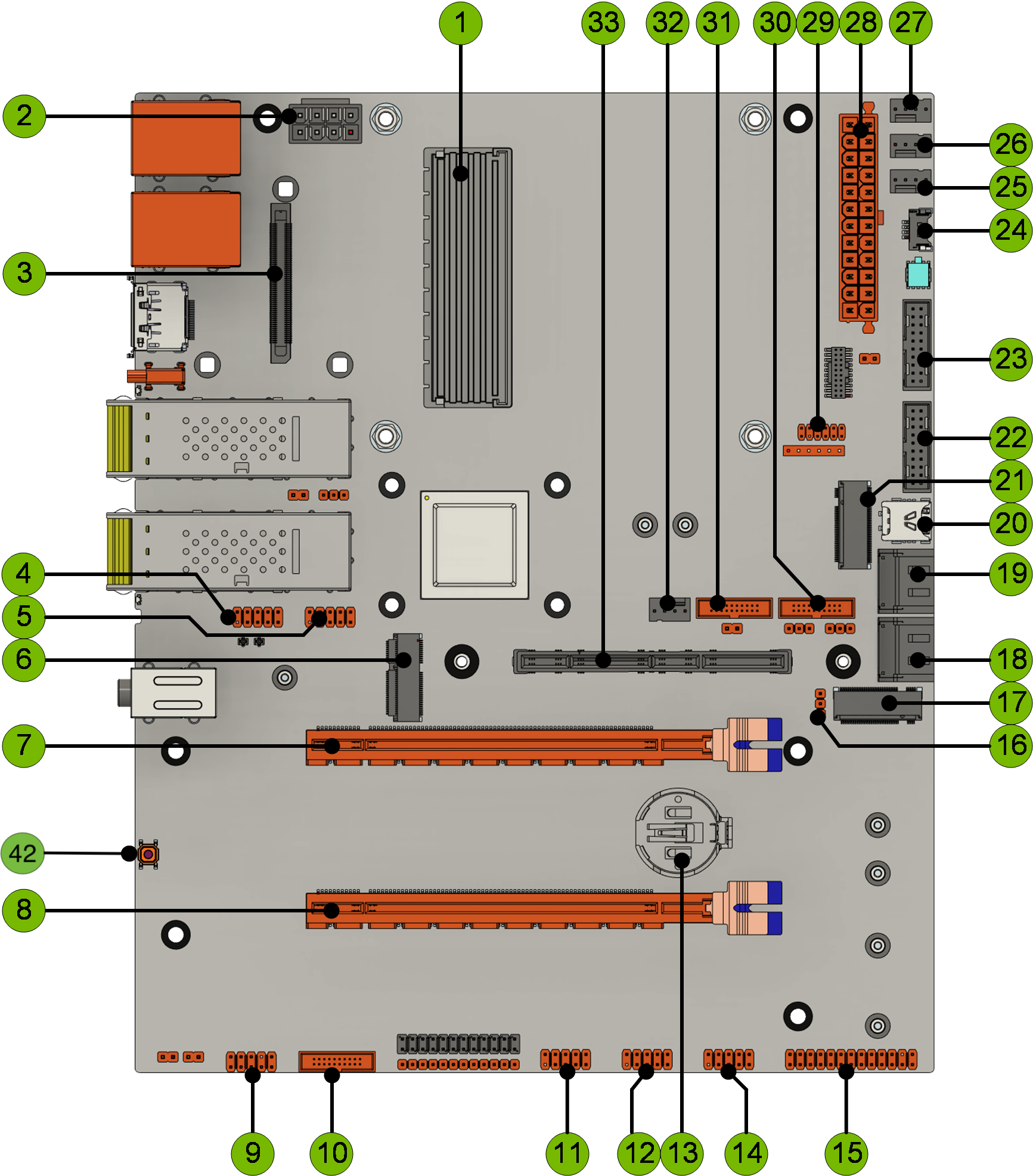
Item 42: Force Recovery Button, and Item 14: J42 Pin Header#
For more information about the Force Recovery button and the J42 pin header, see Connector Definitions and Buttons and Control. The J42 pin locations are listed in Buttons and Control.
To put the IGX in forced recovery mode:
Switch off the power supply unit (PSU) on the back panel.
Wait 10 seconds.
Switch on the PSU on the back panel.
Press and hold the Force Recovery button.
While holding the Force Recovery button, use a jumper cable to connect pins 8 and 9 of the J42 pin header. Disconnect the jumper cable after 1 second.
Release the Force Recovery button.
The IGX enters forced recovery mode.
Update the QSPI Firmware#
To update QSPI:
Download the bootloader QSPI package for the target IGX release from the IGX Download Center.
For IGX Orin, go to the latest IGX 1.x release. Select Downloads > Bootloader (QSPI) Package (inside of BSP) (to be used when updating using command line).
Place the downloaded archive in a working directory on the host PC.
Prepare the QSPI package on the host PC. Replace the package file name in the following example with the file name that you downloaded.
1L4T_RELEASE_PACKAGE=Jetson_Linux_R36.4.6_aarch64.tbz2
2
3tar xf ${L4T_RELEASE_PACKAGE}
4cd Linux_for_Tegra/
5sudo ./tools/l4t_flash_prerequisites.sh
Note
You can ignore an error similar to the following:
Package netcat is a virtual package provided by:
  netcat-traditional 1.10-48
  netcat-openbsd 1.226-1ubuntu2
You should explicitly select one to install.
Connect the USB-C cable from the Linux host to the USB-C connector on the back panel.
Flash the QSPI firmware. This step takes about 10 minutes to complete.
sudo ./flash.sh p3740-0002-p3701-0008-qspi external
When the flash completes successfully, power cycle the IGX.