Overview
The video_encode sample application demonstrates how to encode H.264/H.265/AV1 video streams.
The application YUV reads input buffers from a file, performs video encoding, and saves the encoded bitstream to an elementary .264, .265, or av1 file.
The application runs on file source simulated input buffers, and so does not require a camera.
Supported video formats are:
- H.264 (Orin, Thor)
- H.265 (Orin, Thor)
- AV1 (Orin only)
Supported YUV formats are:
- YUV420
- YUV444
- NV24
- P010_10LE
- NV24_10LE
- Note
- For 10-bit encoding, YUV input must be 16-bit MSB aligned.
For AV1 YUV420 8 bit is supported only.
NV24 and NV24_10LE is not supported in Jetson Thor.
CUDA Integration
The application includes comprehensive CUDA support for GPU-accelerated encoding:
- CUDA Memory Types: Supports CUDA Device and CUDA Pinned memory allocation
- GPU Detection: Automatically detects GPU capabilities using
isGPUEnabled() - Memory Management: Intelligent memory type selection based on GPU availability
- Performance Optimization: GPU-accelerated processing paths for enhanced performance
Thor Platform Support
On Thor platforms, the application utilizes GPU-accelerated encoding for:
- Enhanced GPU resource management and allocation
- Optimized memory bandwidth utilization between CPU and GPU
- Improved multi-stream encoding capabilities with GPU coordination
- Better integration with CUDA-based system-wide resource scheduling
- Note
- Some features marked as "Not supported for T264" indicate Thor-specific limitations or alternative implementations through GPU-accelerated paths.
Building and Running
Prerequisites
- You have followed steps 1-3 in Building and Running.
- If you are building from your host Linux PC (x86), you have followed step 4 in Building and Running.
- For CUDA functionality, ensure CUDA runtime is properly installed and configured.
To build
- Enter:
 $ cd /usr/src/jetson_multimedia_api/samples/01_video_encode
 $ make
To run
- Enter:
$ video_encode <in-file> <in-width> <in-height> <encoder-type> <out-file> [OPTIONS]
CUDA-specific Options
The application supports several CUDA-related command-line options:
-alloc_type_oplane <num>: Allocation memory type for output plane buffer0: Default (system-managed allocation)1: CUDA Pinned (host memory accessible by GPU)2: CUDA Device (GPU memory)4: Surface Array
To view supported options
Enter:
$ ./video_encode --help
Example
$ ./video_encode ../../data/Video/sample_outdoor_car_1080p_10fps.yuv 1920 1080 H264 sample_outdoor_car_1080p_10fps.h264
CUDA-enabled Example
$ ./video_encode input.yuv 1920 1080 H264 output.h264 -alloc_type_oplane 2
This example uses CUDA Device memory for optimal GPU performance.
Flow
The following diagram shows the flow through this sample.
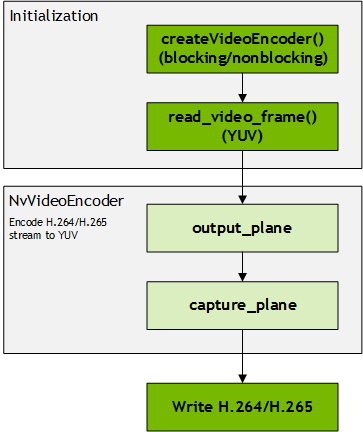
- The Output Plane receives input in YUV frame format and delivers it to the Encoder for encoding.
- The Capture Plane transfers encoded frames to the application in bitstream format.
- The encoded bitstream is written to a file.
- For the Output Plane the application supports MMAP, DMABUF, and USRPTR memory types. For the Capture Plane it supports MMAP memory type.
- Note
- USRPTR is not supported in Jetson Thor for output plane.
CUDA Processing Flow
When CUDA is enabled, the processing flow includes additional GPU-accelerated paths:
- Memory Allocation: CUDA-aware memory allocation using
NvBufSurfAPIs - GPU Detection: Runtime detection of GPU capabilities via
isGPUEnabled() - Memory Type Configuration: Automatic configuration of CUDA memory types using
setCudaMemType() - Buffer Management: Intelligent buffer management for CUDA Device/Pinned memory
- Performance Optimization: GPU-accelerated encoding with optimized memory transfers
Thor Platform Flow
On Thor platforms:
- Resource Discovery: GPU-based resource enumeration and capability detection
- Memory Management: Enhanced memory allocation through GPU-aware APIs
- Stream Management: Multi-stream encoding coordination via GPU scheduler
- Performance Monitoring: Real-time performance metrics and adaptive GPU optimization
Key Structure and Classes
The sample uses the following key structures and classes.
| Element | Description |
|---|---|
| NvVideoEncoder | Contains all video encoding-related elements and functions. |
| Enc_pollthread | A pointer to the thread handler for the encoding capture loop. |
The NvVideoEncoder class packages all video encoding-related elements and functions. Key members used in the sample are:
| Member | Description |
|---|---|
| output_plane | Specifies the V4L2 output plane. |
| capture_plane | Specifies the V4L2 capture plane. |
| createVideoEncoder | Static function to create video encode object. |
| subscribeEvent | Subscribe event. |
| setOutputPlaneFormat | Sets the output plane format. |
| setCapturePlaneFormat | Sets the capture plane format. |
| dqEvent | Dqueue the event which reports by the V4L2 device. |
| isInError | Checks if under error state. |
Class NvVideoEncoder contains two key elements: output_plane and capture_plane. These objects are derived from class type NvV4l2ElementPlane. The sample uses the following key members:
| Element | Description |
|---|---|
| setupPlane | Sets up the plane of V4L2 element. |
| deinitPlane | Destroys the plane of the V4L2 element. |
| setStreamStatus | Starts/stops the stream. |
| setDQThreadCallback | Sets the callback function of the dqueue buffer thread. |
| startDQThread | Starts the thread of the dqueue buffer. |
| stopDQThread | Stops the thread of the dqueue buffer. |
| qBuffer | Queues the V4L2 buffer. |
| dqBuffer | Dequeues the V4L2 buffer. |
| getNumBuffers | Gets the number of V4L2 buffers. |
| getNumQueuedBuffers | Gets the number of buffers currently queued on the plane. |
CUDA Support
CUDA-Specific APIs
The sample includes additional CUDA-specific functionality:
| API Function | Description |
|---|---|
| isGPUEnabled | Checks if GPU configuration is enabled for CUDA processing. |
| setCudaMemType | Sets CUDA memory type (Device/Pinned) when GPU is enabled. |
| setCUDASliceIntrarefresh | Sets CUDA-specific slice intra-refresh parameters. |
| setCudaConstantQp | Sets CUDA-specific constant QP values. |
Memory Management APIs
| API | Description |
|---|---|
NvBufSurf::NvAllocate | Allocates buffer surfaces with CUDA memory type support. |
NVBUF_MEM_CUDA_DEVICE | Enum for CUDA device memory allocation. |
NVBUF_MEM_CUDA_PINNED | Enum for CUDA pinned (host) memory allocation. |
V4L2_CUDA_MEM_TYPE_* | V4L2 controls for CUDA memory type configuration. |
GPU Integration on Thor
The GPU acceleration provides enhanced capabilities:
- Unified Memory Management: Coordinated allocation across CPU/GPU memory domains
- Performance Optimization: Real-time performance monitoring and adaptive GPU tuning
- Multi-Stream Support: Efficient GPU resource sharing for concurrent encoding streams
- System Integration: Deep integration with Thor platform GPU capabilities
Platform-Specific Considerations
| Platform Feature | Thor (T264) | Other Platforms |
|---|---|---|
| CUDA Support | GPU-accelerated | Direct CUDA API |
| Memory Types | GPU-managed | Standard allocation |
| Multi-stream | GPU-scheduled | Application managed |
| Resource limits | Dynamic GPU allocation | Static configuration |
- Note
- Features marked as "Not supported for T264" may have equivalent functionality through GPU-accelerated paths or platform-specific alternatives.