

UDDF Driver Model#
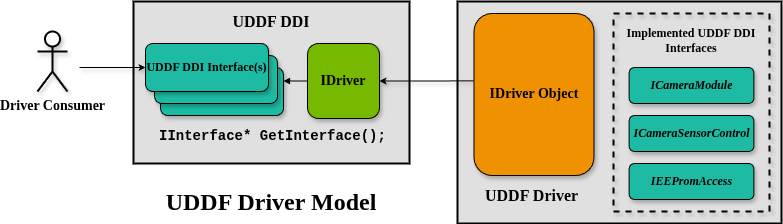
The UDDF driver model is built on two concepts: driver interfaces and driver objects.
A driver interface is a C++ class that defines only pure virtual methods. It contains no data and no implementation. Interfaces provide all communication between a driver and its environment. Driver interfaces come in two flavors:
Device Driver Interface (DDI): interfaces that you implement in your driver.
Camera Driver Interface (CDI): interfaces the framework provides to your driver.
Driver objects represent concrete driver instances. UDDF discovers, probes, and loads these objects on behalf of the driver consumer. Each driver object exposes a single method that returns the interfaces it supports. Beyond that, its internal structure is entirely opaque to UDDF.
Your driver sits between the UDDF client and the hardware. DDI defines the entrypoints that the client calls on your driver. CDI defines the services that the framework provides to your driver so it can talk to hardware.
UDDF Client ──[ DDI: you implement ]──> Your Driver ──[ CDI: framework provides ]──> Hardware
This page builds a fictional CAM123 image sensor driver to make each concept concrete.
Device Driver Interface (DDI)#
UDDF uses dynamic interface acquisition. There are objects and interfaces. An object implements the IInterfaceProvider interface, which lets callers request specific interfaces by UUID. An interface (IInterface) represents a single capability. You obtain an interface from an object—never from another interface.
The two base classes that make this work live in uddf/ddi/IInterface.hpp:
class IInterface {
public:
    static constexpr UUID id { uuid::UUID_NIL };
protected:
    IInterface() = default;
    virtual ~IInterface() = default;
};

class IInterfaceProvider {
public:
    virtual IInterface* GetInterface(const UUID& uuid) noexcept = 0;
protected:
    IInterfaceProvider() = default;
    virtual ~IInterfaceProvider() = default;
};
Every concrete interface inherits from IInterface and carries a static id member containing its UUID. Every object that can provide interfaces inherits from IInterfaceProvider. In practice, you rarely interact with these base classes directly—you inherit from them. Here is what that looks like.
Driver Interfaces#
Every DDI interface follows the same pattern: It inherits from IInterface, declares a static constexpr UUID id, and defines one or more pure virtual methods that serve as driver entrypoints.
All DDI interfaces live in uddf/ddi/interfaces/. The interface you implement depends on your driver type—for example, IGmslModuleControl for GMSL camera modules or ICoEModuleControl for Camera-over-Ethernet (CoE). These domain-specific interfaces are covered in later sections.
The following is a fictional ICam123Control interface for the example driver. It follows the exact same pattern as every real DDI interface in UDDF:
class ICam123Control : public uddf::ddi::IInterface {
public:
    static constexpr UUID id { /* unique UUID */ };

    virtual bool ConfigureDriver(const Cam123Context& ctx,
                                 uddf::ddi::DeviceTable& i2cDevices,
                                 uddf::ddi::GpioPinTable& gpioPins) = 0;
    virtual bool ProbeHardware(const Cam123Context& ctx) = 0;
    virtual bool Init(const Cam123Context& ctx) = 0;
    virtual bool StartStreaming(const Cam123Context& ctx) = 0;
    virtual bool StopStreaming(const Cam123Context& ctx) = 0;
    virtual bool Deinit(const Cam123Context& ctx) = 0;

protected:
    ~ICam123Control() override = default;
};
The methods are the driver lifecycle entrypoints. Each one receives a context structure that carries CDI handles and configuration, covered in Camera Driver Interface (CDI).
Driver Objects#
IDriver (uddf/ddi/IDriver.hpp) is the base class for all driver objects. It inherits from IInterfaceProvider, so every driver must implement GetInterface():
namespace uddf::ddi {

class IDriver : public IInterfaceProvider {
public:
    virtual ~IDriver() = default;
};

} // namespace uddf::ddi
The CAM123 driver inherits from both IDriver and ICam123Control. When UDDF calls GetInterface() with the ICam123Control UUID, the driver returns a pointer to itself:
class Cam123Driver : public uddf::ddi::IDriver, public ICam123Control {
public:
    IInterface* GetInterface(const UUID& uuid) noexcept override {
        if (uuid == ICam123Control::id)
            return static_cast<ICam123Control*>(this);
        return nullptr;
    }

    // Lifecycle methods implemented below ...
};
Note
A driver does not have to implement every interface directly on itself. It can delegate to internal helper objects that each implement a separate interface. GetInterface() simply returns a pointer to the appropriate internal object instead of this. This is an architectural decision that UDDF leaves entirely to you.
Note
On the consumer side, the convenience template interface_cast<TargetInterface>(provider) wraps the UUID lookup and static_cast into a single call. It returns nullptr when the object does not support the requested interface. As a driver author, you typically do not call this yourself—it is used by code that consumes your driver.
Driver Lifecycle#
UDDF calls your driver entrypoints in a defined order:
ConfigureDriver – Declare the I2C devices and GPIO pins your driver uses. Validate the configuration. You cannot access hardware in this entrypoint.
ProbeHardware – Verify that the physical device is present and is the correct type or revision. Do not initialize the device here.
Init – Initialize the hardware (write configuration registers, run startup sequences).
StartStreaming / StopStreaming – Begin or end data flow, where applicable.
Deinit – Tear down the hardware and release resources.
Reset – Recover the device to its post-Init state after a failure. UDDF calls this to attempt recovery after
Initoriginally succeeded.
If any entrypoint returns false, UDDF considers the driver non-functional and will not call further lifecycle methods on it.
Note
Some driver types have additional lifecycle steps. For example, GMSL modules include power management and authentication entrypoints. For more information, refer to GMSL.
CAM123 Lifecycle Methods#
Here is how the CAM123 driver implements the three most instructive entrypoints.
ConfigureDriver fills out the device table. This tells UDDF which I2C devices the driver talks to. There is no hardware access at this point—the driver is only declaring what it needs:
bool Cam123Driver::ConfigureDriver(const Cam123Context& ctx,
                                     DeviceTable& i2cDevices,
                                     GpioPinTable& gpioPins) {
    i2cDevices.push_back({
        .i2cAddress = 0x42,
        .offsetWidth = 2,    // 16-bit register offsets
        .dataWidth = 1,      // 8-bit register data
        .flags = 0,
    });
    return true;
}
ProbeHardware reads the device revision register to verify that the correct sensor is on the bus. The UDDF_LOG_* macros route messages through IDriverServices—you do not need to configure a logging backend because the framework handles that:
bool Cam123Driver::ProbeHardware(const Cam123Context& ctx) {
    uint8_t revision = 0;
    auto result = ctx.hwAccess->ReadI2C(0x42, 0x0000, 1, &revision);
    if (!result) {
        UDDF_LOG_ERROR(*ctx.driverServices, "CAM123: failed to read revision register");
        return false;
    }
    if (revision != EXPECTED_REVISION) {
        UDDF_LOG_ERROR(*ctx.driverServices, "CAM123: unexpected revision 0x%02x", revision);
        return false;
    }
    return true;
}
Init submits a precompiled static HSL sequence that writes the sensor configuration registers. The sequence is compiled from a PyHSL source file at build time (covered in HSL and the Build System below):
bool Cam123Driver::Init(const Cam123Context& ctx) {
    ctx.hwAccess->SubmitSequence(cam123::hsl::Init);
    return true;
}
Camera Driver Interface (CDI)#
CDI interfaces are the flip side of DDI. They are provided to the driver by the UDDF framework so the driver can do its work. Every lifecycle entrypoint receives a context structure that carries CDI handles. The two most important CDI interfaces are:
IHardwareAccess(uddf/cdi/IHardwareAccess.hpp)How the driver talks to hardware. Key capabilities:
Submit dynamic HSL sequences (built at runtime)
Submit static HSL sequences (precompiled from PyHSL)
Query error state from the most recent sequence submission through
GetErrorState()Raw I2C register reads (with an optional
I2CAddressModeparameter for GMSL virtual address control; refer to GMSL for details)GPIO pin reads
IDriverServices(uddf/cdi/IDriverServices.hpp)Basic framework services available to every driver. Key capabilities:
Logging through the
UDDF_LOG_*convenience macros (UDDF_LOG_DEBUG,UDDF_LOG_INFO,UDDF_LOG_WARNING,UDDF_LOG_ERROR,UDDF_LOG_FATAL)Error reporting through
UDDF_REPORT_ERROR
Context Structures#
Every lifecycle entrypoint receives a typed context structure. Here is the one for the CAM123 driver:
struct Cam123Context {
    uddf::cdi::IHardwareAccess* hwAccess {nullptr};
    uddf::cdi::IDriverServices* driverServices {nullptr};

    struct Config {
        uint32_t linkIndex {0};
    } config;
};
During ConfigureDriver, the hwAccess pointer is nullptr because the hardware has not been claimed yet—the driver is only declaring what it needs. Starting from ProbeHardware, hwAccess is valid and the driver can communicate with hardware.
The CAM123 lifecycle methods show CDI handles in action: ctx.hwAccess->ReadI2C() for raw reads, ctx.hwAccess->SubmitSequence() for static HSL, and ctx.driverServices for logging.
HSL and the Build System#
Static HSL sequences are written in PyHSL (a Python DSL) and compiled into C++ headers at build time. The Init method referenced cam123::hsl::Init; the following PyHSL source file produces it:
from pyhsl import *

sensor = I2CDevice(0x42, 16, 8, 'cam123_sensor')

def seq_init():
    with ph_sequence('Init') as seq:
        seq.annotate('CAM123 sensor initialization')
        with sensor:
            write(0x0100, 0x01)  # software reset
            write(0x0104, 0x00)  # standby mode

# ... additional sequence functions ...

def main():
    seq_init()
    # ... call remaining sequence functions ...
The Makefile helper compiles this file and makes the generated header available to the driver target:
HSL_SOURCES    := cam123_hsl.py
HSL_SOURCE_DIR := $(PATH_TO_DRIVER)
HSL_SCRIPT_DIR := $(PATH_TO_HSL_SDK)/pyhsl/src
HSL_OUTPUT_DIR := $(PATH_TO_DRIVER)/hsl_gen
HSL_NAMESPACE  := cam123::hsl

include $(PATH_TO_HSL_SDK)/integrations/make/hsl_compile_rules.mk
For a deeper look at the PyHSL language and the HSL toolchain, refer to Using HSL in UDDF.
Discovery#
Before UDDF can use your driver, it must discover it. Each driver library exports a C-linkage entry point called uddf_discover_drivers() that returns a DriverEnumeratorPtr. The enumerator tells UDDF what drivers the library contains and how to create them.
#include <uddf/ddi/discovery.hpp>

class Cam123Enumerator : public uddf::ddi::IDriverEnumerator {
public:
    std::string_view GetName() const override { return "cam123"; }
    size_t GetDriverCount() const override { return 1; }

    const uddf::ddi::DriverInfo* GetDriverInfo(size_t index) const override {
        static const uddf::ddi::DriverInfo info {
            .name = "CAM123",
            .description = "Fictional CAM123 image sensor driver",
            .vendor = "NVIDIA Corporation",
            .revision = "1.0.0",
        };
        return (index == 0) ? &info : nullptr;
    }

    std::unique_ptr<uddf::ddi::IDriver> CreateDriver(size_t index) override {
        return (index == 0) ? std::make_unique<Cam123Driver>() : nullptr;
    }
};

extern "C" uddf::ddi::DriverEnumeratorPtr uddf_discover_drivers() {
    return std::make_unique<Cam123Enumerator>();
}
For more details on driver discovery and enumeration, refer to Discovery and Enumeration.
For a complete, copy-paste-ready template assembling all the pieces above, refer to CAM123 Driver Template.