

About the Acoustic Echo Cancellation Effect#
Note
In this guide, the term Acoustic Echo Cancellation is used interchangeably with AEC (referred to as aec in the API).
An acoustic echo occurs when a microphone, also known as a near-end microphone, picks up audio signals from the speaker and sends it back to the original recipient. The original recipient hears his or her own delayed voice mixed with a target signal, which makes the communication unintelligible.
The Acoustic Echo Cancellation Effect cancels or suppresses this delayed voice, also known as an acoustic feedback or echo, from the audio. This process improves the overall quality of the recording.
To run the sample application on Windows for this effect, use the following command:
:: Format: run_effect_demo.bat <architecture> <effect> <input_sample_rate> <output_sample_rate>

:: 16k effect
run_effect_demo.bat turing aec 16k 16k

:: 48k effect
run_effect_demo.bat ampere aec 48k 48k
Note
For more information, see Use the Helper Script to Run the Sample Application.
To run the sample application on Linux for this effect, use the following command:
# (One time, initial setup): Download models using models/download_models.sh
./download_models.sh --gpu <gpu> --effects aec-16k,aec-48k

# Refer to Section 3.2 for further details
Format: ./run_effect.sh -g <gpu> -s <sample_rate> -e aec

# 16k effect
./run_effect.sh -g t4 -s 16 -e aec

# 48k effect
./run_effect.sh -g t4 -s 48 -e aec
Note
For more information, see Use the Helper Script to Run the Sample Application.
This effect has the following characteristics:
Supported input/output audio is 32-bit float audio with a sampling rate of 16 kHz or 48 kHz.
In the Linux SDK, this effect has the following maximum throughput (the number of batches supported in real time):
Architecture
Maximum Throughput for the 16K Effect
Maximum Throughput for the 48K Effect
T4
1940
800
A100
9240
4050
A10
4200
1650
L40
7770
3000
H100
11000
4760
B100
15400
7150
RTX PRO 6000
15400
6750
Figure 1-1. Basic AEC Scenario
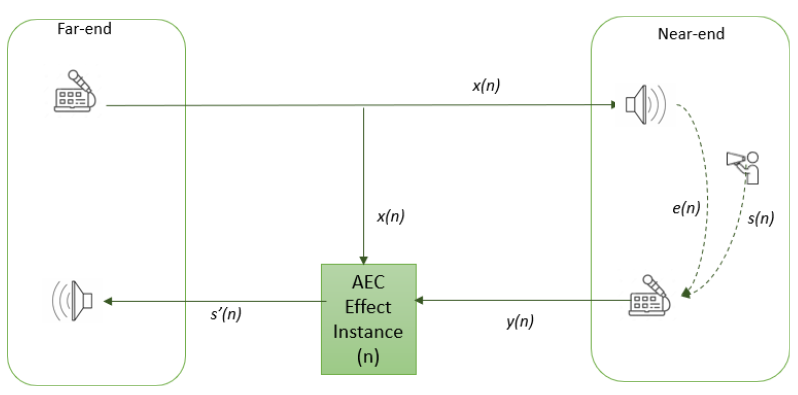
The AEC Effect takes the following inputs:
The near-end microphone signal (denoted by
y).The far-end microphone signal (denoted by
x).
The far-end speaker signal x is the microphone signal of the original recipient. The near-end microphone signal (y) can be described as a combination of the near-end speech signal s and echo signal of the far-end speaker e. The output of the effect is the near-end speech signal s', which is the input combination s + e with the far-end echo signal e removed: s' = (mixture of s + e) - e.
If only the far-end echo signal e is present and the near-end signal s is silent, the output from this effect is silent.
When the AEC effect is integrated in a conferencing application server, multiple streams of data need to run in a batch, one for each speaker. Consider the scenario in figure 1-2, where s(1) corresponds to AEC batch 1 and s(2) corresponds to batch 2.
Figure 1-2. Batched Audio Processing Using the AEC Effect (Linux SDK Only)
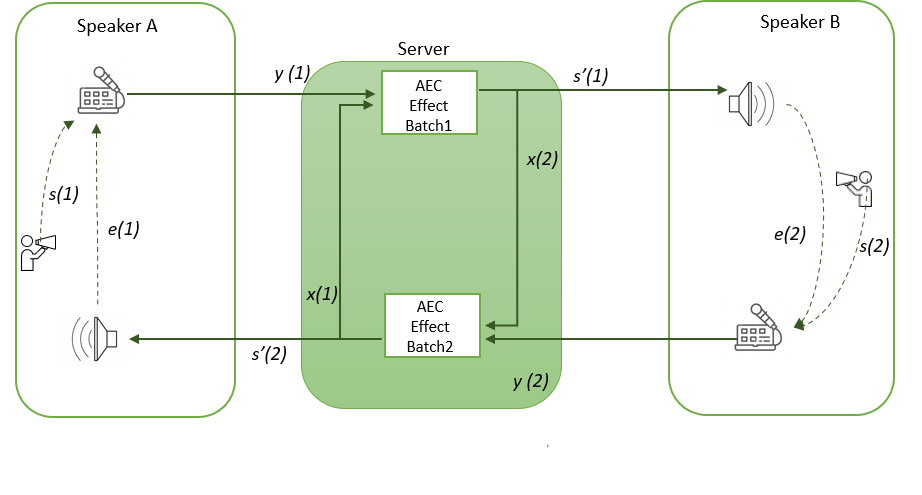
The following steps describe how the AEC effect processes audio as seen in figure 1-2:
The application server receives a microphone recording from Speaker A
y(1).The Application server passes
y(1)to the AEC batch (1). Silence is passed down as a far-end speech signalx(1)to the effect because the server does not yet have the far-end speech.The effect produces processed audio
s'(1), which is passed down to Speaker B.Speaker B sends the near-end audio
y(2)to the application server. This data consists of speech (s(1)) and audio played on speakers (e(2)).The Application server processes batch (2) with
y(1)as near-end audio, and thes'(1)that was received from Step 3 as far-end audio. This is the same audio that was played on the server.The output from batch
s'(2)is passed to Speaker A.
For the settings required for the AEC effect, see Set the Parameters of an Audio Effect.