

Introduction#
NVIDIA Mission Control is an integrated software platform designed for managing and orchestrating large-scale GPU computing clusters. It provides comprehensive deployment, management, and monitoring capabilities for high-performance computing (HPC) and AI workloads across different system configurations.
Platform Overview#
Mission Control delivers a unified control plane that simplifies the complexity of managing GPU-accelerated infrastructure. The platform combines cluster orchestration, workload scheduling, and system monitoring into a cohesive management framework built on Kubernetes and industry-standard tools.
Key capabilities include:
Automated Deployment: Streamlined provisioning and configuration of compute resources
Workload Orchestration: Advanced scheduling and resource allocation for AI/ML and HPC jobs
System Monitoring: Real-time observability and health tracking across the infrastructure
Slurm Integration: Native support for Slurm workload manager with BCM-provisioned clusters
Supported System Configurations#
Mission Control supports multiple system architectures, each optimized for different scale and performance requirements:
DGX B300 Systems#
Architecture Version: v2.1.0
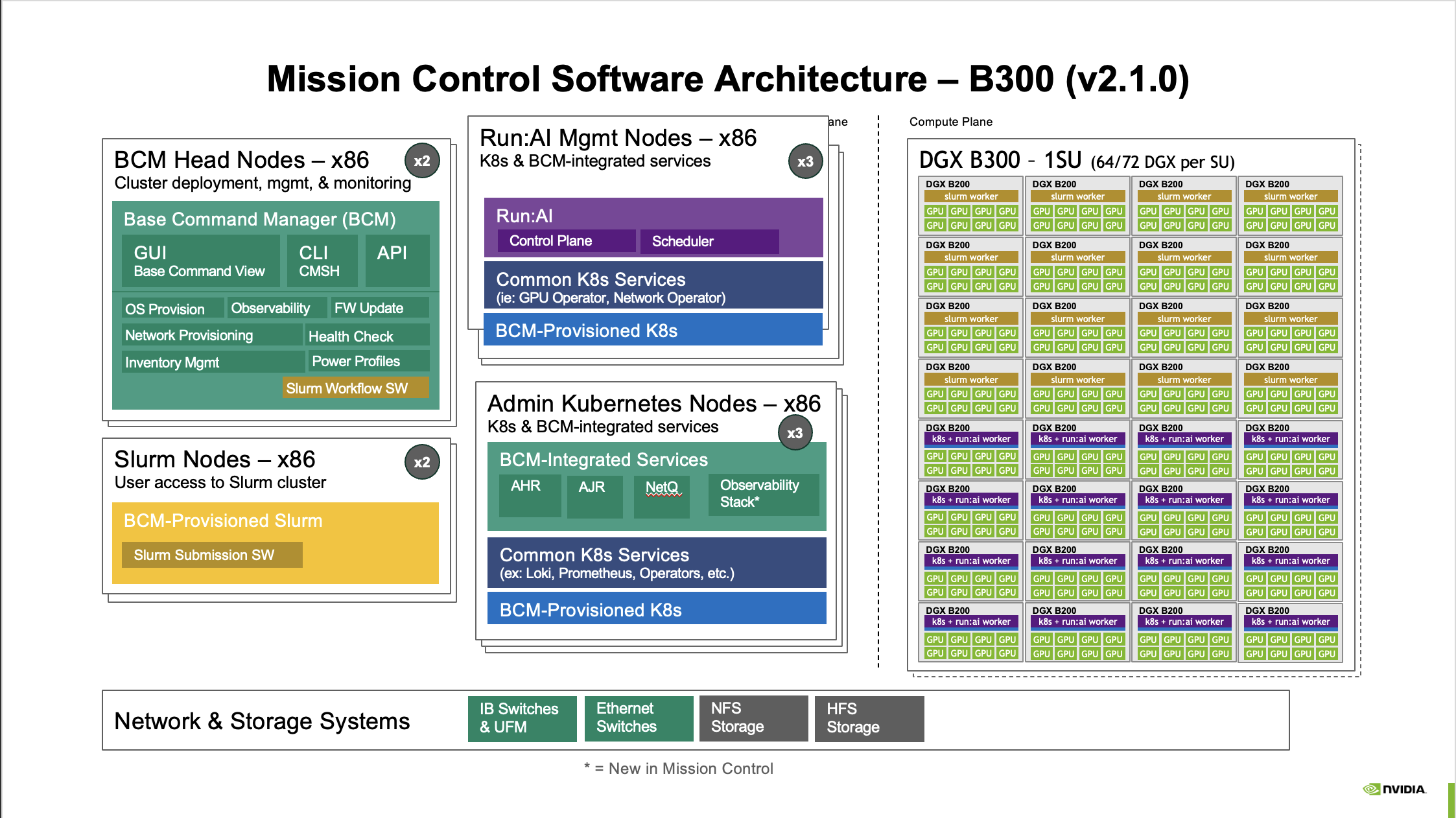
Figure 1 Mission Control Software Architecture – B300 (v2.1.0)#
The DGX B300 configuration represents NVIDIA’s high-density GPU computing platform, featuring:
Compute Plane: DGX B300 - 1SU systems with 64-72 DGX units per superunit
Control Plane:
BCM Head Nodes (x86) - x2 nodes for cluster management
Run:AI Management Nodes (x86) - x3 nodes for AI workload orchestration
Admin Kubernetes Nodes (x86) - x3 nodes for infrastructure services
User Access: Slurm Nodes (x86) - x2 nodes for job submission
Key Features:
Run:AI integration for AI workload management
autonomous job recovery (AJR) and autonomous hardware recovery (AHR) capabilities
NetQ network monitoring and observability stack
DGX B200 Systems#
Architecture Version: v2.0.0
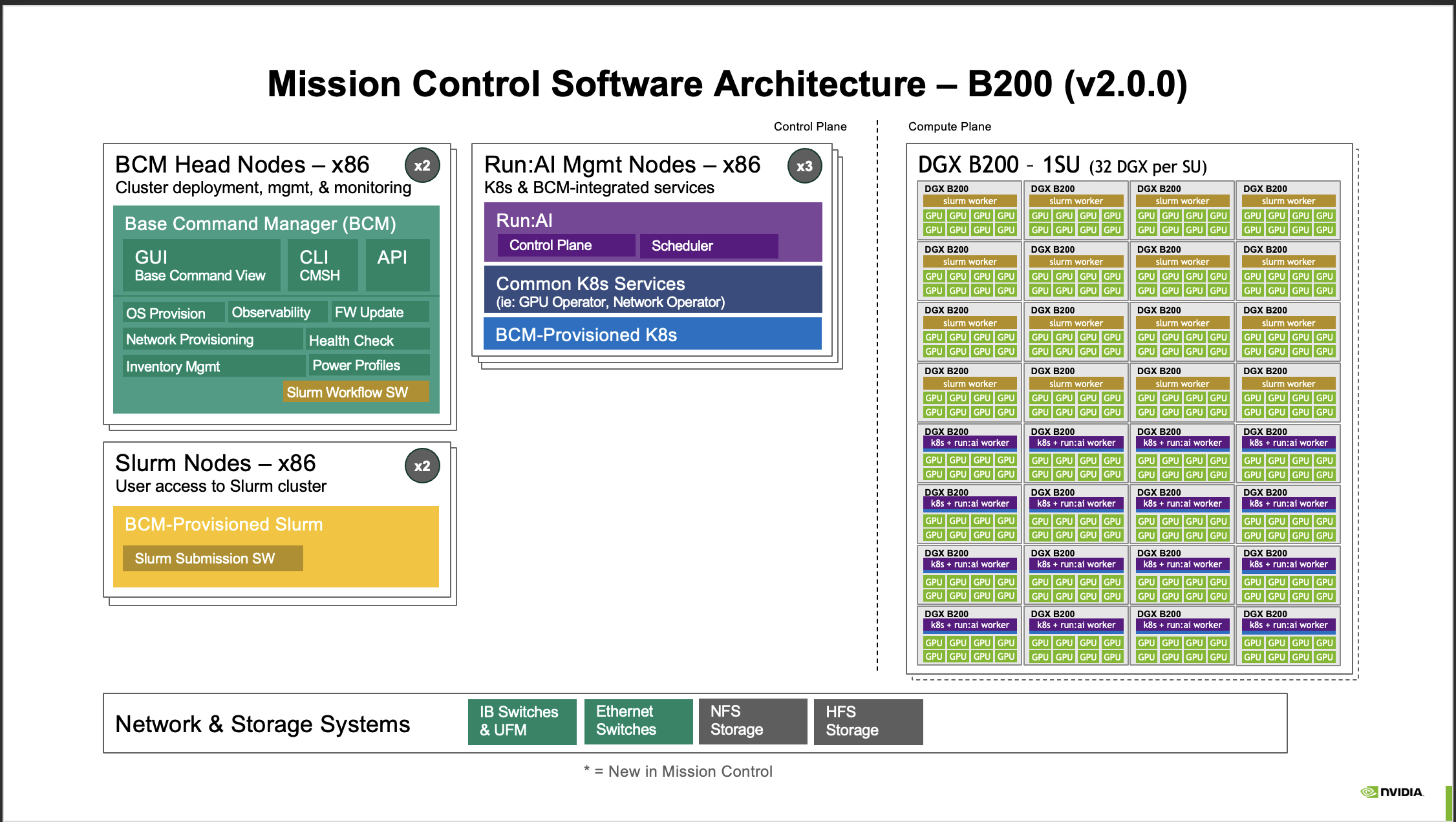
Figure 2 Mission Control Software Architecture – B200 (v2.0.0)#
The DGX B200 configuration provides a balanced architecture for production AI workloads:
Compute Plane: DGX B200 - 1SU systems with 32 DGX units per superunit
Control Plane:
BCM Head Nodes (x86) - x2 nodes
Run:AI Management Nodes (x86) - x3 nodes
User Access: Slurm Nodes (x86) - x2 nodes
Key Features:
CMSH CLI interface for Base Command Manager
Streamlined architecture focused on core orchestration capabilities
NVIDIA GB300 NVL72 Systems#
Architecture Version: v2.1.0
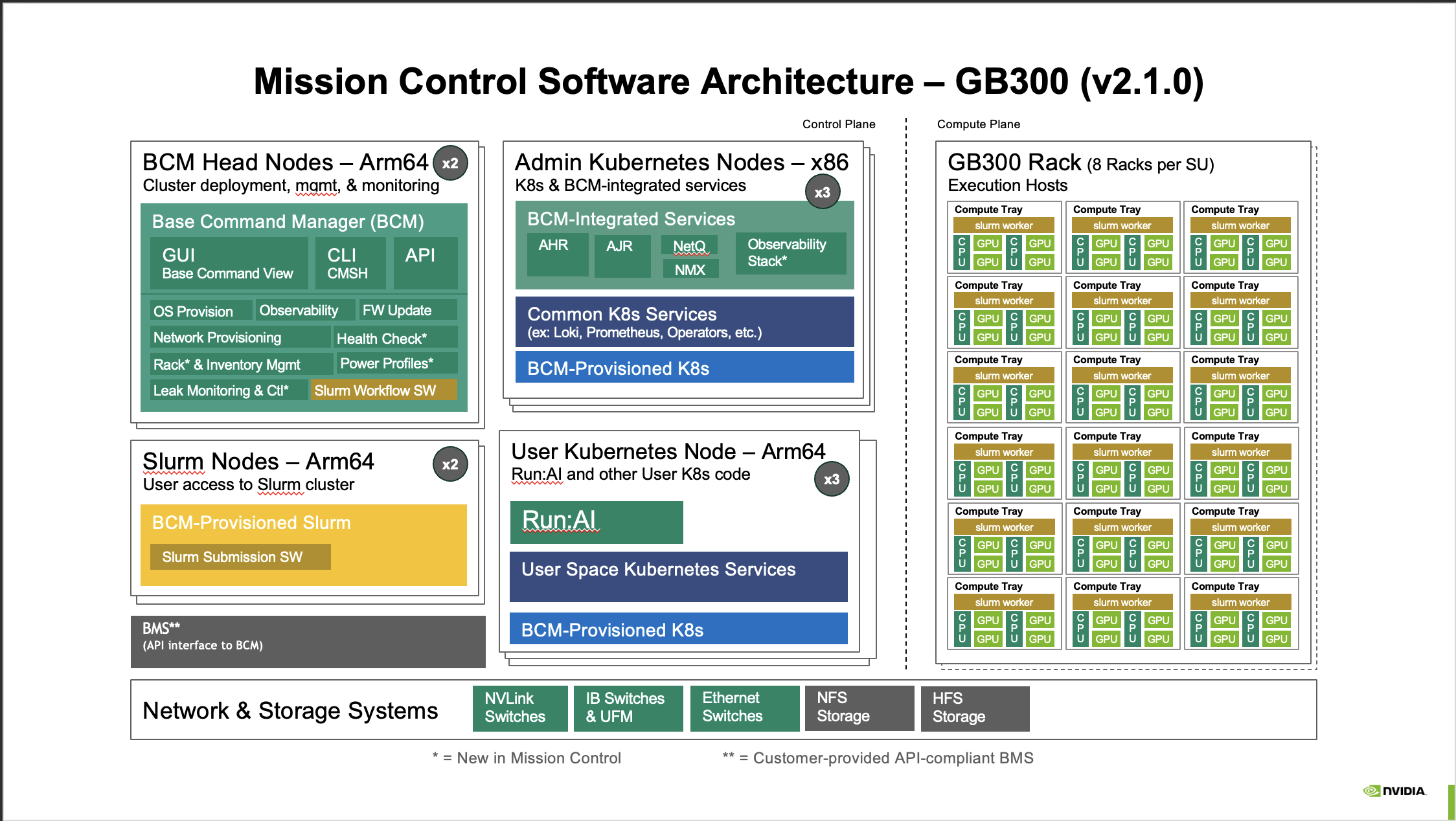
Figure 3 Mission Control Software Architecture – GB300 (v2.1.0)#
The GB300 configuration introduces Arm64-based control infrastructure for next-generation systems:
Compute Plane: GB300 Rack with 8 racks per superunit, organized in compute trays
Control Plane:
BCM Head Nodes (Arm64) - x2 nodes
Admin Kubernetes Nodes (x86) - x3 nodes
User Access:
Slurm Nodes (Arm64) - x2 nodes
User Kubernetes Node (Arm64) - x3 nodes for Run:AI and user workloads
Key Features:
Hybrid Arm64/x86 architecture
CMSH CLI and NVLink switches for high-speed interconnect
Customer-provided BMS (Building Management System) support
Leak monitoring and control capabilities
NVIDIA GB200 NVL72 Systems#
Architecture Version: v2.0.0
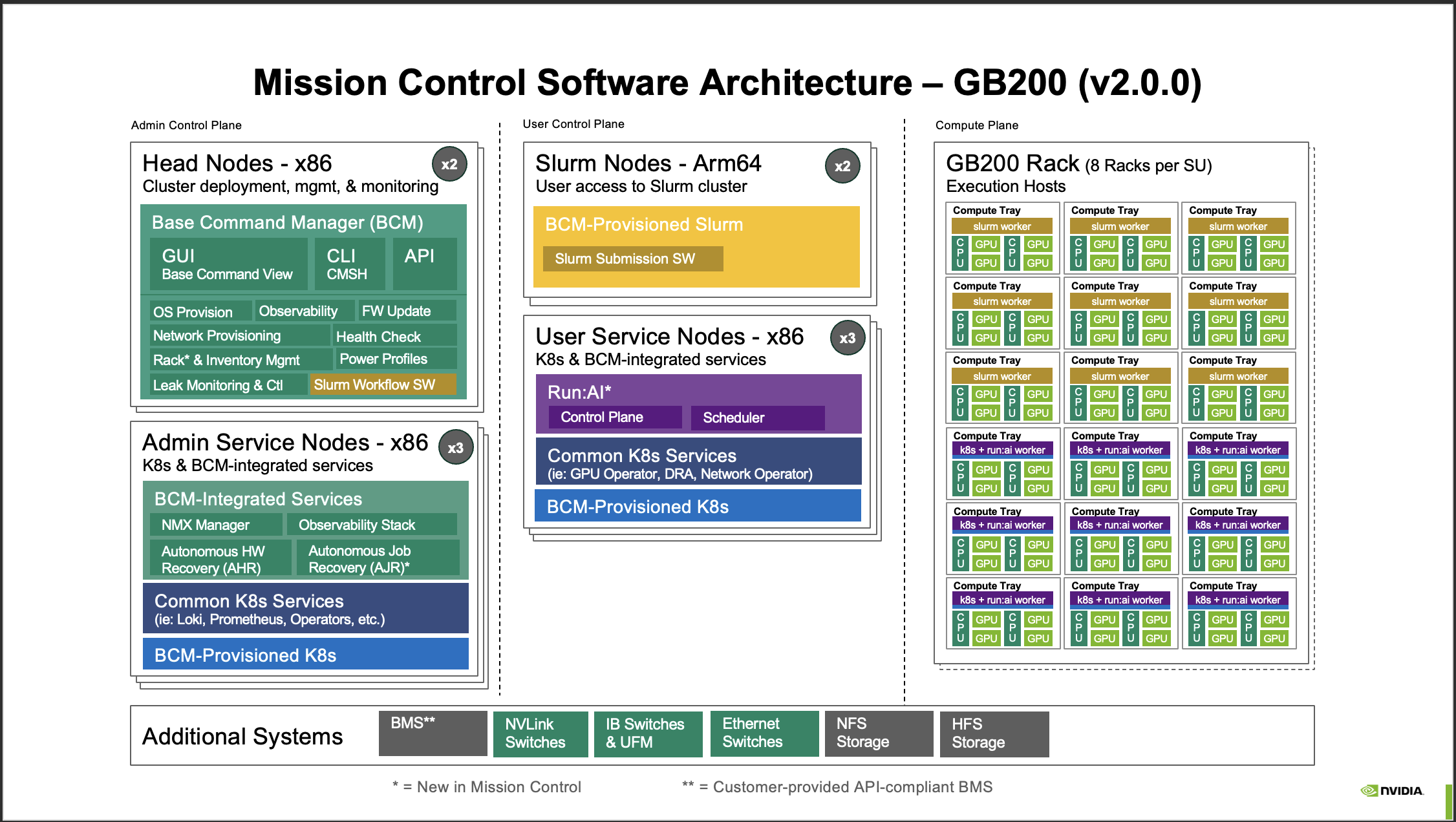
Figure 4 Mission Control Software Architecture – GB200 (v2.0.0)#
The GB200 configuration delivers advanced capabilities with separated control and user planes:
Compute Plane: GB200 Rack with 8 racks per superunit in compute tray organization
Admin Control Plane:
Head Nodes (x86) - x2 nodes
Admin Service Nodes (x86) - x3 nodes with AHR, AJR, NMX Manager, and Observability Stack
User Control Plane:
Slurm Nodes (Arm64) - x2 nodes
User Service Nodes (x86) - x3 nodes with Run:AI orchestration
Key Features:
Separated admin and user control planes for enhanced security and isolation
Autonomous Hardware Recovery (AHR) and Autonomous Job Recovery (AJR)
NMX Manager for network fabric management
Customer-provided BMS integration
Architecture Components#
Base Command Manager (BCM)#
The Base Command Manager serves as the central management interface for Mission Control, providing:
GUI: Web-based Base Command View for visual cluster management
CLI: Command-line interface (CMSH for x86 systems, CMSH for Arm64 systems)
API: RESTful API for programmatic automation
Core Functions:
OS provisioning and firmware updates
Network provisioning and health checks
Inventory management and power profiles
Observability and monitoring integration
Run:AI Orchestration#
Run:AI provides advanced AI workload management with:
Intelligent scheduling and resource allocation
GPU sharing and fractionalization
Workload prioritization and fairness policies
Integration with common machine learning frameworks
Kubernetes Infrastructure#
Mission Control leverages Kubernetes for:
Container orchestration across control and compute planes
Service discovery and load balancing
Declarative configuration management
BCM-provisioned and common Kubernetes services (Loki, Prometheus, network operators)
Slurm Workload Manager#
BCM-provisioned Slurm integration enables:
Traditional HPC job scheduling
Resource allocation and queue management
Integration with existing HPC workflows
Slurm submission software for user access
Network and Storage Systems#
Mission Control integrates with enterprise infrastructure:
Networking: InfiniBand switches and UFM, Ethernet switches, NVLink switches (GB300), NVLink switches (GB200)
Storage: NFS storage for shared filesystems, HFS storage for high-performance workloads
Version Information#
This documentation covers Mission Control version 2.0.0 and 2.1.0, supporting the latest DGX B300, DGX B200, NVIDIA GB300 NVL72, and NVIDIA GB200 NVL72 system architectures. New features introduced in version 2.1.0 include enhanced observability capabilities, network monitoring with NetQ, and expanded Arm64 support.
Getting Started#
To begin using Mission Control:
Review the system requirements for your target architecture (B300, B200, GB300, or GB200)
Follow the installation procedures specific to your configuration
Configure the Base Command Manager for your cluster topology
Provision compute nodes and verify system health
Set up user access through Slurm or Kubernetes interfaces
The following chapters provide detailed instructions for installation, configuration, and operation of Mission Control across all supported system architectures.