

Overview#
This guide provides system administrators with the information needed to manage and maintain NVIDIA Mission Control clusters across different system architectures. It covers deployment, configuration, monitoring, and troubleshooting procedures for DGX B300, DGX B200, GB300, and GB200 systems.
Target Audience#
This guide is intended for:
System administrators responsible for deploying and managing Mission Control clusters
Infrastructure engineers configuring GPU computing environments
Operations teams monitoring and maintaining production systems
Technical staff performing system updates and troubleshooting
Prerequisites#
Before using this guide, you should have:
Familiarity with Linux system administration
Basic understanding of Kubernetes concepts and container orchestration
Knowledge of networking fundamentals (InfiniBand, Ethernet, NVLink where applicable)
Experience with storage systems (NFS, HFS)
Understanding of your specific system architecture (B300, B200, GB300, or GB200)
System Design#
The following diagram shows the logical design of the DGX SuperPOD:
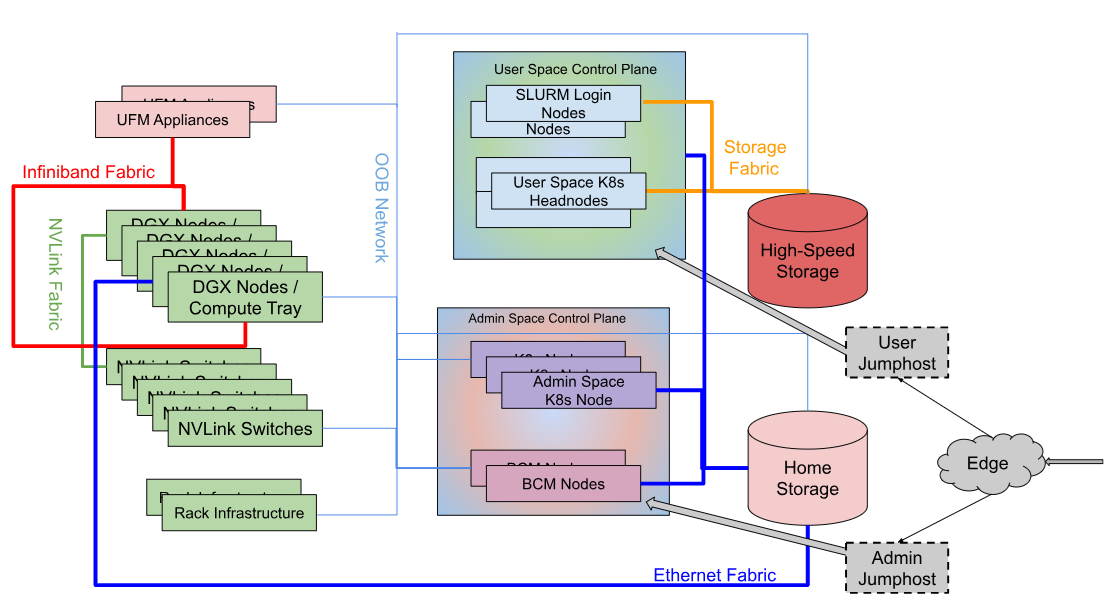
The components shown in the diagram are described below:
DGX SuperPOD Component |
Description |
|---|---|
User Jumphost |
The User Jumphost is the gateway into the DGX SuperPOD intended to provide a single entry-point into the cluster and additional security when required. It is not actually a part of the DGX SuperPOD, but of the corporate IT environment. This function is defined and provided by local IT requirements. |
DGX Nodes / Compute Trays |
The compute trays are where the user work gets done on the system. For DGX B-series systems (B300, B200), each DGX unit is a traditional GPU server in a standard rack configuration. For GB-series systems (GB300, GB200), compute resources are organized as compute trays within NVL72 racks, with each tray containing integrated CPU/GPU units. |
Management Nodes |
The management nodes provide the services necessary to support operation and monitoring of the DGX SuperPOD. Services, configured in high availability (HA) mode where needed, provide the highest system availability. See the Management Servers section below for details of each node and its function. |
High-Speed Storage |
High-speed storage provides shared storage to all nodes in the DGX SuperPOD. This is where datasets, checkpoints, and other large files should be stored. High-speed storage typically holds large datasets that are being actively operated on by the DGX SuperPOD jobs. Data on the high-speed storage is a subset of all data housed in a data lake outside of the DGX SuperPOD. |
Home & High Speed Storage |
Shared storage on a network file system (NFS) is allocated for user home directories as well for cluster services. |
InfiniBand Fabric Compute |
The Compute InfiniBand Fabric is the high-speed network fabric connecting all compute nodes together to allow high-bandwidth and low-latency communication between nodes and racks. |
InfiniBand Fabric Storage |
The Storage InfiniBand Fabric is the high-speed network fabric dedicated for storage traffic. Storage traffic is dedicated to its own fabric to remove interference with the node-to-node application traffic that can degrade overall performance. |
In-Band Network Fabric |
The In-band Network Fabric provides fast Ethernet connectivity between all nodes in the DGX SuperPOD. The In-band fabric is used for TCP/IP-based communication and services for provisioning and inband management. |
Out-of-Band Network Fabric |
The out-of-band Ethernet network is used for system management using the BMC and provides connectivity to manage all networking equipment. |
NVLink |
NVIDIA NVLink is a high-speed interconnect that allows multiple GPUs to communicate directly. Multi-Node NVLink is a capability enabled over an NVLink Switch network where multiple systems are interconnected to form a large GPU memory fabric also known as an NVLink Domain. Available on GB300 and GB200 systems. |
Management Servers#
The following describes the function and services running on the management servers:
Server Function |
Services |
|---|---|
Head Node |
Head nodes serve various functions:
|
Login/Slurm Nodes |
Entry point to the DGX SuperPOD for users. CPU-based nodes that are Slurm clients with filesystems mounted to support development, job submission, job monitoring, and file management. Multiple nodes are included for redundancy and supporting user workloads. These hosts can also be used for container caching. |
UFM Appliance |
NVIDIA Unified Fabric Manager (UFM) for both storage and compute InfiniBand fabric. Manages InfiniBand switches and fabric topology. |
NVLink Management Software |
NVLink Management Software (NMX) is an integrated platform for management and monitoring of NVLink connections. Available on GB300 and GB200 systems. |
Admin/User Service Nodes |
Kubernetes control plane nodes that host infrastructure services (admin space) and user workload orchestration services (user space). Configuration varies by architecture - see architecture-specific sections below. |
Mission Control Architecture Overview#
Mission Control consists of three primary operational planes:
Control Plane#
The control plane manages cluster operations and provides administrative interfaces. It includes:
Base Command Manager (BCM): Central management platform with GUI, CLI, and API interfaces
Kubernetes Infrastructure: Container orchestration for services and workloads
Management Services: Monitoring, observability, health checking, and automated recovery
Architecture-Specific Notes:
DGX B300/B200: x86-based BCM Head Nodes and Run:AI Management Nodes
GB300: Arm64-based BCM Head Nodes with x86 Admin Kubernetes Nodes
GB200: Separated Admin Control Plane (x86) and User Control Plane (Arm64/x86 hybrid)
User Access Plane#
The user access plane provides interfaces for job submission and workload management:
Slurm Nodes: Traditional HPC workload submission via Slurm workload manager
User Kubernetes Nodes: Direct access to Kubernetes for containerized workloads (GB300/GB200)
Run:AI Interface: AI-specific workload orchestration and GPU resource management
Architecture-Specific Notes:
DGX B300/B200: x86-based Slurm Nodes for user access
GB300: Arm64-based Slurm Nodes and dedicated User Kubernetes Nodes
GB200: Arm64 Slurm Nodes with x86 User Service Nodes running Run:AI
Compute Plane#
The compute plane executes workloads on GPU-accelerated resources:
DGX B300: 1SU configuration with 64-72 DGX units per superunit
DGX B200: 1SU configuration with 32 DGX units per superunit
GB300: Rack-based configuration with 8 racks per superunit, organized in compute trays
GB200: Rack-based configuration with 8 racks per superunit, organized in compute trays
Each compute node runs Slurm worker processes and provides GPU resources to scheduled workloads.
Key Components by Architecture#
DGX B300 (v2.1.0)#
Control Infrastructure:
BCM Head Nodes (x86) - x2: Cluster deployment, management, and monitoring
Run:AI Management Nodes (x86) - x3: AI workload orchestration with integrated Kubernetes and common services
Admin Kubernetes Nodes (x86) - x3: BCM-integrated infrastructure services including AHR, AJR, NetQ, and Observability Stack
User Access:
Slurm Nodes (x86) - x2: Job submission interface with BCM-provisioned Slurm software
Compute:
DGX B300 - 1SU: High-density GPU compute with either 72 DGX per SU (InfiniBand configuration) or 64 DGX per SU (Spectrum Ethernet configuration)
New Features in v2.1.0:
NetQ network monitoring integration
Enhanced Observability Stack for comprehensive system monitoring
Autonomous Hardware Recovery (AHR) and Autonomous Job Recovery (AJR) capabilities
Separate Admin Kubernetes Nodes for infrastructure services
DGX B200 (v2.0.0)#
Control Infrastructure:
BCM Head Nodes (x86) - x2: Cluster management with GUI, CLI (CMSH), and API interfaces
Run:AI Management Nodes (x86) - x3: AI workload scheduling with integrated Kubernetes services including Run:AI control plane, scheduler, and common Kubernetes services (GPU Operator, Network Operator)
User Access:
Slurm Nodes (x86) - x2: Job submission interface with BCM-provisioned Slurm software
Compute:
DGX B200 - 1SU: Production-scale GPU compute with 32 DGX per SU
Key Characteristics:
Streamlined architecture focused on core orchestration without separate admin infrastructure nodes
CMSH CLI for Base Command Manager operations
Balanced configuration for production AI workloads
Run:AI Management Nodes serve dual purpose: AI orchestration and common Kubernetes services
BCM-provisioned Kubernetes and Slurm infrastructure
GB300 (v2.1.0)#
Control Infrastructure:
BCM Head Nodes (Arm64) - x2: Cluster management with CMSH CLI on Arm64 architecture
Admin Kubernetes Nodes (x86) - x3: BCM-integrated services including AHR, AJR, NetQ, NMX, and Observability Stack
User Access:
Slurm Nodes (Arm64) - x2: Job submission interface on Arm64 architecture
User Kubernetes Nodes (Arm64) - x3: Run:AI orchestration and user-space Kubernetes workloads on Arm64 architecture
Compute:
GB300 Rack: 8 racks per SU organized in compute trays with CPU/GPU units in NVL72 configuration
Key Characteristics:
Hybrid Arm64/x86 architecture: Arm64 for BCM head nodes and user access, x86 for admin infrastructure services
NVLink switches for high-speed GPU interconnect within and across racks
Customer-provided BMS integration via API-compliant interface
Advanced leak monitoring and control capabilities
Rack and inventory management for NVL72 systems
NetQ for comprehensive network fabric monitoring
GB200 (v2.0.0)#
Admin Control Plane:
Head Nodes (x86) - x2: Cluster deployment and management
Admin Service Nodes (x86) - x3: BCM-integrated infrastructure services including NMX Manager, Observability Stack, Autonomous Hardware Recovery (AHR), and Autonomous Job Recovery (AJR)
User Control Plane:
Slurm Nodes (Arm64) - x2: Job submission interface on Arm64 architecture
User Service Nodes (x86) - x3: Run:AI orchestration (control plane and scheduler), common Kubernetes services (GPU Operator, DRA, Network Operator), and user workloads
Compute:
GB200 Rack: 8 racks per SU in compute tray configuration with NVL72 architecture
Key Characteristics:
Separated admin and user control planes for enhanced security and operational isolation
Admin plane (x86) handles all infrastructure services and system management
User plane (Arm64 + x86) provides workload submission and AI orchestration
Autonomous Hardware Recovery (AHR) and Autonomous Job Recovery (AJR) on admin plane
NMX Manager for NVLink fabric management and monitoring
NVLink switches for high-speed GPU communication within compute trays
Customer-provided BMS integration via API-compliant interface
Advanced leak monitoring and control capabilities
Rack and inventory management for NVL72 systems
Infrastructure Services#
Base Command Manager (BCM)#
BCM provides comprehensive cluster management capabilities:
Management Interfaces:
GUI: Web-based Base Command View for visual cluster administration
CLI: Command-line interface (CMSH) for scripting and automation
API: RESTful API for programmatic integration
Core Capabilities:
OS provisioning and deployment
Firmware and software updates
Network provisioning and configuration
Health checking and monitoring
Inventory management
Power profile management
Integration with observability tools
Architecture Notes:
Available on all architectures with architecture-specific CLI variants
x86-based on DGX B300/B200 and GB200 admin plane
Arm64-based on GB300 head nodes
Kubernetes Services#
Mission Control leverages Kubernetes for service orchestration:
BCM-Provisioned Kubernetes:
All architectures include BCM-managed Kubernetes infrastructure for system services.
Common Kubernetes Services:
GPU Operator for GPU resource management
Network Operator for network fabric configuration
Loki for log aggregation
Prometheus for metrics collection
Additional operators as needed for the specific architecture
Architecture-Specific Deployment:
DGX B300: Run:AI Management Nodes and Admin Kubernetes Nodes
DGX B200: Run:AI Management Nodes only
GB300: Admin Kubernetes Nodes (x86) and User Kubernetes Nodes (Arm64)
GB200: Admin Service Nodes and User Service Nodes with separated control
Run:AI Orchestration#
Run:AI provides AI-specific workload management:
Capabilities:
Control plane for AI workload scheduling
Intelligent GPU resource allocation
Scheduler for job prioritization and fairness
Integration with common K8s services
Workload monitoring and optimization
Deployment:
Runs on dedicated Run:AI Management Nodes (DGX B300/B200)
Integrated into User Kubernetes Nodes (GB300)
Deployed on User Service Nodes (GB200)
Slurm Workload Manager#
BCM-provisioned Slurm enables traditional HPC workflows:
Features:
Job scheduling and resource allocation
Queue management
Integration with existing HPC environments
Slurm submission software on dedicated Slurm nodes
Architecture Deployment:
x86 Slurm Nodes on DGX B300/B200
Arm64 Slurm Nodes on GB300/GB200
BCM-provisioned Slurm workflow software
Advanced Features#
Autonomous Hardware Recovery (AHR)#
AHR provides automated hardware fault detection and recovery:
Capabilities:
Continuous hardware health monitoring
Automatic fault detection and isolation
Self-healing capabilities for recoverable issues
Integration with BCM for administrative actions
Availability:
DGX B300 (v2.1.0): Available on Admin Kubernetes Nodes
GB300 (v2.1.0): Available on Admin Kubernetes Nodes
GB200 (v2.0.0): Available on Admin Service Nodes
DGX B200 (v2.0.0): Not available in this architecture
Autonomous Job Recovery (AJR)#
AJR enables automatic job restart and recovery:
Capabilities:
Job state monitoring
Automatic job restart on recoverable failures
Checkpoint and restart support
Integration with Slurm and Kubernetes schedulers
Availability:
DGX B300 (v2.1.0): Available on Admin Kubernetes Nodes
GB300 (v2.1.0): Available on Admin Kubernetes Nodes
GB200 (v2.0.0): Available on Admin Service Nodes
DGX B200 (v2.0.0): Not available in this architecture
Observability Stack#
Comprehensive monitoring and observability infrastructure:
Components:
Metrics collection and aggregation
Log management and analysis
Health and performance dashboards
Alert management and notification
Availability:
DGX B300 (v2.1.0): On Admin Kubernetes Nodes
GB300 (v2.1.0): On Admin Kubernetes Nodes
GB200 (v2.0.0): On Admin Service Nodes
DGX B200 (v2.0.0): Integrated into Run:AI Management Nodes
Network Management#
NetQ (v2.1.0):
Network fabric monitoring and troubleshooting for modern data center networks.
DGX B300 (v2.1.0): Available on Admin Kubernetes Nodes
GB300 (v2.1.0): Available on Admin Kubernetes Nodes
Not available on v2.0.0 architectures (B200, GB200)
NMX Manager:
NVLink fabric management and configuration for NVL72 rack systems.
GB300 (v2.1.0): Available on Admin Kubernetes Nodes
GB200 (v2.0.0): Available on Admin Service Nodes
Not applicable to B-series systems (B300, B200)
NVLink Switches:
High-speed GPU interconnect for direct GPU-to-GPU communication.
GB300: NVLink switches for GPU communication within and across racks
GB200: NVLink switches integrated with network fabric within compute trays
Not applicable to B-series systems which use traditional InfiniBand/Ethernet interconnect
Network and Storage Infrastructure#
Networking#
Mission Control integrates with enterprise network infrastructure:
InfiniBand:
IB Switches and Unified Fabric Manager (UFM)
High-bandwidth, low-latency interconnect for HPC and AI workloads
Available on all architectures
Ethernet:
Ethernet switches for management and data networks
Available on all architectures
NVLink:
NVLink switches for GPU interconnect (GB300, GB200)
High-speed GPU-to-GPU communication within compute trays
Storage Systems#
NFS Storage:
Network File System for shared storage
Home directories, shared datasets, and application data
Available on all architectures
HFS Storage:
High-performance file system for demanding workloads
Optimized for large-scale data processing
Available on all architectures
Additional Systems#
Customer-Provided BMS:
Baseboard Management System integration for GB-series systems (GB300, GB200)
API-compliant BMS for enhanced hardware management and control
Customer-provided component that integrates with BCM via API interface
Not applicable to B-series systems (B300, B200)
Administrative Tasks#
Common administrative tasks covered in this guide include:
Deployment and Configuration:
Initial cluster deployment
Network and storage configuration
User access setup
Service configuration and tuning
Monitoring and Maintenance:
System health monitoring
Performance analysis
Log management
Firmware and software updates
User Management:
User account provisioning
Access control configuration
Resource quota management
Job submission access
Troubleshooting:
Diagnostic procedures
Common issues and resolutions
Log analysis
Hardware fault isolation
Architecture Selection Guide#
Choose the appropriate architecture based on your requirements:
DGX B300:
Highest GPU density: 72 DGX per SU (InfiniBand) or 64 DGX per SU (Ethernet)
Advanced monitoring with NetQ (v2.1.0)
Autonomous recovery features (AHR/AJR) in v2.1.0
Traditional DGX node architecture in standard racks
x86-based infrastructure throughout
Separate Admin Kubernetes Nodes for infrastructure services
DGX B200:
Balanced production configuration: 32 DGX per SU
Proven v2.0.0 architecture
Streamlined deployment without separate admin infrastructure nodes
Traditional DGX node architecture in standard racks
x86-based infrastructure throughout
Cost-effective for production AI workloads
GB300:
Next-generation NVL72 rack-based system
Hybrid Arm64/x86 architecture: Arm64 for control and user access, x86 for admin services
NVLink high-speed interconnect for GPU fabric
Separate User Kubernetes Nodes for user workloads
Advanced features: NetQ, NMX, AHR, AJR (v2.1.0)
Compute tray organization with 8 racks per SU
GB200:
Enterprise NVL72 rack-based system with highest isolation
Separated admin and user control planes for security
Hybrid Arm64/x86 architecture: x86 admin plane, Arm64 Slurm nodes, x86 user services
Advanced autonomous recovery (AHR, AJR) in v2.0.0
NMX Manager for NVLink fabric management
Compute tray organization with 8 racks per SU
Ideal for multi-tenant environments requiring strong isolation
Document Conventions#
This guide uses the following conventions:
Bold text: UI elements, buttons, menu items
Monospace text: Commands, file paths, configuration valuesItalic text: New terms, emphasis
Note
Architecture-specific procedures are clearly marked throughout the guide.
Warning
Always verify compatibility with your specific hardware configuration before making changes.
Tip
Consult the release notes for version-specific features and known issues.