> For clean Markdown of any page, append .md to the page URL.
> For a complete documentation index, see https://docs.nvidia.com/nemo/automodel/llms.txt.
> For AI client integration (Claude Code, Cursor, etc.), connect to the MCP server at https://docs.nvidia.com/nemo/automodel/_mcp/server.
# Fine-Tune MiniMax-M3
## Introduction
[MiniMaxAI/MiniMax-M3](https://huggingface.co/MiniMaxAI/MiniMax-M3) is MiniMaxAI's 428B A22B Mixture-of-Experts first vision-language model combining long-context reasoning, agentic workflows, and creative capabilities in a single platform. The multimodal MoE model evolved from MiniMax M2 along three axes — width, attention, and visual grounding.
MiniMax-M3 enables advanced use cases such as long-form video understanding, extended coding tasks (8+ hours), and high-quality design workflows.
To set up your environment to fine-tune this model with NeMo AutoModel, follow the [installation guide](https://github.com/NVIDIA-NeMo/Automodel#-install-nemo-automodel).
## Model Overview
### Architecture
* **Model type:** 428B total / 22B active MoE vision-language model.
* **Language module:** MiniMax-M2.7 backbone with 60 layers (3 dense + 57 MoE), 64 attention heads, 128 experts, block-sparse DSA attention on the MoE layers and a 512k context length.
* **Vision module:** CLIP-style ViT with 32 layers and dynamic resolution image input from 336×336 up to 2016×2016
* **Precision targets:** BF16 and MXFP8
* **Hardware target:** trained on Hopper GPUs.
## Data
### Multimodal Supervised Fine-Tuning Data
Use image/video instruction data that matches the target agent workflow. Good candidates include:
* frontend mockup-to-project examples,
* screenshot-debugging conversations,
* structured data-processing tasks with visual context,
* image/video question-answer pairs for bounded task execution.
For a full walkthrough of how multimodal datasets are preprocessed and integrated into NeMo AutoModel, including chat-template conversion and collate functions, see the [Multi-Modal Dataset Guide](https://github.com/NVIDIA-NeMo/Automodel/blob/main/docs/guides/vlm/dataset.mdx#multi-modal-datasets).
## Launch Training
NeMo AutoModel supports several ways to launch training: the AutoModel CLI with Slurm, interactive sessions, `torchrun`, and more. For full details on Slurm batch jobs, multi-node configuration, and environment variables, see the [Run on a Cluster](https://github.com/NVIDIA-NeMo/Automodel/blob/main/docs/launcher/slurm.mdx) guide.
### Standalone Slurm Skeleton
Before running, make sure your cluster environment is configured following the [Run on a Cluster](https://github.com/NVIDIA-NeMo/Automodel/blob/main/docs/launcher/slurm.mdx) guide.
```bash
export TRANSFORMERS_OFFLINE=1
export HF_HOME=/path/to/hf_cache
export HF_DATASETS_OFFLINE=1
export WANDB_API_KEY=your_wandb_key
srun --output=output.out \
--error=output.err \
--container-image /path/to/automodel26.04.image.sqsh \
--no-container-mount-home bash -c "
CUDA_DEVICE_MAX_CONNECTIONS=1 automodel \
/path/to/minimax_m3_vl.yaml \
--nproc-per-node=8 \
--model.pretrained_model_name_or_path=/path/to/MiniMax-M3 \
--processor.pretrained_model_name_or_path=/path/to/MiniMax-M3"
```
Use the checked-in [full SFT recipe](https://github.com/NVIDIA-NeMo/Automodel/blob/main/examples/vlm_finetune/minimax_m3/minimax_m3_vl_sft_ep32pp4.yaml) or [LoRA recipe](https://github.com/NVIDIA-NeMo/Automodel/blob/main/examples/vlm_finetune/minimax_m3/minimax_m3_vl_lora_pp4ep8_8node.yaml).
**Before you start**:
* Clone or mirror the model checkpoint locally before launching a multi-node run.
* Ensure `HF_HOME` points to a shared cache visible from all nodes.
* Cache the dataset locally if running with `HF_DATASETS_OFFLINE=1`.
* Configure the `wandb` section in the recipe to record loss, throughput, and memory curves.
## Training Results
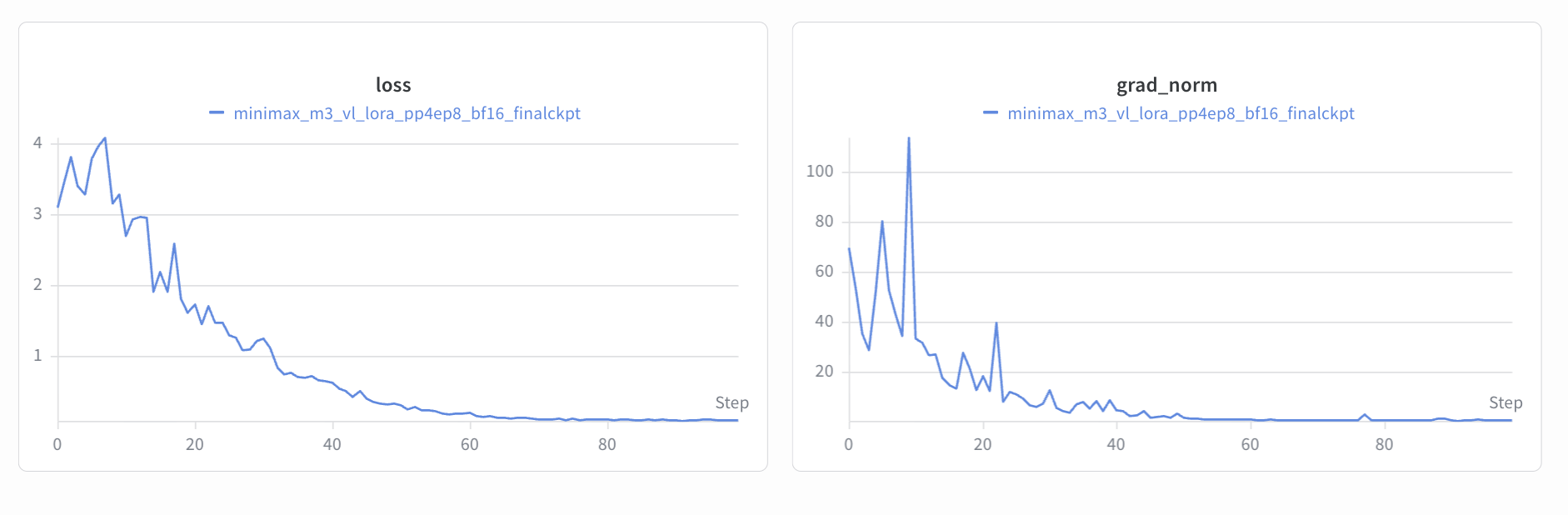
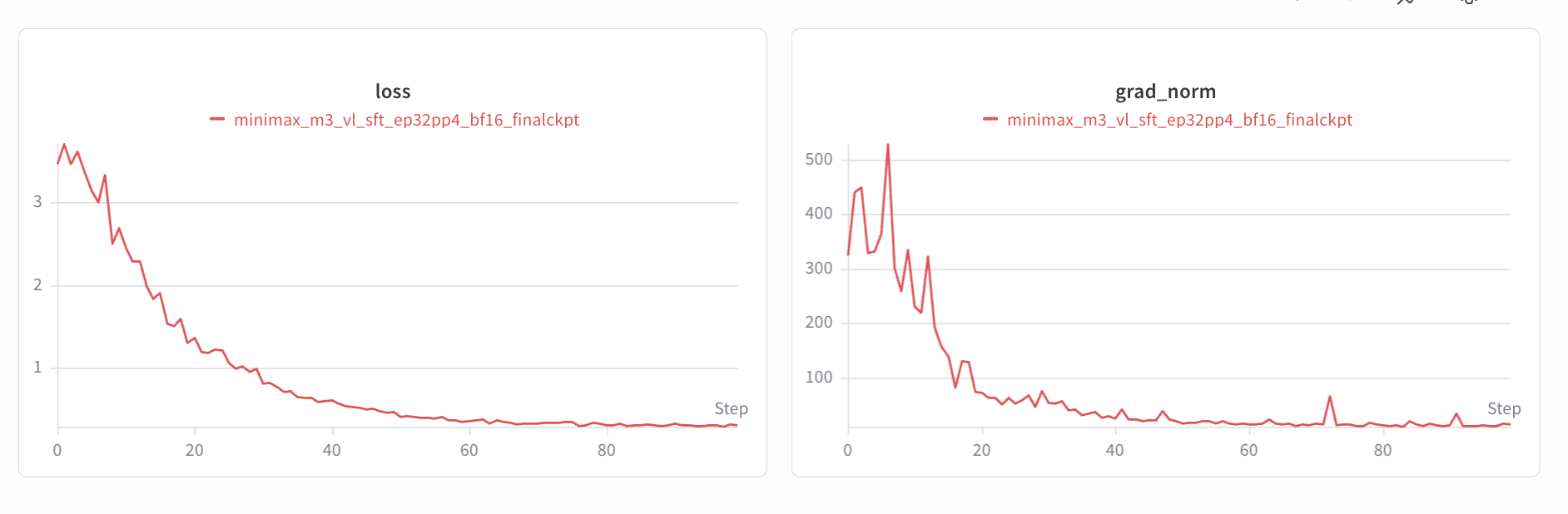
The SFT and LoRA fine-tuning loss curves are shown below.
**SFT**
**LoRA**