> For clean Markdown of any page, append .md to the page URL.
> For a complete documentation index, see https://docs.nvidia.com/nemo/automodel/llms.txt.
> For AI client integration (Claude Code, Cursor, etc.), connect to the MCP server at https://docs.nvidia.com/nemo/automodel/_mcp/server.
# Fine-Tune Qwen3.5-VL
## Introduction
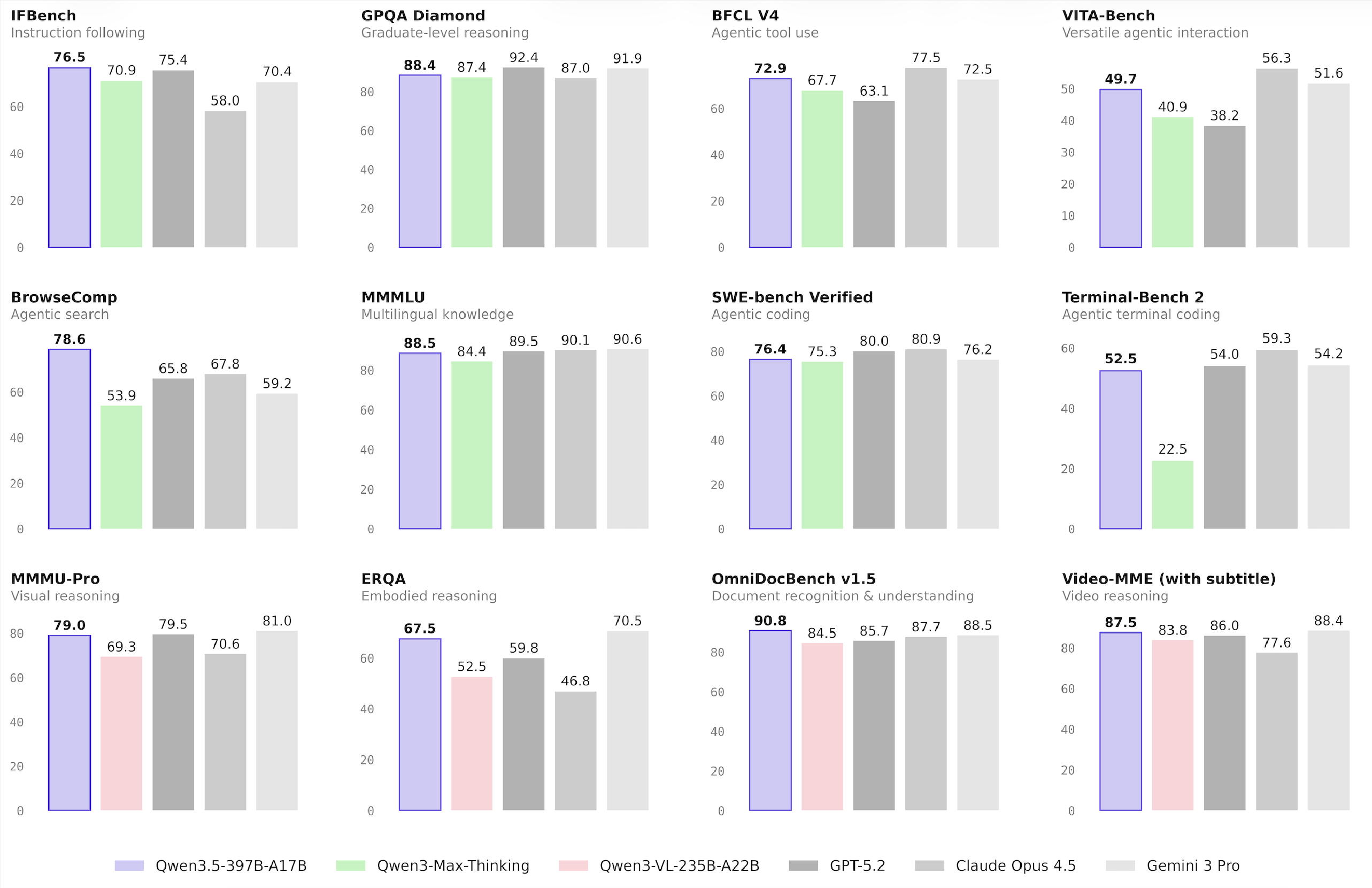
[Qwen/Qwen3.5-397B-A17B](https://huggingface.co/Qwen/Qwen3.5-397B-A17B) is a vision-language model in the Qwen series developed by Alibaba. It is a 397B-parameter hybrid MoE model with 17B active parameters. The model repeats Gated DeltaNet and Gated Attention blocks, each paired with a sparse MoE layer that has 512 experts, including 10 routed experts and one active shared expert. Qwen3.5 combines vision and language capabilities, expands multilingual coverage, and improves efficiency. Qwen3.5-397B-A17B shows competitive benchmark performance across knowledge, reasoning, coding, and agent tasks.
This guide describes how to fine-tune Qwen3.5 for a medical visual question answering task using NVIDIA NeMo AutoModel. It covers preparing the dataset, launching training on a Slurm cluster, and inspecting the results.
To set up your environment to run NeMo AutoModel, follow the [installation guide](https://github.com/NVIDIA-NeMo/Automodel#-install-nemo-automodel).
## Prepare the Data
### MedPix-VQA Dataset
This guide uses the [MedPix-VQA](https://huggingface.co/datasets/mmoukouba/MedPix-VQA) dataset. This medical visual question answering dataset contains radiological images paired with questions and answers for medical image interpretation.
The dataset includes:
* **20,500 total examples** (85% training and 15% validation)
* **Columns**: `image_id`, `mode`, `case_id`, `question`, `answer`
For details about how MedPix-VQA is preprocessed and integrated into NeMo AutoModel, including chat-template conversion and collate functions, see the [Multi-Modal Dataset Guide](/datasets/multi-modal-dataset).
## Launch Training
A ready-to-use recipe is available at [`examples/vlm_finetune/qwen3_5_moe/qwen3_5_moe_medpix.yaml`](https://github.com/NVIDIA-NeMo/Automodel/blob/main/examples/vlm_finetune/qwen3_5_moe/qwen3_5_moe_medpix.yaml). This recipe is configured for 32 nodes with eight NVIDIA H100 GPUs per node.
Long-context Qwen3.5 runs can require prewarming during setup even when later training steps fit in memory. This occurs because first-use CUDA and communicator allocations overlap with the first backward-pass memory peak. The short-context MedPix recipe does not enable prewarming by default. If a longer hybrid-attention MoE run fails only during its first step, see [Prewarm One-Time CUDA Initialization](/get-started/configuration#prewarm-one-time-cuda-initialization). Enable only the warmup that matches the failure signature. This behavior alone does not establish support for a specific context length.
NeMo AutoModel supports several methods for launching training, including the AutoModel CLI with Slurm, interactive sessions, and `torchrun`. For details about all launch options, including Slurm batch jobs, multi-node configs, and environment variables, see the [Run on a Cluster](/job-launchers/slurm-cluster) guide.
### Standalone Slurm Script
The following example provides a standalone Slurm script for Qwen3.5. Before running it, configure your cluster environment according to the [Run on a Cluster](/job-launchers/slurm-cluster) guide. Then submit the job:
```bash
export TRANSFORMERS_OFFLINE=1
export HF_HOME=your/path/to/hf_cache
export HF_DATASETS_OFFLINE=1
export WANDB_API_KEY=your_wandb_key
srun --output=output.out \
--error=output.err \
--container-image /your/path/to/automodel26.06.image.sqsh --no-container-mount-home bash -c "
CUDA_DEVICE_MAX_CONNECTIONS=1 automodel \
examples/vlm_finetune/qwen3_5_moe/qwen3_5_moe_medpix.yaml \
--nproc-per-node=8 \
--model.pretrained_model_name_or_path=/your/local/qwen3.5weights \
--processor.pretrained_model_name_or_path=/your/local/qwen3.5weights "
```
**Before you start**:
* Hugging Face applies rate limits on downloads. We recommend cloning the model repository to your local filesystem beforehand.
* Ensure your Hugging Face cache (`HF_HOME`) is configured and that the dataset is already cached locally.
* To enable Weights & Biases logging, set your `WANDB_API_KEY` and configure the `wandb` section in the YAML file.
## Training Results
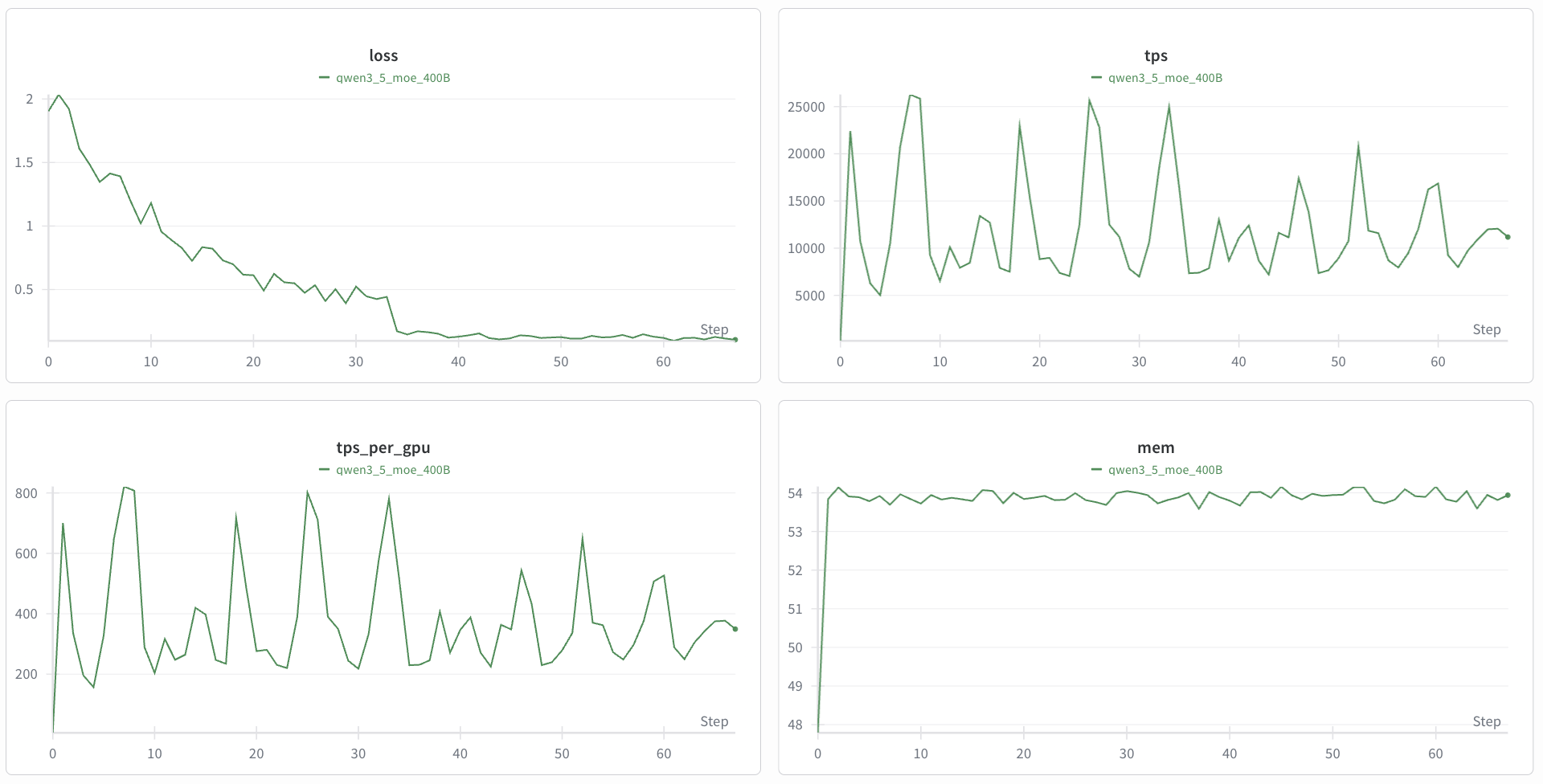
The following figure shows the training loss curves for Qwen3.5-VL fine-tuned on MedPix-VQA.