> For clean Markdown of any page, append .md to the page URL.
> For a complete documentation index, see https://docs.nvidia.com/nemo/automodel/llms.txt.
> For AI client integration (Claude Code, Cursor, etc.), connect to the MCP server at https://docs.nvidia.com/nemo/automodel/_mcp/server.
# Fine-Tune Qwen3.5-VL
## Introduction
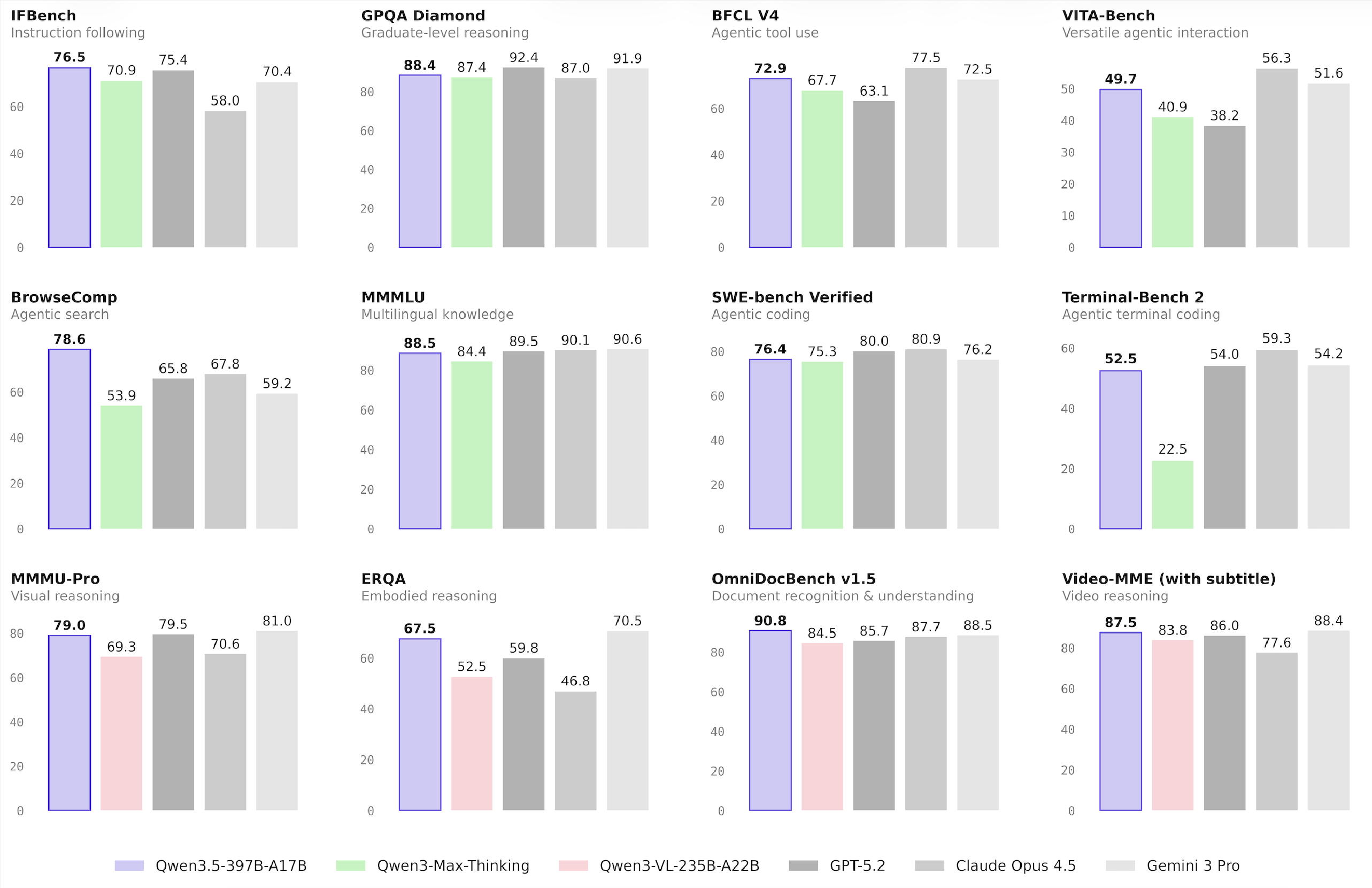
[Qwen/Qwen3.5-397B-A17B](https://huggingface.co/Qwen/Qwen3.5-397B-A17B) is the latest vision-language model in the Qwen series developed by Alibaba. It’s a 397B-parameter (17B active) hybrid MoE model that uses a repeated layout of Gated DeltaNet and Gated Attention blocks, each paired with sparse MoE (512 experts; 10 routed + 1 shared active). Qwen3.5 is a major upgrade that unifies vision+language, boosts efficiency and multilingual coverage, delivering higher performance at lower latency/cost for developers and enterprises. Qwen3.5-397B-A17B shows competitive benchmark performance across knowledge, reasoning, coding, and agent tasks.
This guide walks you through fine-tuning Qwen3.5 on a medical Visual Question Answering task using NVIDIA NeMo Automodel. You will learn how to prepare the dataset, launch training on a Slurm cluster, and inspect the results.
To set up your environment to run NeMo Automodel, follow the [installation guide](https://github.com/NVIDIA-NeMo/Automodel#-install-nemo-automodel).
## Data
### MedPix-VQA Dataset
We use the [MedPix-VQA](https://huggingface.co/datasets/mmoukouba/MedPix-VQA) dataset, a comprehensive medical Visual Question Answering dataset containing radiological images paired with question-answer pairs for medical image interpretation.
- **20,500 total examples** (85% train / 15% validation)
- **Columns**: `image_id`, `mode`, `case_id`, `question`, `answer`
For a full walkthrough of how MedPix-VQA is preprocessed and integrated into NeMo Automodel—including the chat-template conversion and collate functions—see the [Multi-Modal Dataset Guide](https://github.com/NVIDIA-NeMo/Automodel/blob/main/docs/guides/vlm/dataset.mdx#multi-modal-datasets).
## Launch Training
We provide a ready-to-use recipe at [`examples/vlm_finetune/qwen3_5_moe/qwen3_5_moe_medpix.yaml`](https://github.com/NVIDIA-NeMo/Automodel/blob/main/examples/vlm_finetune/qwen3_5_moe/qwen3_5_moe_medpix.yaml). This recipe is configured to run on 32 x 8 H100 nodes.
NeMo Automodel supports several ways to launch training—via the Automodel CLI with Slurm, interactive sessions, `torchrun`, and more. For full details on all launch options (Slurm batch jobs, multi-node configuration, environment variables, etc.), see the [Run on a Cluster](https://github.com/NVIDIA-NeMo/Automodel/blob/main/docs/launcher/slurm.mdx) guide.
### Standalone Slurm Script
We also provide a standalone Slurm script example for Qwen3.5. Before running it, ensure your cluster environment is configured following the [Run on a Cluster](https://github.com/NVIDIA-NeMo/Automodel/blob/main/docs/launcher/slurm.mdx) guide. Then submit the job with the following command:
```bash
export TRANSFORMERS_OFFLINE=1
export HF_HOME=your/path/to/hf_cache
export HF_DATASETS_OFFLINE=1
export WANDB_API_KEY=your_wandb_key
srun --output=output.out \
--error=output.err \
--container-image /your/path/to/automodel26.06.image.sqsh --no-container-mount-home bash -c "
CUDA_DEVICE_MAX_CONNECTIONS=1 automodel \
examples/vlm_finetune/qwen3_5_moe/qwen3_5_moe_medpix.yaml \
--nproc-per-node=8 \
--model.pretrained_model_name_or_path=/your/local/qwen3.5weights \
--processor.pretrained_model_name_or_path=/your/local/qwen3.5weights "
```
**Before you start**:
- Hugging Face applies rate limits on downloads. We recommend cloning the model repository to your local filesystem beforehand.
- Ensure your Hugging Face cache (`HF_HOME`) is configured and that the dataset is already cached locally.
- To enable Weights & Biases logging, set your `WANDB_API_KEY` and configure the `wandb` section in the YAML file.
## Training Results
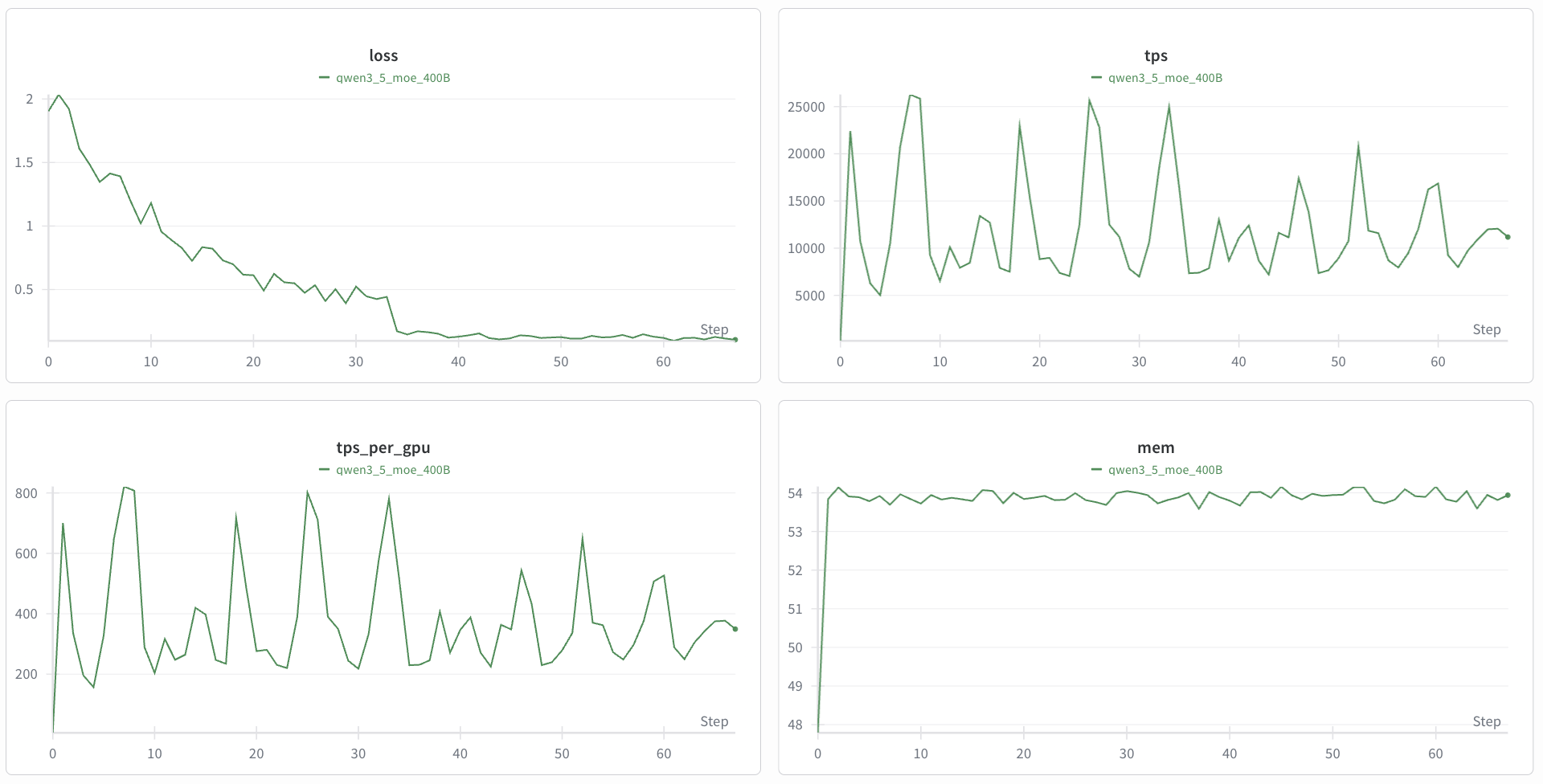
The training loss curves for Qwen3.5-VL fine-tuned on MedPix-VQA are shown below.