> For clean Markdown of any page, append .md to the page URL.
> For a complete documentation index, see https://docs.nvidia.com/nemo/automodel/llms.txt.
> For AI client integration (Claude Code, Cursor, etc.), connect to the MCP server at https://docs.nvidia.com/nemo/automodel/_mcp/server.
# Fine-Tune Step-3.7-Flash
## Introduction
[stepfun-ai/Step-3.7-Flash](https://huggingface.co/stepfun-ai/Step-3.7-Flash) is Stepfun AI's 198B-A13B Mixture-of-Experts vision-language model. It builds on the Step-3.5-Flash language architecture and adds native image and video understanding for agentic developer workflows.
Step-3.7-Flash is positioned for agentic use cases where image or video context is part of the task. Target workflows include frontend development from mockups, data-processing tasks, screenshot-based debugging, and tool-calling agents that need stable structured outputs.
To set up your environment to run NeMo AutoModel, follow the [installation guide](https://github.com/NVIDIA-NeMo/Automodel#-install-nemo-automodel).
## Model Overview
### Architecture
- **Model type:** 198B total / 13B active MoE vision-language model.
- **Language module:** Step-3.5-Flash-derived backbone with 45 layers, 288 experts, 8 activated experts per token, and a 256k context length.
- **Vision module:** 1.8B ViT with 47 layers and 728x728 image inputs.
- **Precision targets:** BF16 and FP8 planned for Day 0; NVFP4 support is best effort.
- **Hardware target:** trained on Hopper GPUs.
### Agentic Positioning
Step-3.7-Flash targets high-throughput, low-latency inference for real-time developer loops. It continues support for agent frameworks such as OpenClaw, HermesAgent, and KiloClaw, with emphasis on tool-call stability.
## Data
### Multimodal Supervised Fine-Tuning Data
Use image/video instruction data that matches the target agent workflow. Good candidates include:
- frontend mockup-to-project examples,
- screenshot-debugging conversations,
- structured data-processing tasks with visual context,
- image/video question-answer pairs for bounded task execution.
For a full walkthrough of how multimodal datasets are preprocessed and integrated into NeMo AutoModel, including chat-template conversion and collate functions, see the [Multi-Modal Dataset Guide](https://github.com/NVIDIA-NeMo/Automodel/blob/main/docs/guides/vlm/dataset.mdx#multi-modal-datasets).
## Launch Training
This documentation-only branch does not add a ready-to-use recipe YAML. A future recipe should use `stepfun-ai/Step-3.7-Flash` as both the model and processor checkpoint and should be sized for a large VLM MoE run with pipeline parallelism and expert parallelism.
NeMo AutoModel supports several ways to launch training: the AutoModel CLI with Slurm, interactive sessions, `torchrun`, and more. For full details on Slurm batch jobs, multi-node configuration, and environment variables, see the [Run on a Cluster](https://github.com/NVIDIA-NeMo/Automodel/blob/main/docs/launcher/slurm.mdx) guide.
### Standalone Slurm Skeleton
Before running, make sure your cluster environment is configured following the [Run on a Cluster](https://github.com/NVIDIA-NeMo/Automodel/blob/main/docs/launcher/slurm.mdx) guide.
```bash
export TRANSFORMERS_OFFLINE=1
export HF_HOME=/path/to/hf_cache
export HF_DATASETS_OFFLINE=1
export WANDB_API_KEY=your_wandb_key
srun --output=output.out \
--error=output.err \
--container-image /path/to/automodel26.06.image.sqsh \
--no-container-mount-home bash -c "
CUDA_DEVICE_MAX_CONNECTIONS=1 automodel \
/path/to/step_3_7_flash_recipe.yaml \
--nproc-per-node=8 \
--model.pretrained_model_name_or_path=/path/to/Step-3.7-Flash \
--processor.pretrained_model_name_or_path=/path/to/Step-3.7-Flash "
```
**Before you start**:
- Clone or mirror the model checkpoint locally before launching a multi-node run.
- Ensure `HF_HOME` points to a shared cache visible from all nodes.
- Cache the dataset locally if running with `HF_DATASETS_OFFLINE=1`.
- Configure the `wandb` section in the recipe to record loss, throughput, and memory curves.
## Training Results
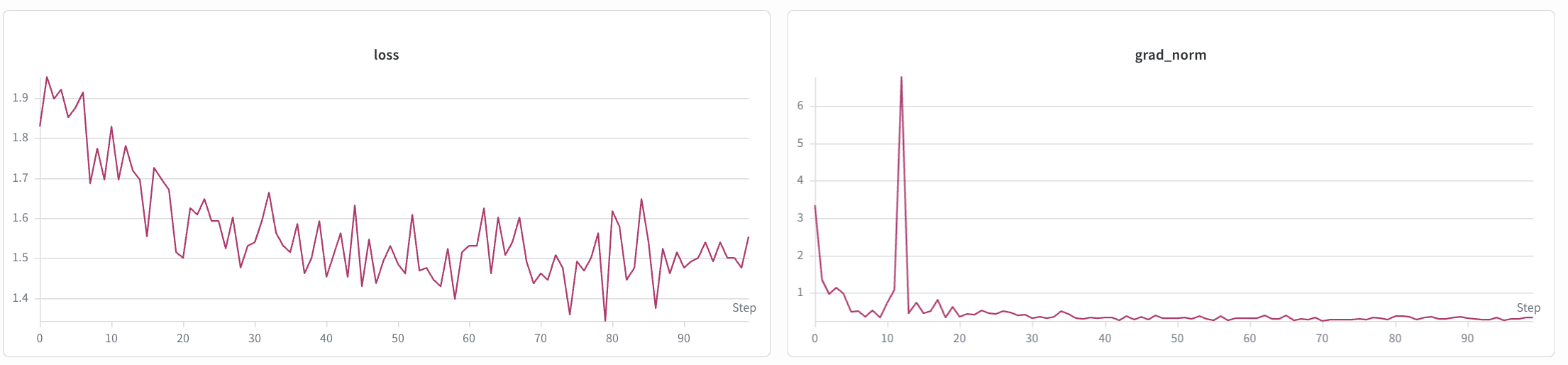
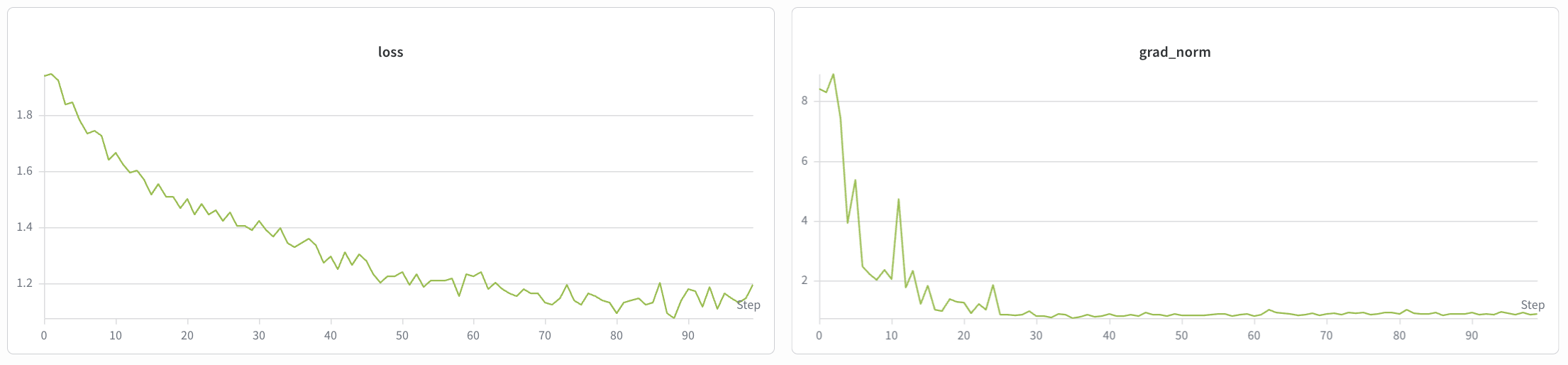
The SFT and LoRA training loss curves are shown below.
**SFT**
**LoRA**