***
description: >-
Comprehensive guide to Ray-based video curation with NeMo Curator including
splitting and deduplication pipelines for large-scale processing
categories:
* video-curation
tags:
* video-processing
* gpu-accelerated
* pipeline
* distributed
* ray
* splitting
* deduplication
* autoscaling
personas:
* mle-focused
* data-scientist-focused
difficulty: intermediate
content\_type: concept
modality: video-only
***
# About Video Curation
Learn what video curation is and how you use NeMo Curator to turn long videos into high‑quality, searchable clips.
Depending on the use case, this can involve processing 100+ PB of videos.
To efficiently process this quantity of videos, NeMo Curator provides highly optimized curation pipelines.
## Use Cases
Identify when to use NeMo Curator by matching your goals to common video curation scenarios.
* Generating clips for video world model training
* Generating clips for generative video model fine-tuning
* Creating a rich video database for video retrieval applications
## Architecture
Understand how components work together so you can plan, scale, and troubleshoot video pipelines. The following diagram outlines NeMo Curator's video curation architecture:
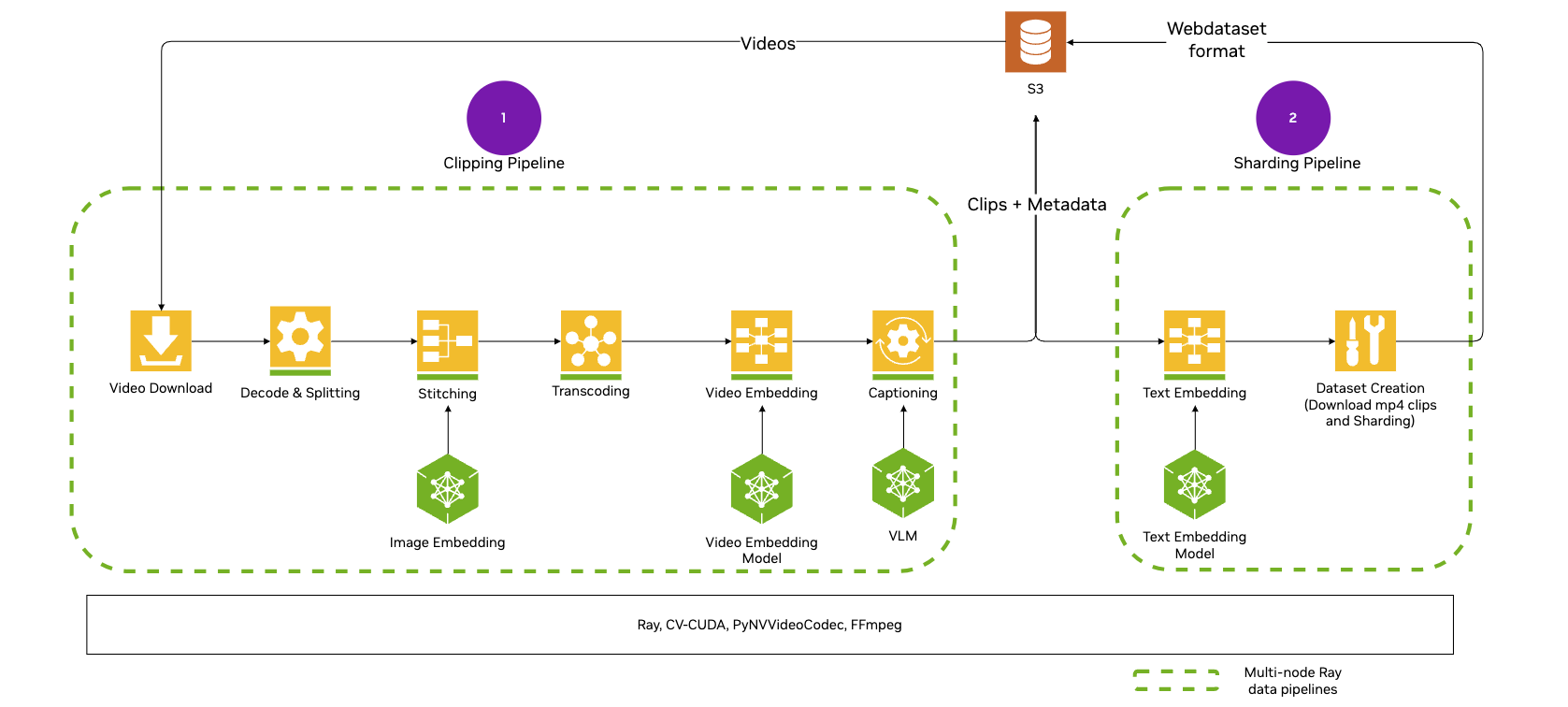
Video pipelines use the `XennaExecutor` backend by default, which provides optimized support for GPU-accelerated video processing including hardware decoders and encoders. You do not need to import or configure the executor unless you want to use an alternative backend. For more information about customizing backends, refer to [Pipeline Execution Backends](/reference/infra/execution-backends).
***
## Introduction
Get oriented and prepare your environment so you can start curating videos with confidence.
Learn about the architecture, stages, pipelines, and data flow for video curation
stages
pipelines
ray
Install NeMo Curator, configure storage, prepare data, and run your first video pipeline.
***
## Curation Tasks
Follow task-based guides to load, process, and write curated video data end to end.
### Load Data
Bring videos into your pipeline from local paths or remote sources you control.
Load videos from local paths or S3-compatible and HTTP(S) URLs.
local
s3
file-list
Provide an explicit JSON file list for remote datasets under a root prefix.
file-list
s3
### Process Data
Transform raw videos into curated clips, frames, embeddings, and metadata you can use.
Split long videos into shorter clips using fixed stride or scene-change detection.
clips
fixed-stride
transnetv2
Encode clips to H.264 using CPU or GPU encoders and tune performance.
clips
h264\_nvenc
libopenh264
libx264
Apply motion-based filtering and aesthetic filtering to improve dataset quality.
clips
frames
motion
aesthetic
Extract frames from clips or full videos for embeddings, filtering, and analysis.
frames
nvdec
ffmpeg
fps
Generate clip-level embeddings with Cosmos-Embed1 for search and duplicate removal.
clips
cosmos-embed1
Generate Qwen‑VL captions and optional WebP previews; optionally enhance with Qwen‑LM.
captions
previews
qwen
webp
Remove near-duplicates using semantic clustering and similarity with generated embeddings.
clips
semantic
pairwise
kmeans
### Write Data
Save outputs in formats your training or retrieval systems can consume at scale.
Understand output directories, parquet embeddings, and packaging for training.
parquet
webdataset
metadata
***
## Tutorials
Practice with guided, hands-on examples to build, customize, and run video pipelines.
Create and run your first video pipeline: read, split, encode, embed, write.
splitting
encoding
embeddings
Customize environments, code, models, and stages for video pipelines.
environments
code
models
stages