> For clean Markdown of any page, append .md to the page URL.
> For a complete documentation index, see https://docs.nvidia.com/nemo/guardrails/llms.txt.
> For full documentation content, see https://docs.nvidia.com/nemo/guardrails/llms-full.txt.
> For AI client integration (Claude Code, Cursor, etc.), connect to the MCP server at https://docs.nvidia.com/nemo/guardrails/_mcp/server.
# Event Generation & Matching
> When working with Colang, we assume to have a common event channel that contains all relevant events happening in the interactive system. From a Colang perspective, relevant events
## Introduction
When working with Colang, we assume to have a common event channel that contains all relevant events happening in the interactive system. From a Colang perspective, relevant events are all events that are required to model the interaction between the user and the bot. With Colang, you can listen for events on this channel, as well as publish new events to the channel for other components to read:
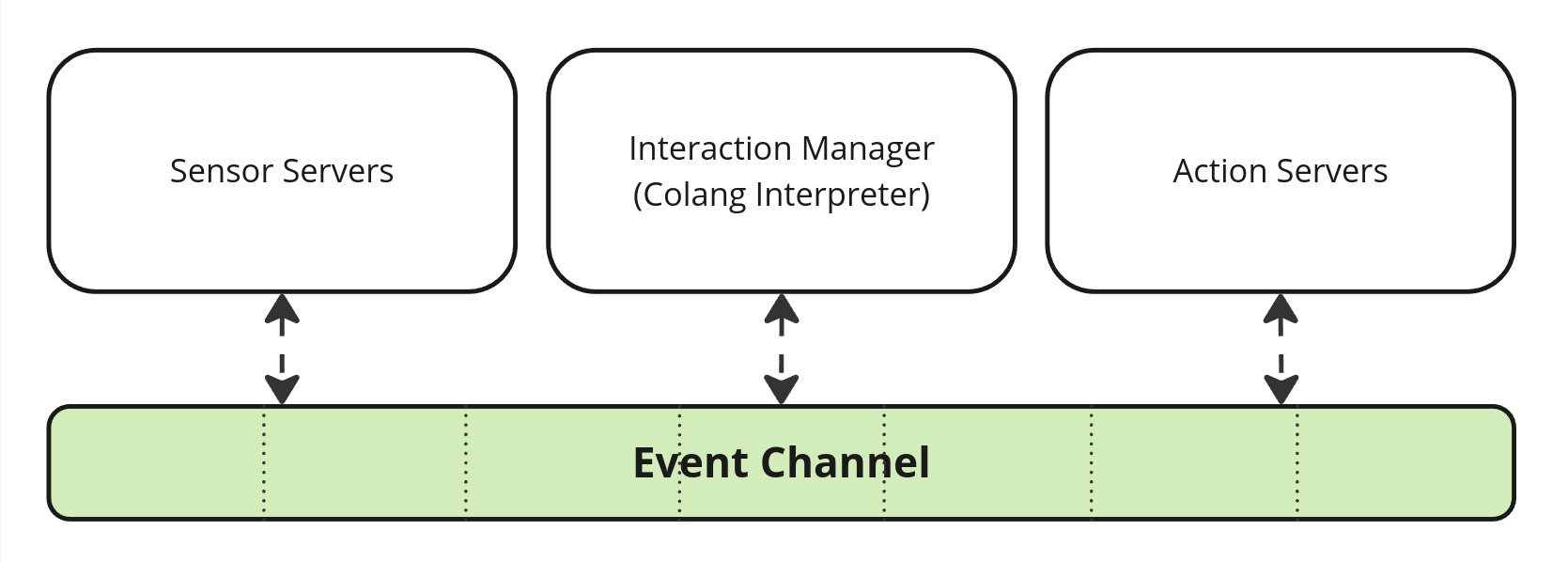
With Colang you can define a set of event production rules (interaction patterns) that depend on the events from the channel. Let's first have a look at the plain definition of an event in Colang:
Event definition:
```text
[(param=[, param=]…)]
```
Examples:
```text
# Bot utterance action start event
StartUtteranceBotAction(script="Hello", intensity=1.0)
# Event containing the final user utterance
UtteranceUserActionFinished(final_transcript="Hi")
# A custom event with no parameters
XYZ()
```
An event uses the Pascal case style naming.
Colang uses the convention that event names are written using Pascal case style. Events can have optional parameters separated by commas with potential default values. You can use these events in Colang statements to build an interaction pattern as a sequence of statements:
Interaction pattern definition:
```text
.
.
```
The statements are processed in order, one by one. We will get to know the different type of statements, starting with the event generation statement:
Event generation statement definition:
```text
send [as $] [and|or [as $]…)]
```
Example:
```text
send StartUtteranceBotAction(script="Hello") as $utterance_event_ref
```
This generates a UMIM event on the event channel to be received again by other system components. We also introduce the event matching statement:
Event matching statement definition:
```text
match [as $] [and|or [as $]…)]
```
Example:
```text
match UtteranceUserActionFinished(final_transcript="Hi") as $user_utterance_event_ref
```
A new event processed by the Colang runtime will be compared against all active event matching statements. An event matching statement is considered to be active if all previous statements were successfully processed so far. The event matching statement is only considered successful if the event name and all the provided parameters of the event matching statement are equal to the processed event. Otherwise, the match statement continues waiting for a matching event.
Let's show this now with an example:
**events/event\_matching/main.co**
```text
flow main
match Event1() # Statement 1
send Success1() # Statement 2
match Event2(param="a") # Statement 3
send Success2() # Statement 4
```
```text
> /Event3
> /Event1()
Event: Success1
> /Event2(param="b")
> /Event2(param="a")
Event: Success2
```
We see that the matching statements only progress if the right event is received. Let's now have another run to demonstrate the so-called `partial match`:
```text
> /Event1(param="a")
Event: Success1
> /Event2(param="a", other_param="b")
Event: Success2
```
From this, we can see that as long as all the provided parameters in the statement match with the parameters of the event, the match statement is successful, even if some of the parameters of the event are missing in the statement. The `partial match` is considered a less specific match than when all parameters are specified.
A `partial event` match is a match where the event matching statement does not specify all available parameters of an event. Such a statement matches a set of events for which the specified parameters are equal to the expected values.
We can assign a generated event to a reference to access its attributes at a later point:
**events/send\_event\_reference/main.co**
```text
flow main
send StartUtteranceBotAction(script="Smile") as $event_ref
send StartGestureBotAction(gesture=$event_ref.script)
match RestartEvent()
```
```text
Smile
Gesture: Smile
```
Note, that we did not start the flow with an event matching statement, but rather directly by generating an event instead. Therefore, the two events will be generated immediately at the start. Even though these two events get generated sequentially, from a user point of view they can be considered as concurrent events, since they will be sent out with almost no time difference. We added an event matching statement at the end such that the main flow does not repeat itself infinitely.
Similarly, any event matching statement can capture the observed event with the help of a reference:
**events/match\_event\_reference/main.co**
```text
flow main
match UtteranceUserActionFinished() as $event_ref
send StartUtteranceBotAction(script=$event_ref.final_transcript)
```
```text
> Hello!
Hello!
```
With this you can access event parameters like the final transcript of the user utterance and use it, for example, to let the bot repeat what the user said.
## Event Grouping
Another powerful feature of Colang is the option to group events with the keywords `and` and `or`:
**events/event\_grouping/main.co**
```text
flow main
match UtteranceUserActionFinished(final_transcript="hi") and UtteranceUserActionFinished(final_transcript="you")
send StartUtteranceBotAction(script="Success1")
match UtteranceUserActionFinished(final_transcript="A") or UtteranceUserActionFinished(final_transcript="B")
send StartUtteranceBotAction(script="Success2")
```
```text
> hi
> you
Success1
> A
Success2
> you
> hi
Success1
> B
Success2
```
Events combined with an `and` will only match once both events have been observed. Events that are grouped with the keyword `or` will match as soon as one of the events is observed. With this grouping, one can build much more complex event matching conditions, using brackets to enforce operator precedence (by default `or` has higher precedence than `and`):
**events/event\_grouping\_advanced/main.co**
```text
flow main
match ((UtteranceUserActionFinished(final_transcript="ok") or UtteranceUserActionFinished(final_transcript="sure"))
and GestureUserActionFinished(gesture="thumbs up"))
or ((UtteranceUserActionFinished(final_transcript="no") or UtteranceUserActionFinished(final_transcript="not sure"))
and GestureUserActionFinished(gesture="thumbs down"))
send StartUtteranceBotAction(script="Success")
```
```text
> ok
> /GestureUserActionFinished(gesture="thumbs up")
Success
> no
> /GestureUserActionFinished(gesture="thumbs down")
Success
> sure
> /GestureUserActionFinished(gesture="thumbs down")
Success
> not sure
> /GestureUserActionFinished(gesture="thumbs down")
Success
```
Note how a group can be split into multiple lines by using appropriate indentation to better visualize the sub grouping.
We can also use the grouping operators `and` and `or` to generate events:
The `and` operator is equivalent to creating a sequence of send statements where both events are generated.
```text
# This statement ...
send StartUtteranceBotAction(script="Hi") and StartGestureBotAction(gesture="Wave")
# ... is equivalent to the following sequence
send StartUtteranceBotAction(script="Hi")
send StartGestureBotAction(gesture="Wave")
```
The `or` operator works like a random selector that will only pick one of the events to be sent out:
```text
# This statement ...
send StartGestureBotAction(gesture="Ping") or StartGestureBotAction(gesture="Pong")
# ... will be evaluated at runtime as one of these two options (at random)
# Option 1:
send StartGestureBotAction(gesture="Ping")
# Option 2:
send StartGestureBotAction(gesture="Pong")
```
See section [Defining Flows - Flow Grouping](defining-flows#defining-flows-flow-grouping) to learn more about the underlying mechanics of the or-grouping.
Here is an example to showcase the grouping operators:
**events/event\_groups/main.co**
```text
flow main
send StartUtteranceBotAction(script="Hi") and StartGestureBotAction(gesture="Wave")
send StartGestureBotAction(gesture="Ping") or StartGestureBotAction(gesture="Pong")
match RestartEvent()
```
You can try that yourself by iterating a couple of times.
```text
Hi
Gesture: Wave
Gesture: Ping
> /RestartEvent
Hi
Gesture: Wave
Gesture: Ping
> /RestartEvent
Hi
Gesture: Wave
Gesture: Pong
```
## Parameter Types
Colang supports many of the fundamental Python value types: `bool`, `str`, `float`, `int`, `list`, `set` and `dict`.
Here is a simple example of an event match based on an integer parameter:
**events/integer\_parameter\_match/main.co**
```text
flow main
match Event(param=42)
send StartUtteranceBotAction(script="Success")
```
```text
> /Event()
> /Event(param=3)
> /Event(param=42)
Success
```
We see that only the last event where the parameter was equal to 42 matched with the matching statement. Matching events with container type parameters like `list`, `set` or `dict` work in the following way:
**List**:
An event `Event(list_param=)` with a list parameter `list_param` matches a match statement `match Event(list_param=)` if:
* The length of the list `` is equal to or smaller than the length of the received list `` that is part of the received event.
* All items in `` match with the corresponding items in ``. Items at the same position in the list are compared. If an item is a container itself it will be recursively checked based on the rules for that container type.
In the following example, the main flow contains a single match statement that expects a match for an event `Event`.
**events/list\_parameters/main.co**
```text
flow main
match Event(param=["a","b"])
send StartUtteranceBotAction(script="Success")
```
Running this flow with the a few input events gives us the following sequence:
```text
> /Event(param=["a"])
> /Event(param=["b","a"])
> /Event(param=["a","b","c"])
Success
```
* The first event does not match since the expected list has more items.
* The second event does not match since the order in the expected list is different
* The third event matches since the all items of the two lists match (at the same position)
**Set**:
An event `Event(set_param=)` with a set parameter `set_param` matches a match statement `match Event(set_param=)` if:
* The size of the set `` is equal to or smaller than the size of the received set `` of the received event.
* All items in `` match with an item in ``. The items in `` will be compared with all items in `` until a match has been found or not. If an item is a container itself, it will be recursively checked based on the rules for that container type.
In the following example, the main flow contains a single match statement that expects a match for an event `Event`.
**events/set\_parameters/main.co**
```text
flow main
match Event(param={"a","b"})
send StartUtteranceBotAction(script="Success")
```
Running this flow with the a few input events gives us the following sequence:
```text
> /Event(param={"a"})
> /Event(param={"b","a","c"})
Success
```
* The first event does not match since the expected set has more items.
* The second event matches since all expected items are available (the order does not matter).
**Dictionary**:
An event `Event(dict_param=)` with a dictionary parameter `dict_param` matches a match statement `match Event(dict_param=)` if:
* The size of the dictionary `` is equal to or smaller than the size of the received dictionary `` of the received event.
* All available dictionary items in `` match with a corresponding item in ``. Items are compared based on their key and value. If a value is a container itself, it will be recursively checked based on the rules for that value type.
In the following example, the main flow contains a single match statement that expects a match for an event `Event`.
**events/dictionary\_parameters/main.co**
```text
flow main
match Event(param={"a": 1})
send StartUtteranceBotAction(script="Success")
```
Running this flow with the a few input events gives us the following sequence:
```text
> /Event(param={"a": 2})
> /Event(param={"b": 1})
> /Event(param={"b": 1, "a": 1})
Success
```
* The first event does not match since the value of item `"a"` is different from the expected item value
* The second event does not match since there is no item with key value `"a"` in it
* The third event matches since all expected items are available in it
## Regular Expressions
Colang also supports Python regular expressions for event parameter matching using the Colang function `regex()`. If used as a parameter value in a match statement it will check if the received event parameter contains at least one match with the defined pattern, like in Python's `re.search(pattern, parameter_value)`:
**events/regular\_expression\_parameters/main.co**
```text
flow main
match Event(param=regex("(?i)test.*"))
send StartUtteranceBotAction(script="Success 1")
match Event(param=regex("1\d*0"))
send StartUtteranceBotAction(script="Success 2")
match Event(param=["a",regex(".*"),"b"])
send StartUtteranceBotAction(script="Success 3")
```
```text
> /Event(param="Test123")
Success 1
> /Event(param=123450)
Success 2
> /Event(param=["a", "0", "b"])
Success 3
```
With this you can build powerful matching patterns.