> This page is for version 1.0.0 (Latest) (default).
> For other versions, use one of these documentation indexes:
> - 1.0.0 (Latest) (default): https://docs.nvidia.com/nim/alpamayo/1.0.0/llms.txt
> For clean Markdown of any page, append .md to the page URL.
> For a complete documentation index, see https://docs.nvidia.com/nim/alpamayo/llms.txt.
> For AI client integration (Claude Code, Cursor, etc.), connect to the MCP server at https://docs.nvidia.com/nim/alpamayo/_mcp/server.
# Quickstart Guide
This page describes how to launch Alpamayo1.5 NIM and verify that the service is ready.
Before following this guide, install and configure the components listed in [Prerequisites](/nim/alpamayo/prerequisites).
## Generate an API Key
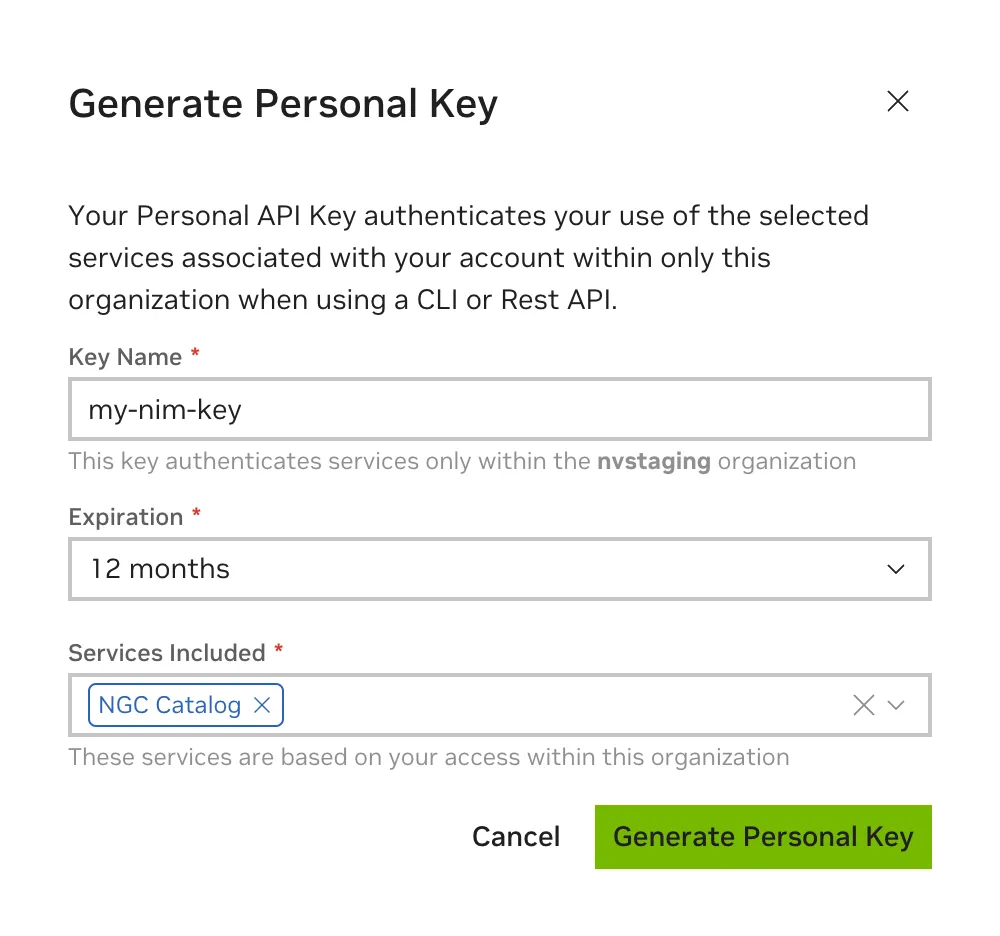
An NGC API key is required to access NGC resources. The key can be generated on the [NGC setup page](https://org.ngc.nvidia.com/setup).
When creating an NGC API key, ensure that at least `NGC Catalog` is selected from the `Services Included` dropdown. If this key will be reused for other purposes, more services can be included.
## Export the API Key
Pass the value of the API key to the `docker run` command in the next section as the `NGC_API_KEY` environment variable to download the appropriate models and resources when starting the NIM.
If you are not familiar with how to create the `NGC_API_KEY` environment variable, export it in your terminal:
```bash
export NGC_API_KEY=
```
Run one of the following commands to make the key available at startup:
```bash
# If using bash
echo "export NGC_API_KEY=" >> ~/.bashrc
# If using zsh
echo "export NGC_API_KEY=" >> ~/.zshrc
```
Other, more secure options include saving the value in a file, which you can retrieve with `cat $NGC_API_KEY_FILE`, or using a [password manager](https://www.passwordstore.org).
## Docker Login to NGC
To pull the NIM container image from NGC, first authenticate with the NVIDIA Container Registry using the following command:
```bash
echo "$NGC_API_KEY" | docker login nvcr.io --username '$oauthtoken' --password-stdin
```
Use `$oauthtoken` as the username and `NGC_API_KEY` as the password. The `$oauthtoken` username is a special name indicating that you authenticate with an API key, not a username/password.
## Launch the NIM
Use the following command to start Alpamayo1.5 NIM interactively. This form removes the container when you exit it and is convenient while evaluating the NIM:
```bash
export IMG_NAME=nvcr.io/nim/nvidia/alpamayo1.5:1.0.0
```
```bash
export LOCAL_NIM_CACHE=/tmp/alpamayo-nim-cache
mkdir -p "$LOCAL_NIM_CACHE"
chmod 777 "$LOCAL_NIM_CACHE"
docker run -it --rm --name alpamayo1.5 \
--runtime=nvidia \
--gpus all \
--shm-size=16g \
--ulimit memlock=-1 \
--ulimit stack=67108864 \
-e NGC_API_KEY=$NGC_API_KEY \
-v "$LOCAL_NIM_CACHE:/opt/nim/.cache" \
-p 8000:8000 \
-p 50051:50051 \
$IMG_NAME
```
For a detached service, use `-d` and omit `--rm` so that logs remain available after the process exits:
```bash
docker run -d --name alpamayo1.5 \
--runtime=nvidia \
--gpus all \
--shm-size=16g \
--ulimit memlock=-1 \
--ulimit stack=67108864 \
-e NGC_API_KEY=$NGC_API_KEY \
-v "$LOCAL_NIM_CACHE:/opt/nim/.cache" \
-p 8000:8000 \
-p 50051:50051 \
$IMG_NAME
```
Follow startup with `docker logs -f alpamayo1.5`. Stop and remove the detached container with `docker stop alpamayo1.5` followed by `docker rm alpamayo1.5`.
`--shm-size=16g` is important for direct Docker usage because PyTriton and TensorRT-LLM exchange multimodal request payloads through shared memory. Host IPC can also work when allowed by your deployment environment, but the quickstart uses an explicit shared-memory segment.
The container runs as user ID `1000`, so the cache directory mounted at `/opt/nim/.cache` must be writable by UID `1000`. The quickstart uses `/tmp` because home directories are commonly NFS-backed and reject writes from the container UID. For a persistent deployment, use a UID-1000-writable directory on local disk or a correctly initialized persistent volume. Refer to [Configuring a NIM](/nim/alpamayo/configuration) for cache permission options.
## Docker Run Parameters
| Flag | Description |
| --------------------------------------- | ----------------------------------------------------------------------------------------------------------------------------------------- |
| `-it` | Runs the container interactively with a terminal attached. |
| `-d` | Runs the container in the background. Use this instead of `-it` for the detached variant. |
| `--rm` | Deletes the container after it exits. |
| `--name alpamayo1.5` | Gives the container a stable name for local inspection. |
| `--runtime=nvidia` | Makes NVIDIA drivers available inside the container. |
| `--gpus all` | Exposes GPUs inside the container. Alpamayo1.5 uses one GPU per container. |
| `--shm-size=16g` | Provides enough shared memory for PyTriton and TensorRT-LLM multimodal request payloads. |
| `--ulimit memlock=-1` | Allows locked memory for GPU-serving runtime components. |
| `--ulimit stack=67108864` | Raises the process stack limit. |
| `-e NGC_API_KEY=$NGC_API_KEY` | Provide the container with the token necessary to download adequate models and resources from NGC. Refer to [Export the API Key](/nim/alpamayo/quickstart-guide#export-the-api-key). |
| `-v "$LOCAL_NIM_CACHE:/opt/nim/.cache"` | Mounts a persistent model cache. |
| `-p 8000:8000` | Exposes the HTTP API. |
| `-p 50051:50051` | Exposes the gRPC trajectory API. |
The NIM automatically selects a compatible profile for the visible GPU. To request a specific precision, add `-e NIM_PRECISION=` with one of `bf16`, `fp8`, or `w4a16`. Refer to [Support Matrix](/nim/alpamayo/support-matrix) for the supported GPU and precision combinations.
## Check Startup
Check readiness and the available model metadata:
```bash
curl http://localhost:8000/v1/health/ready
curl http://localhost:8000/v1/models
```
Readiness is reported after TensorRT-LLM initialization and the configured startup warmup requests complete. Startup warmup is enabled by default because the trajectory expert uses shape-specific CUDA graph replay. Warmup covers every K value in `NIM_ALPAMAYO_TRAJ_SAMPLES`. A first client request can still be slower than steady state because it may populate request-path caches that are not covered by startup warmup. Run one untimed request before benchmarking.
Set `NIM_ALPAMAYO_STARTUP_WARMUP=0` to skip warmup inference during development. The backend still loads before readiness.
## Run a Sample Request
The NIM image includes an Alpamayo sample scene at `/workspace/sample_data`. In another terminal, copy it from the named running container before using the examples:
```bash
docker cp alpamayo1.5:/workspace/sample_data ./sample_data
docker cp alpamayo1.5:/opt/nim/build_http_payload.py ./build_http_payload.py
```
You can also extract the scene without starting the NIM:
```bash
sample_container=$(docker create "$IMG_NAME")
docker cp "$sample_container:/workspace/sample_data" ./sample_data
docker cp "$sample_container:/opt/nim/build_http_payload.py" ./build_http_payload.py
docker rm "$sample_container"
```
### Payload Builder Options
The bundled helper produces complete JSON request bodies for each HTTP endpoint. Its command-line interface is:
```text
usage: build_http_payload.py --endpoint {infer,chat,vqa}
[--sample-dir SAMPLE_DIR]
[--nav-text NAV_TEXT]
[--question QUESTION]
[--layout {full,reduced}]
--endpoint {infer,chat,vqa}
Required endpoint schema to generate.
--sample-dir SAMPLE_DIR
Extracted sample directory (default: /workspace/sample_data).
--nav-text NAV_TEXT
Route context for infer or chat (default: Drive forward.).
--question QUESTION
VQA question (default: What is in front of the ego vehicle?).
--layout {full,reduced}
Trajectory layout for infer or chat. full uses all 16 images and is the
default; reduced uses front_wide_t0 for a quick single-image validation. VQA always
uses front_wide_t0.
```
Run `python3 build_http_payload.py --help` to inspect the options shipped in your container version. The helper writes JSON to standard output, so redirect it to a file and send that file with `curl --data-binary`.
For HTTP trajectory examples, the bundled payload builder uses the complete 16-image scene by default:
```bash
python3 build_http_payload.py \
--endpoint infer --sample-dir sample_data > /tmp/alpamayo-infer.json
```
Use `--layout reduced` only for a quick single-image validation request. The reduced request still includes the required 16-row ego-motion history.
The directory contains `images/`, `egomotion.json`, and an optional `gt_trajectory.json`. Image files use `_t.png` or `.jpg` names. The ego-motion file must contain `ego_history_xyz` with shape `[16, 3]` and `ego_history_rot` with shape `[16, 4]` or `[16, 3, 3]`. All 16 history entries remain required for reduced or single-image trajectory layouts.
The following Python examples use the extracted local `sample_data` directory. Use JPEG images when possible. JPEG payloads are smaller than PNG and use the fastest image decode path in the NIM. The following examples send JPEG payloads; if the sample files are PNG, the client converts them to JPEG in memory.
### Run a gRPC Trajectory Request
For trajectory generation, use the gRPC API when your client can send compressed image bytes directly. HTTP is convenient for trying the NIM and debugging payloads, but latency-sensitive trajectory clients should use gRPC with JPEG image bytes.
Install all client dependencies before running the standalone gRPC example:
```bash
python3 -m pip install grpcio grpcio-tools pillow
```
```python
import importlib
import subprocess
import sys
import tempfile
import textwrap
from io import BytesIO
from pathlib import Path
import grpc
from PIL import Image
PROTO = """
syntax = "proto3";
package nvidia.alpamayo.v1;
service Alpamayo {
rpc Predict(PredictRequest) returns (PredictResponse);
}
message ImageFrame {
string camera = 1;
int32 timestep = 2;
string mime_type = 3;
bytes data = 4;
}
message CompressedImageInput {
repeated ImageFrame frames = 1;
}
message LocalPathInput {
string scene_dir = 1;
repeated string image_paths = 2;
}
message PredictRequest {
reserved 11, 12;
string model = 1;
int32 num_traj_samples = 2;
optional float temperature = 3;
optional float top_p = 4;
int32 max_tokens = 5;
string nav_text = 6;
string egomotion_json = 7;
optional int64 seed = 8;
repeated string camera_order = 9;
int32 num_frames_per_camera = 14;
optional int32 top_k = 15;
oneof input {
CompressedImageInput compressed_images = 10;
LocalPathInput local_paths = 13;
}
}
message PredictResponse {
string model = 1;
string backend = 2;
int32 num_samples = 3;
int32 num_points = 4;
float duration = 5;
string reasoning_text = 6;
float inference_time = 7;
repeated float pred_trajectories = 8;
repeated int64 pred_trajectories_shape = 9;
string raw_json = 10;
repeated float pred_rotations = 11;
repeated int64 pred_rotations_shape = 12;
}
"""
def load_grpc_stubs():
stub_dir = Path(tempfile.mkdtemp(prefix="alpamayo-grpc-"))
proto_path = stub_dir / "alpamayo.proto"
proto_path.write_text(textwrap.dedent(PROTO), encoding="utf-8")
subprocess.run(
[
sys.executable,
"-m",
"grpc_tools.protoc",
f"-I{stub_dir}",
f"--python_out={stub_dir}",
f"--grpc_python_out={stub_dir}",
str(proto_path),
],
check=True,
)
sys.path.insert(0, str(stub_dir))
return (
importlib.import_module("alpamayo_pb2"),
importlib.import_module("alpamayo_pb2_grpc"),
)
cameras = [
("camera_cross_left_120fov", "cross_left"),
("camera_front_wide_120fov", "front_wide"),
("camera_cross_right_120fov", "cross_right"),
("camera_front_tele_30fov", "front_tele"),
]
sample_dir = Path("sample_data")
def image_file(short_name: str, timestep: int) -> Path:
stem = sample_dir / "images" / f"{short_name}_t{timestep}"
for suffix in (".jpg", ".jpeg", ".png"):
path = stem.with_suffix(suffix)
if path.exists():
return path
raise FileNotFoundError(stem)
def jpeg_payload(path: Path) -> bytes:
if path.suffix.lower() in {".jpg", ".jpeg"}:
return path.read_bytes()
buf = BytesIO()
with Image.open(path) as image:
image.convert("RGB").save(buf, format="JPEG", quality=95)
return buf.getvalue()
alpamayo_pb2, alpamayo_pb2_grpc = load_grpc_stubs()
request = alpamayo_pb2.PredictRequest(
model="nvidia/alpamayo1.5",
num_traj_samples=1,
temperature=0.6,
top_p=1.0,
max_tokens=256,
nav_text="Drive forward.",
egomotion_json=(sample_dir / "egomotion.json").read_text(),
seed=42,
top_k=1,
)
for camera, short_name in cameras:
for timestep in range(4):
path = image_file(short_name, timestep)
frame = request.compressed_images.frames.add()
frame.camera = camera
frame.timestep = timestep
frame.mime_type = "image/jpeg"
frame.data = jpeg_payload(path)
options = [
("grpc.max_receive_message_length", 128 * 1024 * 1024),
("grpc.max_send_message_length", 128 * 1024 * 1024),
]
with grpc.insecure_channel("localhost:50051", options=options) as channel:
stub = alpamayo_pb2_grpc.AlpamayoStub(channel)
response = stub.Predict(request, timeout=300)
print(response.pred_trajectories_shape)
print(list(response.pred_trajectories[:6]))
print(response.pred_rotations_shape)
print(list(response.pred_rotations[:9]))
```
The preceding example sends the default 16-image layout: four cameras with four frames per camera. To send a reduced trajectory layout, set `request.camera_order` and `request.num_frames_per_camera` before adding frames. For example, to send one front-wide camera frame:
```python
request.camera_order.append("camera_front_wide_120fov")
request.num_frames_per_camera = 1
frame = request.compressed_images.frames.add()
frame.camera = "camera_front_wide_120fov"
frame.timestep = 0
frame.mime_type = "image/jpeg"
frame.data = jpeg_payload(image_file("front_wide", 0))
```
For controlled deployments, `local_paths` can reference images already available inside the NIM container. These are container-local paths, not paths on a remote client host. Normal clients should send JPEG bytes through `compressed_images` as shown in the preceding gRPC example.
### Run an HTTP Trajectory Request
Use HTTP when you want a JSON-based interface for testing, debugging, or VQA. For production trajectory latency, prefer the gRPC path in the preceding section.
Install the client dependencies before running the standalone example:
```bash
python3 -m pip install pillow requests
```
```python
import base64
import json
from io import BytesIO
from pathlib import Path
from PIL import Image
import requests
image_order = [
"cross_left_t0", "cross_left_t1", "cross_left_t2", "cross_left_t3",
"front_wide_t0", "front_wide_t1", "front_wide_t2", "front_wide_t3",
"cross_right_t0", "cross_right_t1", "cross_right_t2", "cross_right_t3",
"front_tele_t0", "front_tele_t1", "front_tele_t2", "front_tele_t3",
]
sample_dir = Path("sample_data")
def image_file(name: str) -> Path:
stem = sample_dir / "images" / name
for suffix in (".jpg", ".jpeg", ".png"):
path = stem.with_suffix(suffix)
if path.exists():
return path
raise FileNotFoundError(stem)
def jpeg_payload(path: Path) -> bytes:
if path.suffix.lower() in {".jpg", ".jpeg"}:
return path.read_bytes()
buf = BytesIO()
with Image.open(path) as image:
image.convert("RGB").save(buf, format="JPEG", quality=95)
return buf.getvalue()
def image_data_url(name: str) -> str:
data = jpeg_payload(image_file(name))
return "data:image/jpeg;base64," + base64.b64encode(data).decode("ascii")
payload = {
"mode": "trajectory",
"images": [image_data_url(name) for name in image_order],
"egomotion": json.loads((sample_dir / "egomotion.json").read_text()),
"num_traj_samples": 1,
"nav_text": "Drive forward.",
"seed": 42,
"top_k": 1,
"top_p": 1,
}
response = requests.post(
"http://localhost:8000/v1/infer",
json=payload,
timeout=300,
)
response.raise_for_status()
print(response.json()["pred_trajectories"][0][:3])
print(response.json()["pred_rotations"][0][:1])
```
For reduced HTTP trajectory layouts, keep the same `egomotion` payload and add `camera_order` plus `num_frames_per_camera`. The `images` array must follow that camera-major layout:
```python
payload = {
"mode": "trajectory",
"images": [image_data_url("front_wide_t0")],
"egomotion": json.loads((sample_dir / "egomotion.json").read_text()),
"camera_order": ["front_wide"],
"num_frames_per_camera": 1,
"num_traj_samples": 1,
"seed": 42,
"top_k": 1,
"top_p": 1,
}
```
## Next Steps
- Install and use the bundled workflows in [Agent Skills](/nim/alpamayo/agent-skills).
- Refer to request parameters in [Sampling Control](/nim/alpamayo/sampling-params).
- Refer to the full API schema and examples in [API Reference](/nim/alpamayo/api-reference).
- Refer to profile and GPU support in [Support Matrix](/nim/alpamayo/support-matrix).