


API Usage Examples (OpenAPI) for NVIDIA NIM for Nemotron Parse#
Use the examples in this documentation to help you get started using the API for NVIDIA NIM for Nemotron Parse.
Endpoints#
The NIM exposes the following endpoints. For the full API reference, refer to API Reference (OpenAPI) for NVIDIA NIM for Nemotron Parse.
Endpoint |
Method |
Description |
|---|---|---|
|
|
Extract Markdown from one rendered document page. |
|
|
List the models loaded by the server. |
|
|
Check liveness. |
|
|
Check readiness. |
|
|
Return Prometheus metrics. |
|
|
Return NIM metadata. |
|
|
Return model manifest metadata. |
|
|
Return license metadata and content. |
|
|
Return NIM release and API version. |
|
|
Return the running NIM’s OpenAPI specification. |
|
|
Open the running NIM’s API explorer. |
Download the specification with curl http://localhost:8000/v1/openapi.json -o openapi.json, or open http://localhost:8000/docs in a browser. The API explorer includes its web assets and does not require an external CDN.
Health Check#
cURL Request
Use the following command to query the health endpoints.
curl "http://localhost:8000/v1/health/ready" \
-H 'Accept: application/json'
curl "http://localhost:8000/v1/health/live" \
-H 'Accept: application/json'
Response
{
  "object": "health.response",
  "message": "ready",
  "ready": true
}
{
  "object": "health.response",
  "message": "live",
  "live": true
}
If a health check fails, it returns HTTP 503 with message: "unavailable" and the corresponding status set to false. For example, a failed readiness check returns:
{
  "object": "health.response",
  "message": "unavailable",
  "ready": false
}
A failed liveness check uses "live": false in place of "ready": false. Health checks do not use the Parse error envelope.
Parse a Document Page#
The /v1/parse endpoint accepts one rendered document page as an image and returns extracted content with Markdown formatting and coordinate/class control tokens.
The NIM always performs full-page extraction. You don’t provide a prompt, a parsing mode, or sampling parameters.
Send the request as multipart/form-data with the following parts.
Part |
Type |
Required |
Description |
|---|---|---|---|
|
File |
Yes |
One rendered document page as an image file. Supported media types are |
|
JSON object |
No |
Optional request settings. The only supported property is |
Keep the following in mind:
Each request contains exactly one page. The endpoint doesn’t accept a PDF, an array of pages, or several pages stitched into one image. To process a PDF, refer to Parse a PDF.
The NIM checks the media type declared for the
documentpart, not the file contents. Declare the correct type, for exampletype=image/png.Both source image dimensions must be at least 17 pixels. Smaller images return HTTP
422, even when the PNG or JPEG is valid.Preprocessing preserves the aspect ratio and downscales content to fit 2,048 pixels high by 1,664 pixels wide, then pads it for the model. Higher source resolution does not increase this model input size; check that small text remains readable.
The complete multipart request, including the image, the
optionspart, and the multipart overhead, can’t exceed 100 MiB (104,857,600 bytes). The limit is fixed and can’t be changed.
Default Request#
Most requests include only the image. The NIM applies the default output limit of 9,000 tokens. For a downloadable sample page and an explanation of its output, refer to Example: Inspect a Parsed Page.
cURL Request
curl -X POST "http://localhost:8000/v1/parse" \
  -H "Accept: application/json" \
  -F "document=@page.png;type=image/png"
Python Request
import requests

with open("page.png", "rb") as page:
    response = requests.post(
        "http://localhost:8000/v1/parse",
        files={"document": ("page.png", page, "image/png")},
        headers={"Accept": "application/json"},
        timeout=3600,
    )

response.raise_for_status()
result = response.json()
print(result["content"])
Request with a Lower Output Limit#
Use options.decoding.max_output_tokens to set a lower output limit when your pages are known to be simple. The value must be an integer from 1 through 9,000. A lower limit can reduce generation work, but it increases the chance that the response ends before the page is completely represented.
cURL Request
curl -X POST "http://localhost:8000/v1/parse" \
  -H "Accept: application/json" \
  -F "document=@page.png;type=image/png" \
  -F 'options={"decoding":{"max_output_tokens":4000}};type=application/json'
Python Request
import json

import requests

with open("page.png", "rb") as page:
    response = requests.post(
        "http://localhost:8000/v1/parse",
        files={
            "document": ("page.png", page, "image/png"),
            "options": (
                None,
                json.dumps({"decoding": {"max_output_tokens": 4000}}),
                "application/json",
            ),
        },
        headers={"Accept": "application/json"},
        timeout=3600,
    )

response.raise_for_status()
result = response.json()
print(result["content"])
Omitting options, decoding, or max_output_tokens uses the default of 9,000 tokens.
Response#
A successful request returns HTTP 200 with the following JSON body.
{
  "content": "<x_0.0254><y_0.0297>Nemotron Parse documentation smoke test<x_0.2754><y_0.043><class_Text>\n\n<x_0.0254><y_0.0437>A document page with readable text<x_0.2354><y_0.0563><class_Text>",
  "finish_reason": "stop",
  "usage": {
    "output_tokens": 26
  }
}
Field |
Type |
Description |
|---|---|---|
|
String |
Extracted text with Markdown formatting and coordinate/class control tokens. These tokens are expected in the response. |
|
String |
Why generation ended. One of: |
|
Integer |
The number of generated tokens counted against the output limit. Prompt and image tokens aren’t included. |
The finish_reason field has one of the following values:
stop— The model generated an end-of-sequence token. This does not verify that every element on the page was extracted.length— Generation reached the output limit.contentmight be incomplete or empty. If you requested fewer than 9,000 tokens, retry with a higher limit, or omitoptionsto use 9,000.
If output still ends with length at 9,000 tokens, the API has no continuation or resume option. Try preprocessing the page to improve readability, or crop it into smaller regions and send each region as a separate image. Keep each image above the minimum dimensions and check the combined output for missing or repeated content.
Example: Inspect a Parsed Page#
Use this sample page to send a request and see how the response represents document text, tables, and layout.
Download the sample input image and save it as parse-cuda-input.png.
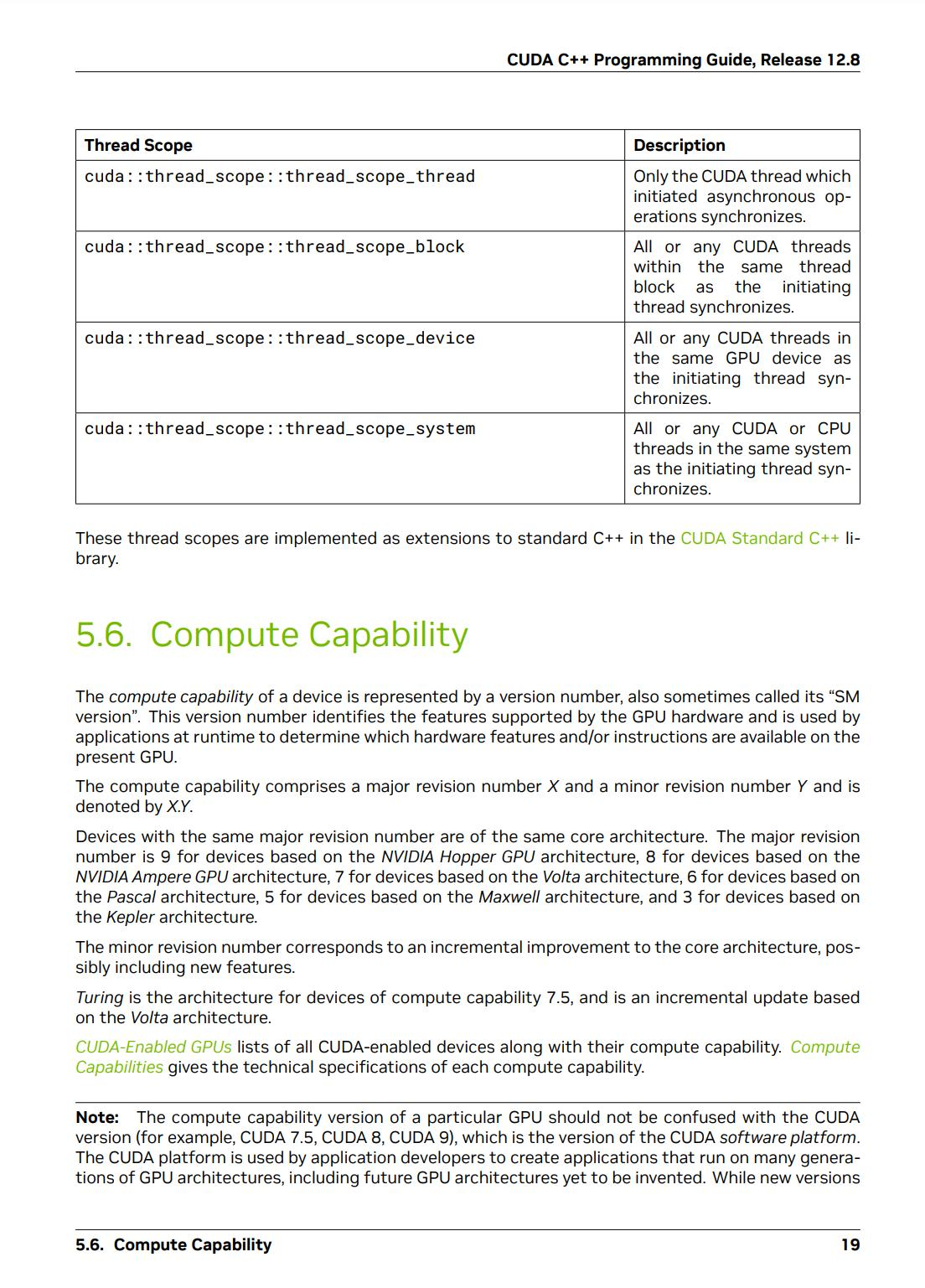
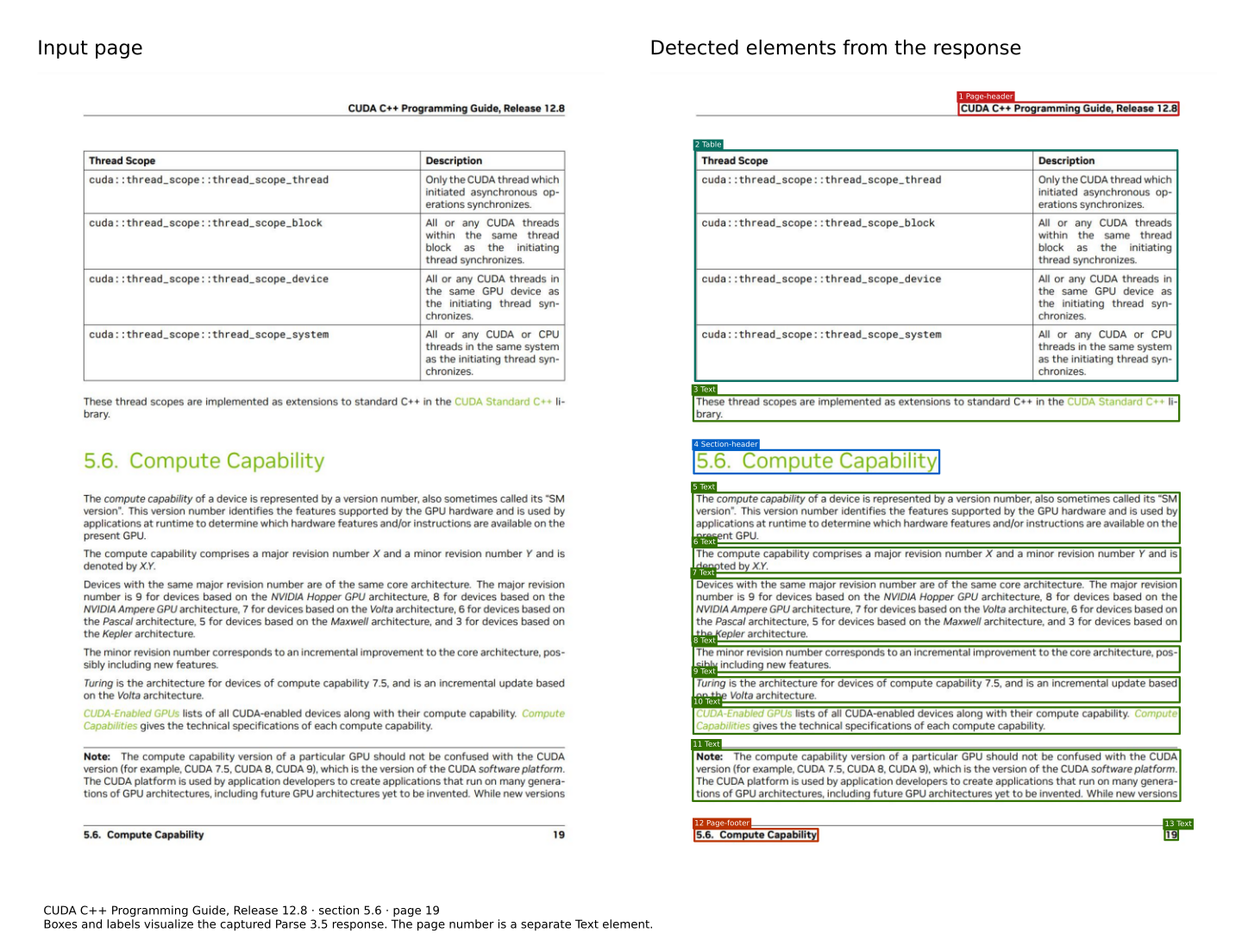
The left panel shows the downloadable input. The right panel visualizes the coordinates and class tokens in the example response. The boxes and labels are added for illustration.#
Send the Request
With the NIM running on localhost:8000, run the following command from the directory containing the downloaded image.
The request uses the default output limit of 9,000 tokens.
curl --fail-with-body -sS "http://localhost:8000/v1/parse" \
  -H "Accept: application/json" \
  -F "document=@parse-cuda-input.png;type=image/png" \
  -o parse-response.json
The command saves the JSON response to parse-response.json. The content field contains the extracted text and layout tokens, as shown in the following record.
The response is illustrative: text, formatting, coordinates, and classes can vary. For example, the table transcription in this response does not preserve all C++ :: punctuation.
Read an Element Record
The following record is copied from the response’s content string:
<x_0.0771><y_0.4789>5.6. Compute Capability<x_0.5098><y_0.5086><class_Section-header>
The following table describes each part of the record.
Part |
Meaning |
|---|---|
|
Top-left corner of this element’s bounding box. |
|
Extracted text for the element. |
|
Bottom-right corner of the bounding box. |
|
Semantic class of the element. |
Coordinates range from 0 to 1 relative to the input image. The origin (0, 0) is the top-left corner, and (1, 1) is the bottom-right corner.
To convert a coordinate to pixels, multiply an x value by the image width or a y value by the image height.
The text between the coordinate pairs can include formatting syntax.
In this response, **...** and _..._ mark Markdown emphasis, and \_ is an escaped underscore. The table uses LaTeX \begin{tabular}{cc} and \end{tabular}, & separates cells, and \\ ends a row.
These formatting markers are part of the extracted payload; <x_...>, <y_...>, and <class_...> are the tokens that describe layout and semantic class.
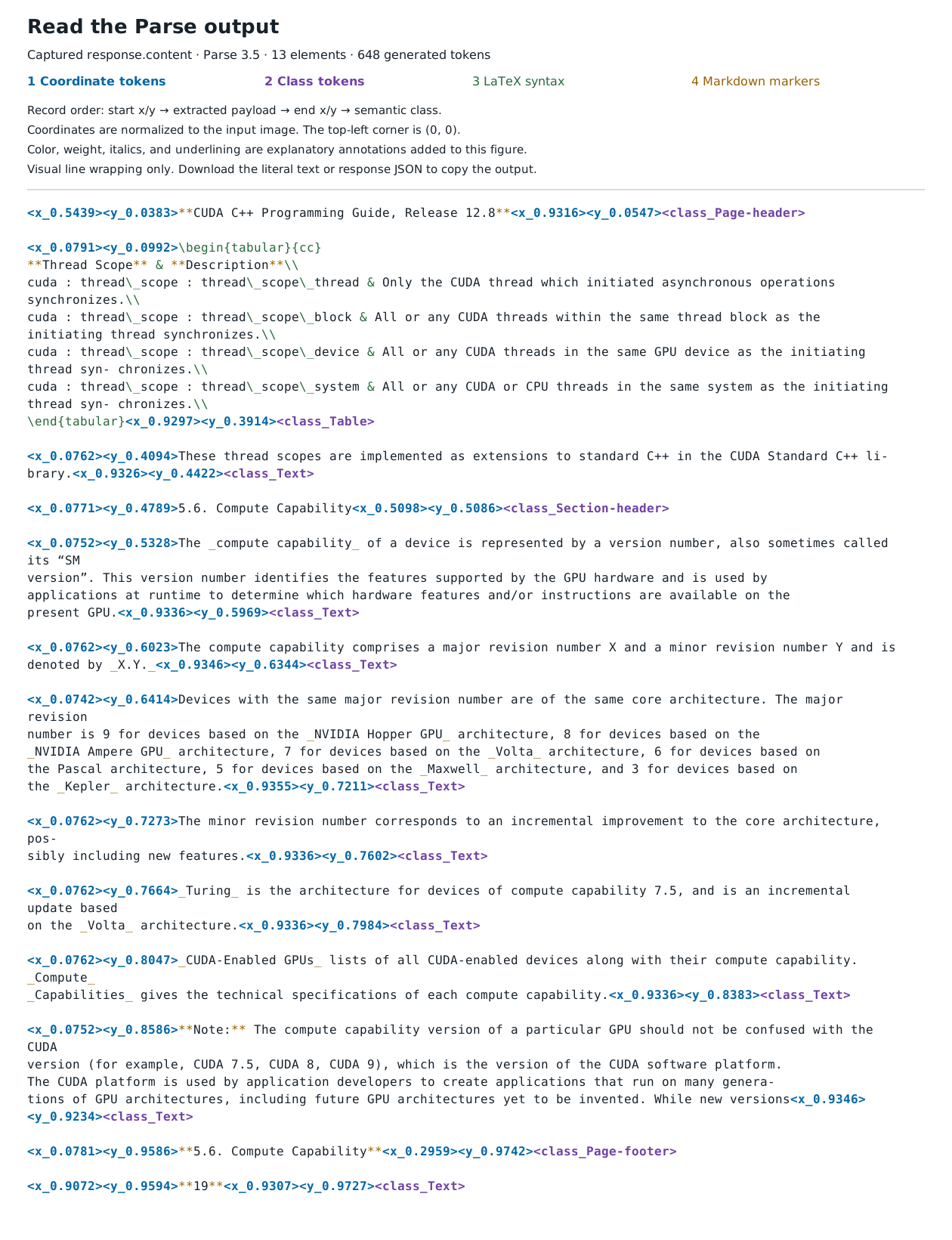
The complete literal output with explanatory syntax coloring. Colors and text styles are added to the illustration.#
Parse a PDF#
The /v1/parse endpoint doesn’t accept PDF files. To parse a PDF, render each page to an image, and then send one request for each page. Render the pages at 300 DPI. Both image dimensions must be at least 17 pixels.
The following example uses pypdfium2 to render each page of a PDF and parse it.
import io

import pypdfium2 as pdfium
import requests

pdf = pdfium.PdfDocument("document.pdf")
pages = []

for page in pdf:
    # PDF units are 72 per inch, so scale to 300 DPI.
    image = page.render(scale=300 / 72).to_pil()
    if min(image.size) < 17:
        raise ValueError("Both page image dimensions must be at least 17 pixels")
    buffer = io.BytesIO()
    image.save(buffer, format="PNG")
    buffer.seek(0)

    response = requests.post(
        "http://localhost:8000/v1/parse",
        files={"document": ("page.png", buffer, "image/png")},
        headers={"Accept": "application/json"},
        timeout=3600,
    )
    response.raise_for_status()
    pages.append(response.json()["content"])

markdown = "\n\n".join(pages)
print(markdown)
You can also render pages with other libraries, such as pdf2image with convert_from_path("document.pdf", dpi=300).
Apply the same dimension checks when using another rendering library. To increase throughput, send requests for several pages concurrently.
Error Handling#
Parse request errors use the following JSON fields. For example, options={"decoding":{"max_output_tokens":0}} returns HTTP 400 with this body:
{
  "object": "error",
  "message": "invalid options JSON",
  "type": "invalid_request_error",
  "detail": "max_output_tokens must be between 1 and 9000 at line 1 column 35"
}
Field |
Description |
|---|---|
|
Always |
|
A description of the error. |
|
|
|
Optional. More information about a validation error. |
Invalid options JSON returns HTTP 400 with message: "invalid options JSON". Its detail contains the validation error and the JSON position, which depends on the exact JSON payload. For an out-of-range integer, the validation text is max_output_tokens must be between 1 and 9000.
Common Error Responses#
Status |
Cause |
|---|---|
|
The |
|
The request exceeds 100 MiB. |
|
The |
|
The image is empty, corrupted, can’t be decoded, or is below the minimum source dimensions. |
|
Inference or post-processing failed unexpectedly. |
|
The queue is full, fail-fast admission rejects the request, or a worker is unavailable. Retry after the interval in the |
|
Queue wait and inference exceeded |
For more help, refer to Troubleshoot NVIDIA NIM for Nemotron Parse.