


Realtime API Reference#
Overview#
Riva Realtime Server provides a WebSocket-based API for real-time text-to-speech (TTS) synthesis. This API allows you to stream text data and receive real-time speech audio output.
Reference#
The WebSocket server provides real-time communication capabilities for text-to-speech synthesis services. To establish a connection, clients must connect to the WebSocket endpoint with the required query parameter.
Synthesis Sessions Endpoint#
The synthesis sessions endpoint allows you to create text-to-speech synthesis sessions.
Base URL:
http://<address>:9000
Endpoint:
/v1/realtime/synthesis_sessions
Method: POST
Mint API Key Authentication#
This endpoint issues the short-lived client_secret that authenticates the WebSocket handshake, so it is the boundary you protect with a long-lived secret. Enforcement is controlled server-side by the REALTIME_AUTH_MINT_API_KEY environment variable:
Key set on the server: every request must present the same key, using either an
Authorization: Bearer <key>or anX-API-Key: <key>header. The server compares the value in constant time. Missing or incorrect credentials return401 Unauthorizedwith aWWW-Authenticate: Bearer realm="riva-realtime-mint"response header.Key unset on the server (default): the endpoint is unauthenticated.
curl -X POST http://localhost:9000/v1/realtime/synthesis_sessions \
    -H "Authorization: Bearer $REALTIME_AUTH_MINT_API_KEY"
Warning
REALTIME_AUTH_MINT_API_KEY is a backend-only secret. Only your session-brokering service should hold it; never ship it to a browser or embed it in a client application. Browsers authenticate the WebSocket handshake with the short-lived client_secret.value that this endpoint returns, described in Ephemeral Token Authentication.
Response: Returns the initial synthesis session configuration.
{
  "id": "sess_<uuid4>",
  "object": "realtime.synthesize_session",
  "input_text_synthesis": {
    "language_code": "en-US",
    "voice_name": "<server-default-voice>",
  },
  "output_audio_params": {
    "sample_rate_hz": 22050,
    "num_channels": 1,
    "audio_format": "LINEAR_PCM"
  },
  "custom_dictionary": "",
  "zero_shot_config": {
    "audio_prompt_bytes" : "<base64_encoded_audio_data>",
    "audio_prompt_transcript": "",
    "prompt_quality": 20,
    "prompt_encoding": "LINEAR_PCM",
    "sample_rate_hz": 22050
  },
  "client_secret": {
    "value": "<uuid4>",
    "expires_at": 1753872000
  }
}
The client_secret field is an object that carries the ephemeral token for the WebSocket handshake, or null when the server does not mint tokens. value is the single-use token to present on the handshake, and expires_at is the Unix timestamp at which it expires, 60 seconds after it is minted.
Parameters#
Parameter |
Type |
Required |
Description |
Default |
|---|---|---|---|---|
id |
string |
No |
Session identifier |
auto-generated (“sess_ |
object |
string |
Yes |
Object type identifier |
“realtime.synthesize_session” |
input_text_synthesis.language_code |
string |
Yes |
Synthesis language code (for example, “en-US”, “es-ES”) |
“en-US” |
input_text_synthesis.voice_name |
string or null |
No |
Voice to use for synthesis. If omitted, Riva selects the default voice for the deployed model. |
Server-selected |
output_audio_params.sample_rate_hz |
integer |
No |
Audio sample rate in Hz |
22050 |
output_audio_params.num_channels |
integer |
No |
Number of audio channels |
1 |
output_audio_params.audio_format |
string |
No |
Output audio format (LINEAR_PCM, OGG_OPUS) |
“LINEAR_PCM” |
custom_dictionary |
string |
No |
Custom pronunciation dictionary |
“” |
custom_configuration |
object |
No |
Model-specific request controls for plain-text flushing: |
null |
zero_shot_config.audio_prompt_bytes |
string |
No |
Base64-encoded audio prompt for zero-shot voice cloning |
“” |
zero_shot_config.audio_prompt_transcript |
string |
No |
Transcript of the audio prompt |
“” |
zero_shot_config.prompt_quality |
integer |
No |
Quality setting for zero-shot (1-40) |
20 |
zero_shot_config.prompt_encoding |
string |
No |
Encoding format of the audio prompt |
“LINEAR_PCM” |
zero_shot_config.sample_rate_hz |
integer |
No |
Sample rate of the audio prompt in Hz |
22050 |
client_secret |
object | null |
No |
Ephemeral WebSocket token object ( |
null |
client_secret.value |
string |
No |
Single-use token presented on the WebSocket handshake |
— |
client_secret.expires_at |
integer |
No |
Unix timestamp when the token expires (60 seconds after mint) |
— |
Note: The zero_shot_config allows for voice cloning using audio prompts. When provided, the system will attempt to synthesize speech in a voice similar to the provided audio prompt. The audio_prompt_bytes should be base64-encoded audio data.
WebSocket Connection Details#
Base URL:
ws://<address>:9000
Endpoint:
/v1/realtime
Required Query Parameter:
intent=synthesize
Ephemeral Token Authentication#
The handshake is authenticated with the client_secret.value returned by the synthesis sessions endpoint. The token travels on the Sec-WebSocket-Protocol header, where the client offers two subprotocol entries:
Sec-WebSocket-Protocol: realtime, realtime-token.<client_secret.value>
The server validates the realtime-token.<value> entry and echoes back only the plain realtime identifier, so the secret never appears in a response header. This is also what makes the flow work from a browser, which cannot set arbitrary headers on a WebSocket upgrade but can supply a subprotocol list:
new WebSocket(
  "wss://localhost:9000/v1/realtime?intent=synthesize",
  ["realtime", `realtime-token.${clientSecret}`]
);
Whether a token is required is controlled server-side by the REALTIME_AUTH_REQUIRE_TOKEN environment variable:
REALTIME_AUTH_REQUIRE_TOKEN=true: every handshake must present a valid, unused, unexpired token. This is the recommended posture for any deployment reachable from an untrusted network.Unset or
false(default): handshakes without a token are accepted, preserving compatibility with client fleets that predate the token flow.
Important
A token that is presented is always validated, even when REALTIME_AUTH_REQUIRE_TOKEN is false. The flag controls whether an absent token is tolerated, not whether a supplied token is checked.
Tokens are single-use, expire 60 seconds after they are minted, and are bound to the intent they were minted for, so a token from the synthesis endpoint cannot be used on a transcription connection.
The following conditions close the connection with code 1008 (Policy Violation):
Condition |
Cause |
|---|---|
Missing token |
|
Invalid token |
The token is unknown, expired, or was already consumed |
Intent mismatch |
The token was minted for a different intent |
Unsafe subprotocol offer |
A token entry was offered without a non-token carrier entry such as |
Note
The last condition is rejected deliberately. With no non-token entry available to echo, the server would have to return the token itself in the Sec-WebSocket-Protocol response header, exposing it to browser developer tools, HAR captures, and any reverse proxy that records response headers.
URL query-string tokens (?token=<value>) are never accepted, regardless of the flag, because they routinely end up in reverse-proxy and load-balancer access logs, a category of exposure that request-header values do not share.
Example Connection URL#
The following is a complete example of a connection URL to access the WebSocket server:
ws://localhost:9000/v1/realtime?intent=synthesize
The client_secret.value is supplied in the Sec-WebSocket-Protocol handshake header, never in the URL.
Connection Requirements#
Establish the WebSocket connection with the
intentquery parameter set to a supported valueThe only currently supported intent for the text-to-speech service is
synthesizeWhen
REALTIME_AUTH_REQUIRE_TOKEN=trueon the server, present a valid ephemeralclient_secret.valueon theSec-WebSocket-Protocolheader (URL query-string tokens are never accepted)When
REALTIME_AUTH_REQUIRE_TOKENis unset orfalse(default), the token is optional and anonymous clients are acceptedThe server runs on port 9000 by default
The connection uses the standard WebSocket protocol (ws://)
An invalid or missing intent results in connection closure with WebSocket code 1008 (Policy Violation)
An invalid, expired, or already-used token results in the same 1008 close code
Usage Notes#
Ensure your client supports WebSocket connections
Maintain the connection for the duration of the synthesis session
Handle connection errors and reconnection logic in your client implementation
Tokens are single-use and expire 60 seconds after they are minted, so request a fresh
client_secretimmediately before opening each socket, including on reconnectThe server never writes the raw token value to its application logs, and because the token is carried on a request header rather than in the URL, it also stays out of reverse-proxy and load-balancer access logs that record URLs but not header values
Health Check Endpoint#
The health check endpoint provides a way to verify the server’s operational status.
Endpoint:
/v1/health
Method: GET
Response:
{
  "status": "ok"
}
Status Codes:
200 OK: Server is healthy and ready to accept connections503 Service Unavailable: Server is not ready to accept connections
Use Cases:
Pre-flight check before establishing WebSocket connections
Load balancer health monitoring
System status monitoring
Events#
WebSocket Events#
The realtime server uses a WebSocket-based event system for communication between clients and the server. Events are JSON messages that follow a specific format and are used to handle various operations like session management, text processing, and speech synthesis.
Each event has:
A unique
event_idfor trackingA
typefield indicating the event typeAdditional fields specific to the event type
Events are categorized into:
Client Events: Events sent from client to server
Session management (create, update)
Text buffer operations (append, commit)
Server Events: Events sent from server to client
Session responses (created, updated)
Speech synthesis results (data, completed, failed)
Error notifications
Status updates
The server validates all incoming events and sends appropriate error messages for:
Invalid event formats
Unsupported features
Message size limits
Server errors
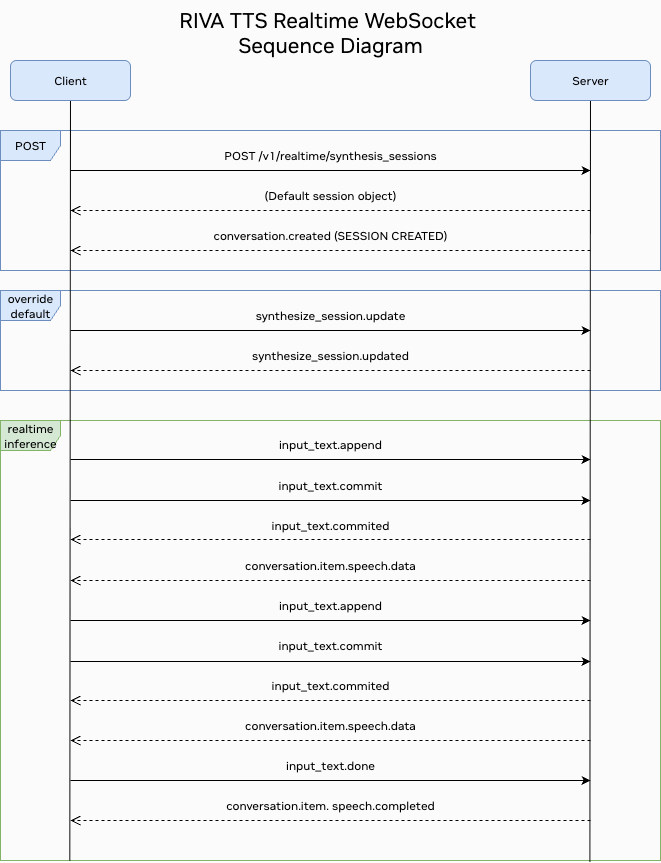
Client Events#
Events that can be sent from the client to the server.
List of Client Events#
Event Type |
Description |
|---|---|
|
Updates session configuration |
|
Sends text data for processing |
|
Commits the current text buffer |
|
Signals completion of text input |
synthesize_session.update#
Send this event to update a synthesis session.
{
    "event_id": "event_<uuid4>",
    "type": "synthesize_session.update",
    "session": {
        "input_text_synthesis": {
            "language_code": "en-US",
            "voice_name": "English-US.Male-1"
        },
        "output_audio_params": {
            "sample_rate_hz": 22050,
            "num_channels": 1,
            "audio_format": "LINEAR_PCM"
        },
        "custom_dictionary": "",
        "zero_shot_config": {
            "audio_prompt_bytes": "<base64_encoded_audio_data>",
            "audio_prompt_transcript": "",
            "prompt_quality": 20,
            "prompt_encoding": "LINEAR_PCM",
            "sample_rate_hz": 22050
        }
    }
}
Parameters#
Parameter |
Type |
Required |
Description |
Default |
|---|---|---|---|---|
event_id |
string |
No |
Event identifier |
auto-generated (“event_ |
type |
string |
Yes |
Event type |
“synthesize_session.update” |
session.input_text_synthesis.language_code |
string |
Yes |
Synthesis language code (for example, “en-US”, “es-ES”) |
“en-US” |
session.input_text_synthesis.voice_name |
string or null |
No |
Voice to use for synthesis. If omitted, Riva selects the default voice for the deployed model. |
null |
session.output_audio_params.sample_rate_hz |
integer |
No |
Audio sample rate in Hz |
22050 |
session.output_audio_params.num_channels |
integer |
No |
Number of audio channels |
1 |
session.output_audio_params.audio_format |
string |
No |
Output audio format |
“LINEAR_PCM” |
session.custom_dictionary |
string |
No |
Custom pronunciation dictionary |
“” |
session.custom_configuration |
object |
No |
Model-specific request controls for plain-text flushing: |
null |
session.zero_shot_config.audio_prompt_bytes |
string |
No |
Base64-encoded audio prompt for zero-shot voice cloning |
“” |
session.zero_shot_config.audio_prompt_transcript |
string |
No |
Transcript of the audio prompt |
“” |
session.zero_shot_config.prompt_quality |
integer |
No |
Quality setting for zero-shot (1-40) |
20 |
session.zero_shot_config.prompt_encoding |
string |
No |
Encoding format of the audio prompt |
“LINEAR_PCM” |
session.zero_shot_config.sample_rate_hz |
integer |
No |
Sample rate of the audio prompt in Hz |
22050 |
input_text.append#
Sends text data to the server for processing. The server maintains a text buffer that accumulates text chunks until they are committed for synthesis. If the buffer is empty, a new chunk is created. If the buffer contains existing chunks, the new text is appended to the last chunk to maintain continuity.
{
  "event_id": "event_0000",
  "type": "input_text.append",
  "text": "Hello, how are you today?"
}
Parameters#
Parameter |
Type |
Required |
Description |
Default |
|---|---|---|---|---|
event_id |
string |
No |
Optional event identifier |
event_0000 |
type |
string |
Yes |
Event type |
“input_text.append” |
text |
string |
Yes |
Text to synthesize. Maximum size: 1MB |
- |
input_text.commit#
Commits the current text buffer for processing. When the session has
custom_configuration: {"flush": "true"}, the committed plain-text buffer is
flushed immediately without waiting for a punctuation boundary or character threshold.
chunk_len_threshold overrides the minimum buffered Unicode character count after
which an encountered punctuation boundary can flush. max_chunk_threshold forces
a flush after the buffer exceeds that many characters without an eligible punctuation
boundary. A missing or 0 value uses the model’s max_sequence_length; a positive
value overrides that default.
{
  "event_id": "event_0000",
  "type": "input_text.commit"
}
Parameters#
Parameter |
Type |
Required |
Description |
Default |
|---|---|---|---|---|
event_id |
string |
No |
Optional event identifier |
event_0000 |
type |
string |
Yes |
Event type |
“input_text.commit” |
input_text.done#
Tells the server that the client is done sending text data and wants to stop the inference processing. This event triggers the server to process any remaining text chunks in the buffer and then stop the inference task.
Note
This parameter is mandatory for text file processing.
{
    "event_id": "event_0000",
    "type": "input_text.done"
}
Parameters#
Parameter |
Type |
Required |
Description |
Default |
|---|---|---|---|---|
event_id |
string |
No |
Optional event identifier |
event_0000 |
type |
string |
Yes |
Event type |
“input_text.done” |
Server Events#
These are events emitted from the server to the client.
List of Server Events#
Event Type |
Description |
|---|---|
|
Returned when a conversation is created |
|
Sent when session configuration is updated |
|
Returned when an input text buffer is committed |
|
Sent when new speech audio data is available |
|
Sent when speech synthesis is completed |
|
Sent when an error occurs |
conversation.created#
Returned when a conversation session is created.
{
    "event_id": "event_<uuid4>",
    "type": "conversation.created",
    "conversation": {
        "id": "conv_<uuid4>",
        "object": "realtime.conversation"
    }
}
Parameters#
Parameter |
Type |
Required |
Description |
Default |
|---|---|---|---|---|
event_id |
string |
No |
Optional event identifier |
auto-generated (“event_ |
type |
string |
Yes |
Event type |
“conversation.created” |
conversation.id |
string |
Yes |
The unique ID of the conversation |
auto-generated (“conv_ |
conversation.object |
string |
Yes |
Must be ‘realtime.conversation’ |
“realtime.conversation” |
synthesize_session.updated#
Returned when a synthesis session is updated.
{
    "event_id": "event_<uuid4>",
    "type": "synthesize_session.updated",
    "session": {
        "input_text_synthesis": {
            "language_code": "en-US",
            "voice_name": "English-US.Male-1"
        },
        "output_audio_params": {
            "sample_rate_hz": 22050,
            "num_channels": 1,
            "audio_format": "LINEAR_PCM"
        },
        "custom_dictionary": "",
        "zero_shot_config": {
            "audio_prompt_bytes": "<base64_encoded_audio_data>",
            "audio_prompt_transcript": "",
            "prompt_quality": 20,
            "prompt_encoding": "LINEAR_PCM",
            "sample_rate_hz": 22050
        }
    }
}
Parameters#
Parameter |
Type |
Required |
Description |
Default |
|---|---|---|---|---|
event_id |
string |
No |
Event identifier |
auto-generated (“event_ |
type |
string |
Yes |
Event type |
“synthesize_session.updated” |
session.input_text_synthesis.language_code |
string |
Yes |
Synthesis language code (for example, “en-US”, “es-ES”) |
“en-US” |
session.input_text_synthesis.voice_name |
string or null |
No |
Voice used for synthesis. A null value delegates default selection to Riva. |
null |
session.output_audio_params.sample_rate_hz |
integer |
No |
Audio sample rate in Hz |
22050 |
session.output_audio_params.num_channels |
integer |
No |
Number of audio channels |
1 |
session.output_audio_params.audio_format |
string |
No |
Output audio format |
“LINEAR_PCM” |
session.custom_dictionary |
string |
No |
Custom pronunciation dictionary |
“” |
session.zero_shot_config.audio_prompt_bytes |
string |
No |
Base64-encoded audio prompt for zero-shot voice cloning |
“” |
session.zero_shot_config.audio_prompt_transcript |
string |
No |
Transcript of the audio prompt |
“” |
session.zero_shot_config.prompt_quality |
integer |
No |
Quality setting for zero-shot (1-40) |
20 |
session.zero_shot_config.prompt_encoding |
string |
No |
Encoding format of the audio prompt |
“LINEAR_PCM” |
session.zero_shot_config.sample_rate_hz |
integer |
No |
Sample rate of the audio prompt in Hz |
22050 |
input_text.committed#
Returned when an input text buffer is committed. All accumulated text chunks in the buffer are sent for inference processing, and the buffer is cleared after processing.
{
    "event_id": "event_0000",
    "type": "input_text.committed",
    "previous_item_id": "msg_0000",
    "item_id": "msg_0001"
}
Parameters#
Parameter |
Type |
Required |
Description |
Default |
|---|---|---|---|---|
event_id |
string |
No |
Optional event identifier |
event_0000 |
type |
string |
Yes |
Event type |
“input_text.committed” |
previous_item_id |
string |
No |
ID of the preceding item |
msg_0000 |
item_id |
string |
No |
ID of the current item |
msg_0001 |
conversation.item.speech.data#
Returned speech audio data when response is received from gRPC server.
{
    "event_id": "event_0000",
    "type": "conversation.item.speech.data",
    "item_id": "item_001",
    "content_index": 0,
    "audio": "<Base64EncodedAudioData>",
    "is_last_chunk": false
}
Parameters#
Parameter |
Type |
Required |
Description |
Default |
|---|---|---|---|---|
event_id |
string |
No |
Optional event identifier |
event_0000 |
type |
string |
Yes |
Event type |
“conversation.item.speech.data” |
item_id |
string |
No |
Optional item identifier |
item_0000 |
content_index |
integer |
No |
The index of the content part |
0 |
audio |
string |
Yes |
Base64-encoded audio data |
- |
is_last_chunk |
boolean |
No |
Indicates if this is the final audio chunk for the text |
false |
conversation.item.speech.completed#
Returned when speech synthesis is completed.
{
    "event_id": "event_0000",
    "type": "conversation.item.speech.completed",
    "item_id": "msg_0000",
    "content_index": 0,
    "total_audio_chunks": 5,
    "synthesis_metadata": {
        "text_length": 25,
        "synthesis_time_ms": 1500,
        "audio_duration_ms": 2000
    },
    "is_last_result": false
}
Parameters#
Parameter |
Type |
Required |
Description |
Default |
|---|---|---|---|---|
event_id |
string |
No |
Optional event identifier |
event_0000 |
type |
string |
Yes |
Event type |
“conversation.item.speech.completed” |
item_id |
string |
Yes |
The ID of the item |
msg_0000 |
content_index |
integer |
Yes |
The index of the content part |
0 |
total_audio_chunks |
integer |
Yes |
Total number of audio chunks generated |
- |
synthesis_metadata |
object |
No |
Metadata about the synthesis process |
- |
synthesis_metadata.text_length |
integer |
No |
Length of the input text |
- |
synthesis_metadata.synthesis_time_ms |
integer |
No |
Time taken for synthesis in milliseconds |
- |
synthesis_metadata.audio_duration_ms |
integer |
No |
Duration of the generated audio in milliseconds |
- |
is_last_result |
boolean |
No |
Indicates if this is the final synthesis result for the text stream |
false |
error#
Returned when an error occurs.
{
    "event_id": "<auto_generated>",
    "type": "error",
    "error": {
        "type": "invalid_request_error",
        "code": "invalid_event",
        "message": "The 'type' field is missing.",
        "param": null
    }
}
Parameters#
Parameter |
Type |
Required |
Description |
|---|---|---|---|
event_id |
string |
No |
Optional event identifier |
type |
string |
Yes |
Must be ‘error’ |
error.type |
string |
Yes |
The type of error |
error.code |
string |
Yes |
Error code |
error.message |
string |
Yes |
A human-readable error message |
error.param |
string |
No |
Parameter related to the error, if any |
Available Voices and Models#
The TTS service provides access to various pre-trained voices and models. Query the available voices using the /v1/audio/list_voices HTTP endpoint.
Endpoint:
GET /v1/audio/list_voices
Response Example:
{
  "en-US": {
    "voices": [
      "English-US.Male-1",
      "English-US.Female-1",
      "English-US.Male-2"
    ]
  },
  "es-US": {
    "voices": [
      "Magpie-Multilingual.ES-US.Diego",
      "Magpie-Multilingual.ES-US.Isabela"
    ]
  }
}
Note: Available voices and models depend on your Riva deployment configuration. Use the list_voices endpoint to discover what is available in your environment.
Configuration#
Server Parameters#
Parameter |
Default Value |
Description |
|---|---|---|
expiration_timeout_secs |
3600 |
Session expiration timeout in seconds (1 hour) |
inactivity_timeout_secs |
60 |
Inactivity timeout in seconds |
max_connections |
10000 |
Maximum number of concurrent connections |
max_message_size |
15728640 |
Maximum message size in bytes (15MB) |
Authentication Environment Variables#
Variable |
Type |
Default |
Description |
|---|---|---|---|
|
string |
unset |
Static key required on |
|
boolean |
|
Require an ephemeral |
Boolean values accept 1, true, yes, or on, case-insensitively. Both variables take precedence over the server configuration file, so you can change the authentication posture at docker run time without rebuilding the image. The 60-second token lifetime is fixed and cannot be configured through the environment.
Both variables are server-wide rather than per-intent, so a single realtime server serving both synthesis and transcription applies the same posture to both.
The two variables are independent, which gives four postures:
|
|
Behavior |
Suitable for |
|---|---|---|---|
unset |
|
Anyone can mint a session and connect anonymously |
Local development on a trusted network |
set |
|
Minting requires the key; sockets still accept anonymous clients |
Migrating an existing client fleet incrementally |
unset |
|
Sockets require a token, but anyone can mint one |
Blocking anonymous sockets without a broker in place |
set |
|
Minting requires the key and sockets require a fresh token |
Production and browser-facing deployments |
Launching the NIM with Authentication Enabled#
Pass both variables with -e flags alongside the standard runtime parameters described in Runtime Parameters for Speech NIM Containers. Refer to the TTS support matrix to choose the values for CONTAINER_ID and NIM_TAGS_SELECTOR, and to Deploy and Run the TTS NIM Microservice for a full deployment walkthrough.
The following example enables both tiers, the recommended posture for a deployment reachable from an untrusted network:
export CONTAINER_ID=magpie-tts-multilingual
export NIM_TAGS_SELECTOR=name=magpie-tts-multilingual

# Long-lived secret, held only by your session-brokering backend.
export REALTIME_AUTH_MINT_API_KEY=$(openssl rand -hex 32)

docker run -it --rm --name=$CONTAINER_ID \
    --runtime=nvidia \
    --gpus '"device=0"' \
    --shm-size=8GB \
    -e NGC_API_KEY \
    -e NIM_TAGS_SELECTOR \
    -e NIM_HTTP_API_PORT=9000 \
    -e NIM_GRPC_API_PORT=50051 \
    -e REALTIME_AUTH_REQUIRE_TOKEN=true \
    -e REALTIME_AUTH_MINT_API_KEY \
    -p 9000:9000 \
    -p 50051:50051 \
    nvcr.io/nim/nvidia/$CONTAINER_ID:latest
Note
Passing -e REALTIME_AUTH_MINT_API_KEY without a value makes Docker inherit it from your shell, which keeps the secret out of your shell history and the host process list. The value is still visible via docker inspect, so on orchestrated deployments prefer a Kubernetes secret or an equivalent secret store over a literal value in a manifest.
To verify the deployment end to end, mint a session with the backend key and then open the socket with the returned token inside the 60-second window:
export TOKEN=$(curl -sS -X POST http://localhost:9000/v1/realtime/synthesis_sessions \
    -H "Authorization: Bearer $REALTIME_AUTH_MINT_API_KEY" \
    | python3 -c 'import json, sys; print(json.load(sys.stdin)["client_secret"]["value"])')

python3 - <<'PY'
import asyncio, os, websockets

async def main():
    token = os.environ["TOKEN"]
    async with websockets.connect(
        "ws://localhost:9000/v1/realtime?intent=synthesize",
        subprotocols=["realtime", f"realtime-token.{token}"],
    ) as ws:
        print("connected, negotiated subprotocol:", ws.subprotocol)

asyncio.run(main())
PY
A successful run prints realtime as the negotiated subprotocol, confirming that the server accepted the token without echoing it back.
Error Handling#
The realtime server implements comprehensive error handling for various scenarios:
WebSocket Error Codes#
Code |
Description |
Action |
|---|---|---|
1000 |
Normal closure |
Connection closed normally |
1008 |
Policy violation |
Invalid intent, failed authentication, or unsupported operation |
1011 |
Internal error |
Server encountered an error |
1013 |
Try again later |
Server temporarily unavailable |
Common Error Scenarios#
Invalid Intent: Connection closed with code 1008 if intent is missing or unsupported
Message Size Limits: Errors returned for messages exceeding 15MB limit
Session Timeout: Connections closed after inactivity timeout (60 seconds default)
Server Overload: Connection refused when max connections (10000) is reached
Missing or Invalid Token: Connection closed with code 1008 when
REALTIME_AUTH_REQUIRE_TOKEN=trueand no token is offered, or when the supplied token is unknown, expired, already consumed, or minted for a different intentUnauthorized Mint Request:
401 Unauthorizedreturned whenREALTIME_AUTH_MINT_API_KEYis set on the server and the request presents no key or the wrong one
Authentication failures on the mint endpoint are HTTP rather than WebSocket errors, and return 401 Unauthorized with a WWW-Authenticate: Bearer realm="riva-realtime-mint" header.
Error Response Format#
All errors follow the standard error event format:
{
    "event_id": "event_0000",
    "type": "error",
    "error": {
        "type": "error_type",
        "code": "error_code",
        "message": "Human-readable error message",
        "param": "Additional parameter if applicable"
    }
}
Client Development Resources#
For building realtime WebSocket clients in Python, refer to the NVIDIA Riva Python Clients repository.
Quick Start#
git clone https://github.com/nvidia-riva/python-clients.git
pip install -r requirements.txt
python scripts/tts/realtime_tts_client.py --help
Refer to the repository for complete examples and API documentation.