


Customizing ASR Models#
This section demonstrates customization options with ASR models. You can use these options with Streaming and Offline APIs.
These examples use Riva ASR sample clients in Python to demonstrate Riva ASR features. You can build speech AI applications with Riva by using the API Reference, Python libraries, and sample clients.
The following table lists supported customizations for each model. Automatic Punctuation is supported for all models.
Model |
Word Boosting |
Silero VAD |
Profanity Filter |
Speaker Diarization |
|---|---|---|---|---|
✅ |
✅ |
✅ |
✅ |
|
✅ |
✅ |
✅ |
✅ |
|
✅ |
✅ |
✅ |
❌ |
|
✅ |
✅ |
✅ |
✅ |
|
✅ |
✅ |
✅ |
✅ |
|
✅ |
✅ |
✅ |
✅ |
|
✅ |
✅ |
✅ |
✅ |
|
✅ |
✅ |
❌ |
✅ |
|
❌ |
❌ |
❌ |
❌ |
|
❌ |
❌ |
✅ |
❌ |
|
✅ |
❌ |
✅ |
✅ |
Runtime Customizations#
Runtime customizations can be applied without NIM server redeployment. These customizations are sent as parameters in the client request and are processed dynamically by the server.
Word Boosting#




Word boosting allows you to bias the ASR engine to recognize particular words of interest by assigning them scores when decoding the acoustic model’s output. Riva supports dynamic word boosting, which a client configures for an individual request or stream, and static word boosting, which you configure when you build the RMIR and which applies to every request. This section demonstrates dynamic word boosting. For static word boosting, refer to Static (Global) Word Boosting.
Use a score from -200 through 200 for CTC models and Nemotron ASR Streaming.
Positive values encourage the decoder to select the specified words, and negative values discourage them.
For other RNNT and TDT models, use a score from 0.5 through 2.0.
Copy an example audio file from the NIM container to the host machine, or use your own.
docker cp $CONTAINER_ID:/opt/riva/wav/en-US_wordboosting_sample.wav .
First, run ASR on the sample audio without word boosting.
python3 python-clients/scripts/asr/transcribe_file.py --server 0.0.0.0:50051 \
    --language-code en-US \
    --input-file en-US_wordboosting_sample.wav
Output:
## aunt bertha and ab loper both transformer based language models are examples of the emerging work in using graph neural networks to design protein sequences for particular target antigens
As seen in the output, ASR struggles to recognize domain-specific terms like AntiBERTa and ABlooper. You can apply word boosting to improve ASR accuracy for these domain-specific terms.
python3 python-clients/scripts/asr/transcribe_file.py --server 0.0.0.0:50051 \
    --language-code en-US \
    --input-file en-US_wordboosting_sample.wav \
    --boosted-lm-words AntiBERTa --boosted-lm-score 20 \
    --boosted-lm-words ABlooper --boosted-lm-score 20
Output:
## AntiBERTa and ABlooper both transformer based language models are examples of the emerging work in using graph neural networks to design protein sequences for particular target antigens
With word boosting enabled, ASR is able to correctly transcribe the domain-specific terms AntiBERTa and ABlooper.
For Nemotron ASR Streaming, you can assign different dynamic boost scores to individual words or phrases by adding multiple speech contexts to the request. Each speech context applies one score to all phrases in that context. The following example assigns three different scores:
import riva.client

config = riva.client.RecognitionConfig(language_code="en-US")

for phrases, score in [
    (["NVIDIA"], 10.0),
    (["Riva Speech"], 6.0),
    (["suppress this phrase"], -4.0),
]:
    riva.client.add_word_boosting_to_config(config, phrases, score)
The --boosted-lm-score option in the sample CLI applies one score to every phrase supplied with --boosted-lm-words.
To use different dynamic scores, construct multiple speech contexts through the client API as shown above.
Refer to the ASR word boosting tutorial for a complete runtime word boosting example.
Additional Information About Word Boosting#
Dynamic word boosting is also called per-stream word boosting because the client sends the word list and score at request time. Different requests can use different words and scores without rebuilding or redeploying the model. Static word boosting is also called global word boosting because the word list is packaged in the RMIR and applies to every request. For setup, refer to Static (Global) Word Boosting. Only RNNT, TDT, and Nemotron ASR models support static word boosting.
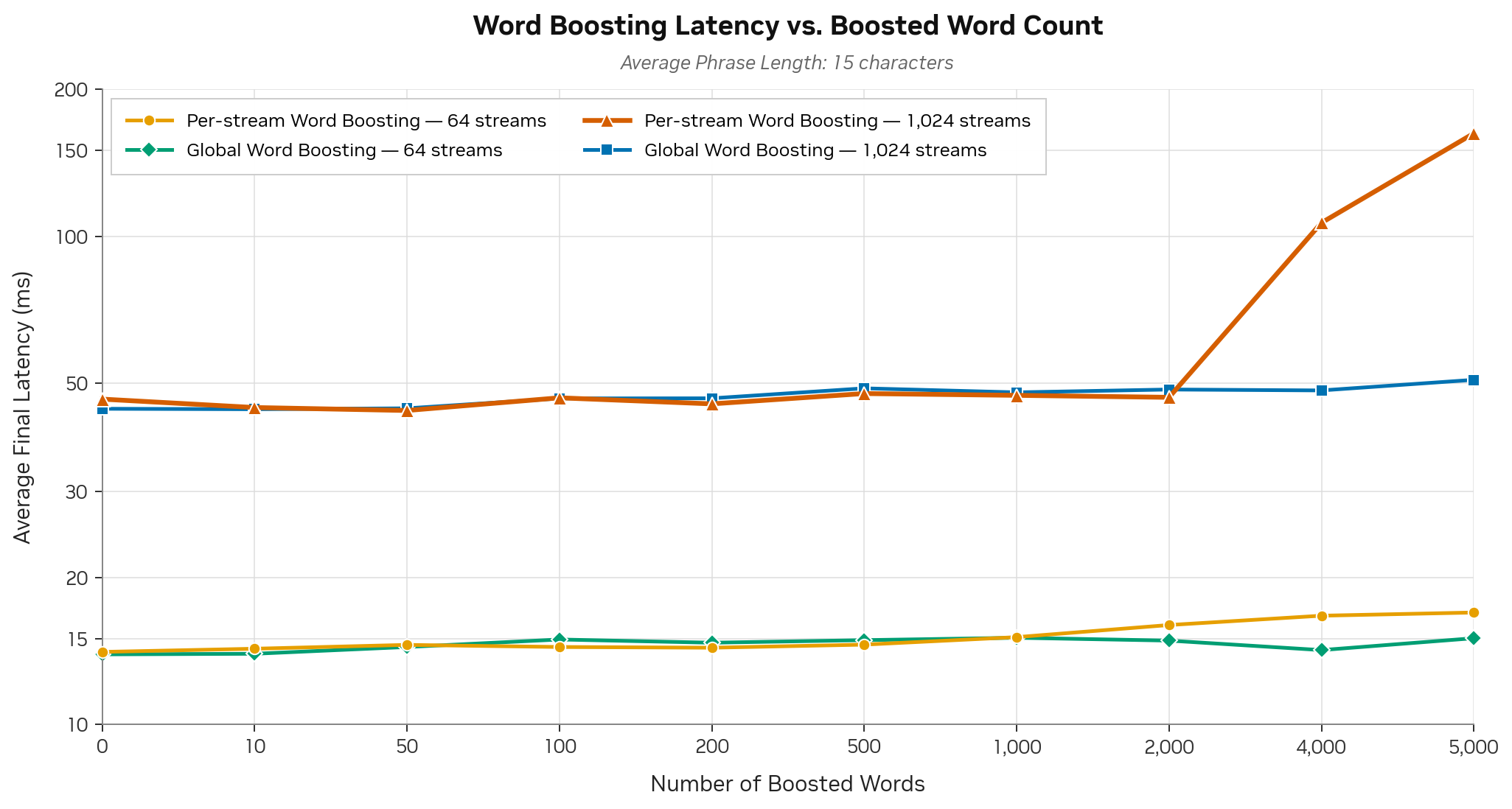
Average final end-to-end latency on H100 with 64 and 1,024 parallel streams for Nemotron ASR Streaming.#
CTC models and Nemotron ASR Streaming support scores from
-200through200. Positive scores encourage a word or phrase, and negative scores discourage it.Other RNNT and TDT models support scores from
0.5through2.0.For Nemotron ASR Streaming, per-stream and global boosting have comparable latency at lower concurrency. At higher concurrency, per-stream latency increases for large boost lists while global latency remains stable; other RNNT and TDT models show this effect at smaller list sizes.
For Parakeet RNNT and TDT models, use dynamic word boosting only up to approximately 500 words. For larger boost lists, use static word boosting, which supports 5,000 or more words. CTC supports dynamic lists of 5,000 or more words.
RNNT and TDT models do not support out-of-vocabulary boosting.
RNNT and TDT models other than Nemotron ASR Streaming apply a single boost score to all boosted words. Nemotron ASR Streaming supports assigning different scores to individual words or phrases for both dynamic and static word boosting. Among RNNT and TDT models, only Nemotron ASR Streaming supports negative word boosting.
For word boosting to work effectively, include words in all possible cases, such as lowercase and CamelCase.
For Parakeet 0.6b CTC Mandarin, specify boosted words with a space between each Mandarin character. Example:
--boosted-lm-words "望 岳 ".
Custom Pronunciation Using Word Boosting#
Word boosting with explicit tokenization allows you to provide custom pronunciations on a per-request basis.
Word boosting with explicit token mappings can override ASR predictions. This is useful for correcting specific misrecognitions or providing custom pronunciations without rebuilding the model.
Example Scenario: ASR predicts “I want to buy a tomato” but you want it to predict “I want to buy a mango”
Step 1: Generate Token Mapping
Use the SentencePiece tokenizer to get the tokens of the word ASR predicts, and map them to the word you want ASR to produce:
nbest_encode only works for Unigram tokenizers. BPE tokenizers have no lattice to rank candidates from, so tokenize below falls back to dropout sampling (enable_sampling=True) to collect multiple valid segmentations instead. This works for both tokenizer types:
import sentencepiece as spm

def tokenize(sp, word, k=10, max_attempts=200, alpha=0.1):
    try:
        cands = {tuple(p): p for p in sp.nbest_encode(word, nbest_size=k, out_type=str)}
        return list(cands.values())[:k]
    except RuntimeError:
        pass  # BPE / no lattice -> fall back to dropout sampling

    cands = {}
    for _ in range(max_attempts):
        if len(cands) >= k:
            break
        p = sp.encode(word, out_type=str, enable_sampling=True, alpha=alpha, nbest_size=-1)
        cands[tuple(p)] = p
    return list(cands.values()) or [sp.encode(word, out_type=str)]


word_which_asr_predicts = "tomato"
word_asr_should_predict = "mango"
sp = spm.SentencePieceProcessor(model_file="tokenizer.model")

for pieces in tokenize(sp, word_which_asr_predicts, k=10):
    print(word_asr_should_predict + ":" + "/".join(pieces))
Output (Unigram tokenizer):
mango:▁t/o/ma/to
mango:▁to/ma/to
mango:▁/to/ma/to
mango:▁t/om/a/to
mango:▁t/om/at/o
mango:▁t/o/ma/t/o
mango:▁to/ma/t/o
mango:▁/t/o/ma/to
mango:▁/to/ma/t/o
mango:▁t/o/m/a/to
For a BPE tokenizer, the sampling fallback may return fewer than k candidates if the word is short and has few valid segmentations — the function returns however many distinct ones it found.
Step 2: Create Boosted Words File
Save the mapping to a file, for example boost.txt:
cat > boost.txt << 'EOF'
mango:▁to/ma/to
mango:▁to/ma/t/o
mango:▁to/m/at/o
mango:▁to/m/a/to
mango:▁to/m/a/t/o
mango:▁t/om/at/o
mango:▁t/om/a/to
mango:▁t/o/ma/to
mango:▁t/om/a/t/o
mango:▁t/o/ma/t/o
EOF
Step 3: Use with C++ Client
Run the ASR client with the boosted words file:
riva_streaming_asr_client \
    --audio_file=audio.wav \
    --boosted_words_file=boost.txt \
    --boosted_words_score=20
This approach lets you provide custom pronunciations at inference time without modifying the model or rebuilding the pipeline. CTC models support boost scores from -200 through 200. Use a positive score to encourage the custom mapping; larger positive values apply a stronger bias.
Note
This technique is particularly useful for:
Correcting specific misrecognitions in production
Handling brand names or technical terms with unusual pronunciations
A/B testing different pronunciation mappings
Per-user or per-session vocabulary customization
Automatic Punctuation#

Automatic punctuation and capitalization can be enabled by passing the flag --automatic-punctuation.
python3 python-clients/scripts/asr/transcribe_file.py --server 0.0.0.0:50051 \
    --input-file en-US_sample.wav \
    --language-code en-US \
    --automatic-punctuation
Note
--automatic-punctuation applies punctuation only to the final transcripts. If punctuation is needed for partial transcripts, pass --custom-configuration="apply_partial_pnc:true" to the above command.
The previous command prints the transcript with punctuation and capitalization as shown in the following example.
## What is natural language processing?
End of Utterance#

Endpointing is the process by which Riva ASR determines when a user has finished speaking. This allows the system to segment continuous audio streams into distinct utterances for accurate transcription. Proper endpointing ensures that transcripts are generated promptly and that partial or incomplete utterances are not prematurely finalized.
Riva ASR detects endpointing primarily through silence detection. The system monitors the audio stream for periods of silence and uses configurable thresholds to determine when speech has ended. When the system detects a sufficient duration of silence (typically measured in milliseconds), it triggers the endpointing mechanism to finalize the current utterance and generate the transcript. To configure the amount of silence to look for before detecting EOU, use the --stop-history parameter.
python3 python-clients/scripts/asr/transcribe_file.py --server 0.0.0.0:50051 \
    --input-file en-US_sample.wav \
    --language-code en-US \
    --stop-history 800
Note
--stop-history specifies silence duration in milliseconds and must be a multiple of 80 ms. We recommend at least 560 ms for good accuracy.
Note
For Nemotron ASR Streaming, you can set --stop-history as low as 80 ms when final transcripts are needed as soon as possible, without significantly affecting ASR accuracy. Avoid enabling ITN with low end-of-utterance thresholds (--stop-history below 400 ms), because each final segment has limited context and ITN can produce unexpected results.
Detecting End of Utterance in the Client#
Each StreamingRecognitionResult in the response includes an is_final field. When is_final=true, the recognizer has finalized that segment and does not revise it. When is_final=false, the result is an interim (partial) transcript that can still change as more audio arrives.
By default, the server returns only is_final=true results. To also receive interim transcripts, pass --show-intermediate to the sample client:
python3 python-clients/scripts/asr/transcribe_file.py --server 0.0.0.0:50051 \
    --input-file en-US_sample.wav \
    --language-code en-US \
    --show-intermediate
Note
You do not need to implement your own voice activity detection to determine when a transcript is complete. Check is_final on each response result instead.
Force End of Utterance from the Client#
In addition to silence-based endpointing, a client can force the server to finalize the current utterance on demand by setting the force_eou runtime flag on a particular audio chunk. The server emits a final transcript for the audio buffered so far and keeps the stream open. Subsequent audio continues as a new utterance. This behavior differs from closing the stream (is_last), which terminates recognition entirely.
Use this flag when the client has information the server does not. For example, a push-to-talk button release, a turn-taking signal from a conversational agent, or a faster client-side voice-activity detector. Because the client drives finalization, the client can trigger it well before the server’s silence threshold (--stop-history) would otherwise fire.
Set the flag through the per-chunk runtime_config map on StreamingRecognizeRequest:
import riva.client.proto.riva_asr_pb2 as rasr

def request_generator(streaming_config, audio_chunks, force_eou_decisions):
    yield rasr.StreamingRecognizeRequest(streaming_config=streaming_config)
    for chunk, force_eou in zip(audio_chunks, force_eou_decisions):
        runtime_config = {"force_eou": "true"} if force_eou else {}
        yield rasr.StreamingRecognizeRequest(
            audio_content=chunk,
            runtime_config=runtime_config,
        )
Note
Only cache-aware RNNT models (Nemotron ASR Streaming) currently honor
force_eou. Other decoders silently ignore the flag.Treat
force_eouas an edge-triggered event. Send"true"once on the chunk where you want to finalize, not on every chunk during a sustained silence.force_eoudoes not disable the server’s own silence-based endpointing — both can fire on the same stream. If you wantforce_eouto be the only source of end-of-utterance signals, raise the silence threshold high enough that the server never triggers on its own, for example by settingendpointing.stop_historyto a very high value such as 4500 ms.
For a complete worked example, including a client-side silence detector built on RMS energy, refer to the asr-force-eou.ipynb tutorial.
Inverse Text Normalization#
To enable inverse text normalization, pass the --no-verbatim-transcripts flag.
python3 python-clients/scripts/asr/transcribe_file.py --server 0.0.0.0:50051 \
    --input-file <your_file_with_ITNizable_values> \
    --language-code en-US \
    --no-verbatim-transcripts
Note
--no-verbatim-transcriptsapplies ITN only to the final transcripts. If ITN is needed for partial transcripts, pass--custom-configuration="apply_partial_itn:true"to the above command.The Canary and Whisper models apply ITN to transcripts by default, and this behavior cannot be turned off.
Filler Word Removal#
Filler word removal removes common disfluencies, such as uh and um, from ASR transcripts using the configured pre_process.far grammar. The phrase you know is removed only when it is followed by a comma (you know,), which identifies it as a discourse marker. Other occurrences are preserved to avoid changing the intended meaning. This feature is currently supported only for English (en-US) with Nemotron ASR Streaming.
Filler word removal runs as a preprocessing step in the ASR post-processing pipeline, immediately before inverse text normalization. To enable it, the client request must explicitly set language_code to en-US and enable both ITN and runtime preprocessing.
python3 python-clients/scripts/asr/transcribe_file.py --server 0.0.0.0:50051 \
    --input-file <your_audio_file> \
    --language-code en-US \
    --no-verbatim-transcripts \
    --custom-configuration="enable_preprocessing:true"
For a custom client, set the same values in the recognition configuration:
import riva.client

config = riva.client.RecognitionConfig(
    # Set the remaining request fields as needed.
    language_code="en-US",
    verbatim_transcripts=False,
)
config.custom_configuration["enable_preprocessing"] = "true"
Note
Only the exact lowercase value "true" enables preprocessing. If enable_preprocessing is absent or has another value, filler word removal remains disabled. If verbatim_transcripts=True, ITN is disabled and filler word removal does not run.
Profanity Filter#
Riva ASR models can detect profane words in your audio data and censor them in the transcript. This feature uses a predefined list of profane words and is supported only for the English language.
To enable the profanity filter, pass the --profanity-filter flag to the sample client. When enabled, profane words appear with only the first letter visible, followed by asterisks in the transcript (for example, f***).
python3 python-clients/scripts/asr/transcribe_file.py --server 0.0.0.0:50051 \
    --input-file <your_file_with_profane_words> \
    --language-code en-US \
    --profanity-filter
Silero VAD Customization#
Profiles with vad=silero use Silero VAD to detect the start and end of an utterance. The Silero VAD parameters control how speech boundaries (start/end) are identified. The default values are optimized for typical use cases, but they can be adjusted as needed for specific scenarios.
The following parameters can be configured at runtime using the custom-configuration option.
Parameter |
Details |
Range |
Default |
|---|---|---|---|
|
Minimum probability threshold to detect the start of a speech segment |
0.0 to 1.0 |
0.85 |
|
Minimum probability threshold to detect the end of a speech segment |
0.0 to 1.0 |
0.3 |
|
Minimum duration (in seconds) of speech to be considered a valid segment |
> 0 |
0.2 |
|
Minimum duration (in seconds) of silence to be considered a non-speech segment |
> 0 |
0.5 |
|
Duration (in seconds) to pad before the detected speech onset |
> 0 |
0.3 |
|
Duration (in seconds) to pad after the detected speech offset |
> 0 |
0.08 |
Example of runtime configuration:
python3 python-clients/scripts/asr/transcribe_file.py --server 0.0.0.0:50051 \
    --input-file <your_speech_file> \
    --language-code en-US \
    --custom-configuration="neural_vad.onset:0.9,neural_vad.offset:0.4,neural_vad.min_duration_on:0.3,neural_vad.min_duration_off:0.6"
Riva NIM can also return voice activity detection (VAD) probabilities. To enable this feature, add get_vad_probabilities:true to the --custom-configuration parameter in the command above. When enabled, Riva NIM generates probability values for the entire buffer, with each value representing a 32 ms segment of audio. These VAD probabilities indicate speech presence, ranging from 0 to 1, for each segment across the buffer. The text following the ## symbol represents the transcript for that buffer.
The output will appear as follows:
python3 python-clients/scripts/asr/transcribe_file.py --server 0.0.0.0:50051 \
    --input-file en-US_sample.wav \
    --language-code en-US \
    --custom-configuration="neural_vad.onset:0.9,neural_vad.offset:0.4,neural_vad.min_duration_on:0.3,neural_vad.min_duration_off:0.6,get_vad_probabilities:true"

VAD States: 0.00 0.00 0.00 0.00 0.00 0.00 0.00 0.00 0.00 0.00 0.00 0.00 0.00 0.00 0.00 0.00 0.00 0.00 0.00 0.00 0.00 0.00 0.00 0.00 0.00 0.00 0.00 0.00 0.00 0.00 0.00 0.00 0.00 0.00 0.00 0.00 0.00 0.00 0.00 0.00 0.00 0.00 0.00 0.00 0.00 0.00 0.00 0.00 0.00 0.00 0.00 0.00 0.00 0.00 0.00 0.00 0.00 0.00 0.00 0.00 0.00 0.00 0.00 0.00 0.00 0.00 0.00 0.00 0.00 0.00 0.00 0.00 0.00 0.00 0.00 0.00 0.00 0.00 0.00 0.00 0.00 0.00 0.00 0.00 0.00 0.00 0.00 0.00 0.00 0.00 0.00 0.00 0.00 0.00 0.00 0.00 0.00 0.00 0.00 0.00 0.00 0.00 0.00 0.00 0.00 0.00 0.00 0.00 0.00 0.00 0.00 0.00 0.00 0.00 0.00 0.00 0.00 0.00 0.00 0.00 0.01 0.01 0.01 0.00 0.00
VAD States: 0.00 0.00 0.00 0.00 0.00 0.00 0.00 0.00 0.00 0.00 0.00 0.00 0.00 0.00 0.00 0.00 0.00 0.00 0.00 0.00 0.00 0.00 0.00 0.00 0.00 0.00 0.00 0.00 0.00 0.00 0.00 0.00 0.00 0.00 0.00 0.00 0.00 0.00 0.00 0.00 0.00 0.00 0.00 0.00 0.00 0.00 0.00 0.00 0.00 0.00 0.00 0.00 0.00 0.00 0.00 0.00 0.00 0.00 0.00 0.00 0.00 0.00 0.00 0.00 0.00 0.00 0.00 0.00 0.00 0.00 0.00 0.00 0.00 0.00 0.00 0.00 0.00 0.00 0.00 0.00 0.00 0.00 0.00 0.00 0.00 0.00 0.00 0.00 0.00 0.00 0.00 0.00 0.00 0.00 0.00 0.00 0.00 0.00 0.00 0.00 0.00 0.00 0.00 0.00 0.00 0.00 0.00 0.00 0.00 0.00 0.00 0.00 0.00 0.00 0.00 0.01 0.01 0.01 0.00 0.00 0.00 0.00 0.00 0.00 0.00
.
.
.
##what is natural language processing
VAD States: 0.01 0.01 0.01 0.00 0.00 0.00 0.00 0.00 0.00 0.00 0.00 0.00 0.00 0.00 0.00 0.01 0.01 0.00 0.00 0.00 0.00 0.00 0.00 0.00 0.00 0.63 0.97 0.98 0.96 0.93 0.94 0.93 0.92 0.94 0.99 0.99 1.00 1.00 1.00 1.00 1.00 1.00 1.00 1.00 1.00 1.00 0.99 0.57 0.61 0.48 0.23 0.14 0.92 0.99 0.99 0.99 1.00 1.00 1.00 1.00 0.99 1.00 1.00 1.00 1.00 1.00 1.00 1.00 1.00 1.00 1.00 1.00 1.00 0.99 0.99 0.94 0.94 0.92 0.85 0.53 0.32 0.42 0.72 1.00 1.00 1.00 1.00 1.00 1.00 1.00 1.00 1.00 1.00 1.00 1.00 1.00 0.98 0.93 0.62 0.23 0.08 0.03 0.02 0.01 0.01 0.01 0.00 0.00 0.00 0.00 0.00 0.00 0.00 0.00 0.00 0.00 0.00 0.00 0.00 0.00 0.00 0.00 0.00 0.00 0.00
.
.
Speaker Diarization Customization#
Nemotron ASR Streaming profiles with diarizer=sortformer use the eight-speaker Sortformer model. Parakeet CTC and Parakeet RNNT profiles use the older four-speaker Sortformer model. For every final transcript generated at end-of-utterance detection, speaker tags are provided for all words in the transcript. Enable speaker diarization using the --speaker-diarization flag. Use --diarization-max-speakers to limit the number of speaker identities for an individual stream: use a value from 1 through 8 for Nemotron ASR Streaming or from 1 through 4 for Parakeet. This value is an upper bound, not a request to identify exactly that many speakers, so the response can contain fewer speakers.
The following is an example of speaker diarization.
python3 python-clients/scripts/asr/transcribe_file.py --server 0.0.0.0:50051 \
    --input-file <your_speech_file> \
    --language-code en-US \
    --speaker-diarization \
    --diarization-max-speakers 4
Deploy Time Customizations#
These customizations require offline model artifact preparation and NIM server redeployment. You cannot configure these customizations from the client. They apply at the server level.
Custom Vocabulary#
The Flashlight decoder, deployed by default in Riva ASR NIM, is a lexicon-based decoder and emits only words that are present in the provided vocabulary file. This means that domain-specific words that are not present in the vocabulary file cannot be generated.
To expand the decoder vocabulary, build a custom model. In the riva-build command, pass the extended vocabulary file to the --decoding_vocab=<vocabulary_file> parameter. You can find out-of-the-box vocabulary files for Riva languages on NGC. For example, the flashlight_decoder_vocab.txt vocabulary file for English is available in the Riva ASR English (en-US) LM model. For information about how to use riva-build, refer to the Deploying Custom Models as NIM section.
Static (Global) Word Boosting#
Static word boosting bakes a fixed list of boosted words into the RMIR. The deployed model automatically applies the list to every incoming request. Unlike dynamic word boosting, the client does not send a boost list with each request. To change the static list or score, rebuild the RMIR with riva-build, redeploy the model repository, and restart the server.
Configure global word boosting by passing the following flags to riva-build:
riva-build speech_recognition <output.rmir> <input.riva> \
    ... \
    --boosted_words_file=<path/to/boosted_words.txt> \
    --boosted_words_score=<score>
Flag |
Description |
|---|---|
|
Path to a text file that contains one boosted word or phrase per line. For Nemotron ASR Streaming, append an optional tab-separated score to each entry to assign different scores to individual words or phrases. |
|
Default score for entries that do not specify a tab-separated score. Use |
For Nemotron ASR Streaming, you can assign a different static boost score to each word or phrase. Separate the entry and score with a tab character:
NVIDIA	10
Riva Speech	6
suppress this phrase	-4
ordinary phrase
In this example, NVIDIA, Riva Speech, and suppress this phrase use their explicitly specified scores.
ordinary phrase uses the value supplied by --boosted_words_score.
If every entry has an explicit score, --boosted_words_score is not applied to any entry.
Scores must be nonzero.
Positive scores encourage the decoder to select an entry, while negative scores discourage it.
Static word boosting scales latency better than dynamic word boosting as the number of boosted words increases. It supports 5,000 or more words, whereas dynamic word boosting is recommended only up to approximately 500 words for RNNT and TDT models.
For a detailed latency cost comparison, refer to Additional Information About Word Boosting.
Custom Pronunciation (Lexicon Mapping)#
When using the Flashlight decoder, the lexicon file provides a mapping between vocabulary dictionary words and their tokenized form (for example, sentence piece tokens for many Riva models).
Modifying the lexicon file serves two purposes:
Extends the vocabulary.
Provides one or more explicit custom pronunciations for a specific word. For example:
manu ▁ma n u
manu ▁man n n ew
manu ▁man n ew
Custom Language Models#
Introducing a language model to an ASR pipeline is an easy way to improve accuracy for natural language, and you can fine-tune it for niche settings. An n-gram language model estimates the probability distribution over groups of n or fewer consecutive words/tokens, P (word-1, …, word-n). By altering or biasing the data on which a language model is trained, you change the distribution it is estimating. As a result, it can predict different transcriptions as more likely, altering the prediction without changing the acoustic model. Riva supports n-gram models that are trained and exported from KenLM.
Custom language models can provide a permanent solution for improving the recognition of domain-specific terms and phrases. You can mix a domain-specific custom LM with a general domain LM using a process called interpolation.
To deploy a custom n-gram language model file in binary format as part of an ASR NIM, pass the binary language model file to riva-build. Use the flag --decoding_language_model_binary=<lm_binary> for CTC models and --nemo_decoder.language_model_file=<nemo LM> for RNNT models.
Inverse Text Normalization#
Riva ASR NIM implements inverse text normalization (ITN) for ASR requests. It uses weighted finite-state transducer (WFST)-based models to convert spoken-domain output from an ASR model into written-domain text to improve the readability of the ASR system’s output.
Text normalization converts text from written form into its verbalized form. It is used as a preprocessing step before text-to-speech (TTS) and can also be used for preprocessing ASR training transcripts.
ITN is part of the ASR post-processing pipeline. ITN is the task of converting the raw spoken output of the ASR model into its written form to improve text readability.
Enable ITN by passing the --no-verbatim-transcripts flag.
python3 python-clients/scripts/asr/transcribe_file.py --server 0.0.0.0:50051 \
    --input-file en-US_sample.wav \
    --language-code en-US \
    --no-verbatim-transcripts
Note
--no-verbatim-transcripts applies ITN only to the final transcripts. If you need ITN for partial transcripts, pass --custom_configuration="apply_partial_itn:true" to the command.
Riva implements NVIDIA NeMo ITN, which is based on WFST grammars. The tool uses Pynini to construct WFSTs. You can export the created grammars and integrate them into Sparrowhawk for production. Sparrowhawk is an open-source version of the Kestrel TTS text normalization system. For details, refer to the Sparrowhawk documentation.
For example, with a functional NeMo installation, you can export the German ITN grammars with the pynini_export.py tool.
python3 pynini_export.py --output_dir . --grammars itn_grammars --input_case cased --language de
This exports the tokenizer_and_classify and verbalize FSTs as OpenFst finite state archive (FAR) files, ready to be deployed with Riva.
[NeMo I 2022-04-12 14:43:17 tokenize_and_classify:80] Creating ClassifyFst grammars.
Created ./de/classify/tokenize_and_classify.far
Created ./de/verbalize/verbalize.far
To deploy these ITN rules with Riva, pass the FAR files to the riva-build command under these options:
riva-build speech_recognition
[--wfst_tokenizer_model WFST_TOKENIZER_MODEL]
[--wfst_verbalizer_model WFST_VERBALIZER_MODEL]
Additionally, riva-build supports the wfst_pre_process_model and wfst_post_process_model settings for pre- and post-processing FAR files.
For English (en-US) with Nemotron ASR Streaming, pre_process.far can remove filler words before ITN. This behavior is opt-in: clients must set language_code="en-US", verbatim_transcripts=False, and custom_configuration["enable_preprocessing"] = "true".
To learn more about building grammars from the ground up, refer to the NeMo Weighted Finite State Transducers (WFST) tutorial.
For details about the model architecture, refer to the paper NeMo Inverse Text Normalization: From Development To Production.
Speech Hints#
Speech hints apply an out-of-vision (OOV) class as a part of ASR post-processing pipeline. It uses finite state transducers (FST) to improve readability based on the expected OOV class applied to normalize the output in a more readable format.
Speech hints are applied to the spoken-domain output of ASR before the generated text passes through ITN. Add the phrases that need to be applied to RecognitionConfig using SpeechContext.
import riva.client
uri = "localhost:50051"  # Default value
auth = riva.client.Auth(uri=uri)
asr_service = riva.client.ASRService(auth)
config = riva.client.RecognitionConfig(
    encoding=riva.client.AudioEncoding.LINEAR_PCM,
    max_alternatives=1,
    profanity_filter=False,
    enable_automatic_punctuation=True,
    verbatim_transcripts=False,
)
my_wav_file=PATH_TO_YOUR_WAV_FILE
speech_hints = ["$OOV_ALPHA_SEQUENCE", "i worked at the $OOV_ALPHA_SEQUENCE"]
boost_lm_score = 4.0
riva.client.add_audio_file_specs_to_config(config, my_wav_file)
riva.client.add_word_boosting_to_config(config, speech_hints, boost_lm_score)
The following classes and phrases are supported:
$OOV_NUMERIC_SEQUENCE$OOV_ALPHA_SEQUENCE$OOV_ALPHA_NUMERIC_SEQUENCE$ADDRESSNUM$FULLPHONENUM$POSTALCODE$OOV_CLASS_ORDINAL$MONTH
Training or Fine-Tuning an Acoustic Model#
Model fine-tuning is a set of techniques for making fine adjustments to an existing model with new data. This adapts the model to new situations while retaining its original capabilities.
Model training is the process of training a new model either from scratch (that is, starting from random weights) or with weights initialized from an existing model. The goal is for the model to acquire new skills without necessarily retaining the original capabilities, such as in cross-language transfer learning.
Many use cases require training new models or fine-tuning existing ones with new data. In these cases, follow these best practices. Many of these best practices also apply to inputs at inference time.
Use lossless audio formats, if possible. The use of lossy codecs, such as MP3, can reduce quality.
Augment training data. Adding background noise to audio training data can initially decrease accuracy but increase robustness.
Limit vocabulary size if using scraped text. Many online sources contain typos or ancillary pronouns and uncommon words. Removing these can improve the language model.
Use a minimum sampling rate of 16 kHz, if possible, but do not resample.
If using NeMo to fine-tune ASR models, refer to the Finetuning CTC models on other languages tutorial. We recommend fine-tuning ASR models only with sufficient data, on the order of several hundred hours of speech. If such data is not available, it can be more useful to adapt the LM on an in-domain text corpus than to train the ASR model.
There is no formal guarantee that the ASR model is or is not streamable after training.
Training New Models#
Train models from scratch - End-to-end training of ASR models requires large datasets and heavy compute resources. There are more than 5,000 languages around the world, but very few languages have datasets large enough to train high-quality ASR models. For this reason, we recommend training models from scratch only when several thousand hours of transcribed speech data are available.
Cross-language transfer learning - Cross-language transfer learning is especially helpful when training new models for low-resource languages. Even when a substantial amount of data is available, cross-language transfer learning can help boost the performance further.
It is based on the idea that phoneme representation can be shared across different languages. Experiments by the NeMo team showed that with as little as 16 hours of target-language audio data, transfer learning works substantially better than training from scratch. In the GTC 2020 talk, NVIDIA data scientists demonstrate cross-language transfer learning for a low-resource language with less than 30 hours of speech data.
Fine-Tuning Existing Models#
When simpler approaches fail to address accuracy issues caused by significant acoustic factors, such as different accents, noisy environments, or poor audio quality, fine-tune acoustic models.
We recommend fine-tuning ASR models with sufficient data, on the order of 100 hours of speech or more. The minimum number of hours that we used for NeMo transfer learning was approximately 100 hours for the CORAAL dataset, as shown in the Cross-Language Transfer Learning, Continuous Learning, and Domain Adaptation for End-to-End Automatic Speech Recognition paper. Our experiments demonstrate that in all three cases of cross-language transfer learning, continuous learning, and domain adaptation, transfer learning from a good base model has higher accuracy than a model trained from scratch. We also recommend fine-tuning large models rather than training small models from scratch, even if the fine-tuning dataset is small.
Low-resource domain adaptation - For smaller datasets, such as approximately 10 hours, take appropriate precautions to avoid overfitting to the domain and sacrificing significant accuracy in the general domains, also known as catastrophic forgetting. If you perform fine-tuning on this small dataset, mix it with other larger datasets. For English, for example, NeMo provides a list of public datasets that you can use.
In transfer learning, continual learning is a sub-problem in which models that are trained with new domain data should still retain good performance on the original source domain.
If you are using NeMo to fine-tune ASR models, refer to the Finetuning CTC models on other languages tutorial.
Data quality and augmentation - Use lossless audio formats, if possible. The use of lossy codecs, such as MP3, can reduce quality. As a regular practice, use a minimum sampling rate of 16 kHz. You can also use Opus-encoded sources with 8 kHz, 16 kHz, 24 kHz, or 48 kHz sampling rates.
Augmenting training data with noise can improve the model’s ability to cope with noisy environments. Adding background noise to audio training data can initially decrease accuracy but increase robustness.
Punctuation and Capitalization Model#
ASR systems typically generate text with no punctuation or capitalization. In Riva, the punctuation and capitalization model formats the text with punctuation and capitalization.
The punctuation and capitalization model should be customized when an out-of-the-box model does not perform well in the application context, such as when applying to a new language variant.
To train or fine-tune and deploy a custom punctuation and capitalization model, refer to Riva Punctuation and NeMo Punctuation and Capitalization.
Note
All models produce punctuated and capitalized text. For most models, the ASR model handles this itself. The English Parakeet CTC NIM uses a separate PnC model, which the NIM bundles and loads automatically. Punctuation is off by default. Enable it at inference time by passing --automatic-punctuation (for CLI) or setting enable_automatic_punctuation=true (for gRPC/HTTP API). Customize the bundled PnC model only if the default formatting does not meet your application needs.
Deploying a Custom Acoustic Model#
If using NVIDIA NeMo, first convert the model from .nemo format to .riva format using the nemo2riva tool that is available as part of the Riva distribution. Next, use the Riva ASR NIM container and tools (riva-build and riva-deploy) for deployment. For more information, refer to the Deploying Custom Models as NIM section.
Summary of Riva ASR Customizations#
The following table lists the corresponding customizations in increasing order of difficulty and effort:
Techniques |
Difficulty |
What it Does |
When to Use |
How to Use |
|---|---|---|---|---|
Word boosting |
Quick and easy |
Extends the vocabulary while increasing the chance of recognition for a provided list of keywords. This strategy enables you to easily improve recognition of specific words at request time. |
When certain words or phrases are important in a particular context. For example, attendee names in a meeting. |
|
Custom vocabulary |
Easy |
Extends the vocabulary while increasing the chance of recognition for a provided list of keywords. This strategy enables you to improve recognition of specific words at request time easily. |
When certain words or phrases are important in a particular context, for example, attendee names in a meeting. |
|
Custom pronunciation (Lexicon mapping) |
Easy |
Explicitly guides the decoder to map pronunciations (that is, token sequences) to specific words. The lexicon decoder emits words that are present in the decoder lexicon. It is possible to modify the lexicon used by the decoder to improve recognition. |
When a word can have one or more possible pronunciations. |
|
Retrain language model |
Moderate |
Trains a new language model for the application domain to improve the recognition of domain specific terms. The Riva ASR pipeline supports the use of n-gram language models. Using a language model that is tailored to your use case can greatly help in improving the accuracy of transcripts. |
When domain text data is available. |
|
Fine tune an existing acoustic model |
Moderately hard |
Fine-tunes an existing acoustic model using a small amount of domain data to better suit the domain. |
When you have transcribed domain audio data (10h-100h) and other easier approaches fall short. |
|
Train a new acoustic model |
Hard |
Trains a new acoustic model from scratch or with cross-language transfer learning, using thousands of hours of audio data. |
Recommended only when adapting Riva to a new language or dialect. |