NVIDIA® Nsight™ Application Development Environment for Heterogeneous Platforms, Visual Studio Edition 5.3 User Guide
Send Feedback
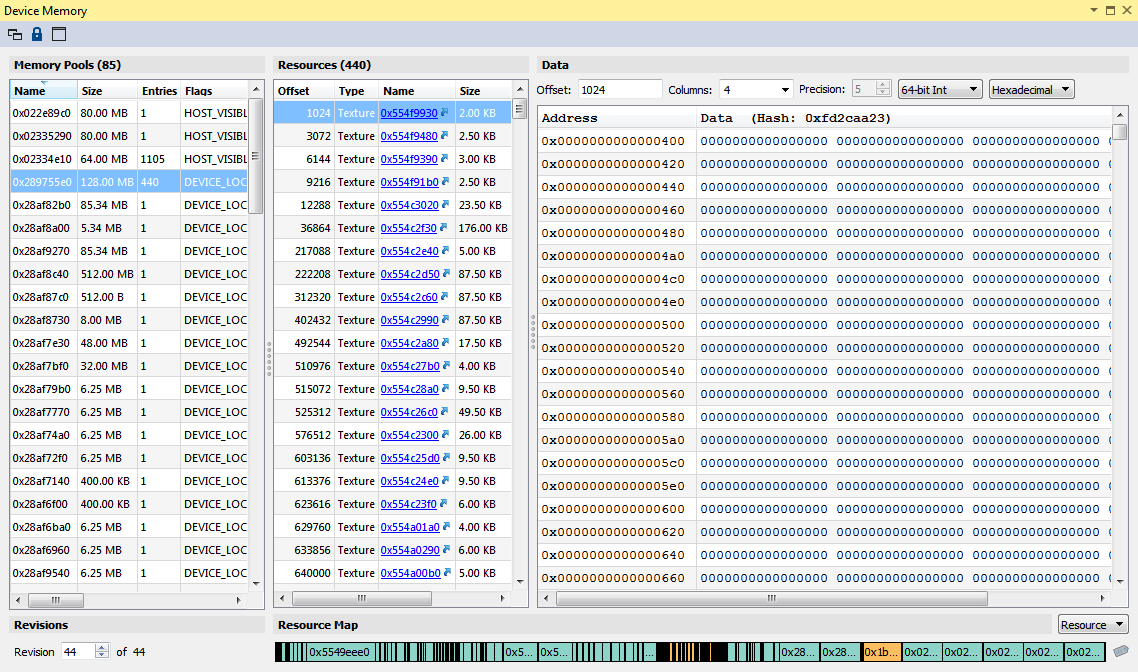
The Device Memory view provides a list of all device memory allocated by the application, along with detailed information about the resources contained in each memory region.
To access the Device Memory view, go to: Nsight > Windows > Device Memory.
The left-most pane contains information about all device memory objects currently allocated. Once a device memory object is selected, the contained resources will be listed in the middle pane, along with the resource layout map in the bottom left, and contained data on the right.

NVIDIA® Nsight™ Application Development Environment for Heterogeneous Platforms, Visual Studio Edition User Guide Rev. 5.3.170616 ©2009-2017. NVIDIA Corporation. All Rights Reserved.